1. Introdución
The STC My Home Q30 WiFi Range Extender is designed to expand and strengthen your existing Wi-Fi network, eliminating dead zones and providing stable, high-speed internet coverage throughout your home or office. This dual-band booster supports both 2.4GHz and 5GHz frequencies, offering speeds up to 1200 Mbps for seamless streaming, gaming, and browsing.
1.1 Contido do paquete
- STC My Home Q30 WiFi Range Extender
- Power Adapter (Integrated)
- Guía de inicio rápido
2. Produto rematadoview
Familiarize yourself with the STC My Home Q30 extender's components and indicators.

Imaxe 2.1: Fronte view of the STC My Home Q30 WiFi Range Extender. The device is white with a black central panel featuring the 'stc' logo.

Imaxe 2.2: Primeiro plano frontal view of the STC Q30 extender, highlighting the indicator lights and WPS button area.

Imaxe 2.3: Costas view of the STC Q30 extender, showing the ventilation and power plug area.
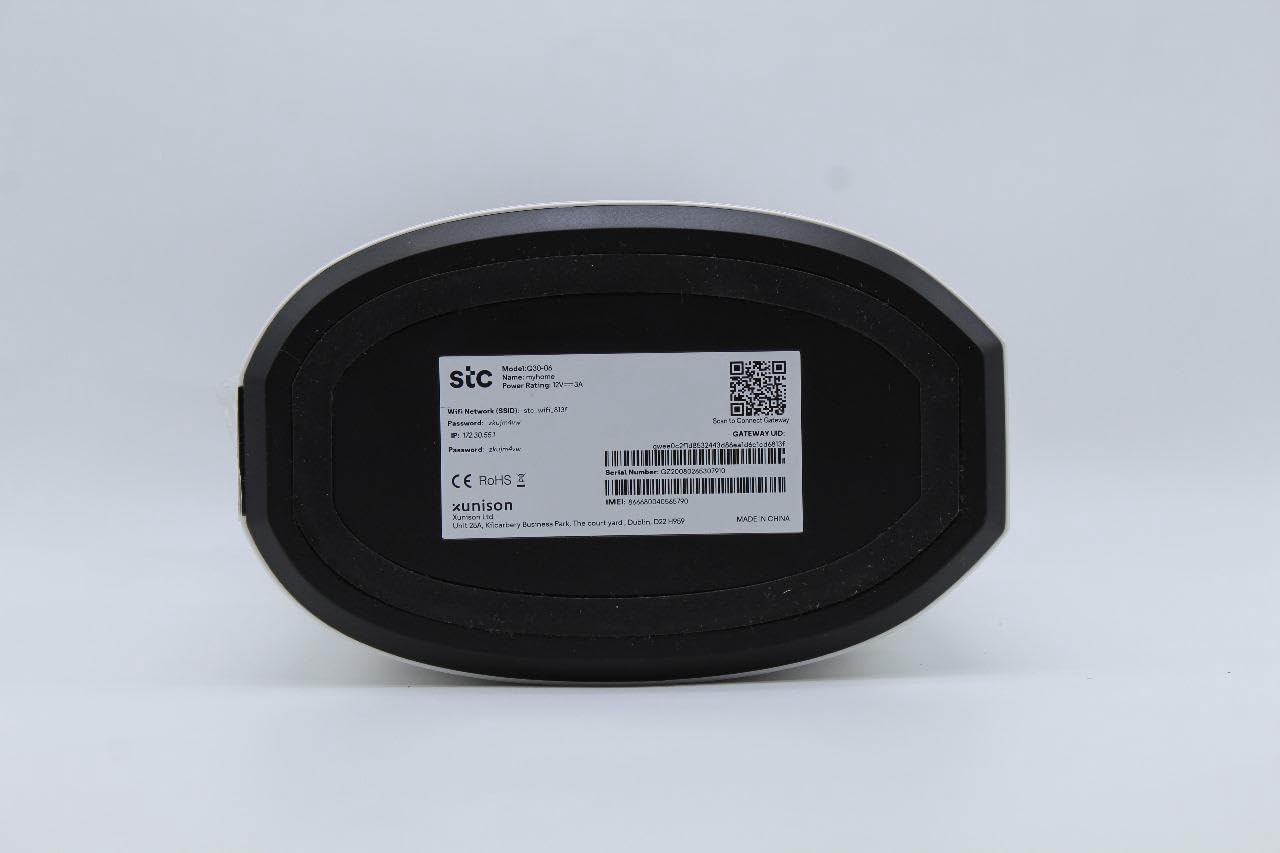
Image 2.4: Bottom label of the STC Q30 extender, displaying model information, serial number, default login details, and a QR code for quick access or setup.
2.1 Luces indicadoras
- LED de alimentación: Indica o estado da enerxía.
- LED Wi-Fi: Indicates Wi-Fi signal status and activity.
- LED de intensidade do sinal: Shows the strength of the signal received from the main router.
2.2 Botóns e portos
- Botón WPS: For quick and easy setup with WPS-enabled routers.
- Botón de reinicio: Used to restore the extender to factory default settings (typically a small pinhole button).
- Porto Ethernet: For connecting wired devices or for initial setup.
3. Instrucións de configuración
The STC My Home Q30 offers two primary methods for setup: WPS (Wi-Fi Protected Setup) and Web Interface.
3.1 WPS Setup (Recommended for Quick Setup)
- Plug the Q30 extender into an electrical outlet near your main Wi-Fi router. Wait for the Power LED to turn solid.
- Preme o botón WPS no teu enrutador Wi-Fi principal.
- Within two minutes, press the WPS button on the STC My Home Q30 extender.
- Wait for the Wi-Fi LED on the extender to turn solid, indicating a successful connection.
- Relocate the extender to a suitable location between your router and the Wi-Fi dead zone. Ensure the Signal Strength LED indicates a good connection (e.g., green or blue).
3.2 Web Configuración da interface
- Plug the Q30 extender into an electrical outlet near your main Wi-Fi router. Wait for the Power LED to turn solid.
- Connect your computer or mobile device to the extender's default Wi-Fi network (e.g., "STC_Extender" or similar, usually found on the product label). No password is required initially.
- Abrir a web navegador e introduza o enderezo IP ou nome de dominio predeterminado (por exemplo,
192.168.1.1orstcextender.net) provided on the product label or quick start guide. - Log in using the default username and password (e.g.,
admin/adminor as specified on the label). - Follow the on-screen instructions of the setup wizard to select your main Wi-Fi network and enter its password.
- Configure the extender's Wi-Fi network name (SSID) and password. You can choose to keep the same as your main network or create a new one.
- Completa a configuración. O extensor reiniciarase.
- Relocate the extender to an optimal position and connect your devices to the extended network.
4. Instrucións de funcionamento
Once set up, the STC My Home Q30 operates automatically. Here are some operational guidelines:
- Colocación óptima: Place the extender roughly halfway between your main router and the area with weak Wi-Fi signal. The Signal Strength LED should indicate a strong connection to the router.
- Dispositivos de conexión: Devices will automatically connect to the strongest available Wi-Fi signal. If you created a new SSID for the extender, connect to that network.
- Uso do porto Ethernet: The Ethernet port can be used to connect a wired device (e.g., smart TV, gaming console, PC) to the extended network, providing a stable wired connection.
5. Mantemento
Regular maintenance ensures optimal performance and longevity of your STC My Home Q30 extender.
- Actualizacións de firmware: Periodically check the STC support website for firmware updates. Updating firmware can improve performance, add features, and fix bugs. Access the web interface to perform updates.
- Limpeza: Gently wipe the device with a dry, soft cloth. Do not use liquid cleaners or abrasive materials. Ensure ventilation holes are clear of dust.
- Reinicio: If you experience connectivity issues, try unplugging the extender from the power outlet for 10 seconds and then plugging it back in.
- Restablecemento de fábrica: If the extender is not functioning correctly or you forget the login credentials, perform a factory reset by pressing and holding the Reset button for 5-10 seconds with a paperclip until the LEDs flash. Note that this will erase all custom settings.
6 Solución de problemas
Consulte os seguintes problemas comúns e as súas solucións.
- Sen enerxía:
- Asegúrate de que o extensor estea conectado correctamente a unha toma de corrente que funcione.
- Check if the Power LED is illuminated.
- Sen acceso a Internet despois da configuración:
- Verifica que o teu enrutador principal teña unha conexión a internet activa.
- Check the Signal Strength LED on the extender. If it's red or off, the extender is too far from the router or the connection is poor. Relocate the extender closer to the router.
- Ensure you entered the correct Wi-Fi password for your main router during setup.
- Tenta reiniciar tanto o enrutador como o extensor.
- Slow Speed on Extended Network:
- Relocate the extender to an optimal position where the Signal Strength LED indicates a strong connection (e.g., green or blue). Avoid placing it near large metal objects or other interference sources.
- Ensure your main router is providing adequate speed.
- Comprobe se hai actualizacións de firmware para o extensor.
- Non se pode acceder Web Páxina de xestión:
- Asegúrate de que o dispositivo estea conectado á rede Wi-Fi do extensor.
- Verify the IP address or domain name entered in the browser.
- Limpa a caché do teu navegador ou proba cun navegador diferente.
- Realiza un restablecemento de fábrica se esqueciches as credenciais de inicio de sesión.
7. Especificacións
| Número de modelo | Q30 |
| Marca | STC (Generic) |
| Taxa de transferencia de datos | Ata 1200 Mbps |
| Band Frequency Supported | 2.4 GHz, 5 GHz (dobre banda) |
| Dispositivos compatibles | WiFi-enabled devices |
| Cor | Branco |
| Peso do elemento | 1.33 quilogramos |
| Dimensións do paquete | 34.8 x 18 x 14.8 cm |
8. Garantía e soporte
For warranty information and technical support, please refer to the documentation included with your purchase or contact your retailer. STC provides reliable network expertise, and support channels are typically available through the point of purchase or the official STC websitio.
Garda o recibo de compra para reclamacións de garantía.


