Introdución
Thank you for choosing the InMotion True Wireless Earbuds. These earbuds are designed to provide a seamless audio experience with true wireless freedom, comfortable fit, and intuitive controls. Please read this manual carefully before using your earbuds to ensure proper operation and to maximize their lifespan.
O que hai na caixa
- True Wireless Earbuds (Left and Right)
- Charging Carry Case
- Cable de carga USB-C
- Small, Medium, and Large Ear Pads (Suction Tips)
- Manual de usuario
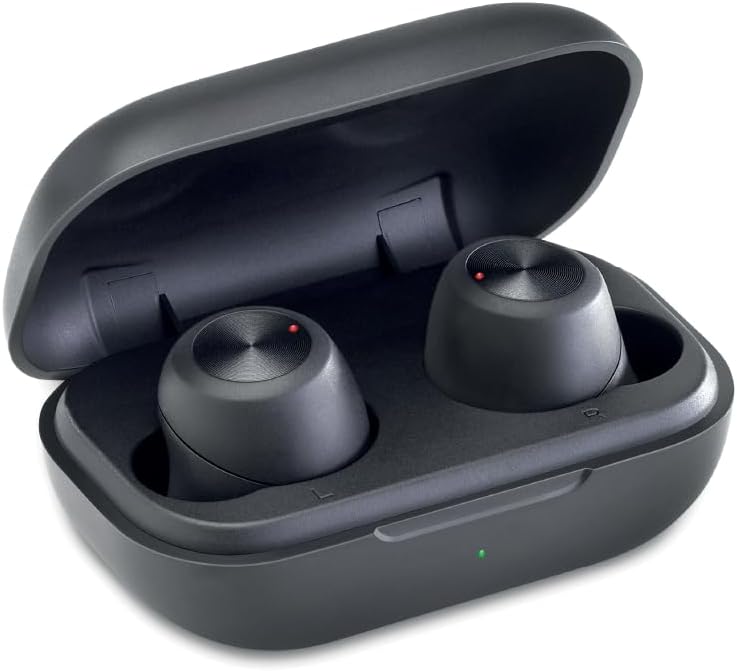
Image: The InMotion True Wireless Earbuds resting inside their open charging case, showing the compact design and charging indicators.
Configuración
1. Carga dos auriculares e da funda
Before first use, fully charge the earbuds and the charging case. Place the earbuds into the charging case. Connect the USB-C charging cable to the charging port on the case and the other end to a USB power source. The charging indicator on the case will show charging status. A full charge takes approximately 2 hours for the case and earbuds.
2. Emparellamento nun só paso
- Asegúrate de que os auriculares estean cargados.
- Abre a caixa de carga. Os auriculares entrarán automaticamente no modo de emparellamento.
- No teu dispositivo (teléfono intelixente, tableta, portátil), vai á configuración de Bluetooth e activa Bluetooth.
- Look for "InMotion Earbuds" or "True Wireless Earbuds" in the list of available devices and select it to connect.
- Unha vez conectados, escoitarás un ton de confirmación e os auriculares estarán listos para usar.
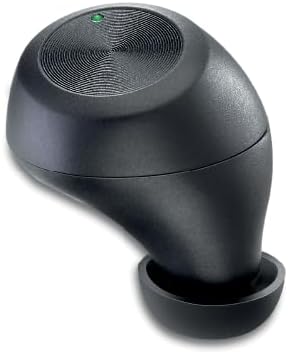
Image: A single InMotion True Wireless Earbud, showcasing its ergonomic design and the touch control surface.
3. Escolla das almofadas axeitadas
The earbuds come with small, medium, and large suction tips. For optimal sound quality and comfort, choose the ear tips that provide the best seal in your ear canal. A good seal helps with noise isolation and bass response.
Instrucións de funcionamento
Funcións básicas
- Encendido/apagado: Earbuds power on automatically when removed from the case and power off when placed back into the case.
- Reproducir/Pausa: Tap the touch control surface on either earbud once.
- Próxima pista: Double-tap the touch control surface on the right earbud.
- Pista anterior: Double-tap the touch control surface on the left earbud.
- Responder/Finalizar chamada: Tap the touch control surface on either earbud once during an incoming call.
- Rexeitar a chamada: Press and hold the touch control surface on either earbud for 2 seconds during an incoming call.
- Asistente de voz: Triple-tap the touch control surface on either earbud to activate your device's voice assistant (Siri, Google Assistant, etc.).
The earbuds provide up to 4 hours of continuous use on a single charge, with additional charges available from the portable charging case.
Mantemento
- Limpeza: Limpa regularmente os auriculares e a funda de carga cun pano suave, seco e sen pelusa. Non empregues produtos químicos agresivos nin materiais abrasivos.
- Consellos para oídos: Retire e limpe as almofadas dos auriculares periodicamente con auga e xabón suave. Asegúrese de que estean completamente secas antes de volver colocalas nos auriculares.
- Almacenamento: Cando non estean en uso, garde os auriculares no seu estoxo de carga para protexelos e mantelos cargados. Garde nun lugar fresco e seco, lonxe de temperaturas extremas.
- Evitar auga: Estes auriculares non son impermeables. Evita a exposición á auga, á choiva ou á humidade excesiva.
Resolución de problemas
| Problema | Posible Solución |
|---|---|
| Os auriculares non se emparejan |
|
| Non hai son dun auricular |
|
| Os auriculares non se cargan |
|
| Mala calidade de son |
|
Especificacións
| Característica | Detalle |
|---|---|
| Nome do modelo | Audífonos verdadeiros sen fíos |
| Tecnoloxía de conectividade | Sen fíos (Bluetooth) |
| Versión Bluetooth | 5.2 |
| distancia wireless | Ata 10 m |
| Capacidade da batería dos auriculares | 45 mAh |
| Capacidade da batería do estuche de carga | 400 mAh |
| Tempo de xogo | Ata 4 horas por carga |
| Tempo de carga | Aprox. 2 horas |
| Colocación do oído | En Orella |
| Factor de forma | En Orella |
| Impedancia | 16 ohmios |
| Cor | Negro |
| Peso do elemento | 2.89 onzas |
| Fabricante | InMotion |
Garantía e Soporte
InMotion products are designed for reliability and performance. For warranty information or technical support, please refer to the contact details provided with your product packaging or visit the official InMotion website. You can also reach out to the seller, InMotion Accessories, through the Amazon platform for assistance.
Para máis información, visite o InMotion Store on Amazon.