1. Introdución
The EMPIRE GAMING RF908 is a versatile rechargeable wireless gaming mouse designed for performance and comfort. It features a 10,000 DPI adjustable sensor, 8 programmable buttons, and offers three connection modes: 2.4GHz WiFi, Bluetooth, and wired via USB-C. The mouse includes an RGB magnetic charging station for convenient power management and customizable RGB lighting. It is compatible with PC, Mac, and various consoles.
2. Contido do paquete
Verifica que todos os elementos estean presentes no paquete:
- RF908 Wireless Mouse
- Estación de carga magnética
- Cable USB-C
- Receptor USB de 2.4 GHz
- Manual de usuario
3. Produto rematadoview
Familiarize yourself with the components of your RF908 gaming mouse and charging station.

Imaxe 3.1: Acabadoview of the RF908 mouse, magnetic charging station, and 2.4GHz USB receiver. The image also indicates the mouse's battery life and an additional USB port on the charging station.
Imaxe 3.2: Arriba view of the RF908 mouse, highlighting the scroll wheel and two primary programmable buttons located behind it.

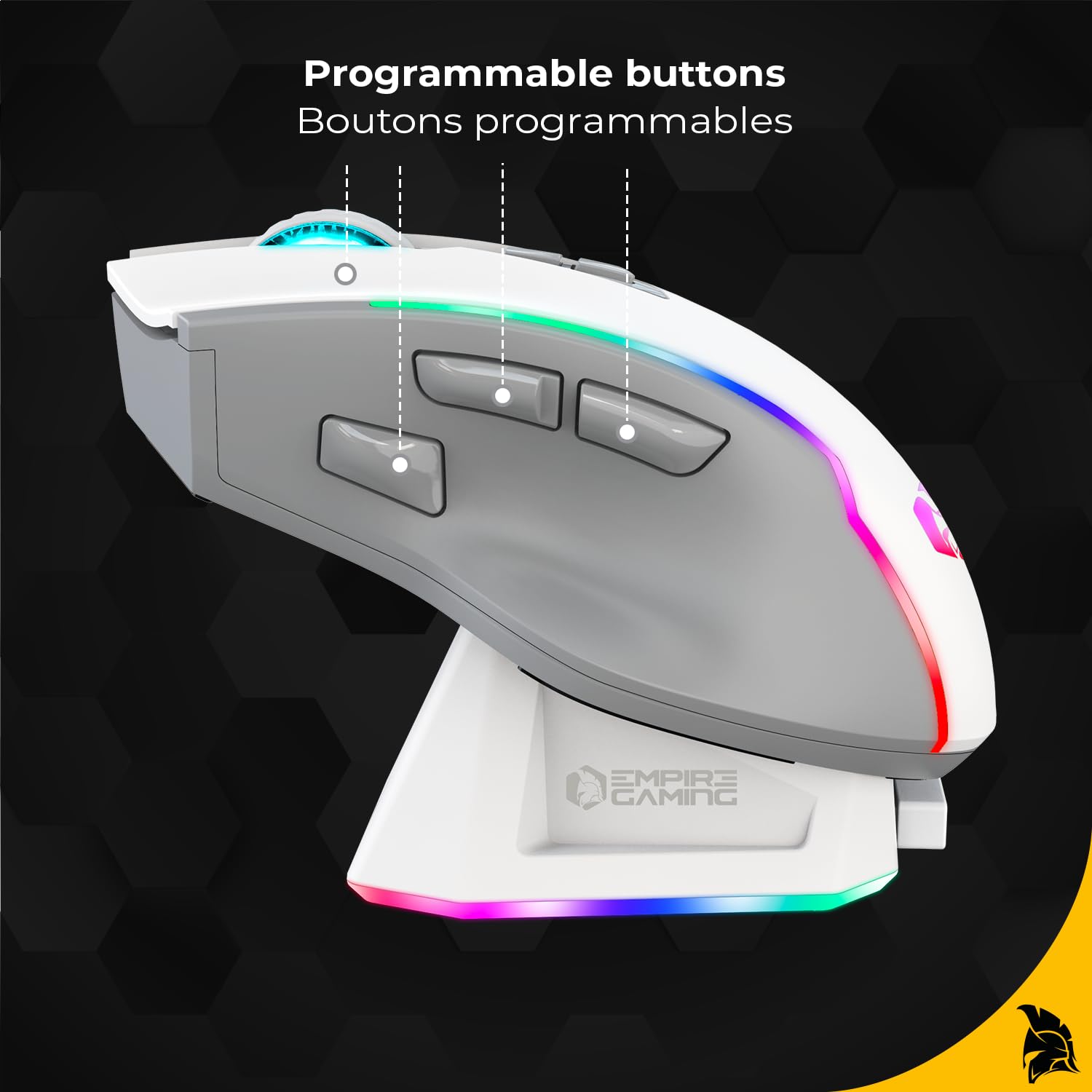
Imaxe 3.3: Lateral view of the RF908 mouse, illustrating the ergonomic design and the three programmable thumb buttons.

Imaxe 3.4: Parte inferior view of the RF908 mouse, showing the ON/OFF switch, the WiFi and Bluetooth mode selection button, the optical sensor, and the storage slot for the 2.4GHz USB receiver.

Imaxe 3.5: Fronte view of the RF908 mouse, indicating the USB-C port for wired connection and recharging.
4. Configuración
4.1 Carga inicial
Before first use, fully charge the RF908 mouse. Connect the USB-C cable to the magnetic charging station and a power source (e.g., computer USB port or USB wall adapter). Place the mouse onto the magnetic charging station. The RGB lighting on the mouse and station will indicate charging status. Alternatively, connect the USB-C cable directly to the mouse for charging.

Image 4.1: The magnetic charging station for the RF908 mouse, featuring RGB lighting and contact points for charging.
4.2 Conexión do rato
The RF908 mouse supports three connection modes:
4.2.1 Modo sen fíos de 2.4 GHz
- Locate the 2.4GHz USB receiver stored in the bottom compartment of the mouse.
- Plug the USB receiver into an available USB port on your computer or console.
- Turn on the mouse using the ON/OFF switch on the bottom.
- Press the mode selection button on the bottom of the mouse until the indicator light shows 2.4GHz mode (usually green).
- O rato debería conectarse automaticamente.
4.2.2 Modo Bluetooth
- Acenda o rato usando o interruptor ON/OFF.
- Press the mode selection button on the bottom of the mouse until the indicator light shows Bluetooth mode (usually blue).
- On your device (PC, Mac, smartphone, tablet), go to Bluetooth settings and search for new devices.
- Select "RF908" from the list of available devices to pair.
4.2.3 Modo con cable
- Connect the USB-C cable to the front port of the mouse.
- Connect the other end of the USB-C cable to an available USB port on your computer or console.
- O rato cambiará automaticamente ao modo con fío e comezará a cargar.
5. Instrucións de funcionamento
5.1 Axuste de DPI
The mouse features an adjustable sensor with up to 10,000 DPI. Use the dedicated DPI cycle button (typically located behind the scroll wheel) to cycle through preset DPI levels. The RGB lighting may change to indicate the current DPI setting.
5.2 Botóns programables
The RF908 mouse has 8 programmable buttons. These buttons can be customized using the dedicated software available for download from the official EMPIRE GAMING website. The software allows you to assign macros, key functions, and other commands to each button.
5.3 Personalización da iluminación RGB
The mouse features dynamic RGB backlighting. The lighting effects, colors, and brightness can be customized through the EMPIRE GAMING software. This allows for personalization to match your gaming setup.

Imaxe 5.1: Traseira view of the RF908 mouse, showcasing a súa retroiluminación RGB personalizable.
5.4 Instalación de software
To unlock the full customization potential of your RF908 mouse, download and install the dedicated software from the official EMPIRE GAMING websitio. O software permite:
- Configuring programmable buttons.
- Adjusting DPI profiles.
- Customizing RGB backlight effects.
Visita www.empiregaming.com/support (exampa ligazón, consulte a documentación real do produto para obter información correcta URL) for software downloads and updates.
6. Mantemento
6.1 Limpeza
Para limpar o rato, use un pano suave e seco. Para a sucidade persistente, use un pano lixeiramente seco.amp cloth can be used, ensuring no liquid enters the mouse. Avoid using harsh chemicals or abrasive materials.
6.2 Coidado coa batería
The RF908 mouse has a built-in rechargeable Lithium Ion battery. To prolong battery life:
- Evite descargar completamente a batería con frecuencia.
- Garde o rato nun lugar fresco e seco cando non o use durante períodos prolongados.
- Charge the mouse regularly, especially if it has been unused for a long time.
7 Solución de problemas
7.1 O rato non responde
- Asegúrate de que o rato estea acendido.
- Comprobe o nivel da batería e cárguea se é necesario.
- For 2.4GHz mode, ensure the USB receiver is securely plugged in and the mouse is set to 2.4GHz mode. Try a different USB port.
- For Bluetooth mode, ensure Bluetooth is enabled on your device and the mouse is paired. Try re-pairing.
- For wired mode, ensure the USB-C cable is securely connected to both the mouse and the device.
- Tenta reiniciar o teu ordenador/dispositivo.
7.2 Lag or Disconnections
- Ensure the mouse is within range of the USB receiver (for 2.4GHz) or your Bluetooth device.
- Minimiza as interferencias doutros dispositivos sen fíos (por exemplo, enrutadores Wi-Fi, teléfonos sen fíos).
- Asegúrate de que o rato estea completamente cargado.
- Update mouse drivers or software if available.
7.3 Problemas de carga
- Ensure the USB-C cable is properly connected to both the charging station/mouse and the power source.
- Verifica que a fonte de alimentación estea activa.
- Clean the charging contacts on both the mouse and the charging station.
- Proba cun cable USB-C ou adaptador de corrente diferente.
8. Especificacións
| Característica | Detalle |
|---|---|
| Nome do modelo | RF908 |
| Tecnoloxía de conectividade | 2.4GHz WiFi, Bluetooth, USB-C (Wired) |
| Tecnoloxía de detección de movemento | Óptica |
| Sensibilidade DPI | Ata 10,000 DPI (axustable) |
| Botóns programables | 8 |
| Taxa de votación | 1000 Hz |
| Tipo de batería | Ion de litio (recargable) |
| Duración da batería | Ata 70 horas (aprox.) |
| Características especiais | RGB Lighting, Magnetic Charging Station, Soundless, Ergonomic Design |
| Dispositivos compatibles | PC, Mac, Gaming Consoles, Smartphone, Tablet |
| Material | Plástico, Metal |
| Peso do elemento | 220 g |
| Dimensións do paquete | 19 x 13.5 x 5.4 cm |
9. Garantía e soporte
For warranty information and technical support, please refer to the documentation included with your product or visit the official EMPIRE GAMING websitio. Garda o comprobante de compra para reclamacións de garantía.


