1. Produto rematadoview
The roborock Q10 S5+ is an advanced robot vacuum and mop designed to provide comprehensive floor cleaning with minimal user intervention. This model features powerful suction, intelligent navigation, and a convenient self-emptying station, ensuring a clean home environment for extended periods.

Figure 1: The roborock Q10 S5+ robot vacuum, its self-emptying station, and a pack of disposable dust bags.
Características principais:
- 7 Weeks of Hands-Free Cleaning: The large 2.7L dust bag in the self-emptying station allows for up to 7 weeks of maintenance-free cleaning, ideal for busy households and pet owners.
- 10,000 Pa HyperForce Suction: Experience powerful suction that effortlessly lifts embedded pet hair, crumbs, and debris from various floor types, including carpets and hard floors.
- Dual Anti-Tangle System: Equipped with a JawScrapers Comb main brush and a specialized anti-tangle side brush, this system minimizes hair tangling, reducing the need for frequent manual cleaning of the brushes.
- VibraRise 2.0 Mopping System: Tackle stubborn stains with ease using the advanced mopping system, which provides effective and thorough wet cleaning.
- Anti-Leakage Dust Bags: The disposable dust bags are designed to prevent dust leakage, ensuring that collected dirt remains securely inside the bag and is not released back into the air.
- Easy Dust Bag Replacement: Featuring a push-pull handle design, the dust bags can be easily removed and replaced without direct contact with the collected dust.
2. Compoñentes do produto
Before setup, ensure all components are present in the packaging:
- roborock Q10 S5+ Robot Vacuum
- Self-Emptying Station (Auto-Empty Dock)
- 6-Pack Disposable Dust Bags
- Power Cable for Dock
- 1 x Mop Head
- 1 x solución de limpeza
- Manual de usuario (este documento)
Note: Additional accessories may be included depending on the specific package.
3. Guía de configuración
3.1 Desembalaxe
- Retire coidadosamente todos os compoñentes da embalaxe.
- Remove any protective films or packing materials from the robot and the self-emptying station.
3.2 Positioning the Self-Emptying Station
- Place the self-emptying station on a hard, level surface against a wall.
- Ensure there is at least 0.5 meters (1.6 feet) of clear space on both sides and 1.5 meters (4.9 feet) in front of the station for optimal robot docking.
- Avoid placing the station in direct sunlight or near heat sources.
- Connect the power cable to the station and plug it into a wall outlet.
3.3 Carga inicial
- Place the robot vacuum onto the self-emptying station. Ensure the charging contacts on the robot align with those on the station.
- The robot will automatically begin charging. The indicator light on the robot will show charging status.
- For first-time use, fully charge the robot before its initial cleaning cycle. This typically takes several hours.
3.4 Conexión á aplicación (recomendada)
- Download the "roborock" app from your mobile device's app store (iOS App Store or Google Play Store).
- Open the app and follow the on-screen instructions to create an account and add your roborock Q10 S5+ device.
- The app provides advanced features such as remote control, cleaning schedules, no-go zones, and cleaning history.
4. Instrucións de funcionamento
4.1 Inicio dun ciclo de limpeza
- Mediante o botón do robot: Press the Power/Clean button on the robot once to start a full cleaning cycle. Press again to pause.
- A través da aplicación: Open the roborock app, select your device, and tap "Clean" to start. You can also select specific rooms or zones to clean.
4.2 Función de fregado
- Fill the water tank with clean water. You may add the provided cleaning solution as per instructions.
- Attach the mop cloth to the mop head and slide the mop module into the robot until it clicks into place.
- The robot will automatically switch to mopping mode when the mop module is detected.
- The VibraRise 2.0 system allows the mop to lift automatically when detecting carpets, preventing wetting.
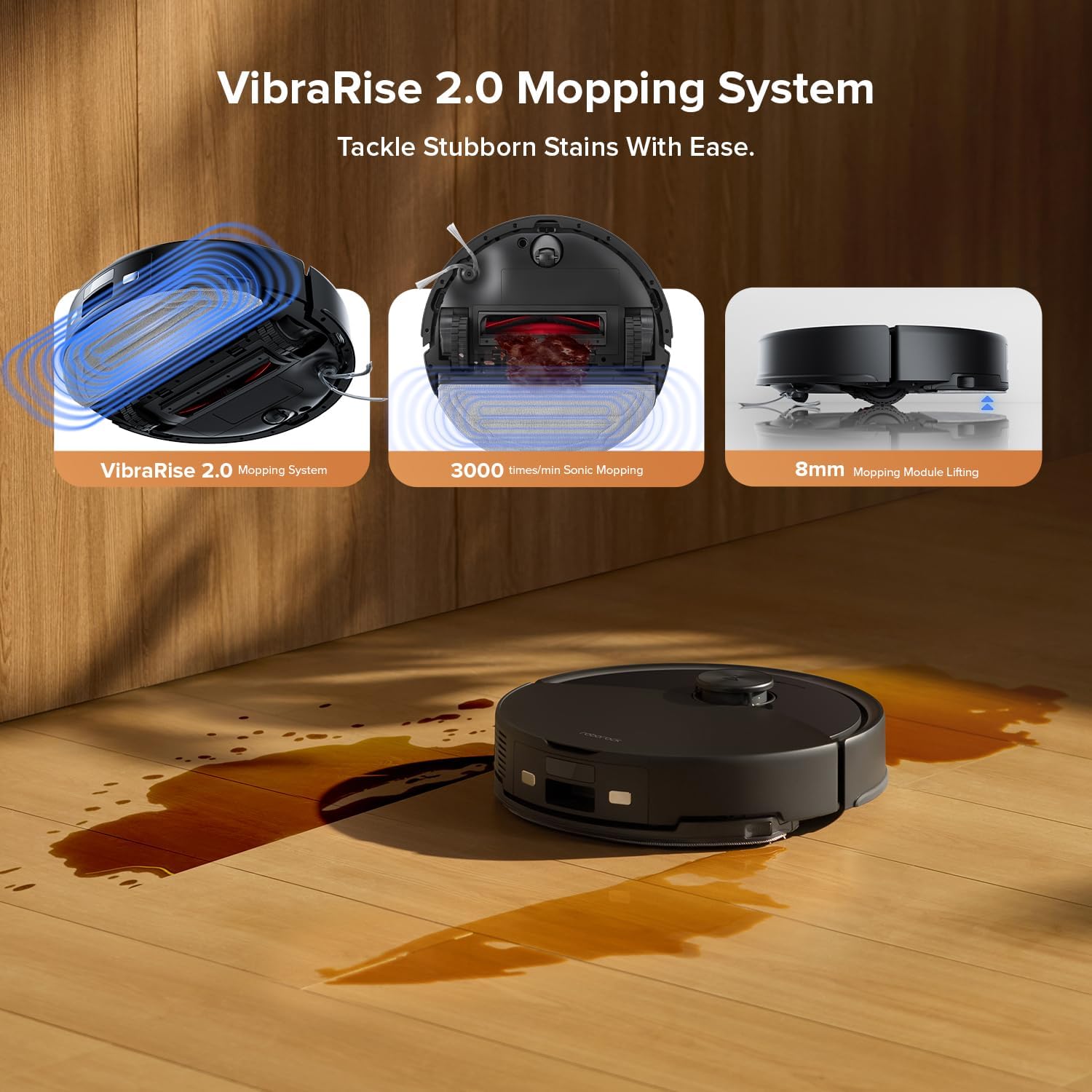
Figure 2: The VibraRise 2.0 Mopping System, illustrating its sonic mopping action and 8mm mopping module lifting capability.
4.3 Suction Power and Anti-Tangle System
The Q10 S5+ features 10,000 Pa HyperForce suction for deep cleaning. The Dual Anti-Tangle System, with its JawScrapers Comb main brush and specialized side brush, is designed to minimize hair tangling, ensuring consistent performance.

Figure 3: Visual representation of the 10,000 Pa HyperForce Suction effectively picking up various debris like long hair, crumbs, pet food pellets, and coffee grounds.

Figure 4: Comparison illustrating the effectiveness of the Dual Anti-Tangle Design, showing minimal hair tangling on the roborock side brush compared to a conventional brush.
5. Mantemento
Un mantemento regular garante un rendemento óptimo e prolonga a vida útil do teu robot aspirador.
5.1 Replacing the Disposable Dust Bag
- The 2.7L dust bag in the self-emptying station provides up to 7 weeks of hands-free cleaning.
- When the dust bag is full, the app will notify you, or the indicator on the station may light up.
- To replace: Open the lid of the self-emptying station. Pull the full dust bag upwards using its handle. The bag's opening will automatically seal to prevent dust leakage.
- Dispose of the full bag and insert a new roborock disposable dust bag into the slot. Push down until it is securely in place.
- It is recommended to replace the dust bag every 1-2 months for optimal performance.

Figure 5: A single roborock disposable dust bag, designed for easy and hygienic replacement.

Figure 6: Key features of the roborock disposable dust bag, highlighting its tight sealing, hot press edge, and sturdy fabric construction for effective dust containment.
5.2 Cepillos de limpeza
- Cepillo principal: Turn the robot over. Press the release tabs to remove the main brush cover. Lift out the main brush. Use the cleaning tool (if provided) to remove tangled hair and debris. Reinstall the brush and cover.
- Cepillo lateral: Use a screwdriver to remove the screw holding the side brush. Remove any tangled hair or debris. Reattach the side brush.
5.3 Limpeza dos filtros
- Open the robot's top cover and remove the dustbin.
- Remove the filter assembly (Cloth and Foam filters). Tap the filter against a trash can to remove dust.
- Rinse the filter under running water if necessary (check manual for specific filter type instructions). Allow to air dry completely before reinstalling.
5.4 Limpeza de sensores e contactos de carga
- Wipe all sensors (cliff sensors, wall sensor) on the robot and the charging contacts on both the robot and the station with a soft, dry cloth.
5.5 Limpeza do depósito de auga e da almofada da mopa
- Despois de cada sesión de fregado, baleira a auga restante do depósito.
- Remove the mop pad and rinse it thoroughly. Allow it to air dry completely before reattaching or storing.
6 Solución de problemas
If you encounter issues with your roborock Q10 S5+, refer to the following common solutions:
| Problema | Causa posible | Solución |
|---|---|---|
| O robot non se acende nin carga. | Battery low; charging contacts dirty; power cable disconnected. | Ensure robot is properly docked. Clean charging contacts. Check power cable connection to station and outlet. |
| O robot quédase atascado con frecuencia. | Obstacles in path; cliff sensors dirty; robot stuck on high pile carpet. | Clear obstacles. Clean cliff sensors. Use no-go zones in the app for problematic areas. |
| Mal rendemento de succión. | Depósito do po cheo; filtro atascado; cepillo principal enredado. | Replace dust bag. Clean or replace filters. Clean main brush and side brush. |
| Fregar non é eficaz. | Water tank empty; mop pad dirty or dry; water flow setting too low. | Refill water tank. Clean or replace mop pad. Adjust water flow in the app. |
| O robot non se pode conectar á wifi/aplicación. | Contrasinal wifi incorrecto; problemas co router; robot demasiado lonxe do router. | Ensure correct Wi-Fi password. Restart router. Move robot closer to router during setup. |
For more detailed troubleshooting, refer to the roborock app's help section or the official roborock support websitio.
7. Especificacións do produto
| Característica | Detalle |
|---|---|
| Marca | roborock |
| Nome do modelo | S5+ |
| Cor | Negro |
| Compoñentes incluídos | 1 x Mop Head, 1 x Cleaning Solution |
| Tipo de filtro | Tecido, escuma |
| Fonte de enerxía | Alimentado por batería |
| Método de control | Control táctil por aplicación |
| Factor de forma | Redondo |
| ASIN | B0F8W48LBB |
| Capacidade do colector de lixo (robot) | 500 ml |
| Capacidade do depósito de auga | 200 ml |
| Duración máxima | minutos 150 |
| Maximum Vacuuming Area | 1,937 pés cadrados |
| Capacidade da bolsa de po autobaleirada | 2.7L (up to 7 weeks of cleaning) |

Figura 7: Máisview of the robot vacuum's capacities, including dustbin, water tank, runtime, and maximum cleaning area.
8. Garantía e soporte
roborock products typically come with a limited warranty. Please refer to the warranty card included in your product packaging or visit the official roborock websitio web para obter termos e condicións de garantía detallados específicos da súa rexión.
Atención ao cliente:
For technical assistance, troubleshooting not covered in this manual, or warranty claims, please contact roborock customer support through their official website or the roborock app. Have your product model (S5+) and ASIN (B0F8W48LBB) ready when contacting support.
Oficial Websitio: https://us.roborock.com/ (ou sitio rexional relevante)


