Introdución
The Marshall Kilburn III is a premium portable Bluetooth speaker designed to deliver exceptional audio quality with a classic aesthetic. It features 360° True Stereophonic sound, robust dust and water resistance, and an extended battery life, making it suitable for various environments. This manual provides detailed instructions for setting up, operating, maintaining, and troubleshooting your Kilburn III speaker.
O que hai na caixa
- Marshall Kilburn III Speaker
- Cable de carga USB-C a USB-C
- Guía de inicio rápido
- Información legal e de seguridade
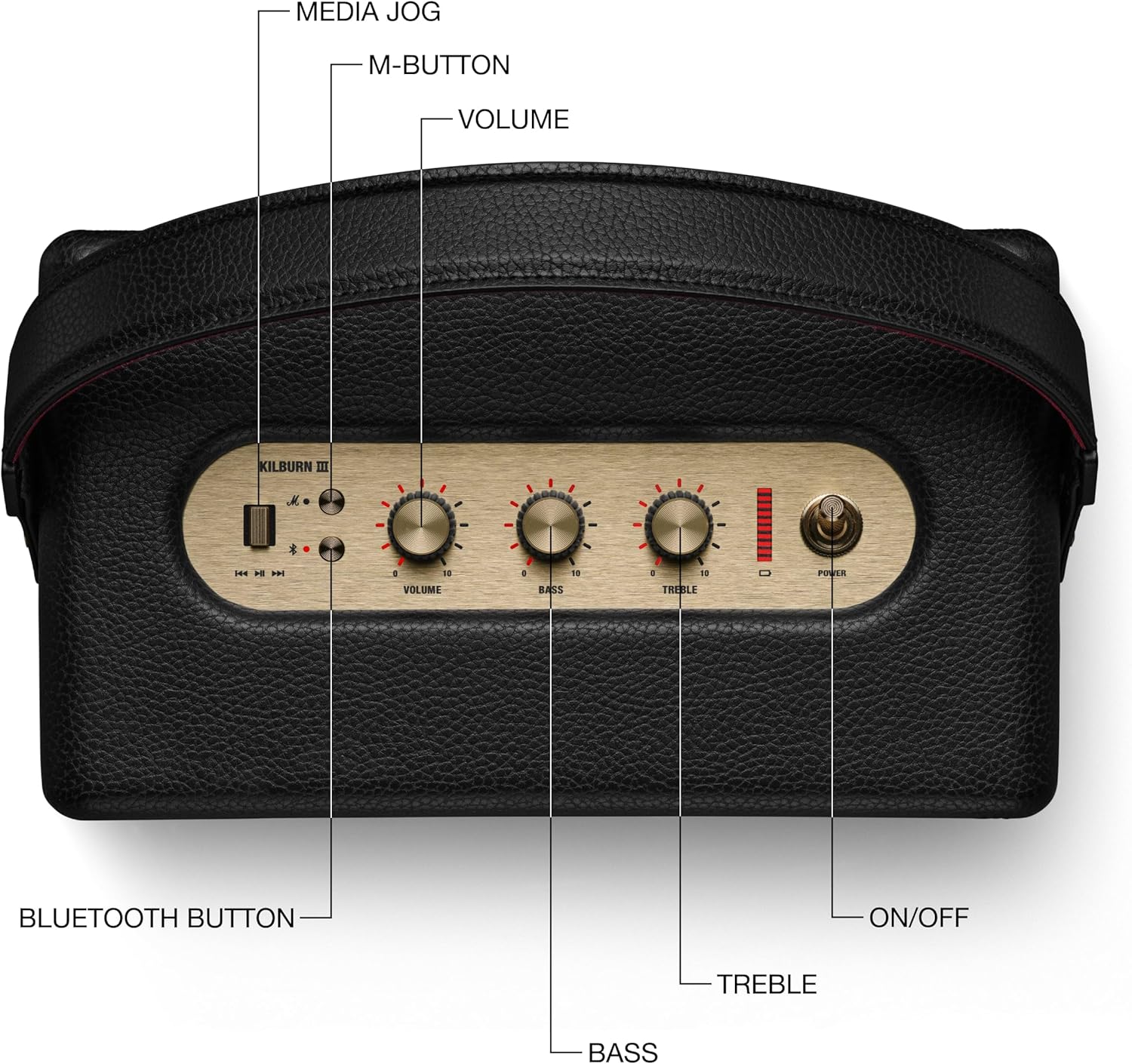
Figure 1: Included components with the Marshall Kilburn III speaker.
Produto rematadoview
The Kilburn III features intuitive controls and a durable design. Familiarize yourself with the main components and controls:

Figure 2: Top panel controls of the Kilburn III speaker.
- Botón de volume: Axusta o nivel xeral de saída de son.
- Botón de baixo: Controls the low-frequency audio output.
- Botón de agudos: Controls the high-frequency audio output.
- Interruptor de alimentación: Toggles the speaker on/off.
- Botón Bluetooth: Inicia o modo de emparellamento Bluetooth.
- M-Button: Allows switching between custom EQ modes (configurable via the Marshall app).
- Indicador de batería: LED bar indicating remaining battery life.

Figure 3: Rear panel connections of the Kilburn III speaker.
- USB-C Power Input/Output: Used for charging the speaker and for using the speaker as a power bank to charge other devices.
- AUX 3.5mm Input: For connecting audio devices via a 3.5mm audio cable.
Configuración
Cargando o altofalante
Before first use, fully charge the Kilburn III speaker. Use the included USB-C to USB-C charging cable.
- Connect one end of the USB-C cable to the USB-C port on the rear of the speaker.
- Connect the other end of the USB-C cable to a compatible USB power adapter (not included) or a USB-C power source.
- The battery indicator LEDs on the top panel will illuminate to show charging progress. All LEDs will be solid when fully charged.

Figure 4: Charging the Kilburn III speaker via USB-C.
Emparejamento Bluetooth
To connect your audio device to the Kilburn III via Bluetooth:
- Tire do interruptor de alimentación cara adiante ata que o altofalante se acenda.
- Push and hold the Bluetooth button on the top panel until the LED turns to a slow pulse, indicating pairing mode.
- On your audio device (smartphone, tablet, laptop), open the Bluetooth settings.
- Select "Kilburn III" from the list of available devices.
- Once connected, the Bluetooth LED on the speaker will turn solid.

Figure 5: Marshall Kilburn III ready for Bluetooth pairing.
Instrucións de funcionamento
Reproducción básica
- Ensure the speaker is powered on and connected via Bluetooth or AUX.
- Start playing audio from your connected device.
- Adjust the Volume knob on the speaker to your desired listening level.

Figure 6: Adjusting the volume on the Kilburn III.
Axuste do son
Customize your audio experience using the dedicated Bass and Treble knobs:
- Xire o Botón de baixo clockwise to increase bass, or counter-clockwise to decrease it.
- Xire o Botón de agudos clockwise to increase treble, or counter-clockwise to decrease it.
Using the M-Button (Custom Modes)
The M-button allows you to cycle through pre-set or custom equalizer modes. To configure these modes, you may need to use the official Marshall app (if available for this model).
- Preme o Botón M to switch between available sound modes.
Charging External Devices (Power Bank Function)
The Kilburn III can act as a power bank to charge your mobile devices:
- Connect your device's USB-C charging cable to the USB-C port on the rear of the Kilburn III.
- The speaker will begin charging your device. Note that using this feature will reduce the speaker's playtime.
Mantemento
To ensure the longevity and optimal performance of your Marshall Kilburn III speaker, follow these maintenance guidelines:
- Limpeza: Use a soft, dry cloth to wipe the speaker's surfaces. Do not use abrasive cleaners, alcohol, or chemical solvents.
- Resistencia á auga e ao po: The speaker is IP54 rated, meaning it is resistant to dust and water splashes from any direction. However, it is not waterproof and should not be submerged in water. Ensure all ports are dry before charging.
- Almacenamento: Garde o altofalante nun lugar fresco e seco, lonxe da luz solar directa e de temperaturas extremas.
- Coidado da batería: Para unha duración óptima da batería, evite descargala completamente con frecuencia. Cargue o altofalante regularmente, mesmo se non o usa durante períodos prolongados.
Resolución de problemas
If you encounter issues with your Kilburn III, try the following solutions:
| Problema | Posible Solución |
|---|---|
| O altofalante non se acende. | Asegúrate de que a batería estea cargada. Conecta o altofalante a unha fonte de alimentación mediante o cable USB-C. |
| Non se pode emparellar por Bluetooth. |
|
| Sen son ou volume baixo. |
|
| Distorsión do son. |
|
| A batería esgotarase rapidamente. |
|
Especificacións
| Característica | Detalle |
|---|---|
| Nome do modelo | Kilburn III |
| Tipo de altofalante | Altofalante portátil |
| Cor | Black & Brass |
| Dimensións do produto | 10.75" D x 5.91" W x 6.65" H |
| Peso do elemento | 6.17 libras |
| Duración da batería | 50 horas |
| Tempo de carga | 3 horas |
| Tecnoloxía de comunicación sen fíos | Bluetooth |
| Alcance Bluetooth | 33 pés |
| Nivel de resistencia á auga | Water Resistant (IP54 rated) |
| Potencia de saída máxima do altofalante | 36 vatios |
| Modo de saída de audio | Estéreo |
| Método de control | Touch (Knobs) |
| Fonte de enerxía | Alimentado por batería |
Garantía e Soporte
The Marshall Kilburn III comes with a Limited Warranty. For detailed warranty information, please refer to the "Legal and Safety Information" document included in your product packaging.
For further assistance, technical support, or to purchase replacement parts, please visit the official Marshall websitio web ou póñase en contacto co seu servizo de atención ao cliente. Tamén pode consultar o Manual do usuario (PDF) para detalles adicionais.


