1. Introdución
The SingularXYZ L1-Laser IMU GNSS RTK Surveying Equipment is a professional-grade tool designed for high-precision positioning and measurement in various environments. It integrates advanced GNSS technology with a laser rangefinder and IMU tilt compensation, offering centimeter-level accuracy and enhanced efficiency for surveying tasks, even in challenging conditions.

Figure 1.1: The L1-Laser GNSS Receiver in a surveying scenario, highlighting its non-contact laser measurement capability.
2. Características clave
- Professional-Grade RTK Precision: 1408-channel dual-frequency L1/L2 GNSS receiver with 5-second initialization and centimeter-level accuracy. Supports full constellations (GPS, Galileo, GLONASS, BDS, QZSS, SBAS) with anti-multipath technology.
- Hybrid Surveying System: Integrated laser rangefinder for non-contact measurement up to 10m, combined with RTK positioning for inaccessible points.
- Advanced Tilt Compensation: Professional-grade MEMS IMU provides ±60° dynamic tilt operation with auto-calibration, delivering 2cm RTK accuracy for pole-free topographic surveys.
- Long-Range UHF Connectivity: Built-in 2W UHF transceiver supports 15km radio range between rover and base with RTCM v3/CMR correction. Compatible with third-party base stations.
- Field-Optimized Connectivity: 8GB onboard storage, NFC (Touch connection), Bluetooth, USB Type-C, WiFi, TNC Connector, RS232 Serial Port. Web UI for remote configuration and data download. Supports NTRIP/CORS via SingularPad software.
- Military-Grade Field Reliability: IP67-rated magnesium alloy housing withstands -40°C to 65°C operation with water/dust resistance and drop protection.

Figura 2.1: Máisview of the L1-Laser's key features and capabilities.
3. Que hai na caixa
The L1-Laser IMU GNSS RTK Surveying Equipment package includes the following components:
- L1 GNSS Receiver
- Maleta de transporte (x1)
- Cable USB tipo C (x2)
- Supercargador (x2)
- Whip Antenna (x1)
- GNSS Adapter (x1)
- Colector de datos SC60 (x1)
- Soporte (x1)
- SingularPad Software (x1)
- Guía de inicio rápido (x1)
- Tarxeta de inicio rápido (x1)

Figure 3.1: All components included in the L1-Laser product package.
4. Configuración
4.1 Configuración inicial
Before operating the L1-Laser system, ensure all components are present and charged. Connect the SC60 Data Collector to the L1 GNSS Receiver using the provided bracket and cables. Ensure the whip antenna is securely attached to the L1 receiver for optimal signal reception.
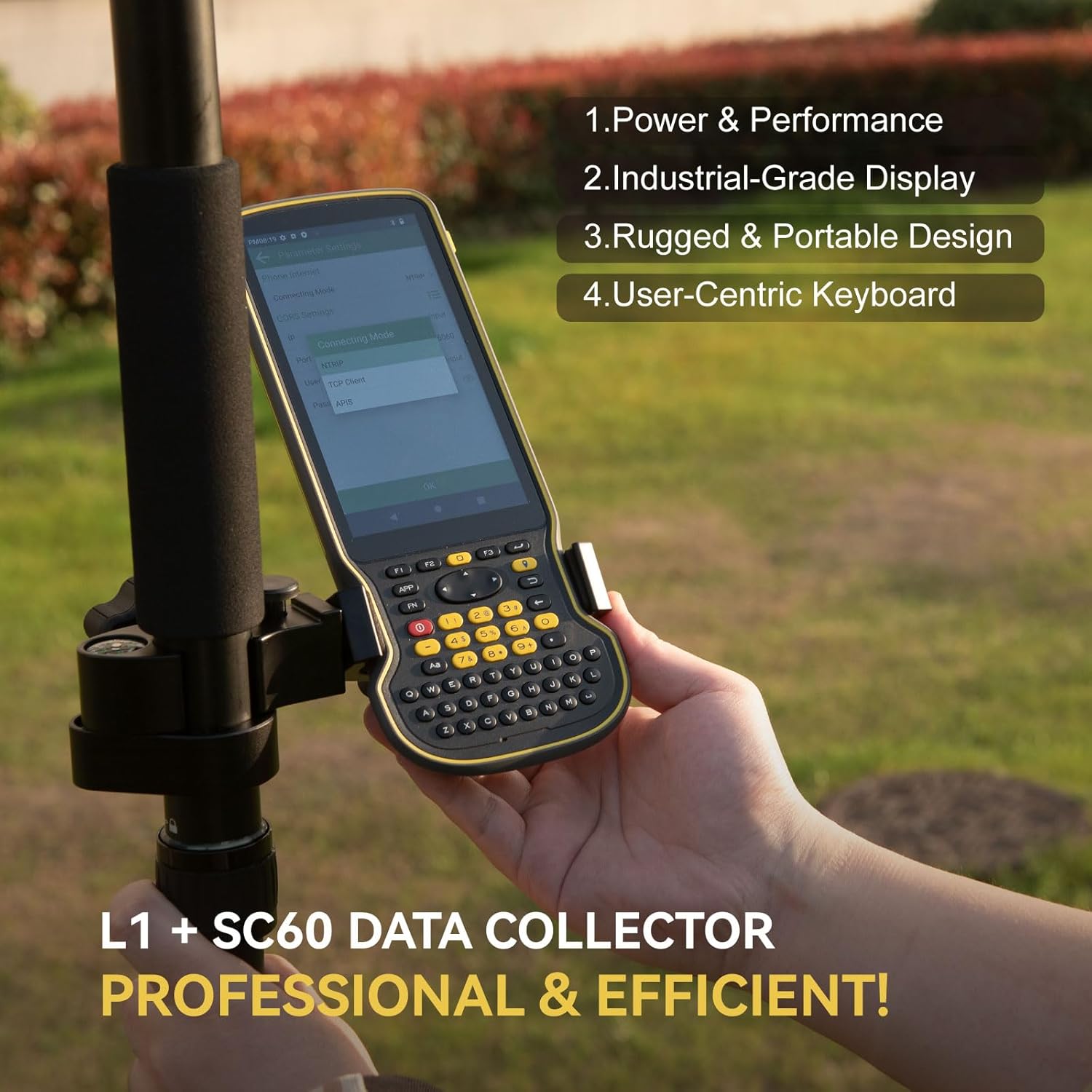
Figure 4.1: Proper assembly of the L1 GNSS Receiver and SC60 Data Collector for field use.
4.2 Flexible Work Modes
The L1-Laser supports various work modes to suit different surveying needs:
- Static Measurement: Record static data using the 8GB onboard storage. Data can be downloaded via the Web UI.
- Internal Radio Base & Rover: Achieve up to 15km range with the built-in UHF radio for real-time kinematic (RTK) corrections.
- Ntrip Mode: Connect through Bluetooth to easily access local CORS (Continuously Operating Reference Station) via PDAs.

Figure 4.2: Visual representation of the three primary work modes.
4.3 Working with CORS/RTK Correction Service
To use the CORS/RTK Correction Service, follow these steps:
- Purchase a CORS/RTK Correction Service account in your local area.
- Ensure your PDA device (phone/tablet/data collector) can access the network and supports Bluetooth connection.
- Place your L1 GNSS receiver in an open view do ceo.
- Abre o programa SingularPad.
- Click "Communication" and connect to your L1 receiver's SN via Bluetooth.
- Click "Rover" and then "Set Data Link" as Phone Internet. Go to "Connect Mode" and fill in your CORS/RTK Correction Service account details.
- Click "Get" to obtain the Mount-Point list and select the appropriate one. Click Start and Apply.
Nota: Atopa o punto de montaxe axeitado mediante o websitio do seu provedor local de servizos correccionais CORS/RTK. Asegúrese de que a liña de base estea a menos de 50 km.

Figure 4.3: Step-by-step guide for CORS/RTK Correction Service setup.
4.4 Working with L1 Rover + Base
For a Rover + Base setup, you will need two L1 GNSS receivers. Designate one as the base and the other as the rover.
- Connect the L1 base to your PDA. Go to Device > Base.
- For Base Startup Mode, you can input known point coordinates to set up, or select Single Point mode for automatic setup.
- Set Datalink as Internal Radio and customize radio channels, frequency, and protocol according to your needs.
- Save settings and Start Base. The status bar will become Base.
- Disconnect L1 base and connect to the rover in the software.
- Go to Device > Rover, set Data Link as Internal Radio.
- Coincide e configura o mesmo protocolo e frecuencia que a configuración base.
- Click Collection to save settings and click Apply.

Figure 4.4: Configuration steps for L1 Rover + Base setup.
5. Instrucións de funcionamento
5.1 RTK Precision and IMU Tilt Compensation
The L1-Laser provides robust RTK positioning. Its integrated IMU allows for tilt compensation up to ±60°, enabling accurate measurements without needing to perfectly level the pole. This significantly increases survey efficiency, especially in challenging terrains or when measuring inaccessible points.

Figure 5.1: Illustration of 60° tilt compensation for pole surveying and visual stakeout.
5.2 Laser Measurement
The integrated laser rangefinder allows for non-contact measurements up to 10 meters. This feature is particularly useful for surveying points that are difficult or hazardous to access, such as power lines, bridge abutments, or points across obstacles. Simply aim the laser at the target point, and the system will combine the laser measurement with RTK positioning for precise coordinates.
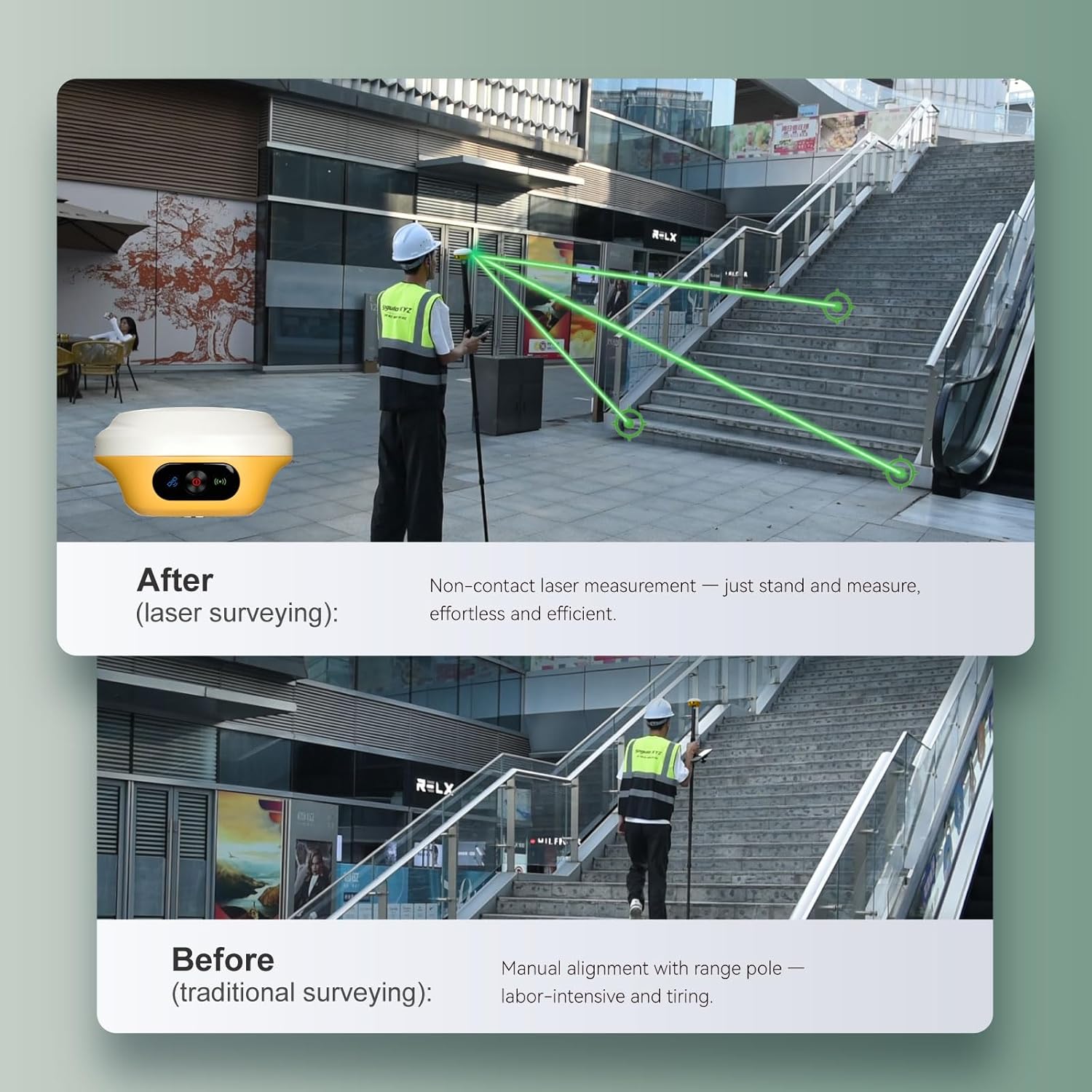
Figure 5.2: Comparison of traditional surveying vs. laser surveying for efficiency.

Figura 5.3: Examples of effortless laser surveying in different scenarios.
5.3 Data Collection and Management
The SC60 Data Collector, running SingularPad software, provides a robust interface for data collection. It features a full physical keyboard and a 5.5" 1080P display for efficient data input and viewing. Data can be stored on the L1-Laser's 8GB internal storage and easily downloaded via its Web UI by connecting to the device's Wi-Fi.

Figure 5.4: The SC60 Data Collector, optimized for field data entry.

Figure 5.5: Data download via Web UI and extended battery life.
5.4 Viewestado de posicionamento RTK
After completing your L1 RTK setup, check the current RTK solution status in the top left corner of the SingularPad software:
- FIXADO: L1 is receiving RTK corrections stably and obtaining a Fixed RTK solution with centimeter-level accuracy.
- FLOTADOR: L1 receives corrections from the base/CORS, but due to obstructions or magnetic field interference, the signal reception is not very stable, and the accuracy is sub-meter level.
- AUTONÓMICO: Posicionamento por satélite nun só punto sen recibir datos de corrección RTK. A precisión é de arredor do nivel dun metro.
Consello: Before surveying, make sure L1 has a clear sky view, libre de obstáculos como edificios, árbores, coches e moito máis.

Figure 5.6: Understanding RTK positioning status indicators.
6. Mantemento
Proper maintenance ensures the longevity and optimal performance of your L1-Laser equipment:
- Limpeza: Regularly wipe down the device with a soft, damp cloth. Avoid abrasive cleaners or solvents. Ensure the laser aperture and GNSS antenna are free from dirt and debris.
- Almacenamento: Garde o equipo na súa caixa de transporte nun lugar fresco e seco cando non o use. Evite temperaturas extremas e a luz solar directa.
- Coidado da batería: Charge the batteries regularly, even if the device is not in frequent use, to maintain battery health. Avoid fully discharging the batteries for extended periods.
- Actualizacións de firmware: Periodically check the SingularXYZ website for firmware updates for both the L1 receiver and the SC60 Data Collector. Keeping the firmware updated ensures access to the latest features and performance improvements.
- Inspección física: Before each use, inspect cables, connectors, and the housing for any signs of wear or damage.
7 Solución de problemas
If you encounter issues with your L1-Laser equipment, consider the following common troubleshooting steps:
- Sen enerxía: Ensure batteries are fully charged. Check all cable connections. Try a different charger or USB-C cable.
- No GNSS Signal: Asegúrate de que o dispositivo teña unha imaxe clara view of the sky, free from obstructions like tall buildings or dense foliage. Check antenna connection.
- RTK Not Fixing (FLOAT/AUTONOMOUS): Verify base station or CORS connection. Ensure correction data is being received. Check radio/Ntrip settings for correct frequency/mount point. Ensure the baseline distance is within recommended limits.
- Problemas de conectividade Bluetooth/Wi-Fi: Restart both the L1 receiver and the data collector. Ensure Bluetooth/Wi-Fi is enabled on both devices. Forget and re-pair Bluetooth connections if necessary.
- Software Malfunction: Restart the SingularPad software. If the issue persists, restart the SC60 Data Collector. Ensure the software is updated to the latest version.
- Inaccurate Laser Measurement: Ensure the laser aperture is clean. Verify the target surface is suitable for laser reflection.
Se estes pasos non resolven o problema, consulta a sección de soporte para obter máis axuda.
8. Especificacións
| Característica | Especificación |
|---|---|
| Peso do elemento | 1.2 libras |
| Dimensións do produto | 4.21 x 4.21 x 2.31 polgadas |
| Número de modelo do artigo | L1-Laser rover |
| Baterías | Necesita 3 batería de 9 V (incluída) |
| Tamaño de visualización | 1 polgadas |
| Duración da batería | 12 horas |
| Comando de voz | Buttons, Keyboard, OCR, Touchscreen |
| Característica especial | Bluetooth, Touchscreen, Waterproof |
| Tecnoloxía de conectividade | Bluetooth, Ethernet, USB, Wi-Fi |
| Tipo de mapa | En todo o mundo |
| Modo de saída de audio | Dixital |
9. Garantía e soporte
9.1 Información da garantía
The L1-Laser IMU GNSS RTK Surveying Equipment comes with a 1 anos de garantía do fabricanteConserva o comprobante de compra para reclamacións de garantía.
9.2 Soporte técnico
SingularXYZ is committed to providing reliable support for its products. If you require technical assistance or have questions regarding the equipment's operation, please:
- Refer to the manual included in the package.
- Email the SingularXYZ technical support team for assistance.
- Visit the official SingularXYZ website to get in touch with support.
- Video conference guidance for RTK GNSS survey equipment is also available to assist you.


