1. Introduction to TENS Therapy
The AUVON Dual Channel TENS Unit is designed to provide temporary relief from pain associated with aching and fatigued muscles. Transcutaneous Electrical Nerve Stimulation (TENS) therapy works by delivering small electrical impulses through electrodes placed on the skin, which can help block pain signals and stimulate endorphin production.

Image 1.1: Areas for TENS application, illustrating common pain points like the shoulder, lower back, and limbs.
Aviso de seguridade importante:
TENS units should NOT be used by individuals with pacemakers, pregnant women, or those with epilepsy. Consult your doctor before use if you have any medical conditions.
2. Contido do paquete
Upon opening your AUVON Dual Channel TENS Unit package, please verify that all the following items are included:
- 1 x AUVON Dual Channel TENS Machine (Model JT8012B)
- 4 almofadas de eléctrodos cadradas de 2"
- 4 x Large Rectangle 2"x4" Electrode Pads
- 2 cables de conexión
- 1 x USB Cable for charging
- 1 x Manual de usuario (este documento)
- 1 soporte para almofadas
- 1 x bolsa de almacenamento
Note: The 2"x2" pads are typically packaged together, and the 2"x4" pads are also packaged together. Unfold each sealed pack to count the pads.
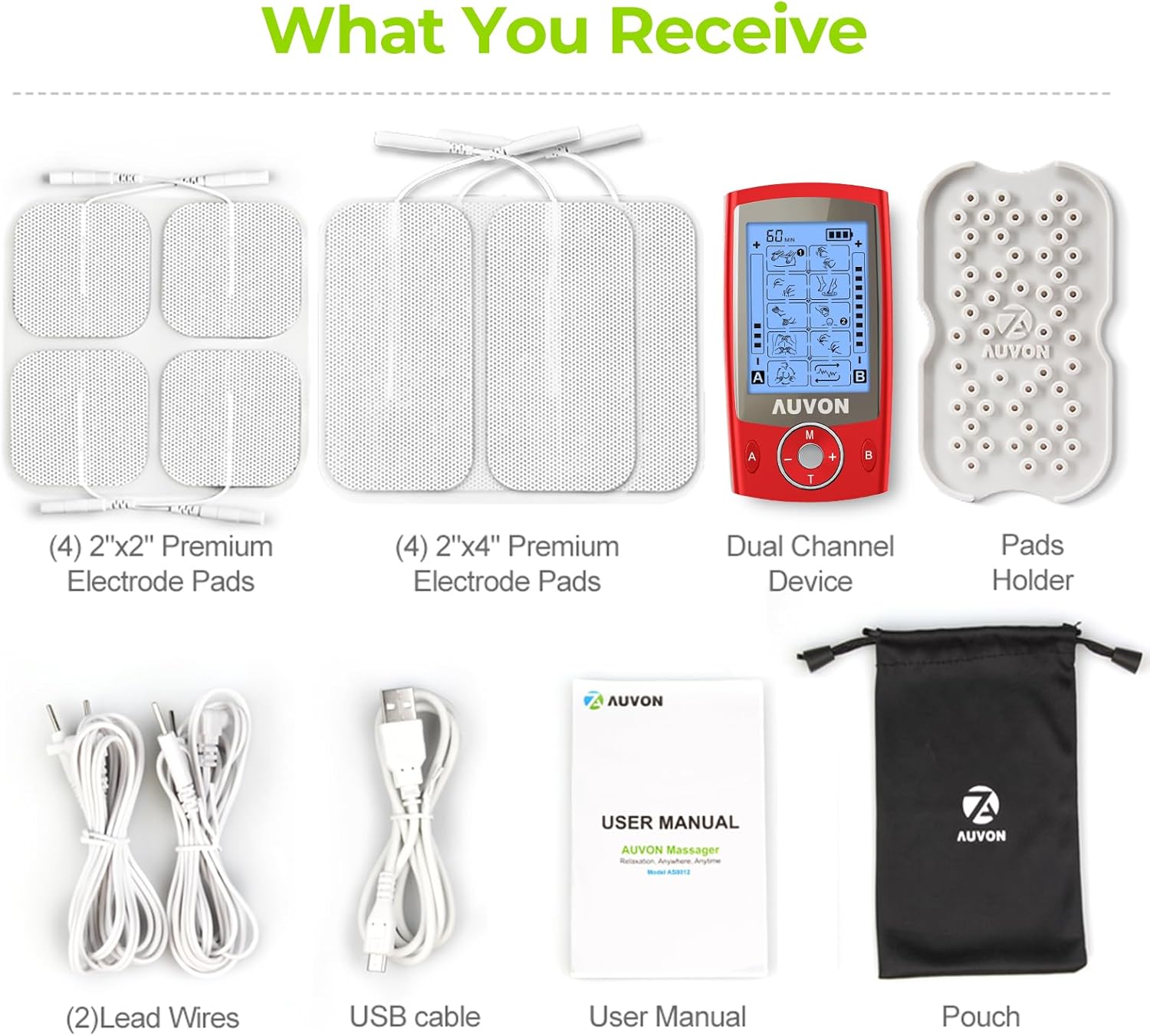
Image 2.1: Visual representation of all items included in the AUVON TENS Unit package.
3. Dispositivo rematadoview
The AUVON Dual Channel TENS Unit is a compact, portable device designed for ease of use. It features independent dual channels (A and B), allowing for different modes and intensity settings to be applied simultaneously to two separate body areas.

Imaxe 3.1: Fronte view of the AUVON Dual Channel TENS Unit and accessories.
Características principais:
- Dual Channels (A/B): Allows for simultaneous treatment of two different body areas with independent settings.
- 20 Pre-set Modes: Offers a variety of stimulation patterns for different types of muscle relief.
- USB recargable: Built-in lithium-ion battery for convenient charging.
- Adjustable Intensity and Timer: Customize your therapy session duration and strength.

Imaxe 3.2: Acabadoview of the AUVON TENS Unit's main features.
4. Instrucións de configuración
4.1 Carga do dispositivo
Before first use, fully charge the TENS unit. Connect the provided USB cable to the device's charging port and to a USB power source (e.g., computer, wall adapter). The battery indicator on the screen will show charging status. A full charge typically provides up to 10 hours of continuous use.

Image 4.1: The AUVON TENS Unit connected for charging, highlighting its rechargeable battery.
4.2 Connecting Lead Wires and Electrode Pads
- Insert the pin connectors of the lead wires into the output ports (A and B) on the top of the TENS unit.
- Attach the other end of the lead wires to the electrode pads. Ensure a secure connection.
- Peel the protective film from the electrode pads. Retain the film for reapplication after use.
5. Instrucións de funcionamento
Follow these steps to operate your AUVON TENS Unit:
- Encendido/apagado: Press and hold the central power button (labeled 'M' or 'T' depending on model) for 2-3 seconds to turn the device on or off.
- Seleccione o canal: Press the 'A' or 'B' button to select the desired channel for adjustment. The selected channel will be highlighted on the screen.
- Seleccionar modo: Press the 'M' button to cycle through the 20 available modes. Each mode offers a different stimulation pattern.
- Axustar a intensidade: Use the '+' and '-' buttons to increase or decrease the intensity level for the selected channel. Start with the lowest intensity and gradually increase until a comfortable, yet effective, sensation is felt.
- Establecer temporizador: Press the 'T' button to adjust the treatment duration. The timer can typically be set from 10 to 60 minutes. The device will automatically shut off when the timer expires.
- Función de bloqueo: To prevent accidental changes during use, long-press the center button (between '+' and '-') to lock the screen. Repeat to unlock.

Image 5.1: Step-by-step guide for operating the AUVON TENS Unit controls.
Control independente de canles:
The dual-channel design allows you to apply different modes and intensities to two separate areas simultaneously. For example, you can set Channel A to 'Tapping' mode with intensity level 5 for your shoulder, and Channel B to 'Palm Kneading' mode with intensity level 12 for your lower back.

Imaxe 5.2: Ex.ample of independent dual-channel use on different body parts.
6. Electrode Pad Application
Proper placement of electrode pads is crucial for effective TENS therapy. Ensure your skin is clean and dry before applying pads.
Directrices xerais:
- Place pads on or around the area of pain.
- Ensure pads are at least one inch apart.
- Avoid placing pads directly over joints, open wounds, or sensitive areas.
- The 2"x2" square pads are suitable for smaller, more compact areas like knees or elbows.
- The 2"x4" rectangular pads are ideal for larger areas such as the back or thighs.

Image 6.1: Recommended electrode pad placements for different body areas.
7. Coidados e mantemento
7.1 Coidado das almofadas de eléctrodos
The included electrode pads are designed for multiple uses (up to 45 uses with proper care). To prolong their lifespan:
- After each use, reapply the protective film to the adhesive side of the pads.
- If pads lose their stickiness, gently wipe the adhesive surface with a damp cloth (water only) and let them air dry. Do not use soap or alcohol.
- Store pads on the provided pad holder or in a sealed bag to prevent drying out.
- Replace pads when they no longer adhere well to the skin or if the sensation becomes uneven.

Image 7.1: Cross-section of an AUVON electrode pad, illustrating its construction for durability and conductivity.
7.2 Coidado do dispositivo
- Limpe o dispositivo cun pano suave e seco. Non empregue produtos de limpeza abrasivos nin o mergulle en auga.
- Store the device in the provided pouch in a cool, dry place away from direct sunlight.
8 Solución de problemas
If you encounter issues with your AUVON TENS Unit, refer to the following common problems and solutions:
| Problema | Causa posible | Solución |
|---|---|---|
| Sen sensación ou sensación débil | Low battery; Pads not adhering well; Lead wires not connected; Intensity too low; Device off. | Charge device; Clean/replace pads; Check wire connections; Increase intensity gradually; Turn device on. |
| Uneven sensation | Pads are old/dry; Poor skin contact; One lead wire faulty. | Clean/replace pads; Ensure full pad contact; Try new lead wires. |
| O dispositivo non se acende | Batería esgotada; Avaría do dispositivo. | Charge device fully; If problem persists, contact customer support. |
| A pantalla non responde | Screen lock is active. | Long-press the center button to unlock the screen. |
9. Especificacións
- Número de modelo: JT8012B
- Dimensións do produto: 4.12 x 2.24 x 0.43 polgadas
- Peso do artigo: 11.68 onzas
- Batería: 1 batería de iones de litio (incluída)
- Canles: Dobre (A/B)
- Modos: 20
- Fabricante: AUVON
10. Garantía e soporte
AUVON provides a 24 meses de garantía for the Dual Channel TENS Unit Muscle Stimulator Machine, Model JT8012B. This warranty covers manufacturing defects and ensures reliable performance of your device.
For technical support, warranty claims, or any questions regarding your product, please contact AUVON customer service through the official AUVON websitio web ou a túa plataforma de compra.
11. Important Legal Disclaimer
As declaracións sobre suplementos dietéticos non foron avaliadas pola FDA e non están destinadas a diagnosticar, tratar, curar ou previr ningunha enfermidade ou condición de saúde.
This device is intended for temporary relief of pain associated with sore and aching muscles due to strain from exercise or normal household and work activities. It is not a substitute for professional medical advice, diagnosis, or treatment. Always seek the advice of your physician or other qualified health provider with any questions you may have regarding a medical condition.


