Introdución
This manual provides essential information for setting up, operating, and maintaining your TCL 32S5K 32-inch QLED Smart TV. Please read these instructions carefully before using your television to ensure proper functionality and safety. Keep this manual for future reference.

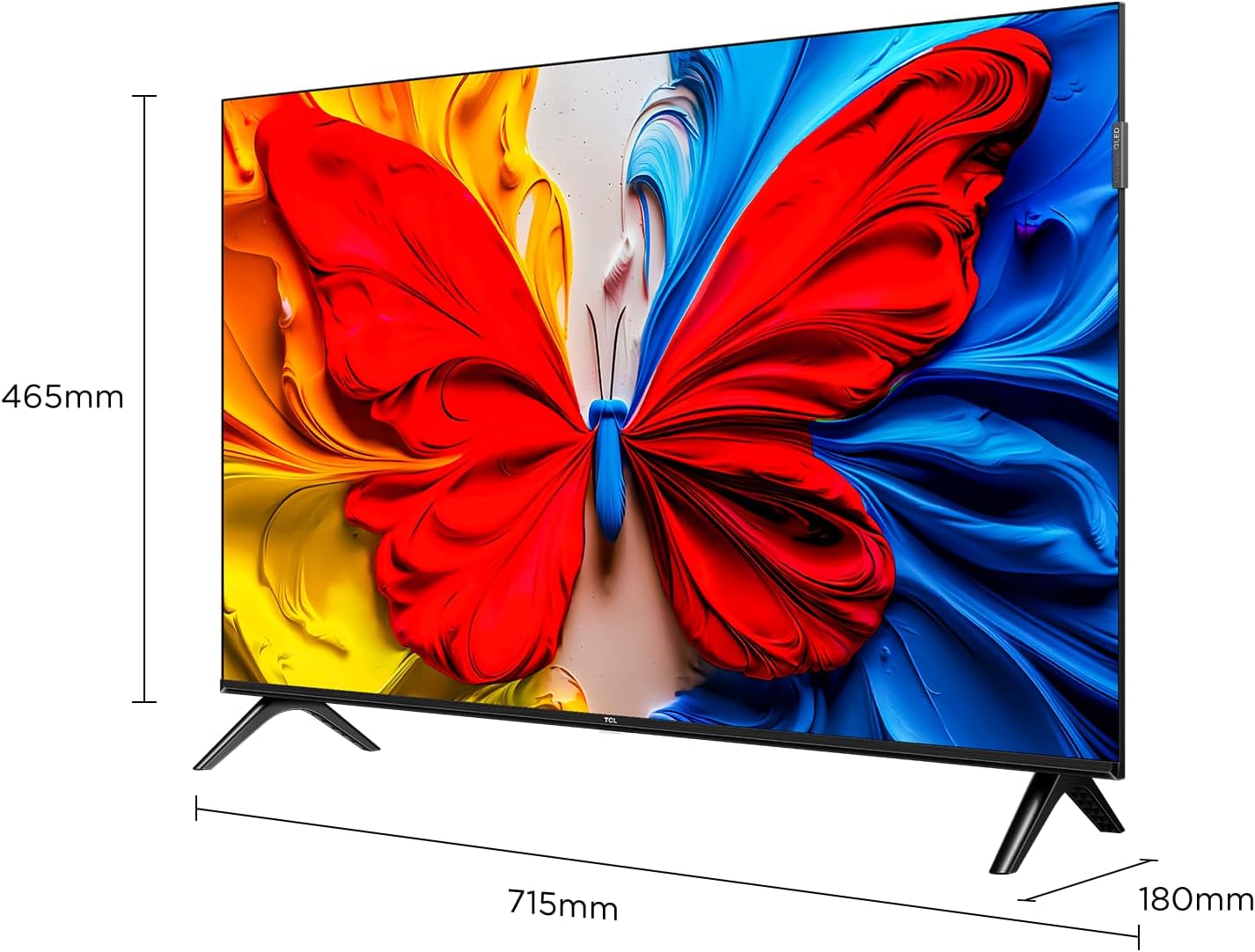
Fronte view of the TCL 32S5K 32-inch QLED Smart TV. This image shows the television screen displaying vibrant colors, supported by two sleek stands.
O que hai na caixa
Comprobe que todos os compoñentes estean presentes na embalaxe:
- TCL 32S5K Television
- Adaptador de alimentación
- Cable de alimentación
- Control remoto
- Soporte para TV (2 pezas)
- Manual de usuario (este documento)
Configuración
1. Fixación do soporte para TV
- Coloque con coidado a pantalla do televisor sobre unha superficie suave e plana para evitar danala.
- Aliñe cada soporte coas ranuras correspondentes na parte inferior do televisor.
- Fixa os soportes cos parafusos proporcionados. Asegúrate de que estean firmemente fixados.

Image illustrating the dimensions of the TCL 32S5K TV and how the stands are attached to the bottom of the unit. The image shows measurements for width (715mm) and height (465mm).
2. Montaxe na parede (opcional)
If you choose to wall mount your TV, refer to the instructions provided with your wall mount kit. Ensure the wall mount is compatible with the VESA mounting pattern of the TCL 32S5K TV. Professional installation is recommended for wall mounting.
Traseira view of the TCL 32S5K TV, showing the VESA mounting points and various input ports. This view is useful for understanding wall mount compatibility and cable management.
3. Conectando Dispositivos Externos
O televisor ten varios portos para conectar dispositivos externos:
- Portos HDMI: Connect Blu-ray players, game consoles, cable/satellite boxes, etc. (Total 2 HDMI ports).
- Portos USB: Conecta unidades USB para reproducir contido multimedia.
- Wi-Fi: Conéctate á túa rede doméstica para acceder a internet e reproducir contido en streaming.
- Bluetooth: Connect compatible wireless accessories.

Lado view of the TCL 32S5K TV, highlighting the accessible input ports including HDMI and USB. This image helps users locate the connectivity options.
4. Conexión de alimentación
Connect the power cable to the TV's power input, then plug the other end into a suitable electrical outlet.
5. Configuración inicial
Ao acendelo por primeira vez, o televisor guiarache polo proceso de configuración inicial, que inclúe:
- Selección de idioma.
- Network connection (Wi-Fi).
- Google Account sign-in (for Google TV features).
- Exploración de canles (se se conecta unha antena).
Instrucións de funcionamento
Control remoto
The included remote control allows you to navigate the TV's interface and control various functions. Insert two AAA batteries (not included) into the remote control, observing polarity.
- Botón de encendido: Acende ou apaga o televisor.
- Botón de entrada: Selects input sources (HDMI 1, HDMI 2, USB, etc.).
- Botóns de navegación: Up, Down, Left, Right arrows to move through menus.
- Botón Aceptar: Confirma as seleccións.
- Botón Atrás: Volve á pantalla anterior.
- Botón de inicio: Accede á pantalla de inicio de Google TV.
- Botóns de volume: Axusta o nivel de volume.
- Botóns da canle: Changes TV channels (if applicable).
- Botón do Asistente de Google: Activa o control por voz.
Interface de Google TV
Your TCL 32S5K TV runs on the Google TV operating system, providing access to a wide range of streaming apps, movies, and shows. Navigate using the remote control to browse content, search, and manage settings.
- Pantalla de inicio: Displays personalized content recommendations, installed apps, and quick access to inputs.
- Aplicacións: Descarga e xestiona aplicacións desde Google Play Store.
- Configuración: Access TV settings for picture, sound, network, system, and more.
Características clave
QLED Display Technology
The TCL 32S5K features QLED (Quantum Dot LED) technology, which enhances color volume and accuracy, delivering a more vibrant and lifelike viewing experience compared to conventional LED TVs.

Diagram explaining the difference between Colorful Quantum Crystal (TCL QLED) and Conventional Quantum Crystal, highlighting the layers and efficiency.
HDR 10 Support
With HDR 10 support, the TV can display a wider range of brightness and contrast, revealing more detail in both the darkest and brightest areas of the picture. This results in a more dynamic and immersive visual experience.

Comparison image showing a scene with HDR (left) and without HDR (right), demonstrating the enhanced detail and dynamic range provided by HDR 10.
Audio Dolby
Experience rich, clear, and powerful sound with Dolby Audio. This technology optimizes the TV's audio output for an immersive listening experience, whether you're watching movies, sports, or playing games.

Image depicting a TV screen displaying a dynamic ocean wave, with visual elements suggesting enhanced audio quality, representing Dolby Audio.
Modo de xogo
Game Mode automatically optimizes display settings for gaming, reducing input lag and improving responsiveness. This provides a smoother and more enjoyable gaming experience.

Split-screen image comparing "Game Mode Off" (left) and "Game Mode On" (right) during a video game scene, illustrating the visual improvements and reduced lag.
Deseño delgado
The TCL 32S5K features a modern, slim design with a metallic bezel-less display, allowing the screen to blend seamlessly into your living space and providing a more immersive viewexperiencia ing.

Mostra de imaxesasing o profesional delgadofile and metallic bezel-less design of the TCL 32S5K TV, emphasizing its modern aesthetic.
Mantemento
- Limpeza da pantalla: Limpa a pantalla con suavidade cun pano suave e sen pelusa. Para as marcas difíciles, usa un limpador de pantallas deseñado especificamente para televisores, aplícao sobre o pano e non directamente sobre a pantalla.
- Limpeza do armario: Usa un pano suave e seco para limpar o moble da televisión. Evita usar produtos de limpeza abrasivos ou solventes.
- Ventilación: Asegúrate de que as aberturas de ventilación do televisor non estean bloqueadas para evitar o sobrequecemento.
- Cable de alimentación: Comprobe regularmente o cable de alimentación para ver se está danado. Se está danado, póñase en contacto co servizo de atención ao cliente para substituílo.
Resolución de problemas
Antes de contactar co servizo de atención ao cliente, probe as seguintes solucións para problemas comúns:
| Problema | Posible Solución |
|---|---|
| Sen electricidade / o televisor non se acende. |
|
| Sen imaxe, pero si hai son. |
|
| Sen son, pero hai imaxe. |
|
| O control remoto non funciona. |
|
| TV turns on for a few seconds then shuts off. |
|
Especificacións
| Característica | Detalle |
|---|---|
| Nome do modelo | 32S5K |
| Tamaño da pantalla | 32 polgadas |
| Tecnoloxía de visualización | QLED |
| Resolución | 1920 x 1080 (FHD) |
| Taxa de actualización | 60 Hz |
| Formato HDR compatible | HDR10 |
| Tecnoloxía de audio | Dolby Audio, DTS, Dolby Atmos |
| Sistema Operativo | Google TV |
| Conectividade | Wi-Fi, Bluetooth, 2x HDMI, USB |
| Dimensións do produto (P x A x A) | 2.95" D x 28.15" W x 16.61" H |
| Peso do elemento | 4.42 quilogramos |
| Tipo de montaxe | Soporte de mesa, soporte de parede |
| Compoñentes incluídos | Adaptador de corrente, cable de alimentación, control remoto, soporte, manual de usuario |
Garantía e Soporte
Para obter información sobre a garantía, consulte a tarxeta de garantía incluída co produto ou visite o sitio web oficial de TCL. website. For technical support or service inquiries, please contact TCL customer service through their official channels. Keep your purchase receipt as proof of purchase for warranty claims.
Podes atopar máis información e apoio en Tenda TCL en Amazon.


