Introdución
This manual provides comprehensive instructions for the setup, operation, and maintenance of your TMC 8-Inch Digital Clock. Designed with a clear, large display and user-friendly features, this clock is ideal for displaying time, date, and reminders. Please read this manual thoroughly before using the device to ensure proper functionality and longevity.
Información de seguridade
- Asegúrate de que o adaptador de corrente sexa compatible coa túa fonte de alimentación local.
- Non expoñas o dispositivo a temperaturas extremas, luz solar directa nin humidade elevada.
- Evite deixar caer o reloxo nin sometelo a impactos fortes.
- Non intente desmontar ou reparar o dispositivo vostede mesmo. Póñase en contacto co servizo de atención ao cliente para obter asistencia.
- Manter fóra do alcance dos nenos e animais.
Contido do paquete
Verifica que todos os elementos estean presentes no paquete:
- TMC 8-Inch Digital Clock
- Adaptador de alimentación
- Manual de usuario (este documento)
- Soporte de escritorio
- Mando a distancia (se o modelo o inclúe)
Produto rematadoview
The TMC 8-Inch Digital Clock features a clear, high-contrast display designed for easy readability. It includes multiple display styles, automatic brightness adjustment, and up to 12 customizable alarm reminders.
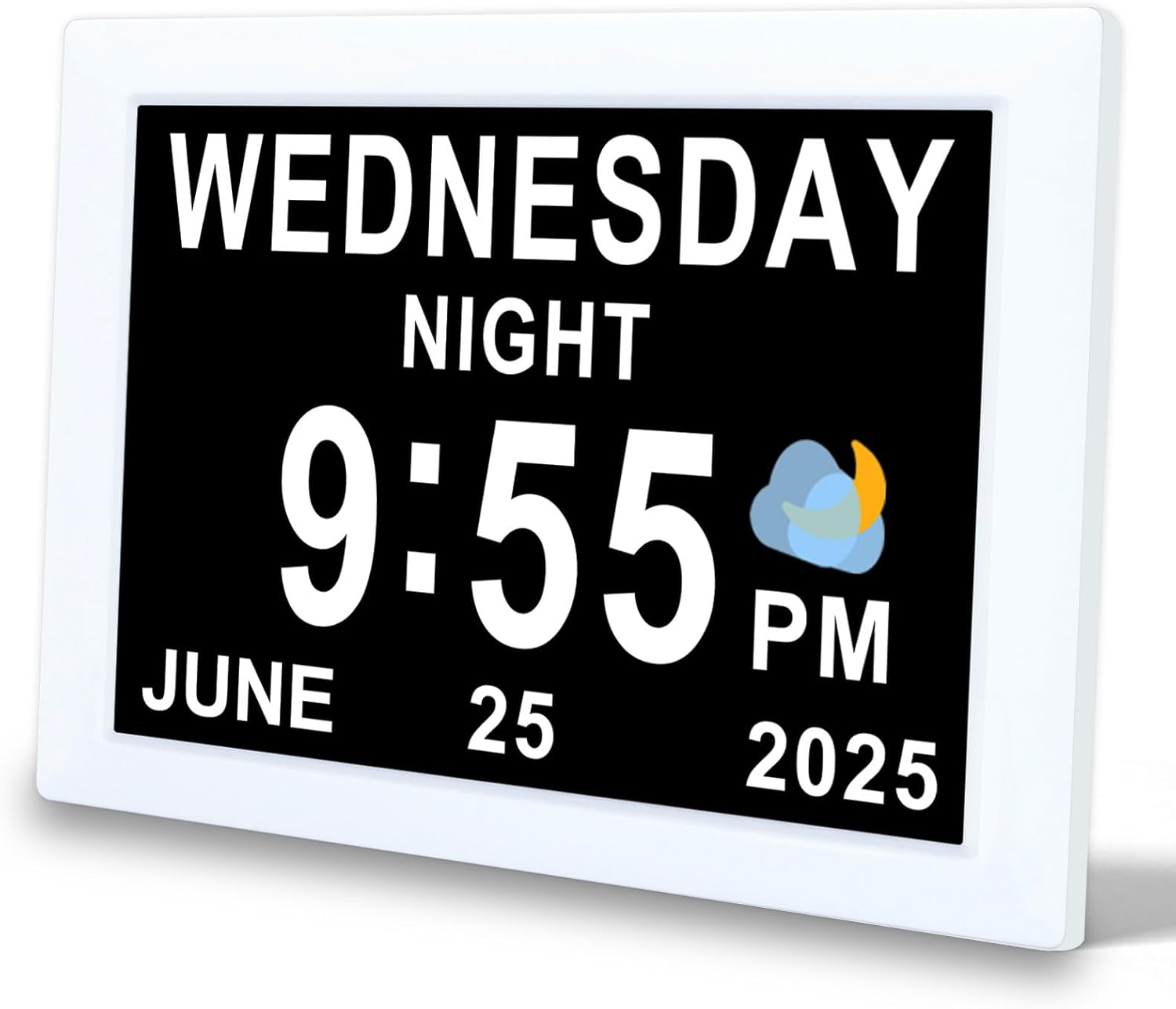
Figura 1: Fronte view of the TMC 8-Inch Digital Clock, showing a clear display of the day, time, and date.

Figura 2: The clock features an ultra-narrow bezel design, enhancing the display area and providing a modern aesthetic for both wall-mounted and desktop use.

Figura 3: The clock's design provides a 20% larger visible screen area compared to typical models, along with an anti-glare finish for improved readability.

Figura 4: Traseira view and dimensions of the clock, highlighting the DC power input, SD card slot, and wall-mounted hole. The remote control is also shown with its buttons: Power, Up, Down, Left, Right, Play/Pause, Menu.
Características principais:
- 8-inch high-resolution display with narrow bezel.
- Admite 10 idiomas.
- 12 customizable alarm reminders with 9 icon options.
- Automatic brightness adjustment (5 levels) or manual control.
- Multiple display interfaces (digital, analog, icon modes).
- 12/24-hour time format.
- Wall-mountable or desktop stand options.
- Built-in backup battery for power loss protection.
- Adjustable volume (levels 1-10).
- SD card support for photo and video playback (optional).
Configuración
- Desempaquetar o dispositivo: Retire con coidado o reloxo e todos os accesorios da embalaxe.
- Colocación:
- For desktop use, attach the provided stand to the back of the clock.
- For wall mounting, use the wall-mounted hole on the back of the clock (mounting hardware not included).
- Conectar enerxía: Plug the power adapter into the DC Power port on the back of the clock, then plug the adapter into a standard electrical outlet. The clock will power on automatically.
- Configuración inicial: Upon first power-on, you may be prompted to set the language, time, and date. Use the remote control or buttons on the back of the clock to navigate and confirm selections.
Instrucións de funcionamento
1. Basic Navigation and Settings
Use the remote control or the buttons on the back of the clock to access and adjust settings. The 'MENU' button typically opens the main settings menu, and arrow buttons navigate options. 'OK' or 'Play/Pause' confirms selections.
2. Axuste da hora e da data
- Press the 'MENU' button to enter the main settings.
- Navigate to 'Time Settings' or 'Date Settings'.
- Use the arrow buttons to adjust hours, minutes, year, month, and day.
- Select 12-hour or 24-hour format as desired.
- Confirm your selections to save.
3. Configuración de alarmas
The clock supports up to 12 customizable alarms. Each alarm can be set with a specific time and an associated icon.

Figura 5: The clock displaying a 'Medication Time' alarm, with a visual representation of various daily reminder icons available for customization.
- Press 'MENU' and navigate to 'Alarm Settings'.
- Seleccione unha franxa horaria de alarma (por exemplo, Alarma 1, Alarma 2).
- Establece a hora desexada para a alarma.
- Choose an alarm icon from the available options (e.g., Medication Time, Meal Time, Wake Up).
- Activar ou desactivar a alarma.
- Adjust the alarm volume (see section 5).
- Confirm to save the alarm.

Figura 6: Detallado view of the alarm setting interface, illustrating the selection of various alarm types and their corresponding icons.
4. Axuste do brillo
The clock features automatic brightness adjustment based on the time of day. You can also manually set the brightness.

Figura 7: Illustration of the automatic brightness feature, showing the display adjusting for daytime and nighttime conditions.
- From the 'MENU', navigate to 'Display Settings' or 'Brightness'.
- Select 'Auto' for automatic adjustment (5 levels) or 'Manual' to set a fixed brightness level.
- If 'Manual' is selected, use arrow buttons to choose your preferred brightness level.
- Confirm to save.
5. Axuste do volume
The alarm and notification volume can be adjusted from level 1 to 10.

Figura 8: The clock's volume adjustment feature, suitable for various preferences, including deep sleepers.
- From the 'MENU', navigate to 'Sound Settings' or 'Volume'.
- Use the arrow buttons to select a volume level from 1 to 10.
- Confirm to save.
6. Display Modes and UI Styles
The clock offers multiple display styles and user interface (UI) layouts to suit your preference.

Figura 9: Various selectable UI styles, including digital, calendar, and analog formats.
- From the 'MENU', navigate to 'Display Settings' or 'UI Style'.
- Use the arrow buttons to cycle through available UI layouts (e.g., digital, analog, icon modes).
- Some styles may offer font color options.
- Confirme a súa selección.

Figura 10: Examples of the unique time-based display, showing how the clock indicates different parts of the day (e.g., Morning, Afternoon, Night).
7. SD Card Photo and Video Playback (Optional)
If your model supports it, you can insert an SD card to display photos or play videos.
- Insert a compatible SD card into the SD card slot on the back of the clock.
- Navigate to 'Media Playback' or 'Photo/Video' in the main menu.
- Select the desired media type (photos or videos) and browse your files.
- Use the 'Play/Pause' button to start or stop playback.
Mantemento
- Limpeza: Use a soft, dry cloth to gently wipe the screen and body of the clock. Do not use liquid cleaners or abrasive materials.
- Almacenamento: If storing the clock for an extended period, disconnect it from power and store it in a cool, dry place.
- Batería de respaldo: The built-in backup battery maintains time and date settings during power outages. It is not user-replaceable.
Resolución de problemas
| Problema | Causa posible | Solución |
|---|---|---|
| O reloxo non se acende. | O adaptador de corrente non está conectado ou está avariado. | Asegúrate de que o adaptador de corrente estea conectado correctamente ao reloxo e a unha toma de corrente que funcione. Proba cunha toma diferente. |
| A pantalla está demasiado escura ou demasiado brillante. | A configuración do brillo é incorrecta. | Adjust brightness settings in the 'Display Settings' menu (see Operating Instructions, section 4). Ensure 'Auto' brightness is enabled if desired. |
| A alarma non soa ou é demasiado silenciosa. | A alarma está desactivada ou o volume é demasiado baixo. | Check 'Alarm Settings' to ensure the alarm is enabled. Adjust the volume in 'Sound Settings' (see Operating Instructions, section 5). |
| Incorrect time or date displayed. | Time/date settings are incorrect. | Access 'Time Settings' and 'Date Settings' in the menu to correct the values (see Operating Instructions, section 2). |
| SD card media not playing. | SD card not inserted correctly or incompatible file formato. | Ensure the SD card is fully inserted. Check the manual for supported file formats. Try a different SD card. |
Especificacións
| Marca | TMC |
| Modelo | 8-Inch Digital Clock |
| Tipo de visualización | Dixital |
| Tamaño da pantalla | 8 polgadas |
| Dimensións do produto | 15.5 x 3.81 x 19.5 cm |
| Peso do elemento | 470 g |
| Material | Plástico |
| Características especiais | Adjustable Brightness, Adjustable Volume, 12 Alarms, Calendar Display, Multi-Style Interfaces, SD Card Playback (optional) |
| Idiomas admitidos | 10 Linguas |

Figura 11: A summary of the clock's features and capabilities.
Garantía e Soporte
For warranty information or technical support, please refer to the contact details provided with your purchase documentation or visit the official TMC websitio. Garde o recibo da compra como xustificante da mesma.


