1. Introdución
This manual provides comprehensive instructions for the installation, operation, and maintenance of the EARU Electric 3-Phase Voltage and Overcurrent Protector, Model EARU-1008. This device is designed to safeguard 3-phase electrical systems by continuously monitoring voltage and current, offering protection against over-voltage, baixo voltage, overcurrent, and phase failure. It is suitable for industrial and commercial applications requiring reliable electrical monitoring and protection.
2. Información de seguridade
ADVERTENCIA: Perigo de descarga eléctrica. A instalación e o mantemento só deben ser realizados por persoal cualificado.
- Desconecte sempre a alimentación antes de instalar ou realizar o mantemento do dispositivo.
- Asegúrese de conectar a terra adecuada para evitar descargas eléctricas.
- Verify all wiring connections are secure and correct according to the wiring diagram.
- Non poñas en funcionamento o dispositivo se parece estar danado.
- Cumpre todos os códigos eléctricos locais e nacionais.
3. Produto rematadoview
3.1. Características clave
- Real-time 3-Phase Monitoring: Displays live voltage (L1, L2, L3) and current (L1, L2, L3) values.
- Protección integral: Safeguards against over-voltage, baixo voltage, overcurrent, and phase failure.
- Parámetros axustables: User-configurable settings for protection thresholds and recovery delays.
- Automatic Phase Failure Reset: Detects and automatically resets after phase anomalies.
- High-Visibility LED Display: Bright red LED for clear readings in various lighting conditions.
- Montaxe en carril DIN: Easy integration into standard electrical panels.
- Clear Terminal Labeling: Simplified installation with clearly marked input and output terminals.
3.2. Compoñentes e pantalla
The device features a clear LED display and intuitive control buttons for configuration. The display shows real-time voltage and current for each phase, along with indicators for protection status.
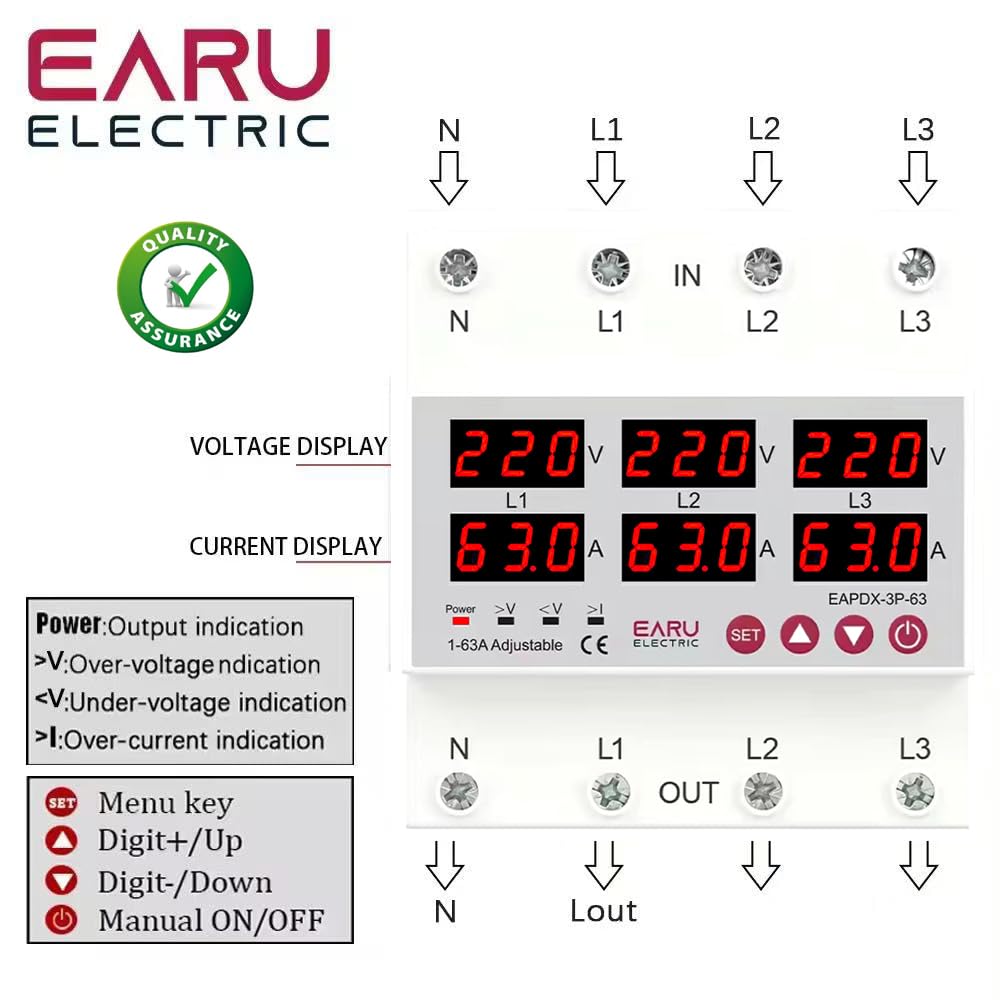
Imaxe 3.2.1: Fronte view of the EARU Electric Voltage Protector, showing the LED display for L1, L2, L3 voltage and current, along with control buttons (SET, Up, Down, Power) and protection indicators. Terminal labels for N, L1, L2, L3 (IN and OUT) are also visible.

Imaxe 3.2.2: Unha perspectiva view highlighting the product features and the input/output terminals (N, L1, L2, L3) at the top and bottom of the device. This image emphasizes the physical layout and connection points.
4. Configuración e instalación
4.1. Montaxe
The EARU-1008 is designed for DIN rail mounting. Securely attach the device to a standard 35mm DIN rail within an electrical enclosure.
4.2. Conexións de cableado
Refer to the wiring diagram below for correct connections. Ensure all connections are tight and properly insulated.
- Connect the incoming neutral (N) and phase lines (L1, L2, L3) to the 'IN' terminals.
- Connect the outgoing neutral (N) and phase lines (L1, L2, L3) to the 'OUT' terminals.
- Comprobe todas as conexións antes de aplicar enerxía.

Imaxe 4.2.1: Detailed wiring diagram for the EARU Electric Voltage Protector, showing connections for N, L1, L2, L3 for both input and output. The diagram illustrates how to integrate the protector into a 3-phase electrical system.
5. Instrucións de funcionamento
5.1. Acendamento inicial
Once wired, apply power to the device. The LED display will illuminate, showing the real-time voltage and current for each phase.
5.2. Indicadores de visualización
- V: Voltagexhibición.
- A: Visualización actual.
- Potencia: Output indication.
- >V: Sobrevoltage indicación.
- <V: Sub-voltage indicación.
- > eu: Over-current indication.
5.3. Configuración de parámetros
Use the 'SET' button to enter the configuration menu and the 'Up' and 'Down' keys to adjust values. Press 'SET' again to confirm and move to the next parameter. Hold 'SET' for 3 seconds to enter settings mode.

Imaxe 5.3.1: A detailed guide to setting various protection parameters on the EARU Electric Voltage Protector. This includes overvoltage, subvoltage, overcurrent, and recovery delay settings, with default values and adjustment ranges.
Key adjustable parameters include:
- Sobrevoltage Configuración de protección: Range 230-300V (Default 270V).
- Sobrevoltage Protection Recover Setting: Range 225-295V (Default 265V).
- Sobrevoltage Recovery Delay: Range 1-500s (Default 30s).
- Sobrevoltage Retardo de viaxe: Range 0.1-30s (Default 1.0s).
- Undervoltage Configuración de protección: Range 140-210V (Default 170V).
- Undervoltage Protection Recover Setting: Range 145-215V (Default 175V).
- Undervoltage Retardo de viaxe: Range 0.1-30s (Default 1.0s).
- Configuración de protección contra sobrecorriente: Range 1-63A (Default 30A).
- Overcurrent Trip Delay: Range 0.1-30s (Default 1.0s).
- Voltage & Current Manual Error Calibration: Adjust for accuracy, range -9.5% to +9.5% (Default 0%).
- Power-on Delay Setting: Adjustable Range: 1-500S (Default: 10s).
5.4. Manual ON/OFF
The power button allows for manual switching of the device output.
6. Mantemento
The EARU-1008 is designed for minimal maintenance. However, periodic checks are recommended:
- Manteña o dispositivo limpo e libre de po e restos.
- Periodically inspect wiring connections for tightness and signs of wear.
- Asegúrese de que haxa unha ventilación axeitada arredor do dispositivo para evitar o sobrequecemento.
7 Solución de problemas
If the device is not functioning as expected, consider the following:
- Sen pantalla/Sen alimentación: Check the main power supply and all wiring connections.
- Protection Trip: Identify the active protection indicator (>V, <V, >I). Check the corresponding voltage or current levels. The device will automatically reset once conditions return to normal, based on configured recovery delays.
- Fallo de fase: The device automatically detects and responds to phase failures, initiating a cut-off and auto-reset once the phase is restored.
- Lecturas incorrectas: If readings appear inaccurate, consider performing a manual error calibration as described in Section 5.3.
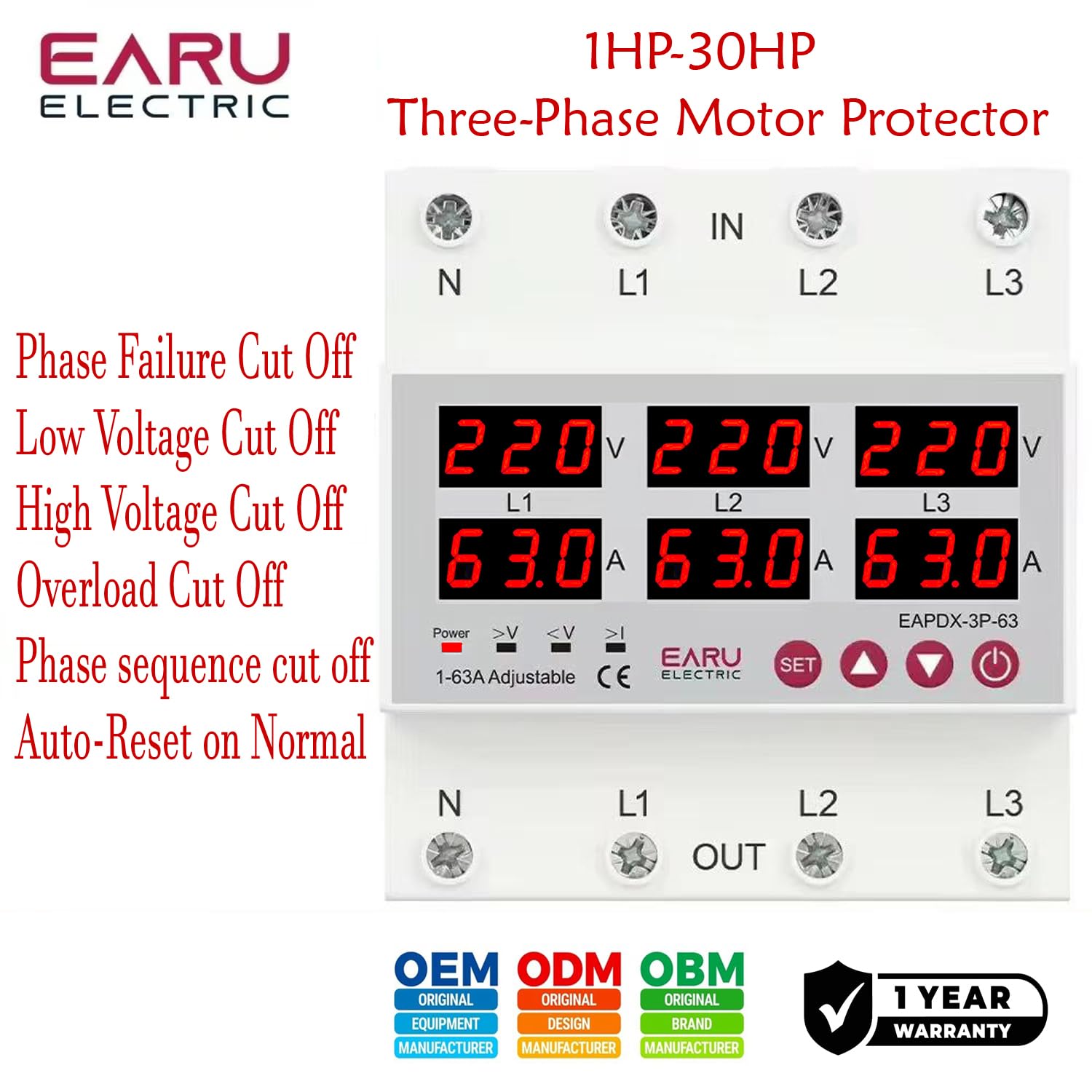
Imaxe 7.1: This image highlights the various protection features of the EARU Electric Voltage Protector, including phase failure cut-off, low voltage cut-off, high voltage cut-off, overload cut-off, phase sequence cut-off, and auto-reset on normal conditions. These are key aspects for troubleshooting protection trips.
8. Especificacións
| Parámetro | Valor |
|---|---|
| Marca | EARU |
| Modelo | EARU-1008 |
| Vol. de oferta clasificadatage | AC 3*220V (N-L1/L2/L3) / 440V |
| Frecuencia nominal | 50/60 Hz |
| Rango de configuración da protección contra sobrecorrente | 1-63A (Default 30A) |
| Máis de VoltagRango de configuración de protección e | 230-300 V (predeterminado 270 V) |
| Baixo o voltagRango de configuración de protección e | 140-210 V (predeterminado 170 V) |
| Dimensións do produto | 20 x 10 x 20 cm |
| Peso do elemento | 450 g |
| Tipo de montaxe | Carril DIN |

Imaxe 8.1: This image provides a visual representation of the EARU Electric Voltage Protector's dimensions and a table of key technical specifications, including voltage, frequency, and protection ranges.
9. Garantía e soporte
9.1. Garantía
The EARU Electric Voltage Protector (Model EARU-1008) comes with a 1 anos de garantía do fabricante desde a data de compra, cubrindo defectos de materiais e fabricación en condicións de uso normal. Conserve o comprobante de compra para reclamacións de garantía.
9.2. Atención ao cliente
For technical assistance, troubleshooting, or warranty inquiries, please contact EARU customer support through your retailer or the official EARU website. Provide your model number (EARU-1008) and a detailed description of the issue for efficient service.


