1. Introdución
Grazas pola compraasing the SENCOR SPT 3907 Bluetooth Radio Player. This compact and versatile device offers multiple audio playback options, including CD, Bluetooth, USB, and FM radio. This manual provides essential information for safe and efficient use of your new player. Please read it thoroughly before operation and retain it for future reference.
2. Instrucións de seguridade
- Fonte de enerxía: Asegúrese de que a fonte de alimentación voltage matches the rating indicated on the unit. Use only the provided power cable.
- Auga e humidade: Non expoña a unidade á choiva, á humidade nin a líquidos que goteen ou salpiquen. Non coloque obxectos cheos de líquido, como vasos, enriba da unidade.
- Ventilación: Non bloquee ningunha abertura de ventilación. Asegúrese de que haxa espazo suficiente arredor da unidade para un fluxo de aire axeitado.
- Calor: Manteña a unidade lonxe de fontes de calor como radiadores, rexistros de calor, estufas ou outros aparellos (incluídos amplificadores) que producen calor.
- Limpeza: Desconecte a unidade da toma de corrente antes de limpala. Use un pano suave e seco. Non empregue produtos de limpeza líquidos nin produtos de limpeza en aerosol.
- Servizo: Non intente atender este produto vostede mesmo. Remita todo o servizo a persoal de servizo cualificado.
- Baterías: When using batteries, ensure correct polarity. Do not mix old and new batteries, or different types of batteries. Remove batteries if the unit is not used for extended periods.
3. Contido do paquete
Verifica que todos os elementos estean presentes no paquete:
- SENCOR SPT 3907 Radio Player
- Control remoto
- Cable de alimentación de CA.
- Documentación (este manual)
4. Características do produto
The SENCOR SPT 3907 is designed for versatile audio entertainment:
- Potencia de saída: 4W RMS for clear sound.
- Reproductor de CD: Supports CD-R/RW discs with programmable playback for up to 20 songs.
- Conectividade Bluetooth: Bluetooth V2.1 + EDR for wireless audio streaming from compatible devices.
- Reprodución USB: USB connection for MP3 file playback with programmable playback for up to 99 songs.
- Radio FM: Stereo FM radio receiver with digital tuning and 30 station presets.
- AUX-IN: 3.5mm auxiliary input for connecting external audio sources.
- Visualización: Backlight LCD display for easy navigation.
- Control remoto: Full-function remote control for convenient operation.
- Opcións de enerxía: Operates on AC 100-240V or D/LR20 batteries for portability.
- Funcións adicionais: Repeat and random playback modes.
5. Controis e funcións
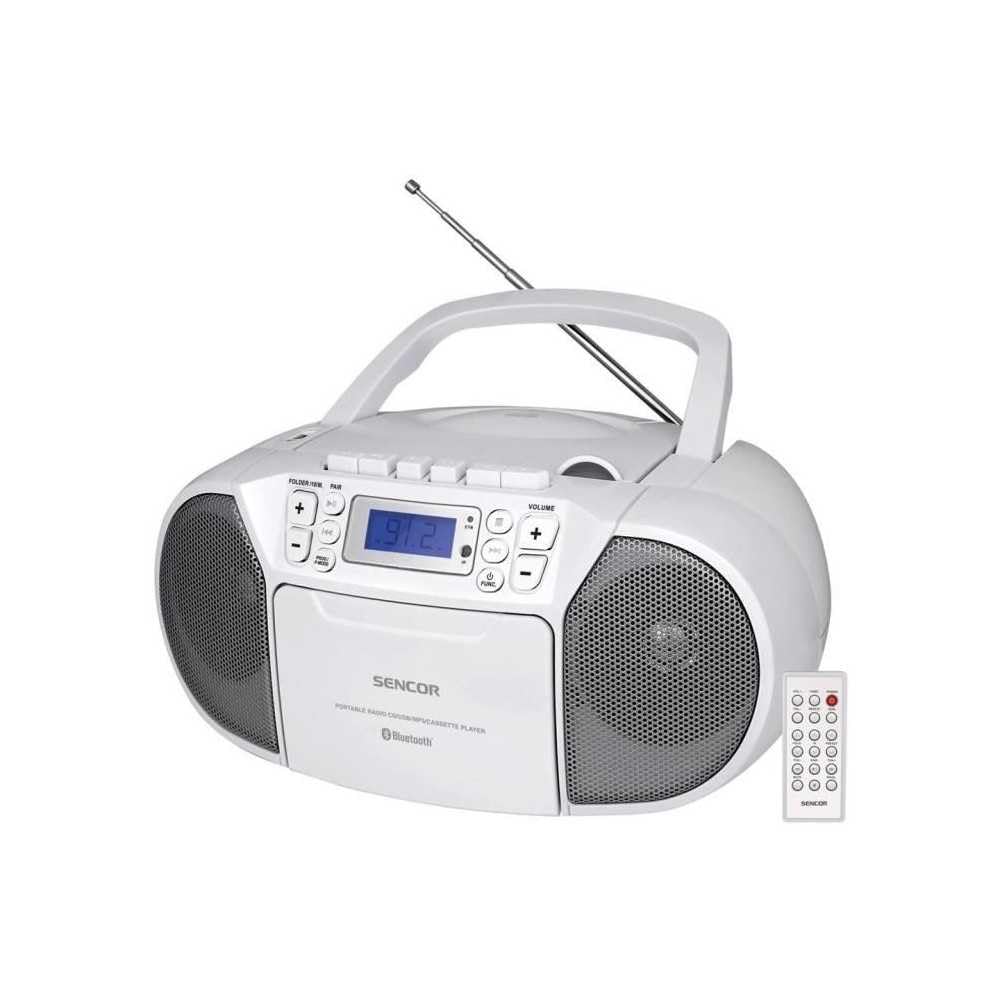
Fronte view of the SENCOR SPT 3907 unit, highlighting the control buttons, LCD screen, CD tray, and speakers. The remote control is also visible.
Controis do panel frontal:
- Botón POWER: Acende ou apaga a unidade.
- Botón MODE: Switches between CD, Bluetooth, USB, FM Radio, and AUX-IN modes.
- Botóns de VOLUME +/-: Axusta o nivel de saída de audio.
- PLAY/PAUSE (►/▮▮) Button: Starts or pauses playback in CD, Bluetooth, or USB mode.
- SKIP (◀◀ / ►►) Buttons: Salta á pista/emisora anterior ou seguinte.
- STOP (■) Button: Detén a reprodución.
- FOLDER / PAIR Button: Navigates folders in USB mode; initiates Bluetooth pairing.
- Botón FUNC: Accesses additional functions (e.g., program, repeat, random).
- Pantalla LCD: Shows current mode, track number, frequency, and other information.
- Compartimento de CD: Para inserir CD de son.
- Porto USB: Para conectar dispositivos de almacenamento USB.
- Conector AUX-IN: Para conectar dispositivos de audio externos.
- Saída de auriculares: Para escoita privada.
Controis do panel traseiro:
- Entrada de enerxía CA: Connects the AC power cable.
- Antena FM: Antena telescópica extensible para recepción de FM.
Control remoto:
The remote control duplicates most of the front panel functions for convenient operation from a distance. Refer to the remote control diagram in the included documentation for specific button layouts.
6. Configuración
6.1 Conexión de alimentación
The SENCOR SPT 3907 can be powered by AC mains or batteries.
Potencia CA:
- Asegúrese de que a unidade estea apagada.
- Connect the supplied AC power cable to the AC input jack on the rear of the unit.
- Plug the other end of the AC power cable into a standard wall outlet (AC 100-240V, 50/60Hz).
Potencia da batería:
- Abra a tapa do compartimento da batería situada na parte inferior da unidade.
- Insert 6 x D/LR20 size batteries (not included), ensuring correct polarity (+/-) as indicated inside the compartment.
- Pecha a tapa do compartimento da batería de forma segura.
Note: When the AC power cable is connected, battery power is automatically disconnected. Remove batteries if the unit will not be used for an extended period to prevent leakage.
6.2 Configuración da antena
For optimal FM radio reception, fully extend the telescopic FM antenna located on the rear of the unit. Adjust its position for the best signal.
7. Instrucións de funcionamento
7.1 Acendido/apagado e selección de modo
- Preme o POTENCIA button to turn the unit on. The LCD display will light up.
- Preme o MODO button repeatedly to cycle through available modes: CD, Bluetooth, USB, FM Radio, AUX-IN. The selected mode will be shown on the LCD display.
- Preme o POTENCIA botón de novo para apagar a unidade.
7.2 Reprodución de CD
- Preme o MODO para seleccionar o modo CD.
- Abra a tapa do compartimento do CD.
- Place a CD (CD-R/RW compatible) with the label side facing up onto the spindle.
- Peche a tapa do compartimento do CD. A unidade lerá o disco e o número total de pistas aparecerá na pantalla.
- Preme o REPRODUCIR/PAUSA botón para iniciar a reprodución.
- Usa o SALTAR (◀◀ / ►►) botóns para saltar pistas.
- Preme o PARAR (■) botón para deter a reprodución.
- Reprodución do programa: While in STOP mode, press the FUNC botón para entrar no modo de programa. Use SALTAR botóns para seleccionar pistas e FUNC again to confirm. Up to 20 CD songs can be programmed.
7.3 Funcionamento Bluetooth
- Preme o MODO para seleccionar o modo Bluetooth. A pantalla mostrará "BT" e parpadeará, indicando que está en modo de emparellamento.
- No teu dispositivo con Bluetooth (por exemplo, teléfono intelixente ou tableta), activa Bluetooth e busca os dispositivos dispoñibles.
- Select 'SPT 3907' from the list of devices. Once paired, the 'BT' indicator on the display will stop flashing and remain solid.
- Start playing audio on your connected device. The sound will be streamed through the SENCOR SPT 3907.
- Usa o REPRODUCIR/PAUSA e SALTAR botóns da unidade ou do mando a distancia para xestionar a reprodución.
Reprodución por USB 7.4
- Insert a USB flash drive (containing MP3 files) no porto USB.
- Preme o MODO button to select USB mode. The unit will automatically read the files.
- Preme o REPRODUCIR/PAUSA botón para iniciar a reprodución.
- Usa o SALTAR (◀◀ / ►►) botóns para saltar pistas.
- Preme o CARPETA button to navigate between folders on the USB drive.
- Reprodución do programa: While in STOP mode, press the FUNC botón para entrar no modo de programa. Use SALTAR botóns para seleccionar pistas e FUNC again to confirm. Up to 99 MP3 songs can be programmed.
7.5 Funcionamento da radio FM
- Preme o MODO button to select FM Radio mode. The current frequency will appear on the display.
- Estenda a antena telescópica para unha mellor recepción.
- Sintonización automática: Manteña premido o SALTAR (◀◀ / ►►) durante uns segundos para buscar automaticamente a seguinte emisora dispoñible.
- Sintonización manual: Prema brevemente o SALTAR (◀◀ / ►►) buttons to fine-tune the frequency step-by-step.
- Estacións predefinidas: To save a station, tune to the desired frequency, then press the FUNC botón. Use SALTAR buttons to select a preset number (P01-P30), then press FUNC de novo para confirmar.
- Para recuperar unha emisora predefinida, prema o botón FUNC botón repetidamente para percorrer as emisoras gardadas.
7.6 Conexión AUX-IN
- Connect one end of a 3.5mm audio cable (not included) to the AUX-IN jack on the SENCOR SPT 3907.
- Conecta o outro extremo do cable á toma de auriculares ou á saída de son do teu dispositivo de son externo (por exemplo, reprodutor de MP3, teléfono intelixente).
- Preme o MODO botón para seleccionar el modo AUX-IN.
- Start playback on your external device. The audio will be played through the SENCOR SPT 3907.
- Axuste o volume empregando o VOLUME +/- buttons on the unit or remote control, and also on your external device.
8. Mantemento
8.1 Limpeza da unidade
Wipe the exterior of the unit with a soft, dry cloth. Do not use abrasive cleaners, waxes, or solvents as they may damage the finish. Ensure the unit is unplugged from the power source before cleaning.
8.2 Coidado da lente do CD
If the CD player experiences reading errors, the lens may need cleaning. Use a commercially available CD lens cleaner disc. Do not touch the lens directly.
8.3 Substitución da batería
When the unit operates on batteries and the sound becomes distorted or the unit stops functioning, replace all batteries with new D/LR20 batteries, ensuring correct polarity.
9 Solución de problemas
| Problema | Causa posible | Solución |
|---|---|---|
| Sen poder | Cable de alimentación non conectado; Pilas esgotadas ou inseridas incorrectamente. | Check AC power connection; Replace batteries, ensuring correct polarity. |
| Sen son | Volume demasiado baixo; Modo incorrecto seleccionado; Auriculares conectados. | Increase volume; Select correct mode (CD, BT, USB, FM, AUX); Disconnect headphones. |
| CD not playing / Skipping | CD dirty or scratched; CD inserted incorrectly; CD lens dirty. | Clean or replace CD; Insert CD with label side up; Use a CD lens cleaner. |
| Bluetooth non se conecta | Unit not in pairing mode; Device too far; Bluetooth not enabled on external device. | Ensure unit is in BT pairing mode; Move device closer; Enable Bluetooth on your device. |
| Mala recepción FM | Antena non estendida ou colocada correctamente; sinal débil. | Estenda e axuste completamente a antena telescópica; probe a mover a unidade a unha localización diferente. |
10. Especificacións
| Característica | Especificación |
|---|---|
| Modelo | SPT 3907 |
| Potencia de saída | 4 W RMS |
| Medios compatibles | CD-R, CD-RW, Bluetooth, MP3, USB |
| Versión Bluetooth | V2.1 + EDR |
| Presets de radio FM | 30 estacións |
| Conectividade | Auxiliar (3.5 mm), USB |
| Fonte de enerxía | AC 100-240V, 50/60Hz; 6 x D/LR20 batteries |
| Peso do elemento | 1 kg 960 g |
| Dimensións | (Not specified in provided data) |
11. Garantía e soporte
SENCOR products are manufactured to high-quality standards and are warranted against manufacturing defects. For specific warranty terms and conditions, please refer to the warranty card included with your purchase or visit the official SENCOR website. For technical support, service, or inquiries, please contact your local SENCOR distributor or authorized service center.


