1. Introdución
This manual provides essential information for setting up, operating, maintaining, and troubleshooting your new VIBOX V-524 PC Gamer. Please read this manual thoroughly before using your computer to ensure proper functionality and longevity.
The VIBOX V-524 is a high-performance gaming PC designed for an immersive gaming experience and efficient multitasking. It features:
- Nvidia GeForce RTX 4060 (8 GB GDDR6 RAM)
- AMD Ryzen 5 5500 Processor (6 Cores, up to 4.2 GHz)
- 16 GB DDR4 RAM (3200 MHz)
- 1 TB SSD for ultra-fast storage
- Pre-installed Windows 11 Home
- Integrated Wi-Fi connectivity

2. Información de seguridade
- Seguridade eléctrica: Always connect the PC to a grounded power outlet. Do not overload power strips.
- Ventilación: Ensure adequate airflow around the PC. Do not block ventilation openings.
- Líquido e humidade: Keep the PC away from liquids and excessive moisture.
- Temperatura: Operate the PC in a well-ventilated area within recommended temperature ranges.
- Manexo: Handle the PC with care. Avoid dropping or subjecting it to strong impacts.
- Compoñentes internos: Do not open the PC case unless you are qualified to do so, as it may void your warranty and expose you to electrical hazards.
3. Contido do paquete
Ao desembalar, comproba que se inclúen todos os seguintes elementos:
- VIBOX V-524 PC Gamer Desktop
- Cable de alimentación
- 300 Mbps Wi-Fi Adapter
- Documentación (incluído este manual)
- Any additional accessories specified at the time of purchase
4. Configuración inicial
4.1 Desembalaxe e colocación
- Carefully remove the PC from its packaging. Retain all packaging materials for future transport or warranty claims.
- Place the PC on a stable, flat surface with sufficient space for ventilation.
- Remove any internal packing materials, such as foam inserts, that may be present inside the PC case to protect components during shipping.
4.2 Conexión de periféricos
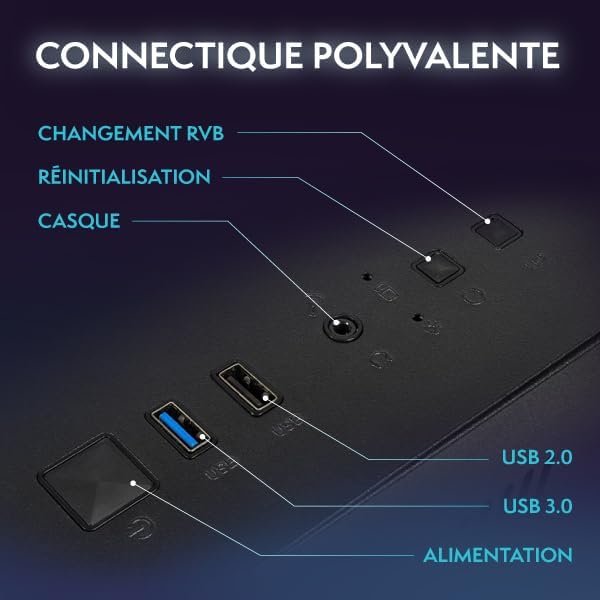
Connect your monitor, keyboard, and mouse to the appropriate ports on the rear of the PC. Refer to Image 4.1 for port identification.
- Monitor: Connect your monitor using an HDMI or DisplayPort cable to the dedicated graphics card ports.
- Teclado e rato: Connect to any available USB ports.
- Wi-Fi Adapter: Plug the included Wi-Fi adapter into an available USB port.
- Ethernet (opcional): For a wired network connection, connect an Ethernet cable to the LAN port.
- Audio: Conecte altofalantes ou auriculares ás tomas de saída de audio.
4.3 Power Connection and First Boot
- Connect the power cable to the PC's power supply unit (PSU) and then to a grounded electrical outlet.
- Prema o botón de acendido/acendido na parte frontal do PC.
- Follow the on-screen instructions to complete the initial Windows 11 setup. This may include setting up your user account, language preferences, and network connection.
4.4 Conectando a Wi-Fi
- Once Windows 11 is set up, click on the Wi-Fi icon in the taskbar.
- Selecciona a rede desexada da lista e introduce o contrasinal se se che solicita.
5. Manexo do teu PC
5.1 Conceptos básicos de Windows 11
Your VIBOX V-524 comes with Windows 11 Home pre-installed. Familiarize yourself with the operating system's interface, Start Menu, and settings to customize your experience.
5.2 Control de iluminación RGB
The PC features customizable RGB lighting for its fans and internal components. Use the dedicated RGB change button on the front panel (as shown in Image 4.1) to cycle through various colors and lighting modes. Refer to your motherboard or case manual for advanced software control options if available.

5.3 Fluxo de aire e refrixeración
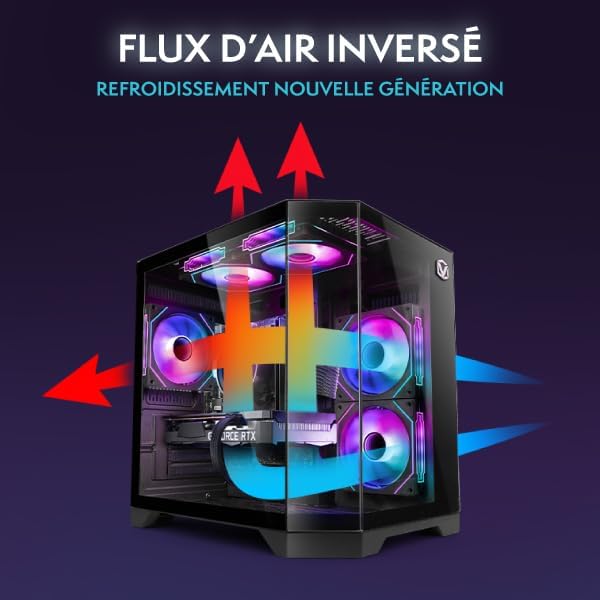
The VIBOX V-524 is designed with optimized airflow for efficient cooling, utilizing an inverse airflow system to reduce heat accumulation and enhance system performance.
6. Mantemento
6.1 Limpeza física
- Exterior: Use un suave, damp cloth to clean the exterior of the PC. Avoid abrasive cleaners.
- Po: Periodically use compressed air to clear dust from ventilation grilles and fan blades. Ensure the PC is powered off and unplugged before cleaning.
6.2 Mantemento do software
- Actualizacións de Windows: Comprobe e instale regularmente actualizacións de Windows para garantir a estabilidade e a seguridade do sistema.
- Actualizacións de controladores: Keep your graphics card drivers (NVIDIA GeForce) and other component drivers updated for optimal performance, especially for gaming.
- Software antivirus: Install and maintain reputable antivirus software to protect against malware.
7 Solución de problemas
If you encounter issues with your VIBOX V-524 PC Gamer, refer to the following common troubleshooting steps:
| Problema | Posible Solución |
|---|---|
| O PC non se acende | Check power cable connections to the PC and wall outlet. Ensure the power switch on the PSU (at the back of the PC) is in the 'On' position. |
| Sen visualización no monitor | Ensure the monitor is powered on and connected to the graphics card ports (not the motherboard ports). Try a different cable or monitor if possible. |
| Problemas de conectividade wifi | Ensure the Wi-Fi adapter is properly inserted. Restart your router and PC. Check Windows network settings. |
| Mal rendemento nos xogos | Ensure graphics drivers are up to date. Check game settings and reduce if necessary. Monitor system temperatures to prevent thermal throttling. Close unnecessary background applications. |
| PC freezes or crashes | Ensure all drivers and Windows are updated. Check for overheating. Run a memory diagnostic. |
If these steps do not resolve your issue, please contact VIBOX customer support for further assistance.
8. Especificacións técnicas
Below are the detailed technical specifications for the VIBOX V-524 PC Gamer:
| Compoñente | Especificación |
|---|---|
| Marca | VIBOX |
| Número de modelo | V-524 |
| Serie | VTX-8 |
| Cor | VTX-8 Black |
| Sistema Operativo | Windows 11 Home |
| Marca de procesador | AMD |
| Tipo de procesador | Ryzen 5 |
| Velocidade do procesador | 3.6 GHz (up to 4.2 GHz boost) |
| Número de núcleos | 6 |
| Memoria máxima | 128 GB |
| Tecnoloxía de disco duro | SSD |
| Interface de disco duro | SSD |
| Tarxeta Gráfica | NVIDIA GeForce RTX 4060 |
| Graphics Card RAM | 8 GB GDDR6 |
| Resolución (máx.) | 7680x4320 |
| Tipo de conectividade | Wi-Fi, Ethernet |
| Interface de hardware | Ethernet, HDMI, DisplayPort, USB |
| Número de portos HDMI | 1 |
| Número de portos USB 2.0 | 3 |
| Número de portos USB 3.0 | 3 |
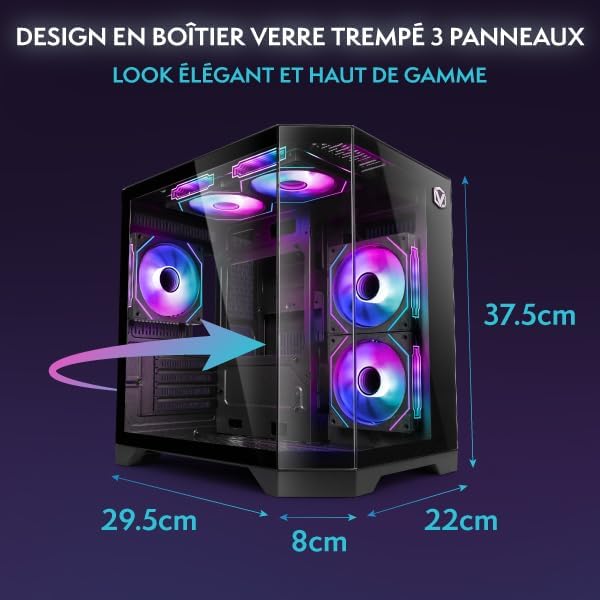
| Dimensións do artigo (L x W x H) | 35 x 28 x 38 centímetros |
| Usos específicos do produto | Gaming, Photo Editing, Video Editing |
9. Garantía e soporte
9.1 Garantía do fabricante
Your VIBOX V-524 PC Gamer comes with a manufacturer's warranty of 2 anos para pezas e lifetime laborConserva o comprobante de compra para reclamacións de garantía.
9.2 Atención ao cliente
For technical assistance, warranty inquiries, or any other support needs, please contact VIBOX customer service. Refer to the VIBOX official websitio web ou na documentación da súa compra para obter a información de contacto máis actualizada.


