1. Introdución
Thank you for choosing the Nillkin Foldable Bluetooth Keyboard. This compact and versatile keyboard is designed to enhance your productivity across multiple devices and operating systems. Please read this manual carefully to ensure proper setup and operation.

Image 1.1: The Nillkin Foldable Bluetooth Keyboard in its fully unfolded state, ready for use.
2. Produto rematadoview
2.1 Características principais
- Compacto e portátil: Three-fold design, lightweight (approx. 238g), easily fits into bags.
- Integrated Touchpad & Numeric Keypad: High-precision touchpad (59x64mm) with multi-gesture support and a switchable numeric keypad.
- Escritura cómoda: Laptop-like feel with full-size keys, pantograph structure, 19mm key pitch, and 1.2mm key travel.
- Xestión eficiente da enerxía: Type-C fast charging, long battery life (1 week+ continuous use, 150 days standby), auto-sleep, and auto power on/off.
- Multi-Device & Multi-OS Support: Bluetooth 5.0 for stable connection up to 10m. Connects up to 3 devices simultaneously, compatible with iOS, Android, Mac, and Windows.
- Deseño duradeiro: High-quality hinge tested for over 50,000 folds, magnetic closure.
2.2 Contido do paquete
- Nillkin Foldable Bluetooth Keyboard x 1
- Cable de carga USB-C x 1
- Bolsa de almacenamento x 1
- Manual de usuario x 1

Image 2.1: Contents of the Nillkin Foldable Bluetooth Keyboard package.
3. Instrucións de configuración
3.1 Encendido/apagado
- Encendido: Desprega o teclado. O teclado acenderase automaticamente.
- Apagado: Dobre o teclado. O teclado apagarase automaticamente.
- Alternatively, use the dedicated ON/OFF switch located on the side of the keyboard.

Image 3.1: The keyboard's compact folded size (18.2 x 10.8 x 1.6cm) and extended dimensions (34.2 x 10.8 x 0.95cm).
3.2 Emparejamento Bluetooth
Ensure your device has Bluetooth functionality enabled before proceeding. If your device lacks Bluetooth, a separate Bluetooth dongle may be required.
- Activar o modo de sincronización:
a. Turn on the keyboard by unfolding it or using the power switch.
b. Prema Fn + A (BT1) briefly to select Bluetooth channel 1.
c. Manteña premido Fn + C (Pairing) for approximately 3 seconds. The blue indicator light for Bluetooth connection 1 will flash, indicating the keyboard is in pairing mode. - On Your Device:
a. Go to your device's Bluetooth settings (e.g., Configuración > Bluetooth on iOS/Android, or System Preferences > Bluetooth on Mac, or Configuración > Dispositivos > Bluetooth e outros dispositivos on Windows).
b. Ensure Bluetooth is turned on. Your device will begin searching for nearby Bluetooth devices. - Conectar:
a. Locate "Nillkin Foldable Keyboard" (or similar name) in the list of available devices.
b. Tap or click on the device name to initiate pairing.
c. If prompted for a PIN code, enter the code displayed on your device's screen using the Nillkin keyboard, then press Entra. - Once connected, the keyboard is ready for use. The blue indicator light will turn solid or extinguish, depending on the device.
Video 3.1: Detailed usage instructions for the Nillkin Foldable Bluetooth Keyboard, including pairing steps.
3.3 Multi-Device Pairing & Switching
The keyboard supports simultaneous connection to up to three devices. After pairing each device, you can switch between them with a single touch.
- Vinculación de dispositivos adicionais: Follow the Bluetooth pairing steps (Section 3.2) for each device, using Fn + S (BT2) for the second device and Fn + D (BT3) for the third device.
- Dispositivos de conmutación: Once paired, press Fn + A (BT1), Fn + S (BT2), ou Fn + D (BT3) to instantly switch between your connected devices.

Image 3.2: Connect up to three devices simultaneously and switch between them easily.
Video 3.2: Operation video demonstrating Bluetooth connection and switching between devices.
4. Instrucións de funcionamento
4.1 Keyboard Layout & Typing
The keyboard features a standard layout with a comfortable 19mm key pitch and a responsive pantograph key structure for a quiet and efficient typing experience.

Image 4.1: The full keyboard layout, including function keys and the integrated numeric keypad/touchpad.
4.2 Touchpad & Numeric Keypad Functions
The right side of the keyboard integrates a high-precision touchpad and a numeric keypad. You can switch between these modes for enhanced functionality.
- Modos de cambio: Preme Fn + Right Command key to toggle between touchpad mode and numeric keypad mode.
- Xestos do touchpad: Supports various multi-touch gestures for smooth scrolling and navigation.
- Clic esquerdo/dereito: Dedicated left and right click buttons are available below the touchpad area.
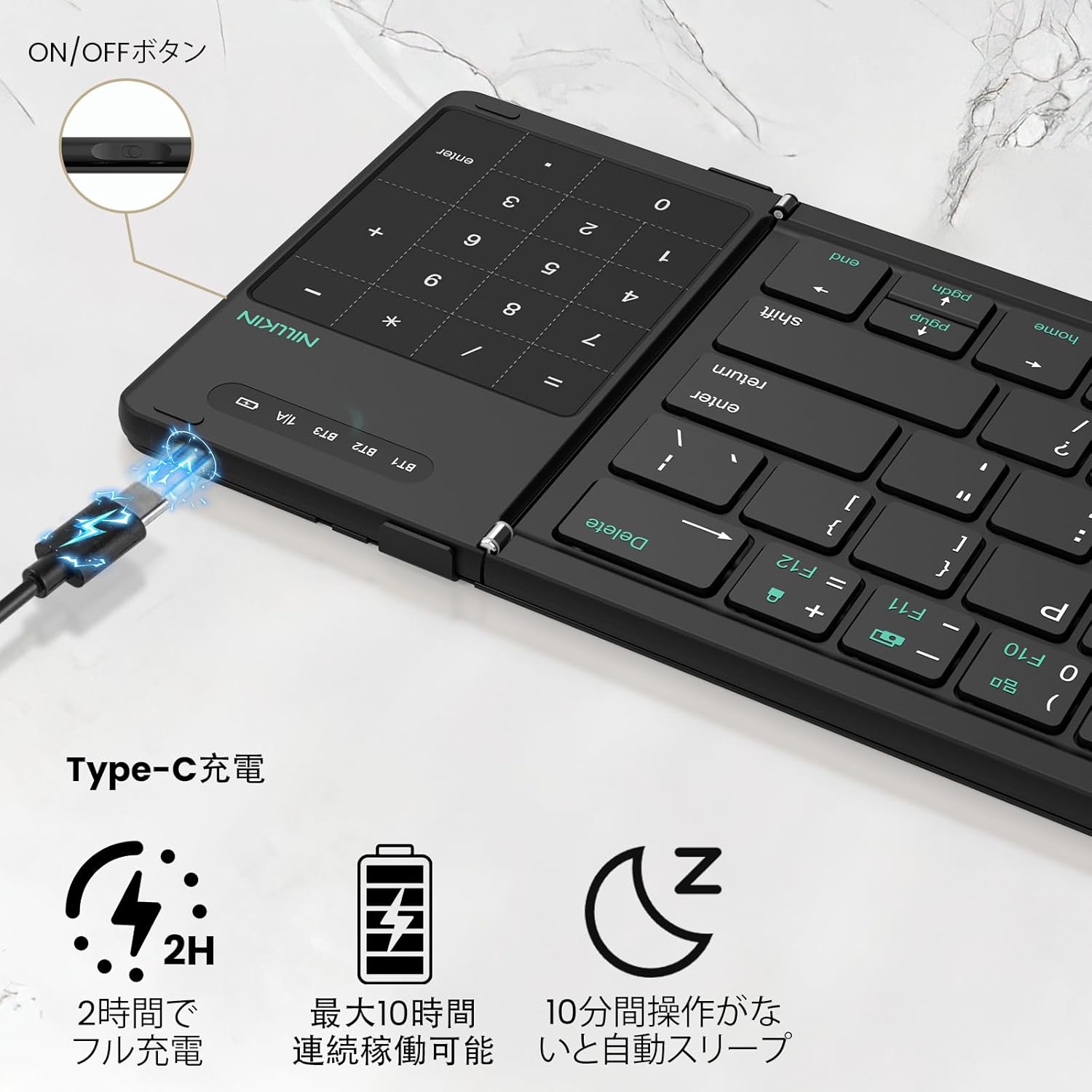
Image 4.2: The 2-in-1 design of the numeric keypad and touchpad, highlighting its functions.
4.3 Teclas de atallo
The keyboard includes 14 types of shortcut keys to improve work efficiency. These are typically accessed by pressing the Fn en combinación coa tecla de función correspondente (F1-F12).
- Fn + F1/F2: Axuste de brillo
- Fn+F3: busca
- Fn+F4: De volta
- Fn+F5: Saltar
- Fn+F6: A continuación
- Fn+F7: Silenciar
- Fn+F8: Baixa o volume
- Fn+F9: Subir o volume
- Fn+F10: Show task window
- Fn+F11: Captura de pantalla
- Fn+F12: Bloqueo da pantalla
Video 4.1: Product demonstration highlighting the keyboard's features and functionality.
4.4 Cambio de idioma
- iOS / Mac: Preme Ctrl + Barra espaciadora.
- Android: Preme Ctrl + Barra espaciadora or Shift + Spacebar.
- Windows: Preme Alt + Maiús.
5. Cargando
The keyboard features a large-capacity battery and Type-C fast charging. A full charge provides over a week of continuous use and up to 150 days of standby time.
- Porto de carga: Connect the provided USB-C cable to the charging port on the keyboard and to a suitable USB power source.
- Indicador de carga: The red indicator light will stay on during charging and turn off when fully charged.
- Comprobación do nivel da batería: Preme Fn + Left Command key to check the current battery level via the LED indicators.

Image 5.1: Type-C charging port and battery status indicators.
6. Mantemento
- Manteña o teclado limpo limpándoo cun pano suave e seco.
- Evite expoñer o teclado a temperaturas extremas, humidade ou luz solar directa.
- Do not disassemble the keyboard, as this will void the warranty.
- The keyboard features a magnetic design for secure closure. Avoid placing it near strong magnetic fields.

Image 6.1: Cleaning the keyboard with a soft cloth.
7 Solución de problemas
If you encounter issues with your Nillkin Foldable Bluetooth Keyboard, please refer to the following common solutions:
- O teclado non se emparella:
a. Ensure the keyboard is fully charged.
b. Confirm the keyboard is in pairing mode (blue indicator light flashing).
c. Check that Bluetooth is enabled on your device.
d. Move the keyboard closer to your device and ensure no obstructions are between them.
e. Try restarting both the keyboard and your device. - As teclas non responden:
a. Check the battery level.
b. Ensure the keyboard is properly connected to your device.
c. If using the numeric keypad, ensure it is not in touchpad mode. - O panel táctil non funciona:
a. Ensure the keyboard is in touchpad mode (not numeric keypad mode).
b. For iPad users, ensure "AssistiveTouch" is enabled in your iPad settings.
c. Some gestures may not be supported depending on the OS or application. - A conexión córtase con frecuencia:
a. Ensure the keyboard is within the 10m Bluetooth range.
b. Minimize interference from other wireless devices.
c. Ensure the keyboard is fully charged.
8. Especificacións
| Característica | Detalle |
|---|---|
| Marca | Nillkin |
| Modelo | B0FDGDH8CG |
| Dimensións do produto (desdobrado) | 34.2 x 10.8 x 0.95 cm |
| Dimensións do produto (pregado) | 18.2 x 10.8 x 1.6 cm |
| Peso do elemento | 490 g (approx. 238g for main body) |
| Tecnoloxía de conectividade | Bluetooth 5.0 |
| Dispositivos compatibles | iPad OS, Windows 10+, Mac OS X 10.10+, Android 4.3+, Smartphones, Tablets, Laptops, PCs |
| Fonte de enerxía | Alimentado por batería (recargable) |
| Contido de enerxía da batería de litio | 2.6 vatios-hora |
| Número de celas de ións de litio | 4 |
| Material | ABS, silicona, policarbonato |
9. Garantía e soporte
Nillkin products come with a comprehensive warranty and dedicated customer support:
- Garantía do fabricante: 2 anos desde a data de compra.
- Garantía de calidade: 30-day quality guarantee for returns/exchanges of defective products.
- Atención ao cliente: 24/365 customer service is available. For any issues, please contact us via your Amazon account: Account Service > Order History > Contact Seller. Pretendemos responder nun prazo de 24 horas.

Image 9.1: Nillkin's commitment to quality, warranty, and customer support.


