Introdución
This user manual provides comprehensive instructions for the Baseus Enercore Product Bundle, which includes a 67W Retractable USB C Charger and a 10000mAh Fast Charging Portable Power Bank. Please read this manual carefully before using the products to ensure safe and optimal performance.
Información de seguridade
- Non expoñas os dispositivos a temperaturas extremas, luz solar directa ou humidade elevada.
- Evite deixar caer os dispositivos ou someteros a impactos fortes.
- Do not disassemble, repair, or modify the devices.
- Manter fóra do alcance dos nenos.
- Use only original or certified cables and adapters.
- Desconecte o cargador da toma de corrente cando non estea en uso.
- Se o banco de enerxía se incha, ten fugas ou emite un cheiro inusual, interrompa o seu uso inmediatamente.
Contido do paquete
- 1 x Baseus Enercore 67W Retractable USB C Charger
- 1 x Baseus Enercore 10000mAh Fast Charging Portable Power Bank
- 1 x Manual de usuario (este documento)

Image: The Baseus Enercore 67W Retractable USB C Charger (left) and the 10000mAh Portable Power Bank (right).
Produto rematadoview
Baseus Enercore 67W Retractable USB C Charger
This compact wall charger features a 67W power output, two USB-C ports, and a built-in retractable USB-C cable for convenient charging of multiple devices simultaneously.

Image: The 67W charger connected to a smartphone, illustrating its high-speed charging capability.

Image: The 67W charger with its retractable USB-C cable extended, charging a MacBook Pro.
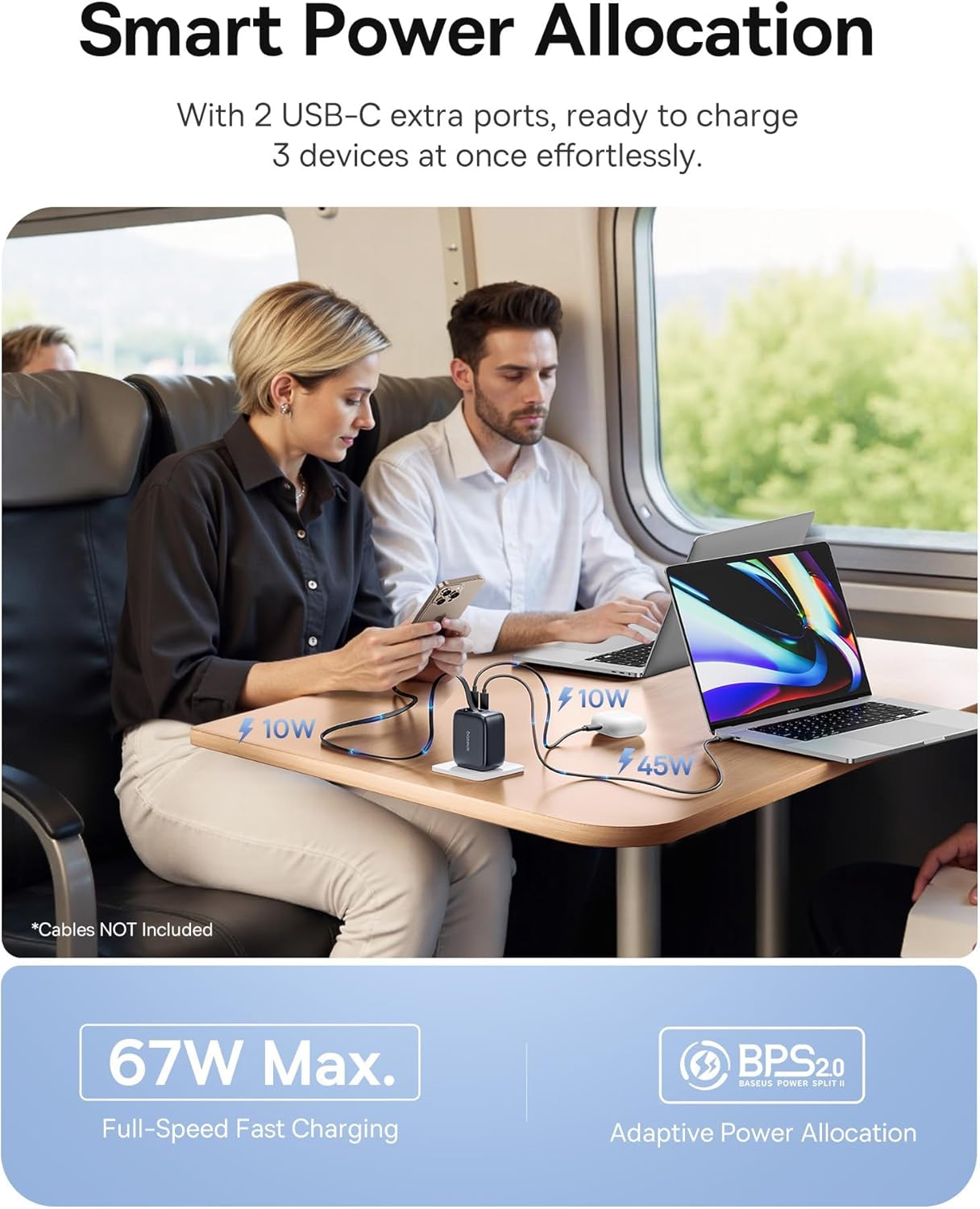
Image: The 67W charger in use, demonstrating its ability to charge three devices simultaneously with smart power allocation.

Image: Close-up of the 67W charger highlighting its foldable prongs and compact, travel-ready design.
Baseus Enercore 10000mAh Portable Power Bank
This portable power bank features a 10000mAh capacity, 45W fast charging, and an integrated retractable USB-C cable, making it ideal for on-the-go power needs.

Image: The 10000mAh power bank showcasing its integrated retractable USB-C cable for convenience.

Imaxe: Unha explosión view of the 10000mAh power bank's internal components and a size comparison to a soda can.

Image: The 10000mAh power bank connected to an iPhone, demonstrating its 45W fast charging capability.

Image: A close-up of the power bank's integrated smart digital display, showing the battery percentage.
Configuración
Initial Power Bank Charging
- Before first use, fully charge the Baseus Enercore Power Bank.
- Connect the power bank to the 67W charger or another compatible USB-C power source using the integrated retractable cable or a separate USB-C cable.
- The digital display will show the charging progress. Charging is complete when the display shows 100%.
Instrucións de funcionamento
Using the 67W Retractable USB C Charger
- Conectar á enerxía: Fold out the prongs and plug the charger into a standard wall outlet.
- Dispositivos de carga:
- For devices with a USB-C port, gently pull the integrated retractable USB-C cable from the charger and connect it to your device.
- For additional devices, use your own USB-C to USB-C or USB-C to Lightning cables and connect them to the available USB-C ports on the charger.
- Cable de retracción: After use, gently pull the retractable cable slightly further out, then release it to allow it to retract back into the charger.
- Fold Prongs: Fold the prongs back into the charger for compact storage.
Using the 10000mAh Portable Power Bank
- Comprobar o nivel da batería: Press the power button once to activate the digital display and check the remaining battery percentage.
- Dispositivos de carga:
- Gently pull the integrated retractable USB-C cable from the power bank and connect it to your device's USB-C port.
- O banco de enerxía comezará a cargar o teu dispositivo automaticamente.
- Recharge Power Bank: When the power bank's battery is low, recharge it using a compatible USB-C charger (like the included 67W charger) and the integrated cable.
- Cable de retracción: After use, gently pull the retractable cable slightly further out, then release it to allow it to retract back into the power bank.
Mantemento
- Limpeza: Use a soft, dry cloth to wipe the surface of the devices. Do not use liquid cleaners or aerosols.
- Almacenamento: Garde os dispositivos nun lugar fresco e seco, lonxe da luz solar directa e de temperaturas extremas.
- Coidado do cable: When retracting the cables, ensure they are not twisted or forced.
Resolución de problemas
| Problema | Causa posible | Solución |
|---|---|---|
| Device not charging from charger. | Charger not plugged in correctly; cable faulty; device incompatible. | Ensure charger is firmly plugged into outlet. Try a different cable. Verify device compatibility. |
| O banco de enerxía non carga. | Charging cable faulty; power source insufficient; power bank depleted. | Try a different USB-C cable and charger. Ensure the power source is active. Allow sufficient time for charging. |
| O cable retráctil non se retrae con suavidade. | Cable twisted or obstructed. | Gently pull the cable out slightly further, then release it. Ensure no obstructions. Do not force. |
| Carga lenta. | O cable non admite a carga rápida; o dispositivo non admite a carga rápida; hai varios dispositivos conectados. | Use a high-quality, fast-charging compatible cable. Ensure your device supports fast charging. Charging speed may decrease when multiple devices are connected. |
Especificacións
Baseus Enercore 67W Retractable USB C Charger
- Modelo: CJ11 (part of bundle)
- Potencia de saída: Ata 67 W máx
- Portos: 2 x USB-C, 1 x Integrated Retractable USB-C Cable
- Características: Foldable Prongs, Smart Power Allocation (BPS2.0)
Baseus Enercore 10000mAh Portable Power Bank
- Modelo: (part of bundle)
- Capacidade: 10000 mAh
- Potencia de saída: Up to 45W PD Fast Charging
- Cable: Built-in 45W Retractable USB-C Cable
- Visualización: Integrated Smart Digital Display
- Compatibilidade: iPhone 16/15 Series, Samsung Galaxy series, Google Pixel, iPad, AirPods, Drone, GoPro, etc.
Garantía e Soporte
Baseus products typically come with a limited warranty. For specific warranty terms and conditions, please refer to the warranty card included with your purchase or visit the official Baseus website. For technical support, troubleshooting assistance, or to inquire about replacement parts, please contact Baseus customer service through their official channels.
Podes atopar máis información e datos de contacto en Tenda Baseus en Amazon.


