1. Introdución
The Retekess TT106S is a 2.4G wireless tour guide system designed for clear and reliable communication over distances up to 200 meters (656 feet). This system is ideal for various applications including guided tours, school events, church services, and industrial training. It features an ear-hook receiver for comfort, long battery life, and simple one-key operation.

Image: The TT106S transmitter displaying its 200-meter working range, with small receiver icons in the background indicating coverage.
2. Que hai na caixa
The Retekess TT106S system typically includes the following components:
- 1 x transmisor
- 10 x Receivers (ear-hook type)
- 1 x micrófono para auriculares
- 1 x Micrófono Lavalier
- 1 base de carga USB
- 11 x cables USB
- 11 x Lanyards
- 1 x Manual de usuario
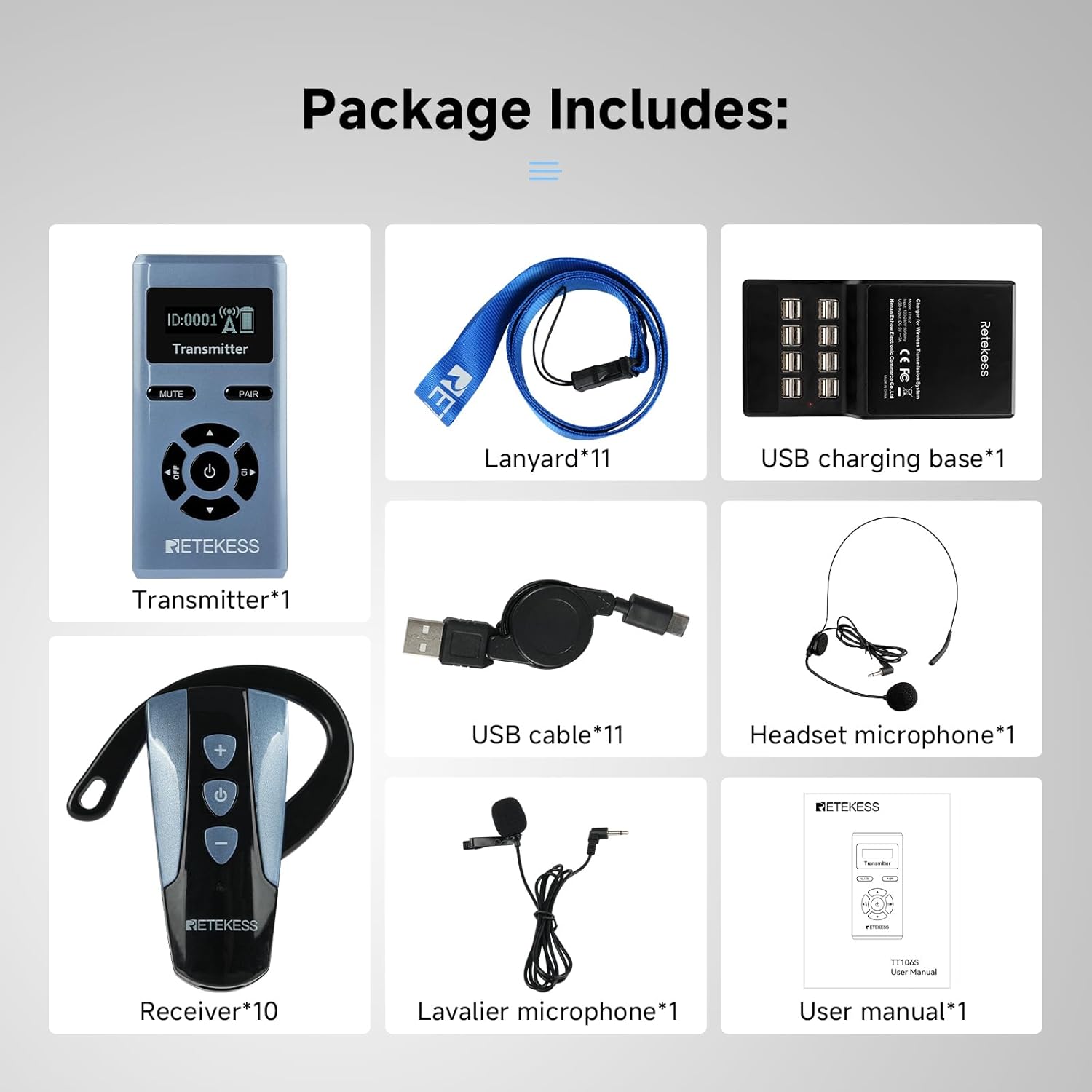
Image: A visual representation of all included components in the Retekess TT106S package, neatly arranged.
3. Produto rematadoview
3.1 Transmisor
The transmitter features a clear display, control buttons for channel selection, volume, mute, and pairing. It includes ports for a microphone and AUX audio input.

Image: The complete Retekess TT106S system, showing the transmitter, multiple ear-hook receivers, the multi-port charging base, and both headset and lavalier microphones.
3.2 Receptor
The ear-hook receiver is designed for comfort and ease of use, with volume controls and a power button. Its design eliminates pressure on the ear canal.

Image: A person wearing the Retekess TT106S ear-hook receiver, demonstrating its comfortable fit with a silicone over-ear hook.
4. Configuración
4.1 Carga dos dispositivos
Before first use, fully charge all transmitters and receivers. The system includes a multi-port USB charging base and individual USB cables.
- Connect the USB charging base to a power outlet.
- Use the provided USB cables to connect each transmitter and receiver to the charging base.
- The receiver boasts a battery life of up to 50 hours and can be fully charged in approximately 3 hours. The transmitter has a running time of 23 hours.

Image: The Retekess TT106S transmitter and an ear-hook receiver shown with a multi-port USB charging base, illustrating the charging setup.
4.2 Conexión de micrófonos
The transmitter supports both headset and lavalier microphones via its 3.5mm MIC input jack.
- Insert the 3.5mm jack of your chosen microphone (headset or lavalier) into the "MIC" port on the top of the transmitter.
- Ensure the connection is secure for optimal audio transmission.
Image: A close-up of the Retekess TT106S transmitter with a lavalier microphone plugged into the MIC port.
4.3 Setting Channel Numbers
Follow these steps to set the channel number on your transmitter:
- Press and hold the ID button on the transmitter for 5 seconds to enter the channel adjustment mode.
- Use the left and right buttons to set the digit positions, and the up and down buttons to change the channel number.
Video: Demonstrates how to set the channel number on the Retekess TT106S transmitter using the control buttons.
5. Instrucións de funcionamento
5.1 Encendido/apagado
- Transmisor: Press and hold the power button (center button) for a few seconds to turn on or off.
- Receptor: Press and hold the power button (center button) on the ear-hook receiver to turn it on or off.

Image: The Retekess TT106S transmitter and ear-hook receiver illustrating the central power button for one-key operation.
5.2 Pairing Devices (One-key Frequency Matching)
To ensure all receivers are connected to the correct transmitter, use the one-key pairing function:
- First, set the desired channel number on the transmitter (refer to Section 4.3).
- Press and hold the "PAIR" button on the transmitter for approximately 5 seconds until the 4-digit channel number and the antenna icon start flashing. Then, release the "PAIR" button to enter the pairing mode.
- Turn on the receiver. It will automatically pair to the same channel as the transmitter.
- The blue light on the receiver will stay on constantly after successful pairing.
- Briefly press the power-off button on the transmitter to exit the pairing mode. The transmitter and the receiver can now communicate normally, and the blue light on the receiver will flash once every 3 seconds.
Video: A demonstration of the one-key pairing process between the Retekess TT106S transmitter and receiver.
5.3 Función de silencio
To temporarily stop audio transmission from the transmitter:
- Briefly press the "MUTE" button on the transmitter to mute the transmission.
- Press it again to resume speaking.
5.4 Axuste de volume
- Transmisor: Use the up and down arrow buttons on the transmitter to adjust the microphone input volume.
- Receptor: Use the '+' and '-' buttons on the ear-hook receiver to adjust the listening volume (0-9 levels).
5.5 One-to-Many Mode
The 2.4G technology supports a "one-to-many" mode, allowing one transmitter to connect to multiple receivers simultaneously. This is suitable for large groups or teams, ensuring all participants receive the audio from a single speaker.

Image: A visual depicting a tour guide using the transmitter to speak to a group of people, each wearing a receiver, demonstrating the "one guide - one group" functionality.
5.6 AUX Audio Input
The transmitter features an AUX audio input for connecting external audio sources, such as smartphones or laptops, for playing background music or pre-recorded messages.
- Connect an audio cable (not included) from your external device's audio output to the "AUX" port on the transmitter.
- This provides a stable and interference-free link for enhanced sound quality.

Image: The Retekess TT106S transmitter highlighting the AUX audio input port, surrounded by icons of compatible devices like laptops, phones, and audio mixers.
6. Mantemento
- Keep the devices clean by wiping them with a soft, dry cloth. Avoid using harsh chemicals or abrasive cleaners.
- Garde o sistema nun lugar fresco e seco, lonxe da luz solar directa e de temperaturas extremas.
- Asegúrate de que todos os portos estean libres de po e residuos.
- The receiver has an energy-saving feature: it will automatically power off if no signal is received for 20 minutes.

Image: A diagram showing the Retekess TT106S receiver with an arrow indicating automatic shutdown after 20 minutes of no signal, emphasizing its smart energy-saving feature.
7 Solución de problemas
| Problema | Causa posible | Solución |
|---|---|---|
| Sen son do receptor |
|
|
| Interferencias ou mala calidade de son |
|
|
| Transmitter not picking up audio |
|
|
8. Especificacións
| Característica | Detalle |
|---|---|
| Nome do modelo | TT106S |
| Marca | Retekes |
| Tecnoloxía de conectividade | Sen fíos de 2.4 GHz |
| Tecnoloxía de comunicación sen fíos | 2.4 GHz |
| Rango de operación | Up to 200m / 656ft (in open environments) |
| Duración da batería do receptor | Ata 50 horas |
| Transmitter Running Time | 23 horas |
| Tempo de carga | Aproximadamente 3 horas |
| Jack para auriculares | 3.5 mm Jack (for microphone input) |
| Interface do dispositivo de entrada | 3.5mm microphone jack, AUX audio input |
| Control de ruído | Cancelación activa de ruído |
| Material | Acrilonitrilo Butadieno Estireno (ABS) |
| Peso do artigo (total) | 2.27 libras (1028 gramos) |
| Dimensións do produto | 13.86 x 5.31 x 3.35 polgadas |
| Características especiais | 0-9 level receiver volume, One-key function, Seamless communication, Smart energy saving, Long Battery Life |
9. Garantía e soporte
Retekess products typically come with a warranty. For specific warranty details, technical support, or service inquiries, please refer to the warranty card included in your package or visit the official Retekess websitio. Tamén podes contactar directamente co vendedor para obter axuda.
Nota: The product information indicates a 12-month guarantee and 24-hour customer support from the brand.


