1. Introdución
Welcome to your new Kaidi KD-7019 TWS Bluetooth Earbuds. This manual provides instructions for the setup, operation, and maintenance of your device. Please read it carefully to ensure proper use and to maximize your listening experience.
Contido do paquete
- 1 Pair of Kaidi KD-7019 Earbuds
- 1 Charging Case with Touch Screen
- 1 Cable de carga USB-C
- 1 Manual de usuario
- Multiple pairs of silicone ear tips (Small, Medium, Large)
2. Produto rematadoview
Compoñentes dos auriculares
The Kaidi KD-7019 earbuds feature an ergonomic in-ear design for a comfortable and secure fit. Each earbud includes a touch-sensitive area for control functions.
Estuche de carga con pantalla táctil
The charging case not only protects and charges your earbuds but also features an integrated touch screen display for advanced control and information.

Figure 2.1: The product packaging for the Kaidi KD-7019 TWS Bluetooth Earbuds, displaying the brand 'KRIDI' (Kaidi) and 'ANC TWS Tela Touch' (ANC TWS Touch Screen) along with the model number KD-7019.

Figure 2.2: An illustration of the Kaidi KD-7019 charging case's LCD touch screen, detailing various functions such as music control, volume control, sound equalizer, 'Find My Buds' locator, ambient sound modes (ANC), spatial sound, flashlight, and lock screen wallpaper.
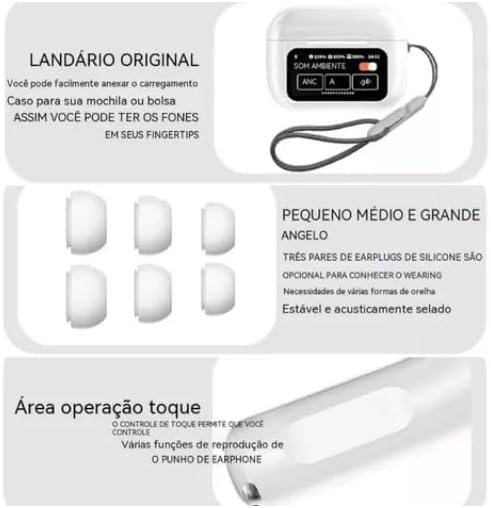
Figure 2.3: This image highlights key features: a lanyard attachment point on the charging case for portability, three pairs of silicone ear tips (small, medium, large) for a comfortable and secure fit, and the touch operation area on the earbuds for controlling playback and other functions.
3. Configuración
3.1 Carga dos auriculares e da funda
- Connect the provided USB-C cable to the charging case and a compatible power source (e.g., USB wall adapter, computer USB port).
- The touch screen on the charging case will display the current charging status.
- Ensure both earbuds are correctly placed inside the charging case to charge them simultaneously.
- A full charge for both the earbuds and the case typically takes approximately 2 hours.
3.2 Emparellamento cun dispositivo Bluetooth
- Open the lid of the charging case. The earbuds will automatically power on and enter Bluetooth pairing mode.
- No dispositivo desexado (por exemplo, teléfono intelixente, tableta, portátil), vaia á configuración de Bluetooth.
- Activa o Bluetooth e busca os dispositivos dispoñibles.
- Select "Kaidi KD-7019" from the list of detected devices to initiate the connection.
- A voice prompt from the earbuds will confirm successful pairing.
4. Instrucións de funcionamento
4.1 Basic Earbud Controls (Touch)
Os auriculares contan con zonas táctiles para un control cómodo da reprodución de audio e das chamadas.
- Reproducir/Pausa: Toca un só auricular en calquera dos auriculares.
- Próxima pista: Toca dúas veces no auricular dereito.
- Pista anterior: Toca dúas veces no auricular esquerdo.
- Responder/Finalizar chamada: Toca un só auricular en calquera dos auriculares.
- Rexeitar a chamada: Press and hold either earbud for approximately 2 seconds.
- Activar o asistente de voz: Toca tres veces en calquera dos auriculares.
4.2 Charging Case Touch Screen Functions
The integrated touch screen on the charging case provides additional control and information without needing to access your paired device.
- Control de música: Navigate through tracks, play, and pause directly from the screen.
- Control de volume: Adjust the audio playback volume.
- Ecualizador de son: Select from various preset equalizer modes to customize your audio experience (e.g., Acid Rock, Pop, Classical).
- Modos de son ambiental: Toggle between Active Noise Cancellation (ANC), Transparency Mode, and Normal mode to suit your environment.
- "Find My Buds" Locator: Activate this function to emit a sound from misplaced earbuds, aiding in their retrieval.
- Son espacial: Enable or disable spatial audio features for an immersive sound experience.
- Lanterna: Activate a small light feature on the charging case for convenience.
- Fondo de pantalla de bloqueo: Customize the display background of the touch screen.
- Visualización de data e hora: View the current date and time directly on the case screen.
5. Mantemento
5.1 Limpeza
- Use a soft, dry, lint-free cloth to clean the earbuds and the charging case.
- Do not use abrasive cleaners, alcohol, or chemical solvents, as these can damage the device.
- If necessary, gently clean the silicone ear tips with a damp cloth and mild soap, then ensure they are completely dry before reattaching them to the earbuds.
5.2 Almacenamento
- Always store the earbuds in their charging case when not in use. This protects them from damage and keeps them charged.
- Evite expoñer o dispositivo a temperaturas extremas, luz solar directa ou humidade elevada.
6 Solución de problemas
Problemas comúns e solucións
- Sen son:
- Asegúrate de que os auriculares estean suficientemente cargados.
- Verify that the Bluetooth connection is active and stable.
- Adjust the volume on both your connected device and via the charging case touch screen.
- Non se pode emparellar:
- Confirm that the earbuds are in pairing mode (open case lid).
- Desactiva e despois activa o Bluetooth no teu dispositivo.
- If previously paired, try forgetting "Kaidi KD-7019" from your device's Bluetooth list and attempt pairing again.
- Ensure no other devices are currently connected to the earbuds.
- Problemas de carga:
- Check the USB-C cable and power adapter for damage and proper connection.
- Ensure both earbuds are correctly seated in their charging slots within the case.
- Clean the charging contacts on both the earbuds and the case if they appear dirty.
- Os controis táctiles non responden:
- Ensure the touch areas on the earbuds are clean and dry.
- Volva colocar os auriculares na caixa de carga, peche a tapa e ábraa de novo para restablecelos.
7. Especificacións
Datos técnicos
| Característica | Detalle |
|---|---|
| Marca | Kaidi |
| Modelo | KD-7019 (also referred to as 3041) |
| Versión Bluetooth | 5.3 |
| Protocolos admitidos | HFP, HSP, A2DP, AVRCP |
| Unidade de condutor | 13 mm |
| Distancia de transmisión | > 10 metros |
| Capacidade da batería dos auriculares | 30 mAh |
| Capacidade da batería da caixa | 360 mAh |
| Tempo de reprodución de música | Ata 5 horas (ao 80 % do volume) |
| Tempo de carga (auriculares e funda) | Aproximadamente 2 horas |
| Método de control | Toca |
| Dispositivos compatibles | Teléfonos móbiles, tabletas, portátiles |
| Control de ruído | Cancelación de ruído ambiental (ENC) |
| Certificación ANATEL | 10545-23-12308 |
| Peso do produto | 190 g |
| Dimensións do paquete | 23 x 13 x 4 cm |
8. Garantía e soporte
8.1 Información da garantía
Based on the available product information, this product does not come with a manufacturer's warranty. Please refer to the return and warranty policies provided by your retailer or point of purchase for any potential coverage.
8.2 Atención ao cliente
For further assistance, technical support, or inquiries regarding your Kaidi KD-7019 TWS Bluetooth Earbuds, please contact the retailer or seller from whom you purchased the product.


