1. Introdución
This manual provides comprehensive instructions for the Nokia G310 5G TA-1573 smartphone. It covers essential information for setup, operation, maintenance, and troubleshooting to ensure optimal use of your device. The Nokia G310 5G TA-1573 features a 6.6-inch HD+ 90 Hz IPS LCD display, a Snapdragon 480+ octa-core processor, 4 GB of RAM, and 5G connectivity, running on Android 13.
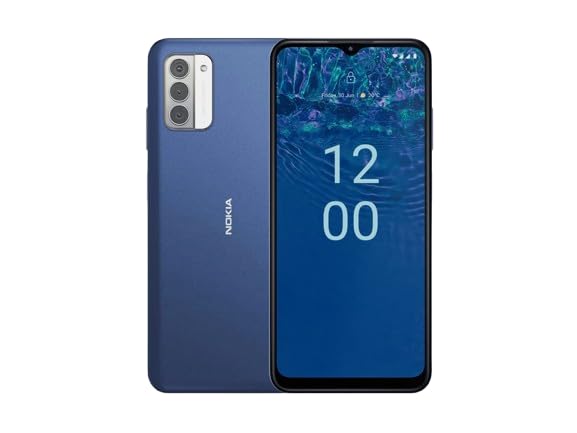
Figura 1.1: Nokia G310 5G TA-1573 Smartphone. This image displays the front view of the Nokia G310 5G smartphone, highlighting its display and general form factor.
2. Que hai na caixa
Upon unboxing your Nokia G310 5G TA-1573, please verify that all the following items are included:
- Nokia G310 5G TA-1573 Smartphone
- Cable USB-C
- Ferramenta de expulsión de SIM
3. Configuración
3.1. Cargando o dispositivo
Before initial use, fully charge your Nokia G310 5G. Connect the provided USB-C cable to the phone's USB-C port and the other end to a compatible power adapter (sold separately) or a computer's USB port. The battery indicator on the screen will show charging progress.
3.2. Inserir a tarxeta SIM
- Localiza a bandexa da tarxeta SIM no lateral do teu teléfono.
- Insira a ferramenta de expulsión da tarxeta SIM no pequeno orificio da bandexa para abrila.
- Coloque a tarxeta Nano-SIM na bandexa cos contactos dourados cara abaixo, asegurándose de que encaixe ben.
- Empurre con coidado a bandexa de volta no teléfono ata que encaixe no seu lugar.
3.3. Acendido e configuración inicial
- Press and hold the Power button (usually on the right side) until the Nokia logo appears.
- Segue as instrucións na pantalla para seleccionar o idioma, conectarte a unha rede wifi e configurar a túa conta de Google.
- Completa o asistente de configuración para personalizar a configuración do teu dispositivo.
4. Funcionamento do teu dispositivo
4.1. Navegación básica
- Xestos na pantalla táctil: Toca para seleccionar, desliza para desprazarte, belisca para ampliar.
- Pantalla de inicio: Accede a aplicacións, widgets e notificacións.
- Barra de navegación: Usa os botóns Atrás, Inicio e Aplicacións recentes na parte inferior da pantalla.
4.2. Facer chamadas e enviar mensaxes
- Abre o Teléfono aplicación para marcar números ou seleccionar contactos.
- Abre o Mensaxes aplicación para redactar e enviar mensaxes de texto.
4.3. Conexión a Redes
- Wi-Fi: Ir a Configuración > Rede e Internet > Internet para conectarse ás redes Wi-Fi dispoñibles.
- Bluetooth: Ir a Axustes > Dispositivos conectados > Preferencias de conexión > Bluetooth para emparellalo con dispositivos Bluetooth.
- Datos móbiles: Asegúrate de que os datos móbiles estean activados en Settings > Network & internet > SIMs para acceder a internet a través da túa rede móbil.
4.4. Usando a cámara
Abre o Cámara app to capture photos and videos. Tap the shutter button to take a picture or hold it to record a video. Explore different modes and settings within the app.
5. Mantemento
5.1. Limpeza do dispositivo
Use a soft, lint-free cloth to clean the screen and body of your phone. Avoid using harsh chemicals or abrasive materials, which can damage the device's finish or screen coating.
5.2. Coidado da batería
- Evita expoñer o teléfono a temperaturas extremas.
- Non deixes que a batería se descargue completamente con regularidade.
- Empregue só cargadores e cables homologados.
5.3. Actualizacións de software
Comprobe e instale actualizacións de software regularmente para garantir que o seu dispositivo teña as últimas funcións, parches de seguridade e melloras de rendemento. Vaia a Configuración > Sistema > Actualización do sistema.
5.4. Xestión do almacenamento
To optimize performance, regularly clear unnecessary files, desinstalar as aplicacións non utilizadas e mover soportes grandes files to cloud storage or an external device. Check storage usage in Configuración > Almacenamento.
6 Solución de problemas
6.1. O dispositivo non se acende
Ensure the battery is charged. Connect the phone to a charger and wait a few minutes before attempting to power it on again. If it still doesn't turn on, try holding the Power button for 10-15 seconds.
6.2. Problemas de conectividade de rede
- Sen sinal: Check if your SIM card is properly inserted. Try restarting the phone.
- Non se conecta a wifi: Ensure the Wi-Fi password is correct. Restart your router and phone.
- Problemas de sincronización Bluetooth: Ensure both devices are in pairing mode and within range.
6.3. As aplicacións fallan ou conxélanse
Try force-closing the app (Settings > Apps > See all apps > [App Name] > Force stop). Clear the app's cache and data (Settings > Apps > See all apps > [App Name] > Storage & cache > Clear cache / Clear storage). Se o problema persiste, desinstala e reinstala a aplicación.
6.4. Restablecemento de fábrica
Como último recurso, se os problemas de software persisten, podes realizar un restablecemento de fábrica. Warning: This will erase all data on your phone. Fai unha copia de seguridade dos datos importantes antes de continuar. Vai a Configuración > Sistema > Opcións de restablecemento > Borrar todos os datos (restablecemento de fábrica).
7. Especificacións
| Característica | Detalle |
|---|---|
| Nome do modelo | Nokia G310 5G TA-1573 |
| Sistema Operativo | Android 13.0 |
| Tamaño de visualización | 6.6 polgadas |
| Resolución | 720 x 1560 píxeles |
| Taxa de actualización | 90 Hz |
| Modelo CPU | Qualcomm Snapdragon MSM8260A (Snapdragon 480+ equivalent) |
| Velocidade da CPU | 2 GHz |
| Tamaño da memoria RAM instalada | 4 GB |
| Capacidade de almacenamento da memoria | 128 GB (interno) |
| Tecnoloxías de Conectividade | 5G |
| Potencia nominal da batería | 3600 millónsamp Horas (ión de litio) |
| Jack de audio | USB-C |
| Peso do elemento | 6.9 onzas |
| Cor | Azul |
8. Garantía e soporte
8.1. Información da garantía
For specific warranty details regarding your Nokia G310 5G TA-1573, please refer to the documentation provided by the seller at the time of purchase. As this is a renewed product, warranty terms may differ from new devices. It is recommended to contact the seller directly for precise warranty coverage and duration.
8.2. Soporte técnico
If you encounter issues that cannot be resolved using the troubleshooting steps in this manual, please contact:
- The seller from whom you purchased the device.
- Nokia's official support channels for general product inquiries.
Please have your device model number (TA-1573) and proof of purchase ready when contacting support.


