1. Introdución
Thank you for choosing the LIGE FV21-D Women's Smartwatch. This device combines elegant design with advanced fitness and communication features to enhance your daily life. This manual provides detailed instructions for setup, operation, and maintenance to ensure optimal use of your smartwatch.
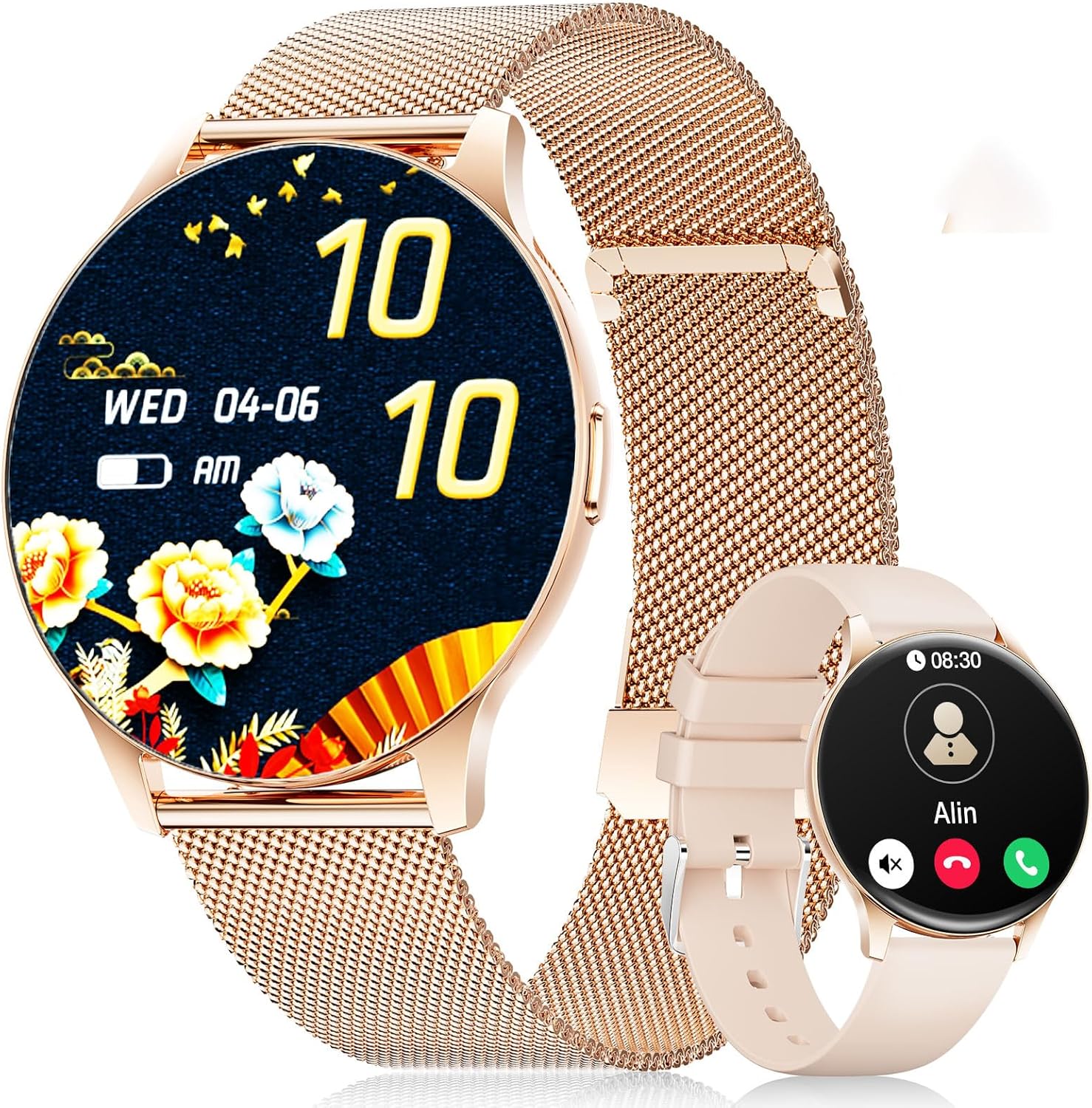
Image: The LIGE FV21-D Smartwatch, showcasing its rose gold casing with a mesh strap and an alternative beige silicone strap. The main display shows a floral watch face, while the smaller inset shows a call interface.
2. Contido do paquete
Verifique que todos os elementos estean presentes no seu paquete:
- LIGE FV21-D Smartwatch
- Metal Mesh Strap (Rose Gold)
- Silicone Strap (Beige)
- Cable de carga
- Manual de usuario (este documento)
3. Configuración
3.1 Cargar o reloxo intelixente
- Conecta o cable de carga ao porto de carga da parte traseira do reloxo intelixente.
- Plug the USB end of the charging cable into a standard USB power adapter (not included) or a computer's USB port.
- The watch display will indicate charging status. Ensure the watch is fully charged before first use. A full charge typically takes approximately 2 hours.
3.2 Encendido/apagado
- Encendido: Press and hold the side button for a few seconds until the LIGE logo appears.
- Apagado: Manteña premido o botón lateral e, a seguir, seleccione a opción "Apagar" na pantalla.
3.3 Instalación e emparellamento da aplicación
To unlock the full functionality of your smartwatch, you need to pair it with your smartphone using the dedicated application.
- Descarga a aplicación: Busca "FitCloudPro" in your smartphone's app store (Apple App Store for iOS or Google Play Store for Android) and install it.
- Activar Bluetooth: Asegúrate de que o Bluetooth estea activado no teu smartphone.
- Abre a aplicación: Launch the FitCloudPro app and follow the on-screen instructions to create an account or log in.
- Engadir dispositivo: In the app, navigate to the "Device" or "Add Device" section. The app will search for available smartwatches.
- Selecciona o teu reloxo: Select "FV21-D" or the corresponding device name from the list.
- Confirmar emparellamento: Pode aparecer unha solicitude de emparellamento tanto no teléfono como no reloxo intelixente. Confirma o emparellamento en ambos dispositivos.
- Conceder permisos: Concede os permisos necesarios (por exemplo, notificacións, localización, contactos) á aplicación para que funcione con total funcionalidade.
Note: The smartwatch supports Android 4.4+ and iOS 9.0+ operating systems.
4. Instrucións de funcionamento
4.1 Navegación básica
- Pantalla táctil: The 1.43-inch HD AMOLED touch display allows for intuitive interaction.
- Pase o dedo cara arriba/abaixo: Desprácese polos menús e as notificacións.
- Pase o dedo cara á esquerda/dereita: Access quick functions or different widgets.
- Toca: Selecciona un elemento ou confirma unha acción.
- Botón lateral: Preme para volver á pantalla de inicio ou activar a pantalla. Mantén premido para ver as opcións de acendido e apagado.
4.2 Personalización das esferas do reloxo
Your smartwatch offers over 200 customizable watch faces. You can change them directly on the watch or through the FitCloudPro app.
- No reloxo: Long-press the home screen, then swipe left or right to browse available watch faces. Tap to select.
- A través da aplicación: Open the FitCloudPro app, go to the "Watch Faces" section, and choose from the gallery. You can also upload your own photos to create custom watch faces.
4.3 Phone Function (Bluetooth Call)
Once paired, you can make and receive calls directly from your smartwatch.
- Facer chamadas: Access the "Dialer" or "Contacts" function on the watch to initiate a call.
- Recepción de chamadas: When a call comes in, the watch will display the caller ID. You can answer or reject the call directly from the watch screen.
4.4 modos deportivos
The smartwatch supports over 120 sports modes, including yoga, cycling, running, and more. To start a workout:
- Navigate to the "Sports" or "Workout" menu on your watch.
- Selecciona a actividade desexada.
- Tap to start tracking. The watch will record data such as duration, calories burned, and heart rate.
- To end a workout, swipe or tap the screen and select the "End" option.
4.5 Vixilancia da saúde
The FV21-D smartwatch provides comprehensive health tracking features:
- Monitor de frecuencia cardíaca: Monitoriza continuamente a túa frecuencia cardíaca ao longo do día. View datos en tempo real no reloxo ou tendencias detalladas na aplicación.
- Monitor de sono: Automatically monitors your sleep patterns, including deep sleep, light sleep, and wake times. Access sleep analysis in the FitCloudPro app.
- Podómetro: Tracks your daily steps taken.
- Calorie Measurement: Estimates calories burned based on activity and personal data.
- SpO2 (Blood Oxygen) Monitor: Mide os niveis de saturación de osíxeno no sangue.
- Seguimento do ciclo menstrual: For female users, the app can track and predict menstrual cycles.
Nota: Este dispositivo non é un dispositivo médico. Os datos sanitarios son só de referencia e non se deben usar para diagnósticos ou tratamentos médicos.
4.6 Notificacións e recordatorios
Receive notifications directly on your wrist:
- Chamadas e mensaxes: Get alerts for incoming calls, SMS, and messages from various apps (e.g., WhatsApp, Facebook). Configure app notifications in the FitCloudPro app.
- Espertador: Set alarms through the app to vibrate on your wrist.
- Recordatorio de sedentarismo: The watch can remind you to move after periods of inactivity.
- Información meteorolóxica: View current weather conditions and forecasts (requires app synchronization).
- Asistente de voz: Access your smartphone's voice assistant directly from the watch.
4.7 Resistencia á auga (IP68)
The FV21-D smartwatch is IP68 waterproof, meaning it is resistant to dust and can withstand immersion in water up to 1.5 meters for 30 minutes. It is suitable for daily use, such as washing hands, rain, and sweating during exercise. However, it is not recommended for hot showers, saunas, or diving, as steam and hot water can damage the seals.
5. Mantemento
5.1 Cleaning the Smartwatch
- Limpa a pantalla e a carcasa do reloxo cun pano suave e sen fiapos.
- Se é necesario, lixeiramente dampEnxágüe o pano con auga. Evite o uso de produtos químicos agresivos ou materiais abrasivos.
- Asegúrate de que o reloxo estea completamente seco antes de cargalo.
5.2 Substitución da correa
Your smartwatch comes with two interchangeable straps: a metal mesh strap and a silicone strap. To replace them:
- Locate the quick-release pins on the underside of the strap where it connects to the watch body.
- Slide the pin inwards to detach the strap.
- Align the new strap with the watch lugs and insert one end of the pin into the hole.
- Slide the quick-release pin inwards, position the strap, and release the pin to secure it. Ensure both ends of the pin are properly seated.
5.3 Coidado coa batería
- Evite descargar completamente a batería con frecuencia.
- Carga o reloxo regularmente, mesmo se non o estás a usar, para manter a batería en bo estado.
- Garde o reloxo nun lugar fresco e seco cando non o use durante períodos prolongados.
6 Solución de problemas
| Problema | Posible Solución |
|---|---|
| O reloxo non se acende. | Asegúrate de que o reloxo estea completamente cargado. Conéctao ao cargador durante polo menos 30 minutos. |
| Non se pode emparellar co teléfono intelixente. |
|
| Non se reciben notificacións. |
|
| Datos sanitarios inexactos. |
|
| Batería de curta duración. |
|
Se tes problemas que non aparecen na lista ou necesitas máis axuda, consulta a sección de soporte.
7. Especificacións
| Característica | Detalle |
|---|---|
| Número de modelo | FV21-D |
| Mostrar | 1.43 Inch HD AMOLED (466 x 466) |
| Dimensións | 1.81 x 1.81 x 0.87 polgadas |
| Peso do elemento | 6.7 onzas |
| Conectividade | Bluetooth |
| Compatibilidade do sistema operativo | Android 4.4+ e iOS 9.0+ |
| Resistencia á auga | IP68 |
| Tipo de batería | Polímero de litio (requírese 1, incluído) |
| Características especiais | Pedometer, Fitness Tracker, Multi-Sport Tracker, Heart Rate Monitor, Oximeter (SpO2), Sleep Tracker, Bluetooth Call, Music Player, Voice Assistant, Reminders, Alarm Clock, Text Messages, Notifications, Sedentary Reminder, Cycle Tracking. |
| Capacidade de almacenamento da memoria | 256 MB |
| GPS | GPS vía Smartphone |
8. Garantía e soporte
LIGE is committed to ensuring your satisfaction with the FV21-D Smartwatch. Should you have any questions, require technical support, or encounter any issues with your device, please do not hesitate to contact our customer service team.
Please refer to the contact information provided with your purchase documentation or visit the official LIGE websitio para obter detalles de asistencia.


