1. Introdución
This manual provides essential information for the safe and effective use of your FLEXISPOT V9-Max-AR Exercise Bike with 2D Desktop. Please read all instructions carefully before assembly and operation. Retain this manual for future reference.
Información importante de seguridade
- Asegúrese de que todas as pezas estean ben fixadas antes de cada uso.
- Non excedas o peso máximo recomendado de 300 libras.
- Manteña os nenos e as mascotas lonxe da bicicleta estática durante o seu funcionamento.
- Consulta cun médico antes de comezar calquera novo programa de exercicios.
- Use the product on a stable, level surface.
2. Produto rematadoview e Compoñentes
The FLEXISPOT V9-Max-AR is a versatile exercise bike designed for indoor use, featuring an integrated 2D adjustable desktop. It combines a stationary bike with a functional workspace, allowing for simultaneous exercise and productivity.

Figure 2.1: User operating the FLEXISPOT V9-Max-AR Exercise Bike with the desktop in use.
Key features include an 8-level quiet magnetic resistance system, an LCD display for tracking workout metrics, and a robust design supporting up to 300 lbs. The adjustable seat and desktop accommodate various user heights and preferences.
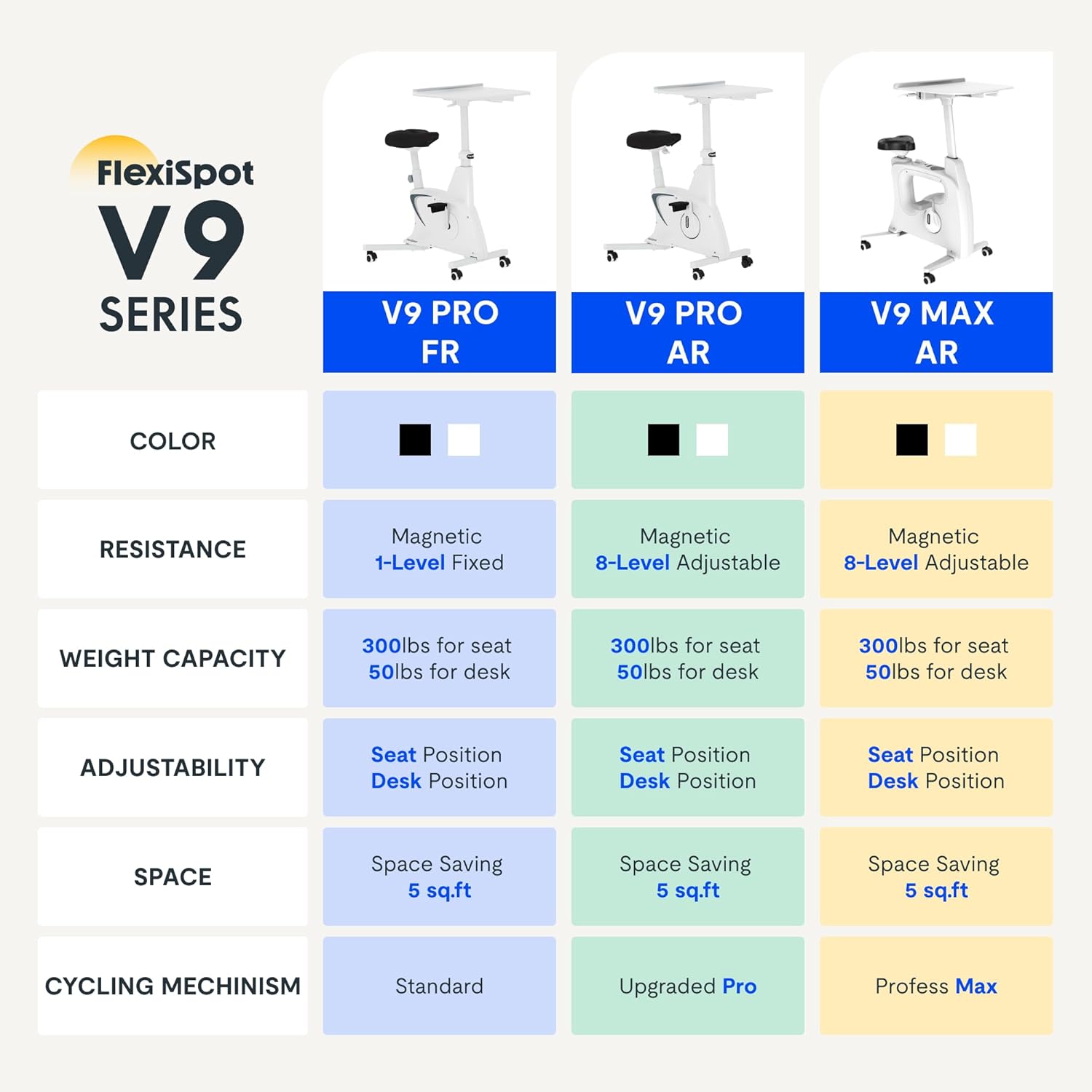
Figure 2.2: Comparison of FlexiSpot V9 series models, highlighting features like resistance and adjustability.
Compoñentes principais:
- Main Frame with Flywheel and Resistance Mechanism
- Asento axustable
- Adjustable Desktop
- Pedais
- Consola con pantalla LCD
- Rodas de transporte
3. Configuración e montaxe
The FLEXISPOT V9-Max-AR is designed for quick and straightforward assembly, typically requiring about 10 minutes.
Pasos de montaxe:
- Desembale todos os compoñentes e verifíqueos coa lista de embalaxe.
- Attach the front and rear stabilizers to the main frame using the provided screws.
- Install the pedals, ensuring the left pedal is tightened counter-clockwise and the right pedal clockwise.
- Mount the seat post and seat onto the main frame, securing them firmly.
- Attach the desktop support column to the main frame.
- Secure the desktop to its support column.
- Insert batteries into the LCD display (batteries not included) and connect the sensor wire.
- Ensure all screws and connections are tightened before first use.

Figure 3.1: Illustration of adjustable components for personalized setup.
4. Instrucións de funcionamento
Adjusting Seat and Desktop:
- Altura do asento: Use the quick-release lever located on the seat post to adjust the seat to a comfortable height. Ensure your leg has a slight bend at the knee when the pedal is at its lowest point.
- Desktop Height: The desktop can be adjusted vertically. Locate the adjustment lever beneath the desktop and raise or lower the desktop to your desired working height.
- Profundidade do escritorio: The desktop can also be adjusted horizontally (forward/backward) to optimize your working posture.
Niveis de resistencia:
The V9-Max-AR features 8 levels of quiet magnetic resistance. Rotate the resistance knob, located below the desktop, clockwise to increase resistance and counter-clockwise to decrease it.

Figure 4.1: LCD display and resistance control knob.
Usando a pantalla LCD:
The built-in LCD display monitors your workout statistics. It tracks:
- Tempo
- Velocidade
- Distancia
- Calorías queimadas
- Total Distance Covered (Odometer)
- Velocidade de rotación
Press the button on the display to cycle through different metrics or hold it to reset values (refer to display specific instructions for exact operation).
Using the 2D Desktop:
The spacious desktop (20" x 22.8") is designed to hold a laptop, notebook, mobile phone, or water cup. It provides a stable surface for working or entertainment while exercising.

Figure 4.2: Desktop in use for studying or working.
Portabilidade:
Equipped with movable silent wheels, the exercise bike can be easily relocated within your home or office. Simply tilt the bike and roll it to your desired position.
5. Mantemento
Regular maintenance ensures the longevity and optimal performance of your FLEXISPOT V9-Max-AR Exercise Bike.
- Limpeza: Limpa a bicicleta regularmente con anunciosamp un pano e un deterxente suave. Evite produtos de limpeza ou solventes abrasivos.
- Inspección: Periodically check all bolts, nuts, and moving parts for tightness. Tighten any loose components immediately.
- Lubricación: Non se require lubricación específica para o sistema de resistencia magnética.
- Almacenamento: Garda a bicicleta nun lugar seco e fresco, lonxe da luz solar directa e de temperaturas extremas.
6 Solución de problemas
Esta sección aborda problemas comúns que podes atopar coa túa bicicleta estática.
| Problema | Causa posible | Solución |
|---|---|---|
| A pantalla LCD non funciona | As baterías están agotadas ou están mal instaladas. | Replace batteries (AAA, not included) or ensure correct polarity. |
| Bicicleta inestable ou tambaleante | Parafusos soltos ou superficie irregular. | Check and tighten all assembly bolts. Ensure the bike is on a flat, stable surface. |
| A resistencia non cambia | Problema do mecanismo de resistencia. | Asegúrate de que o botón de resistencia estea correctamente encaixado. Se o problema persiste, ponte en contacto co servizo de atención ao cliente. |
| Chirridos ou ruídos pouco comúns | Loose components or friction. | Inspect all connections and tighten any loose parts. Ensure no foreign objects are interfering with moving parts. |
7. Especificacións
Detailed specifications for the FLEXISPOT V9-Max-AR Exercise Bike:
- Modelo: V9-Max-AR (Exercise Bike with Desk)
- Marca: FLEXISPOT
- Cor: Negro
- Mecanismo de resistencia: Magnético
- Número de niveis de resistencia: 8
- Peso máximo recomendado: 300 libras
- Dimensións do produto (P x A x A): 37.6" x 23.2" x 47.2"
- Dimensións do escritorio: Approximately 20" x 22.8"
- Minimum Height (Seat): 29.6 polgadas
- Maximum Height (Overall): 47.2 Inches (desktop height can go up to 47.2")
- Fonte de enerxía: Accionamento por pedal (non eléctrico)
- Sistema de accionamento: Cinto
- Característica especial: Adjustable Seat, Adjustable Desktop
- Usos recomendados: Interior
- Space Occupied: Aproximadamente 5 metros cadrados

Figura 7.1: Dimensións do produto.
8. Garantía e soporte
FLEXISPOT is committed to providing quality products and customer satisfaction.
- Devolucións: Este produto ten dereito a devolucións fáciles en 30 días. Consulta a política de devolucións da túa plataforma de compra para obter máis detalles.
- Garantía: For specific warranty terms and conditions, please refer to the official FLEXISPOT websitio web ou póñase en contacto directamente co servizo de atención ao cliente.
- Atención ao cliente: For any questions, assistance, or troubleshooting not covered in this manual, please contact FLEXISPOT customer support. Contact information can typically be found on the manufacturer's websitio web ou a documentación da súa compra.
9. Información adicional
While no specific official product videos were provided in the product data, users may find helpful assembly or usage guides on the manufacturer's official website or their authorized channels. Always ensure the source is official for accurate information.


