1. Introdución
The GEEKOM IT13 Mini PC is a compact yet powerful desktop computer designed for a wide range of applications, from professional tasks like video editing and graphic design to everyday use and gaming. Equipped with the 13th Gen Intel Core i9-13900H processor, 32GB of RAM, and a 2TB NVMe SSD, it offers robust performance in a small form factor. This manual provides essential information to help you set up, operate, maintain, and troubleshoot your GEEKOM IT13 Mini PC.

Imaxe 1.1: Acabadoview of the GEEKOM IT13 Mini PC highlighting its core features like the Intel Core i9 processor, Iris Xe Graphics, 32GB DDR4 RAM, 2TB NVMe SSD, Quad-Screen Display, Efficient Cooling, WiFi 6E, Bluetooth 5.2, Windows 11 Pro, Versatile Connectivity, SD Card Reader, and Ultra-Compact Design.
2. Contido do paquete
Marque a caixa para os seguintes elementos:
- 1 x Mini IT13 Mini PC
- 1 soporte VESA
- 1 x cable HDMI
- 1 x adaptador de alimentación
- 1 x Guía de usuario
3. Produto rematadoview
The GEEKOM IT13 Mini PC features a robust design with a reinforced ABS+PC composite shell and a precision-machined metal frame. It offers a variety of ports for extensive connectivity.

Imaxe 3.1: Parte dianteira e traseira views of the GEEKOM IT13 Mini PC, illustrating its rich interface options including USB4 ports, HDMI ports, 2.5GbE LAN port, USB 3.2 Gen 2 ports, USB 2.0 port, 3.5mm headphone jack, SD card reader, DC jack, and Kensington Lock slot.
Portos frontales:
- 1 x bloqueo Kensington
- 1 x 3.5 mm Headphone Jack
- 3 x portos USB 3.2 Gen 2
Portos traseiros:
- 2 x USB4 Ports
- 1 x toma DC
- 1 porto LAN de 2.5 GbE
- 2 x portos HDMI 2.0
- 1 x porto USB 2.0
- 1 x lector de tarxetas SD
4. Configuración
Follow these steps to set up your GEEKOM IT13 Mini PC:
- Conectar á enerxía: Plug the power adapter into the DC jack on the Mini PC and then into a power outlet.
- Conectar á pantalla: Use the provided HDMI cable to connect your Mini PC to a monitor or TV. For 8K resolution or multiple displays, use the USB4.0 ports or additional HDMI 2.0 ports.
- Conectar periféricos: Plug in your keyboard, mouse, and any other USB devices into the available USB ports.
- Encendido: Press the power button on the front of the Mini PC. The system will boot up, and you will be guided through the initial Windows 11 Pro setup process.
5. Instrucións de funcionamento
Your GEEKOM IT13 Mini PC comes pre-installed with a licensed Windows 11 Pro operating system. Upon first boot, follow the on-screen instructions to complete the Windows setup, including language selection, network connection, and user account creation. The Mini PC supports various operating systems, including Ubuntu and Linux, allowing for flexible usage based on your needs.
6. Conectividade
The GEEKOM IT13 offers advanced connectivity options:
- Wi-Fi 6E: Enjoy ultra-fast, low-latency wireless performance with Tri-Band WiFi 6E (2.5/5/6GHz). The integrated 3D stereo WiFi antenna provides 360° coverage and enhanced anti-interference capabilities for a stable network connection.
- Bluetooth 5.2: Easily pair wireless headsets, mice, keyboards, and other Bluetooth-enabled devices for a clutter-free workspace.
- Rede local de 2.5 GbE: For blazing-fast wired network speeds, data transfer, and seamless streaming, utilize the 2.5GbE RJ45 port.

Image 6.1: Illustration of the GEEKOM IT13 Mini PC's advanced wireless capabilities, including WiFi 6E and Bluetooth 5.2, demonstrating high-speed, low-latency, and anti-interference performance compared to older WiFi standards.
7. Configuración da pantalla
The GEEKOM IT13 Mini PC supports up to 8K Quad Display, making it ideal for multitasking, gaming, and high-resolution visual applications. It is equipped with Intel Iris Xe Graphics.
- Dual USB4.0 Ports: These ports support DP1.4 and 8K output, allowing you to connect two 8K displays.
- Dual HDMI 2.0 Ports: These ports support 4K@60Hz, enabling you to connect two 4K displays.
You can drive two 8K and two 4K displays simultaneously for an expansive and immersive visual experience.

Image 7.1: A GEEKOM IT13 Mini PC connected to four monitors, demonstrating its 8K Quad Display support for enhanced productivity and entertainment.
8. Storage and Memory Upgrades
The GEEKOM IT13 Mini PC offers flexible upgrade options for both RAM and storage to meet evolving performance needs.
- RAM: The device comes with 32GB DDR4 RAM and is upgradeable to a maximum of 64GB. The removable design allows for quick memory upgrades.
- SSD NVMe: It includes a 2TB PCIe Gen4 NVMe SSD, which is up to 75% faster than Gen3 SSDs.
- Additional Storage Slots: The Mini PC features an M.2 2242 SATA SSD slot (expandable up to 2TB) and a 1 x 2.5" SATA HDD (7mm) slot (expandable up to 2TB). These additional slots provide ample space for expanding your storage capacity.
For detailed instructions on how to access and upgrade these components, please refer to the detailed diagrams in the full user manual or contact GEEKOM support.

Imaxe 8.1: Unha explosión view of the GEEKOM IT13 Mini PC, illustrating its internal components including the CPU, DDR4 RAM slots, M.2 2242 SATA SSD slot, M.2 2280 NVMe PCIe SSD, 2.5" SATA HDD slot, IceBlast Cooling System, and 3D Stereo WiFi Antenna, highlighting its exclusive design and premium craftsmanship.
9. Sistema de refrixeración
The GEEKOM IT13 Mini PC incorporates the all-new IceBlast Cooling System, designed for optimal thermal management and quiet operation. This sophisticated airflow design includes an upgraded silent fan and enhanced dual copper pipes.
- 52% Cooling Efficiency Boost: Ensures the system remains cool even under heavy loads.
- Redución de ruído de ata o 40 %: The larger silent fan and optimized design significantly reduce operating noise.
- Operación estable: Maintains stable performance in temperatures ranging from -20°C to 55°C, ensuring 24/7 reliability.
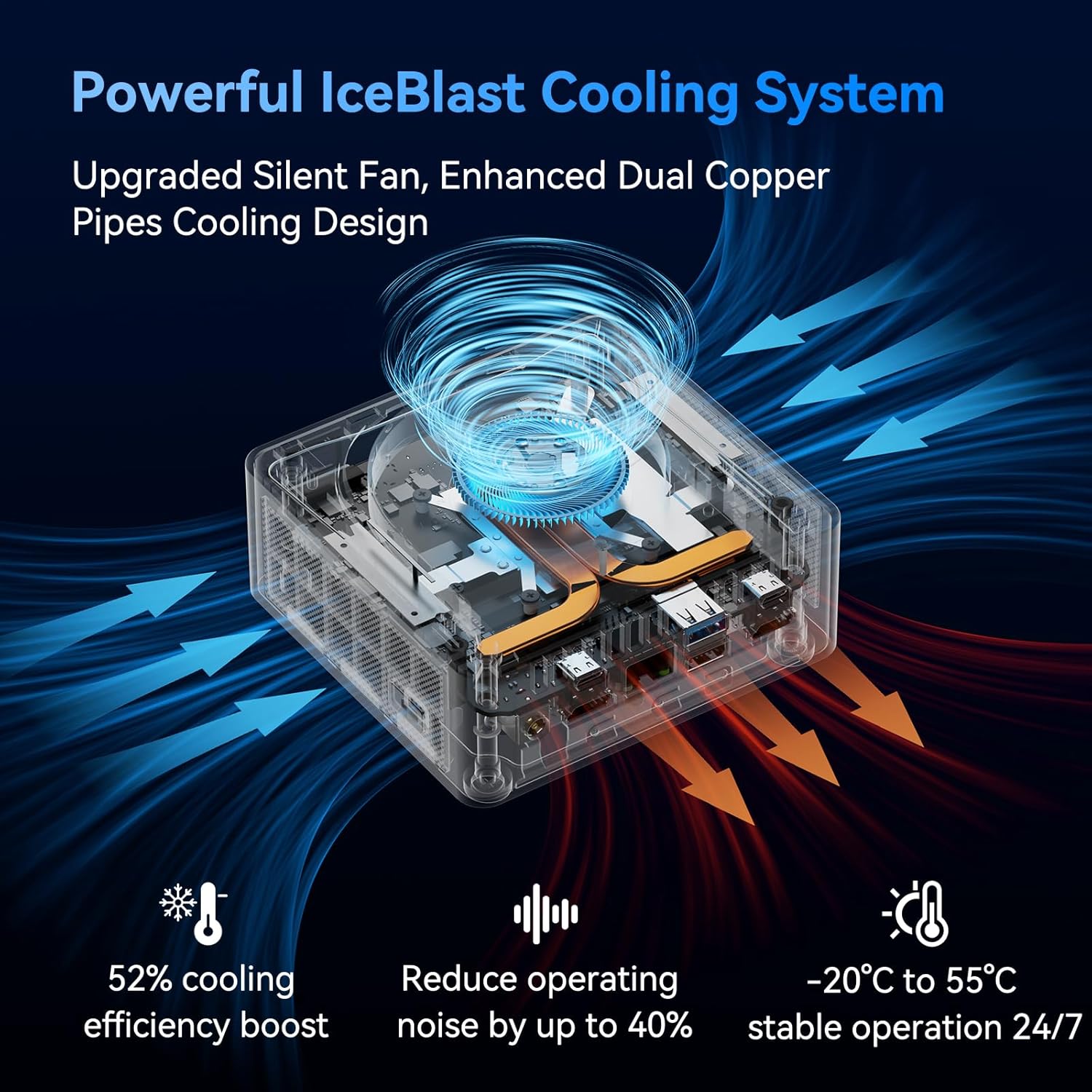
Image 9.1: A transparent view of the GEEKOM IT13 Mini PC, showcasing the internal IceBlast Cooling System with its silent fan and heat dissipation pathways, indicating efficient cooling and low noise operation.
10. Mantemento
To ensure the longevity and optimal performance of your GEEKOM IT13 Mini PC, follow these maintenance guidelines:
- Limpeza: Regularly clean the exterior of the Mini PC with a soft, dry cloth. Use compressed air to gently clear dust from the ventilation openings to prevent overheating. Do not use liquid cleaners directly on the device.
- Actualizacións de software: Keep your Windows 11 Pro operating system and drivers updated to ensure security and performance.
- Condicións ambientais: Operate the Mini PC in a well-ventilated area, away from direct sunlight, excessive heat, and moisture.
- Xestión de enerxía: Use the provided power adapter. Avoid frequent power interruptions and consider using a surge protector.
11 Solución de problemas
If you encounter issues with your GEEKOM IT13 Mini PC, try the following basic troubleshooting steps:
- Sen enerxía: Ensure the power adapter is securely connected to both the Mini PC and a working power outlet. Try a different outlet if necessary.
- Sen visualización: Check all display cable connections (HDMI, USB4.0) to your monitor. Ensure the monitor is powered on and set to the correct input source.
- Periférico non funciona: Tenta conectar o periférico a un porto USB diferente. Asegúrate de que os controladores estean instalados se é necesario.
- Rendemento lento: Close unnecessary applications. Check for background processes that might be consuming resources. Ensure your system is updated.
- Problemas de rede: For Wi-Fi, check your router and ensure the Wi-Fi adapter is enabled. For wired connections, ensure the Ethernet cable is properly connected and your router is functioning.
If problems persist, please refer to the detailed troubleshooting section in the full user manual or contact GEEKOM customer support.
12. Especificacións
| Característica | Detalle |
|---|---|
| Procesador | Intel Core i9-13900H de 13.ª xeración (5.4 GHz) |
| RAM | 32GB DDR4 SDRAM (Upgradeable to 64GB) |
| Almacenamento | 2TB NVMe SSD (PCIe Gen4 x4), M.2 2242 SATA SSD slot (up to 2TB), 2.5" SATA HDD slot (up to 2TB) |
| Gráficos | Gráficos Intel Iris Xe |
| Sistema Operativo | Windows 11 Pro |
| Soporte de visualización | 8K Quad Display (2x USB4.0, 2x HDMI 2.0) |
| Conectividade sen fíos | Tri-Band WiFi 6E (802.11ax), Bluetooth 5.2 |
| Conectividade por cable | Porto LAN de 2.5 GbE |
| Portos USB | 2x USB4.0, 3x USB 3.2 Gen 2, 1x USB 2.0 |
| Outros Portos | 1x SD Card Reader, 1x 3.5mm Headphone Jack, 1x Kensington Lock |
| Dimensións | Aproximadamente 117 x 112 x 49.2 mm |
| Peso | Aproximadamente 3.69 libras |
13. Garantía e soporte
GEEKOM offers a 3 ano de garantía for the IT13 Mini PC, reflecting confidence in its superior materials, precision engineering, and rigorous testing. This warranty includes free repair and replacement services, along with 24/7 customer support.

Image 13.1: GEEKOM's 3-year warranty commitment, highlighting extended support compared to the industry standard of 1 year.
To obtain support:
- Find the Seller on Amazon: Log into your Amazon buyer's account, find your order, and click "Get help" to ask for assistance with this product.
- Email After-sales Team: Tamén pode enviar un correo electrónico a shirley.li@geekom.tw. The support team will respond as soon as possible.
Ensure you purchase genuine GEEKOM products from official stores to receive full warranty benefits and support.


