1. Introdución
This manual provides detailed instructions for the safe and effective use of your HIKMICRO D01 Thermal Camera. Please read this manual thoroughly before operating the device and retain it for future reference. The HIKMICRO D01 is designed for thermal inspection, offering features such as SuperScene Smart Scene Recognition and SuperIR-Enhanced Resolution for various applications.
2. Configuración
2.1 Contido do paquete
Verifica que todos os elementos estean presentes no paquete:
- D01 Model Thermal Camera with Wrist Strap
- Cable USB-A a USB-C
- Guía de inicio rápido
- Caixa de paquetes

Image: The HIKMICRO D01 Thermal Camera, wrist strap, USB-C to USB-A cable, quick start guide, and package box are shown, illustrating the complete contents of the product packaging.
2.2 Carga do dispositivo
The D01 thermal camera features a built-in 3350 mAh high-capacity battery. To charge, connect the provided USB-A to USB-C cable to the camera and a suitable power source. A full charge provides up to 11 hours of continuous operation.
2.3 Encendido/apagado
Press the power button to turn the device on or off. The user-friendly button design allows for instant power control.
3. Instrucións de funcionamento
3.1 Basic Operation and Button Design
The D01 thermal imager is designed for ease of use with intuitive button controls. You can power on, navigate menus, capture images, record videos, and switch color modes instantly.

Image: A close-up of the HIKMICRO D01 Thermal Camera highlighting the power button, navigation buttons, and capture/record button, demonstrating its user-friendly design.
3.2 SuperScene Smart Scene Recognition
The D01 features HIKMICRO's unique SuperScene Scene Recognition technology. This function, powered by advanced deep learning, automatically diagnoses common issues like water leaks and insulation gaps. To enable SuperScene:
- Navega ata Configuración.
- Seleccione Escena.
- Escolle Fuga de auga or Illamento.
- Activar SuperScene (Beta).

Image: Two thermal images demonstrating SuperScene. One shows a suspected water leak (blue area) and the other shows suspected insulation voids (dark areas with exclamation marks), indicating automatic detection.
3.3 240x240 SuperIR-Enhanced Resolution
The HIKMICRO SuperIR image enhancement algorithm improves thermal image clarity from 96x96 to 240x240 during live viewing, providing crisp detail for inspections.
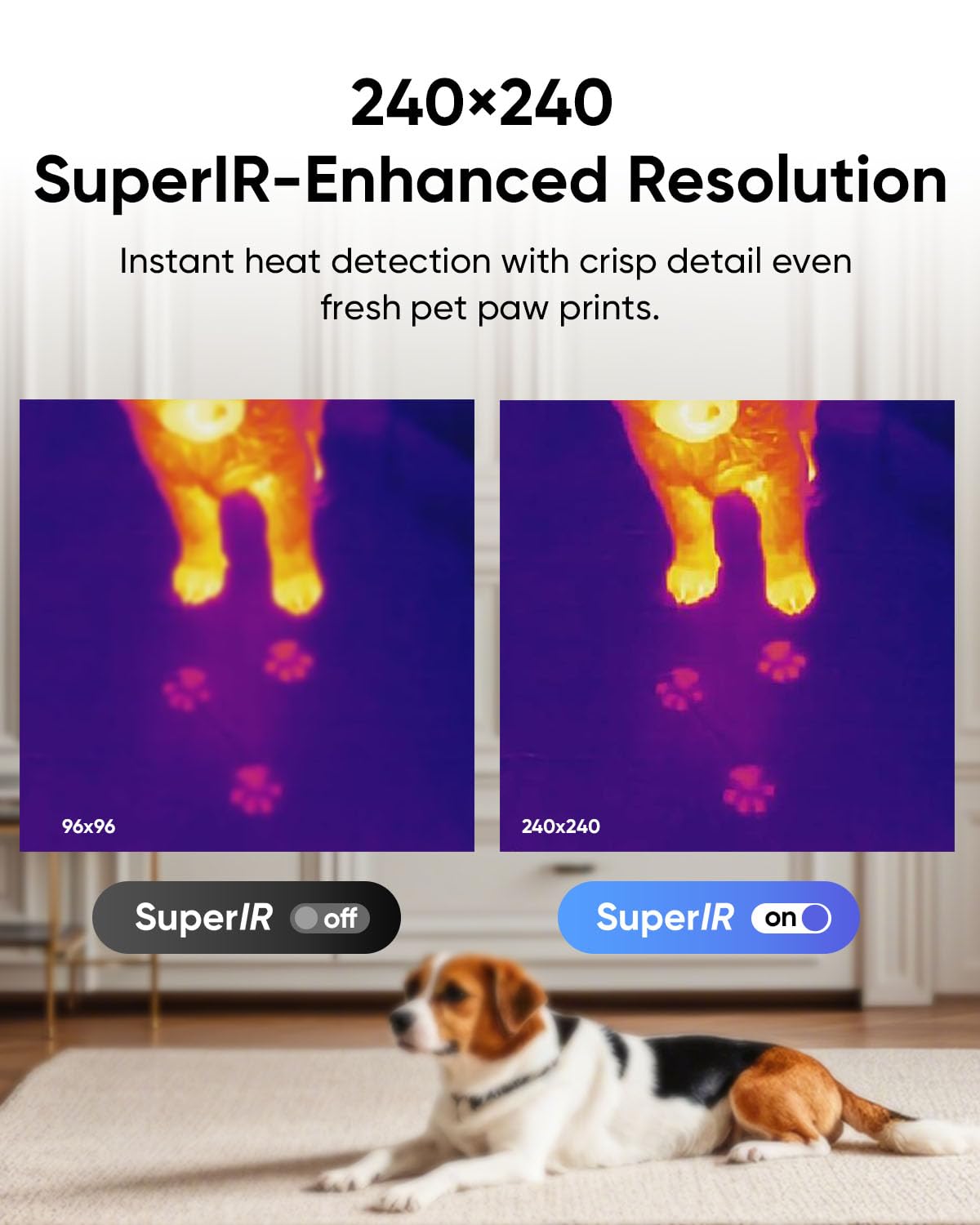
Image: A split thermal image showing a dog, comparing the clarity of 96x96 resolution (left) versus 240x240 SuperIR-Enhanced Resolution (right), demonstrating improved detail.
3.4 Campo de View (FOV)
The D01 features a 50°x50° field of view, allowing for wide coverage during scanning and capturing more thermal detail at a glance. For optimal long-distance image quality, use within 2 meters (6.56 ft).

Image: A person using the HIKMICRO D01 Thermal Camera to scan a wall, with a blue cone illustrating the wide 50°x50° field of view.
3.5 paletas de cores
The device offers 5 selected color palettes to suit various inspection needs and scenarios. You can switch between these palettes to customize your thermal view.
3.6 Timed Capture
The D01 supports timed capture, useful for analyzing heat gradients over time, such as in reptile tanks, to prevent overheating or cold stress.
3.7 Measurement and Alarms
The D01 thermal camera delivers ±3.6°F accuracy across a -4°F to 752°F range. You can adjust emissivity and distance settings to increase accuracy. The device automatically tracks hot, cold, and center spots for instant readings. High or low alarms can be set to alert you when temperatures exceed preset levels.
3.8 Photo and Video Recording with 4GB Storage
The D01 has a built-in 4 GB storage capacity, capable of storing over 30,000 images or 14 hours of video. This ample storage ensures uninterrupted inspections without storage concerns.

Image: An illustration showing the HIKMICRO D01 Thermal Camera with multiple thermal images and videos floating around it, representing its 4GB storage capacity for recording.
3.9 Sen fisuras File Transferencia
Quickly transfer thermal images and videos to your PC for instant analysis or sharing using the provided USB-C to USB-A cable. The HIKMICRO Analyzer Windows PC software offers image analysis, real-time monitoring, 3D plotting, and reporting.
4. Mantemento
4.1 Coidado coa batería
The 3350 mAh battery provides up to 11 hours of use. To prolong battery life, avoid extreme temperatures and fully charge the device before long periods of inactivity. The device also features auto power off and auto sleep settings (10/20/30/40/50/60 mins) to conserve power.

Image: An illustration of the HIKMICRO D01 Thermal Camera highlighting its 3350mAh battery, indicating up to 11 hours of use and featuring auto power off and auto sleep options.
4.2 Durabilidade e limpeza
With an IP54 rating, the D01 is durable enough to withstand water and dust, ensuring reliable performance in various environments. For cleaning, use a soft, dry cloth. Avoid abrasive cleaners or solvents that could damage the device.
5 Solución de problemas
If you encounter any issues with your HIKMICRO D01 Thermal Camera, please refer to the quick start guide or contact customer support. Common issues can often be resolved by restarting the device or ensuring the battery is adequately charged.
6. Especificacións
| Característica | Detalle |
|---|---|
| Nome do modelo | D01 |
| Resolución IR | 96x96 (Enhanced to 240x240 with SuperIR) |
| Batería | 1 Lithium Ion (included), 3350 mAh |
| Duración da batería | Ata 11 horas |
| Almacenamento | 4 GB Internal Flash Memory (30,000+ images, 14+ hours video) |
| Campo de View (FOV) | 50°x50° |
| Rango de temperatura | -4 °F a 752 °F |
| Precisión | ±3.6 °F |
| Conectividade | USB |
| Resolución de captura de vídeo | 240 p |
| Formato de captura de vídeo | MP4 |
| Clasificación IP | IP54 |
| Fabricante | HIKMICRO |
| País de Orixe | China |
7. Garantía e soporte
The HIKMICRO D01 Thermal Camera comes with a comprehensive warranty:
- 1 anos full device coverage
- 2 anos protección de batería
- 10 anos sensor warranty
HIKMICRO offers lifetime firmware updates and round-the-clock technical support. For any inquiries, please reach out to the customer service team through the store or websitio.


