Introdución
The Phanteks Eclipse G400A is a high-performance ATX Mid-Tower computer case designed for optimal airflow and component compatibility. Featuring a tempered glass side panel and pre-installed D-RGB fans, it offers both aesthetic appeal and efficient cooling. This manual provides detailed instructions for setting up, operating, maintaining, and troubleshooting your Eclipse G400A case.

Figure 1: Phanteks Eclipse G400A ATX Mid-Tower Computer Case (White)
Guía de configuración
1. Desembalaxe e inspección
Carefully remove the computer case from its packaging. Inspect the case for any signs of damage during transit. Ensure all accessories, including screws, cable ties, and the user manual, are present.
2. Instalación de compoñentes
The Eclipse G400A is designed for easy installation of your PC components. Follow these general steps:
- Instalación da placa base: Install your ATX motherboard onto the pre-installed standoffs. Ensure proper alignment and secure it with screws. The case supports rear-side connector mainboards for a cleaner build.
- Instalación da unidade de alimentación (PSU): Install your PSU into the dedicated compartment at the bottom rear of the case. The case supports PSUs up to 270mm in length.
- Instalación da unidade de almacenamento: The case supports 2x 2.5" SSDs and 2x 3.5" HDDs. Utilize the dedicated storage brackets and cable management tray for a clean setup.

Figure 2: Internal layout with highlighted storage and cable management areas
- Instalación da tarxeta gráfica (GPU): Install your graphics card into the appropriate PCIe slot. The case supports large GPU cards and includes triple mid-plate 120mm fan locations for direct GPU cooling.
- Instalación de radiadores e ventiladores: The case comes with 4x M25-140 Gen2 D-RGB fans pre-installed. It offers dedicated 360mm radiator support in the top without restrictions.
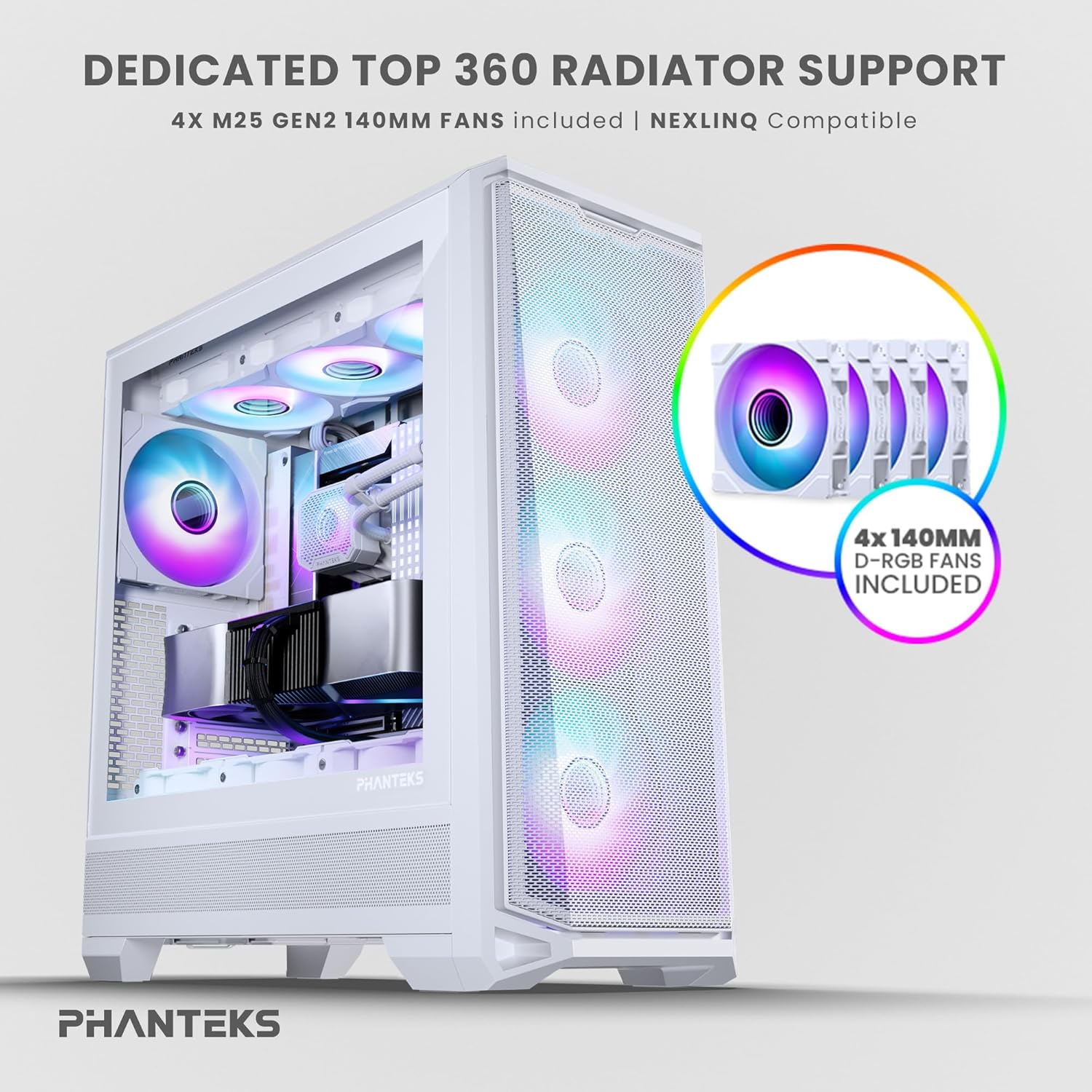
Figure 3: Top radiator support and pre-installed 140mm D-RGB fans

Figure 4: Dedicated 120mm fan positions for direct GPU cooling
3. Xestión de cables
Utilize the dedicated cable management tool and Velcro ties provided to route and secure cables behind the motherboard tray. This ensures optimal airflow and a clean interior.
Instrucións de funcionamento
1. Acendido
After connecting all internal components and external peripherals, connect the power cable to your PSU and a wall outlet. Press the power button located on the top I/O panel of the case to power on your system.

Figure 5: Front I/O Panel Layout
2. Control da iluminación RGB
The pre-installed M25-140 Gen2 D-RGB fans feature addressable RGB lighting. Control the lighting effects through your motherboard's RGB software (if compatible with D-RGB/ARGB) or a dedicated Phanteks RGB controller (sold separately).
Mantemento
1. Limpeza
Unha limpeza regular axuda a manter un rendemento óptimo e prolonga a vida útil dos seus compoñentes.
- Filtros de po: The Eclipse G400A features ultra-fine performance mesh panels on the top, left, and right sides, acting as dust filters. Regularly remove and clean these filters using compressed air or a soft brush to prevent dust buildup.
- Exterior: Limpe as superficies exteriores cun suave, damp pano. Evite produtos de limpeza abrasivos ou solventes.

Figure 6: Removable front mesh panel and dust filter for easy cleaning
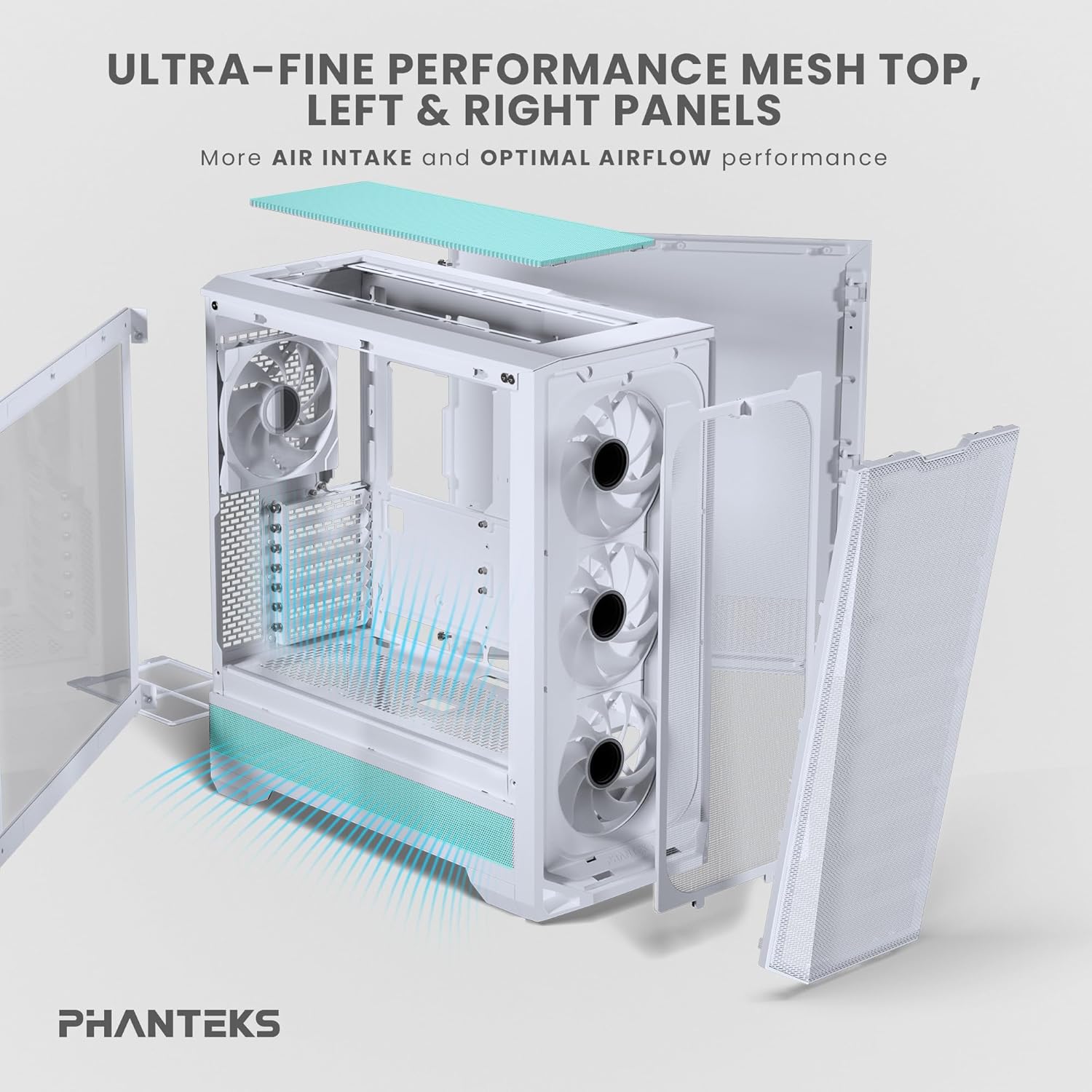
Figure 7: Disassembled panels demonstrating airflow and access for cleaning
2. Optimización do fluxo de aire
Ensure cables are neatly managed to avoid obstructing airflow. Periodically check fan operation to ensure they are spinning freely and quietly.
Resolución de problemas
- O sistema non se acende:
- Check all power connections, including the PSU to wall outlet, PSU to motherboard (24-pin and CPU 8-pin), and front panel power switch header.
- Asegúrese de que o interruptor da fonte de alimentación estea na posición "ON".
- Os ventiladores non xiran / Os RGB non se iluminan:
- Verify fan and RGB cables are correctly connected to the motherboard headers or a dedicated RGB controller.
- Check motherboard BIOS/UEFI settings for fan control and RGB settings.
- Fluxo de aire deficiente / Temperaturas elevadas:
- Clean all dust filters and fans.
- Ensure proper cable management to avoid airflow obstruction.
- Verify fan orientation (intake/exhaust) for optimal airflow path.
Especificacións técnicas
| Característica | Especificación |
|---|---|
| Marca | Phanteks |
| Nome do modelo | Eclipse G400A |
| Tipo de caso | Torre media |
| Cor | Branco |
| Material | Aceiro inoxidable, vidro temperado |
| Dimensións (LxWxH) | 49.48 x 22.99 x 52.20 cm (19.48 polgadas de profundidade x 9.05 polgadas de ancho x 20.55 polgadas de alto) |
| Peso do elemento | 19 libras (8.62 kg) |
| Ventiladores preinstalados | 4x M25-140 Gen2 D-RGB 140mm Fans |
| Soporte radiador | Ata 360 mm (arriba) |
| Soporte de almacenamento | 2 unidades SSD de 2.5 polgadas, 2 unidades HDD de 3.5 polgadas |
| E/S frontal | USB-C 3.2 Gen 2, 2x USB 3.0, Audio/Microphone, Power Button, Reset Button |
Garantía e Soporte
Phanteks products are manufactured to the highest quality standards. For warranty information and technical support, please refer to the official Phanteks websitio web ou póñase en contacto directamente co servizo de atención ao cliente. Garde o comprobante de compra para reclamacións de garantía.
Para obter máis axuda, visita a páxina de soporte oficial de Phanteks: www.phanteks.com/support.html


