1. Produto rematadoview
The Vormooi V15 is a compact and portable digital voice recorder designed for high-quality audio capture in various environments, including lectures, meetings, and classes. It features a large internal storage capacity and advanced noise reduction technology.
Características principais:
- Massive 64GB built-in memory: Stores up to 750 hours of voice recordings in WAV and MP3 formats.
- Deseño compacto e portátil: Pro ultra-delgadofile (0.25 x 1.3 x 2.2 inches) and lightweight (0.7 ounces) for maximum portability.
- Batería recargable de longa duración: Provides extended recording sessions.
- Redución de ruído AI: Equipped with an intelligent 2155P AI chip for enhanced noise cancellation and pure recording.
- Voice-Activated Recording (VAR): Intelligently skips silent passages to save memory and time.
- Operación sinxela: Gravación e gardado cun só botón.
- Compatibilidade universal: Connects via USB Type-C to Windows and macOS computers.

Image: Key features of the Vormooi V15 recorder, including its recording capacity, memory, and battery life.
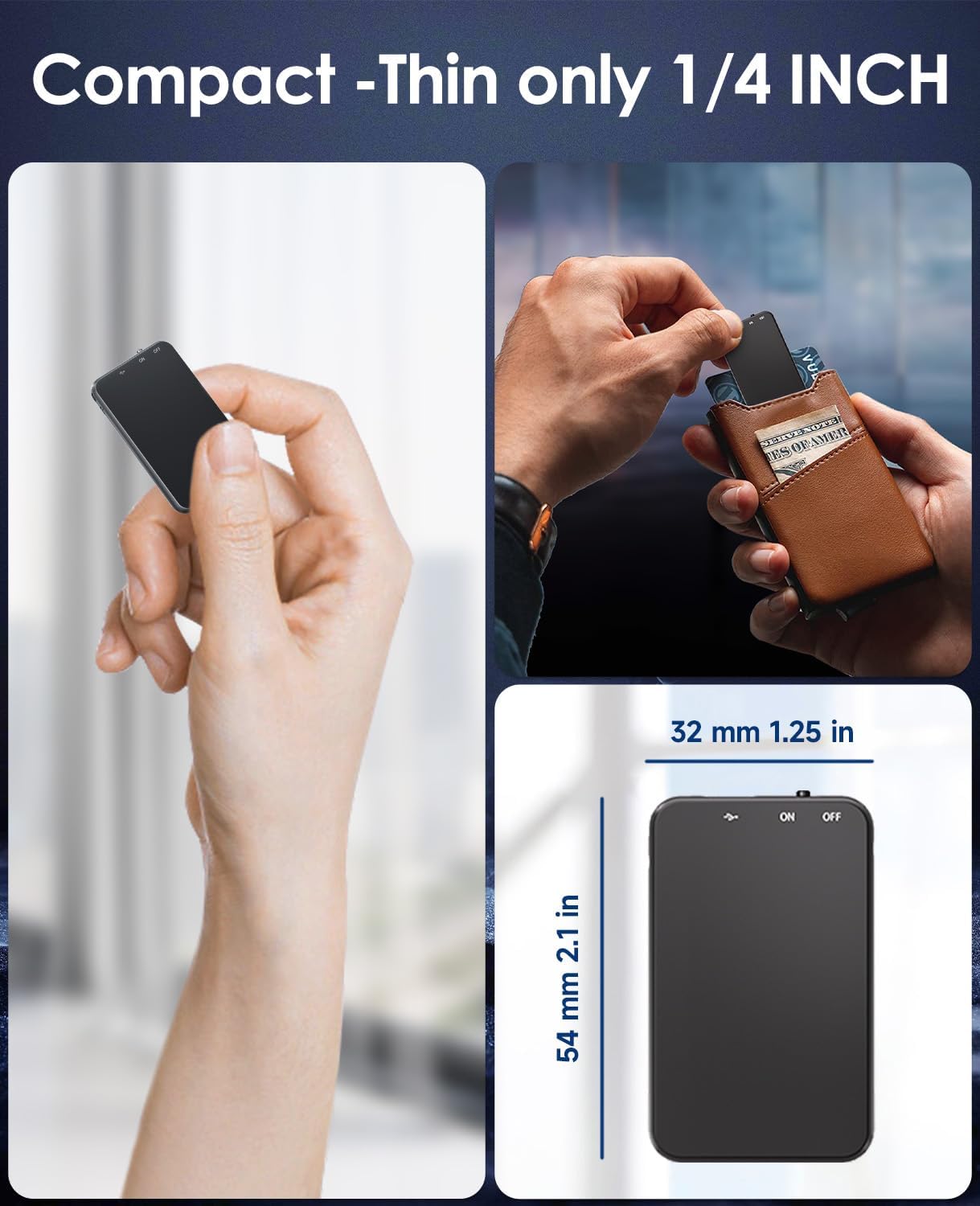
Image: Demonstrates the compact and thin design of the Vormooi V15, showing its small dimensions and portability.

Image: Illustrates the advanced AI noise cancellation technology and supported recording formats (MP3, WAV) of the V15 recorder.
2. Contido do paquete
Ao abrir o paquete, asegúrese de que todos os artigos estean presentes e en bo estado:
- 1 x Vormooi V15 Digital Voice Recorder
- 1 x USB Type-C Cable (for charging and data transfer)
- 1 x Manual de usuario (este documento)
3. Configuración
3.1 Carga do dispositivo
Before first use, fully charge the Vormooi V15 recorder. Connect the included USB Type-C cable to the recorder's Type-C port and the other end to a USB power adapter (not included) or a computer's USB port. The indicator light will show charging status.
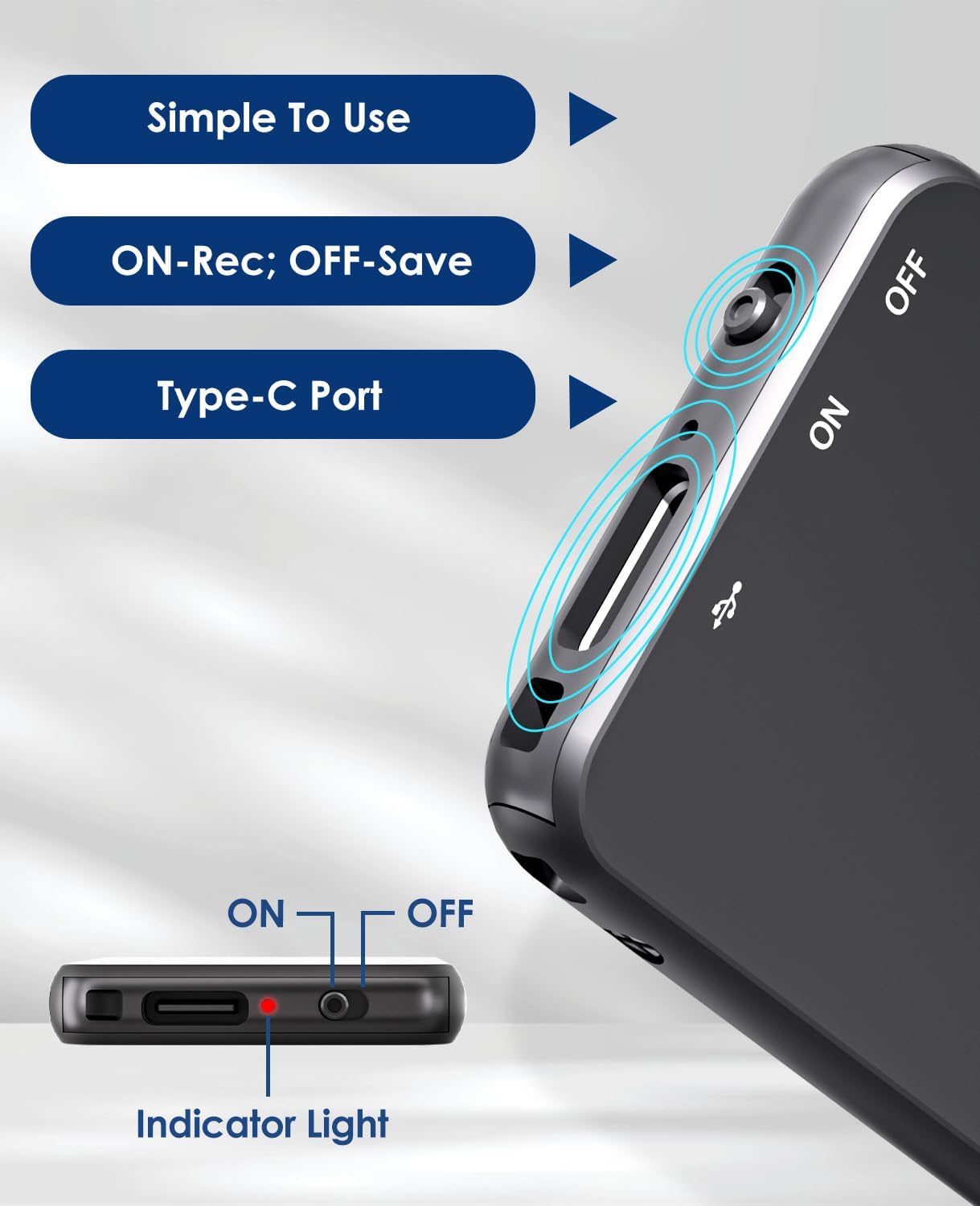
Image: Details of the recorder's side, highlighting the ON/OFF switch, Type-C port, and indicator light for simple operation.
3.2 Acendido/Apagado
To power on the device, slide the ON/OFF switch to the "ON" position. To power off, slide it to the "OFF" position. The indicator light will briefly illuminate.
4. Instrucións de funcionamento
4.1 Gravación de audio
To start recording, simply slide the ON/OFF switch to the "ON" position. The device will automatically begin recording. The indicator light may flash or change color to indicate recording status. To stop recording and save the file, deslice o interruptor á posición "OFF".
4.2 Voice-Activated Recording (VAR)
The V15 features a voice-activated recording function. When enabled, the recorder will automatically pause recording during periods of silence and resume when sound is detected, optimizing memory usage. The sensitivity of the voice activation can be adjusted (though specific instructions for adjustment are not provided in the product images, it's a common feature).

Image: Depicts the Voice-Activated Recording (VAR) feature, illustrating how it saves memory by skipping silent blanks and showing different sensitivity levels.
4.3 Transferencia Files ao ordenador
Connect the Vormooi V15 to your computer using the provided USB Type-C cable. The device will appear as a removable storage device (like a USB drive). You can then drag and drop your recorded audio files (MP3 or WAV format) to your computer. The device is compatible with Windows and macOS operating systems.

Image: Shows the Type-C connection and compatibility with Windows, Mac, and Linux operating systems for easy file Transferir.
4.4 Reprodución
While the device supports playback, specific controls for direct playback (e.g., built-in speaker, headphone jack) are not detailed in the provided information. Typically, playback is done by connecting headphones to the device's headphone jack (if available) or by transferring files to a computer and playing them there.
Note: The product specifications mention "Headphones Jack: 1", confirming the presence of a jack for direct playback.
5. Mantemento
- Limpeza: Usa un pano suave e seco para limpar o dispositivo. Non empregues produtos de limpeza líquidos nin disolventes.
- Almacenamento: Garde a gravadora nun lugar fresco e seco, lonxe da luz solar directa e de temperaturas extremas.
- Coidado da batería: Para prolongar a duración da batería, evite descargala completamente con frecuencia. Cargue o dispositivo regularmente, mesmo se non o usa durante períodos prolongados.
- Copia de seguridade de datos: Fai copias de seguridade das gravacións importantes no teu ordenador con regularidade para evitar a perda de datos.
6 Solución de problemas
- O dispositivo non se acende: Asegúrate de que a batería estea cargada. Conéctaa a unha fonte de alimentación e inténtao de novo.
- Non se pode gravar: Comprobe se a memoria está chea. Transferir files ao teu ordenador para liberar espazo.
- Mala calidade de gravación: Ensure the microphone is not obstructed. Reduce background noise. Check if AI Noise Reduction is functioning.
- Dispositivo non recoñecido polo ordenador: Try a different USB port or cable. Ensure the device is powered on. Restart your computer.
- Restablecer o dispositivo: If the device becomes unresponsive, locate the small "RESET" hole (often requiring a pin or paperclip) and gently press it to restart the device.

Imaxe: Anverso e reverso views of the V15, indicating the location of the reset button and overall dimensions.
7. Especificacións
| Característica | Detalle |
|---|---|
| Número de modelo | V15 |
| Capacidade de almacenamento | 64 GB |
| Capacidade de gravación | Ata 750 horas |
| Formatos de gravación | WAV, MP3 |
| Dimensións do produto | 0.25 x 1.3 x 2.2 polgadas (0.25" de profundidade x 1.3" de ancho x 2.2" de alto) |
| Peso do elemento | 0.705 onzas (20 gramos) |
| Tipo de batería | Lithium-ion (1 A battery included) |
| Duración da batería | 40-50 horas (aprox.) |
| Porto de carga | USB tipo C |
| Micrófono | Integrado |
| Jack para auriculares | 1 |
| Dispositivos compatibles | Windows/macOS Computer |
| Fabricante | Vormooi |
8. Garantía e soporte
For warranty information and technical support, please refer to the documentation included with your purchase or visit the official Vormooi websitio. Garda o comprobante de compra para reclamacións de garantía.
For further assistance, you may contact Vormooi customer service through their official channels. Details are typically found on the product packaging or the brand's official online presence.
9. Uso previsto
The Vormooi V15 Digital Voice Recorder is intended for personal and professional audio recording purposes, including but not limited to:
- Recording lectures and academic presentations.
- Documenting business meetings and conferences.
- Conducting interviews.
- Capturing personal memos and ideas.

Imaxe: Examples of typical usage scenarios for the V15 recorder, such as in classes, interviews, meetings, and for personal notes.


