1. Introdución
This manual provides essential information for the safe and efficient operation of your Anern FGI-DU4200 Dual Voltage Hybrid Solar Inverter. Please read this manual thoroughly before installation and use, and retain it for future reference. This inverter is designed to provide reliable power for various applications, integrating solar charging, AC utility charging, and inverter output functions.
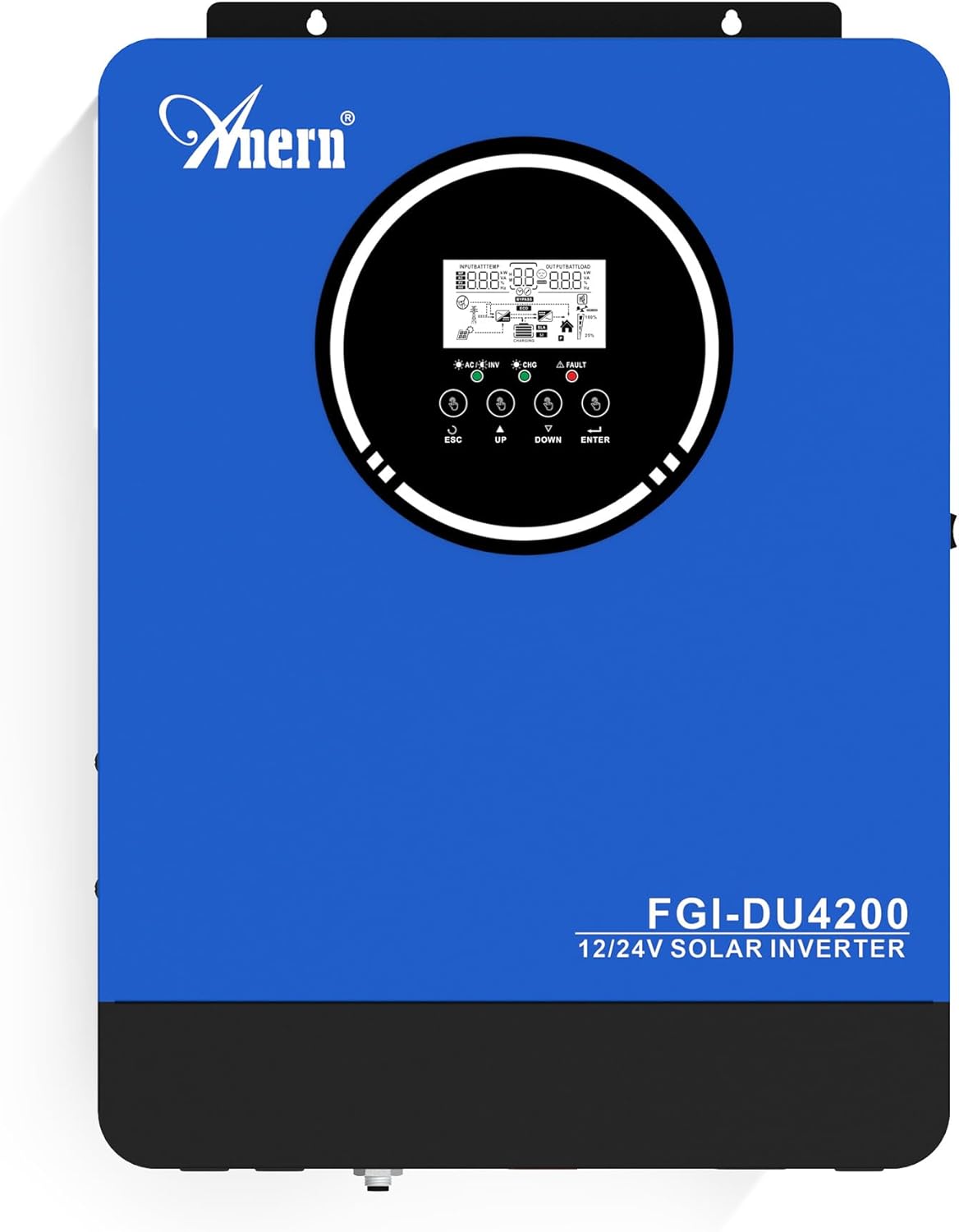
Figura 1: Anern FGI-DU4200 Dual Voltage Hybrid Solar Inverter. This image shows the front panel of the inverter, featuring the display screen and control buttons.
2. Instrucións de seguridade
Observe as seguintes precaucións de seguridade para evitar lesións e danos no inversor ou no equipo conectado:
- A instalación debe ser realizada por persoal cualificado de acordo coas normas eléctricas locais.
- Asegúrate de que todo o cableado teña o tamaño correcto e estea conectado correctamente.
- Non desmonte o inversor. Non hai pezas no seu interior que o usuario poida reparar.
- Manteña o inversor lonxe de materiais inflamables, humidade e luz solar directa.
- Asegúrese de que haxa unha ventilación axeitada arredor do inversor para evitar o sobrequecemento.
- Desconecte sempre todas as fontes de alimentación (solar, baterías, servizos públicos) antes de realizar calquera mantemento ou cableado.
- Usar o equipo de protección individual (EPI) axeitado durante a instalación e o mantemento.
3. Produto rematadoview e Características
The Anern FGI-DU4200 is a versatile hybrid solar inverter designed for both on-grid and off-grid applications. It features automatic dual-voltage operation and a 120A MPPT solar charge controller.
Características principais:
- Automatic Dual-Voltage Operación: Automatically recognizes 12VDC (2300W output) or 24VDC (4200W output) battery systems.
- Saída de onda sinusoidal pura de alta eficiencia: Provides stable 220-230VAC ±5% output (50Hz) with 90% efficiency.
- Integrated 120A MPPT Solar Charge Controller: Maximizes solar power harvesting.
- Múltiples modos de carga: Solar, Solar and Utility, Solar Priority.
- Múltiples modos de saída: Solar Priority, Utility Priority, SBU (Solar-Battery-Utility) Mode.
- Seamless Transfer: Grid/generator transfer time less than 20ms for critical loads.
- Protección integral: Protección contra sobrecarga, sobretemperatura e curtocircuíto.
- Compatibilidade da batería: Supports 12V/24V Lithium, Lead-Acid, and Gel batteries.
- Cold Start Capability: Ensures operation in extreme conditions.
- Monitorización Wi-Fi: Allows system operation control via mobile phone (requires optional Wi-Fi module).

Figura 2: Acabadoview of key features including frequency range, waveform, charging currents, battery voltage, and protection mechanisms.

Figura 3: Illustration of the inverter's dual voltage capability, supporting 4.2KW at 24V and 2.3KW at 12V battery systems.
4. Configuración e instalación
4.1 Desembalaxe e inspección
Upon receiving the inverter, carefully unpack it and inspect for any shipping damage. Ensure all components listed in the packing list are present. If any damage or missing parts are found, contact your dealer immediately.
4.2 Montaxe do inversor
Mount the inverter vertically on a sturdy wall or surface. Ensure there is sufficient clearance around the unit for proper ventilation (at least 20 cm on all sides). Avoid mounting in direct sunlight, near heat sources, or in areas with excessive dust or moisture.
4.3 Conexións de cableado
All wiring must comply with local electrical codes. Use appropriate wire gauges for all connections to prevent overheating and ensure efficient power transfer.
4.3.1 Conexión da batería
The inverter supports both 12VDC and 24VDC battery systems. The inverter automatically detects the battery voltage. Ensure correct polarity when connecting batteries. For 12V systems, batteries are typically connected in parallel. For 24V systems, batteries are typically connected in series.

Figura 4: Wiring diagram illustrating parallel connection for 12V battery systems (2300W output) and series connection for 24V battery systems (4200W output).

Figura 5: The inverter is compatible with various battery types, including Gel, AGM, Flooded (FLD), Lithium (LI), and Sealed Lead-Acid (SLD) batteries.
4.3.2 Conexión do panel solar
Connect your solar panels to the designated PV input terminals. Ensure the open circuit voltage (Voc) of your solar array does not exceed the inverter's maximum PV input voltage (500Vdc). Observe correct polarity.
4.3.3 AC Input Connection (Utility/Generator)
Connect the AC utility grid or a compatible generator to the AC input terminals. The inverter supports 220-230VAC input. Ensure proper grounding.
4.3.4 AC Output Connection (Loads)
Connect your household or office loads to the AC output terminals. The inverter provides a pure sine wave output suitable for sensitive electronics. Do not exceed the rated output power of the inverter (2300W for 12VDC systems, 4200W for 24VDC systems).
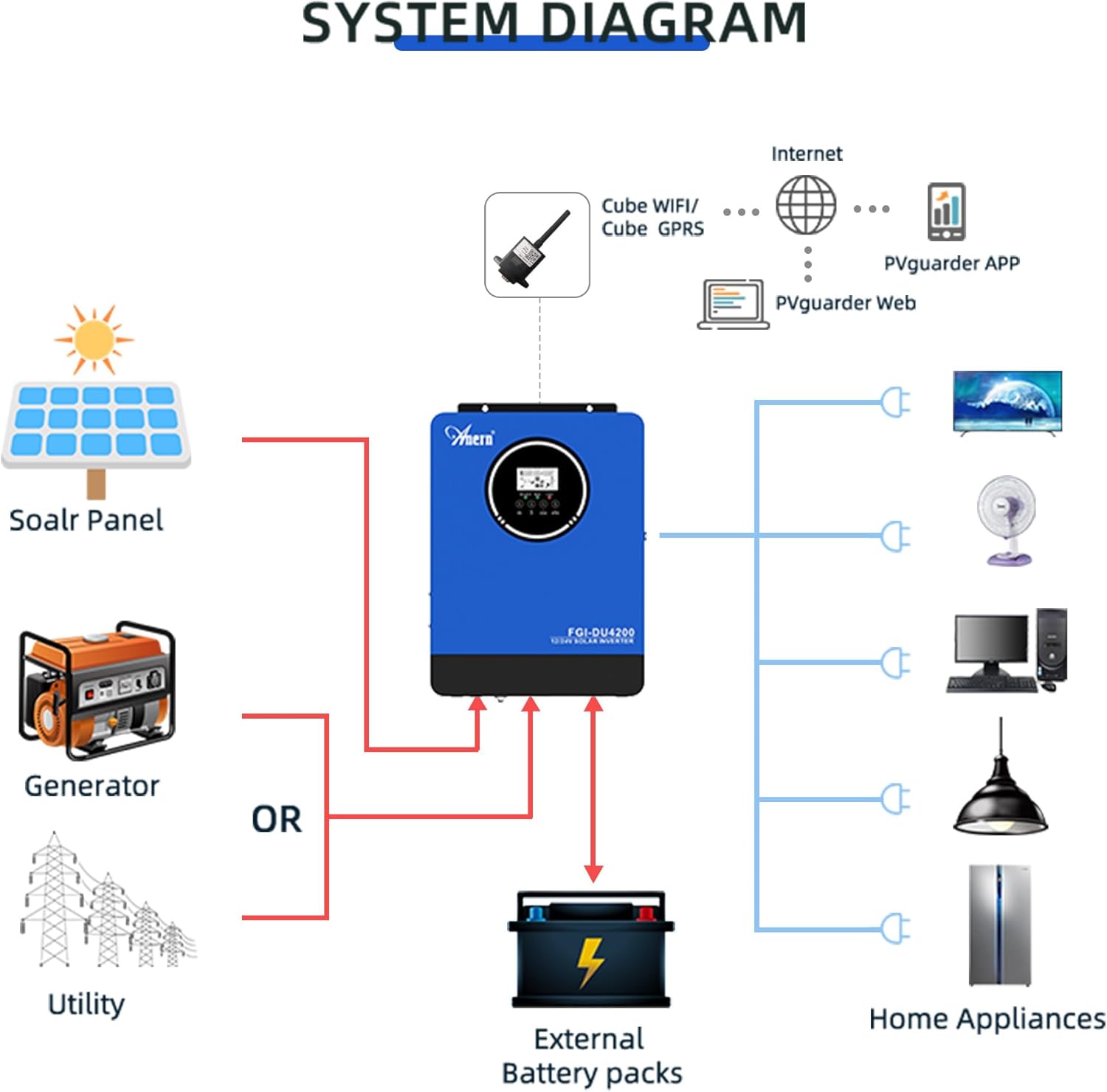
Figura 6: Comprehensive system diagram showing connections for solar panels, generator/utility, external battery packs, and various home appliances.

Figura 7: Example of an outdoor installation of the Anern FGI-DU4200 inverter, demonstrating its integration into a home solar power system.
5. Instrucións de funcionamento
5.1 Acendido/Apagado
After all connections are securely made, switch on the battery breaker first, then the solar array breaker, and finally the AC input breaker (if connected). Press the power button on the inverter to turn it on. To power off, reverse the sequence: turn off AC input, then solar, then battery, and finally the inverter power button.
5.2 Pantalla LCD e botóns de control
The inverter features an LCD display that shows real-time operating status, input/output voltages, battery status, and error codes. Use the control buttons (ESC, UP, DOWN, ENTER) to navigate through menus and adjust settings.
5.3 Modos de carga
O inversor ofrece catro modos de carga seleccionables:
- Prioridade solar: Solar power charges the battery first. If solar is insufficient, utility power supplements.
- Prioridade de servizos públicos: Utility power charges the battery first. Solar power supplements if utility is unavailable.
- Só solar: Only solar power charges the battery.
- Solar e servizos públicos: Both solar and utility power charge the battery simultaneously.
5.4 Modos de saída
The inverter offers three selectable output modes:
- Prioridade de servizos públicos: Loads are primarily powered by utility. If utility fails, the inverter switches to battery power.
- Prioridade solar: Loads are primarily powered by solar. If solar is insufficient, battery power is used. If both are insufficient, utility power is used (if connected).
- SBU (Solar-Battery-Utility) Mode: Loads are powered by solar first, then battery, and finally utility if both solar and battery are depleted or unavailable.
5.5 Wi-Fi Monitoring (Optional)
If equipped with the optional Wi-Fi module, the inverter can be monitored and controlled via a mobile application. Connect the Wi-Fi module to the designated port on the inverter and follow the instructions provided with the module for setup.

Figura 8: Diagram illustrating the connection of an optional Wi-Fi module for remote monitoring and control of the inverter system via a mobile application or web interface.
6. Mantemento
Un mantemento regular garante a lonxevidade e o rendemento óptimo do seu inversor.
- Limpeza: Limpa periodicamente o exterior do inversor cun pano seco. Asegúrate de que as aberturas de ventilación estean libres de po e residuos.
- Conexións: Annually check all electrical connections for tightness and corrosion. Re-tighten if necessary.
- Inspección da batería: For lead-acid batteries, check electrolyte levels and terminal condition as per battery manufacturer guidelines.
- Ambiente: Asegúrese de que o ambiente de funcionamento se manteña dentro dos rangos de temperatura e humidade especificados.
7 Solución de problemas
Esta sección ofrece solucións para problemas comúns. Para problemas que non aparecen na lista, póñase en contacto co servizo de asistencia técnica.
| Problema | Causa posible | Solución |
|---|---|---|
| O inversor non se acende | Sen conexión á batería; Vol. da bateríatage too low; Power button not pressed. | Comprobe as conexións da batería e o voltage; Charge battery; Press and hold power button. |
| Sen saída de CA | Sobrecarga; Curtocircuíto; Batería baixa; Fallo do inversor. | Reduce load; Check for short circuits; Charge battery; Restart inverter. |
| A carga solar non funciona | Solar panels disconnected; Insufficient sunlight; PV voltage too low/high; MPPT fault. | Check PV connections; Ensure adequate sunlight; Verify PV voltage dentro do alcance. |
| Amosouse o código de erro | Specific fault detected by the inverter. | Refer to the inverter's LCD display for the specific error code and consult the full manual (if available) or contact support for detailed interpretation and resolution. |
8. Especificacións
| Parámetro | Valor |
|---|---|
| Modelo | FGI-DU4200 |
| Rated Power (12VDC) | 2300 W |
| Rated Power (24VDC) | 4200 W |
| Batería Voltage | 12 V CC / 24 V CC (detección automática) |
| Vol. De saídatage | 220-230VAC ±5% (50Hz) |
| Forma de onda | Pura Sine Wave |
| MPPT Solar Charge Controller Current | 120A |
| Vol. máx. de circuito aberto de matriz fotovoltaicatage | 500 Vdc |
| Corrente de carga AC | 60A |
| Eficiencia | 90 % |
| Tempo de transferencia | <20 ms |
| Dimensións do produto | 16.9 x 8.27 x 21.6 polgadas |
| Peso do elemento | 19.14 libras |
| Fabricante | Anern |
9. Garantía e soporte
Anern products are designed for reliability and performance. For warranty information, please refer to the warranty card included with your product or visit the official Anern website. For technical support, troubleshooting assistance, or spare parts, please contact Anern customer service through their official channels. Please have your model number (FGI-DU4200) and purchase date ready when contacting support.
Información de contacto: Refer to your product packaging or the official Anern websitio web para obter os datos de contacto máis actualizados.


