Introdución
The Autel MaxiCOM MK808Z-BT is an advanced diagnostic scan tool designed for comprehensive vehicle system analysis and maintenance. This device features an Android 11 operating system, a fast RK3566 CPU, 4GB+64GB memory, and dual 2.4&5GHz Wi-Fi for efficient operation. It offers full bidirectional control, over 28 service functions, and extensive vehicle coverage for 150+ brands from 1996 onwards, including support for 2018+ FCA SGW. This manual provides essential information for setting up, operating, maintaining, and troubleshooting your MK808Z-BT scanner.
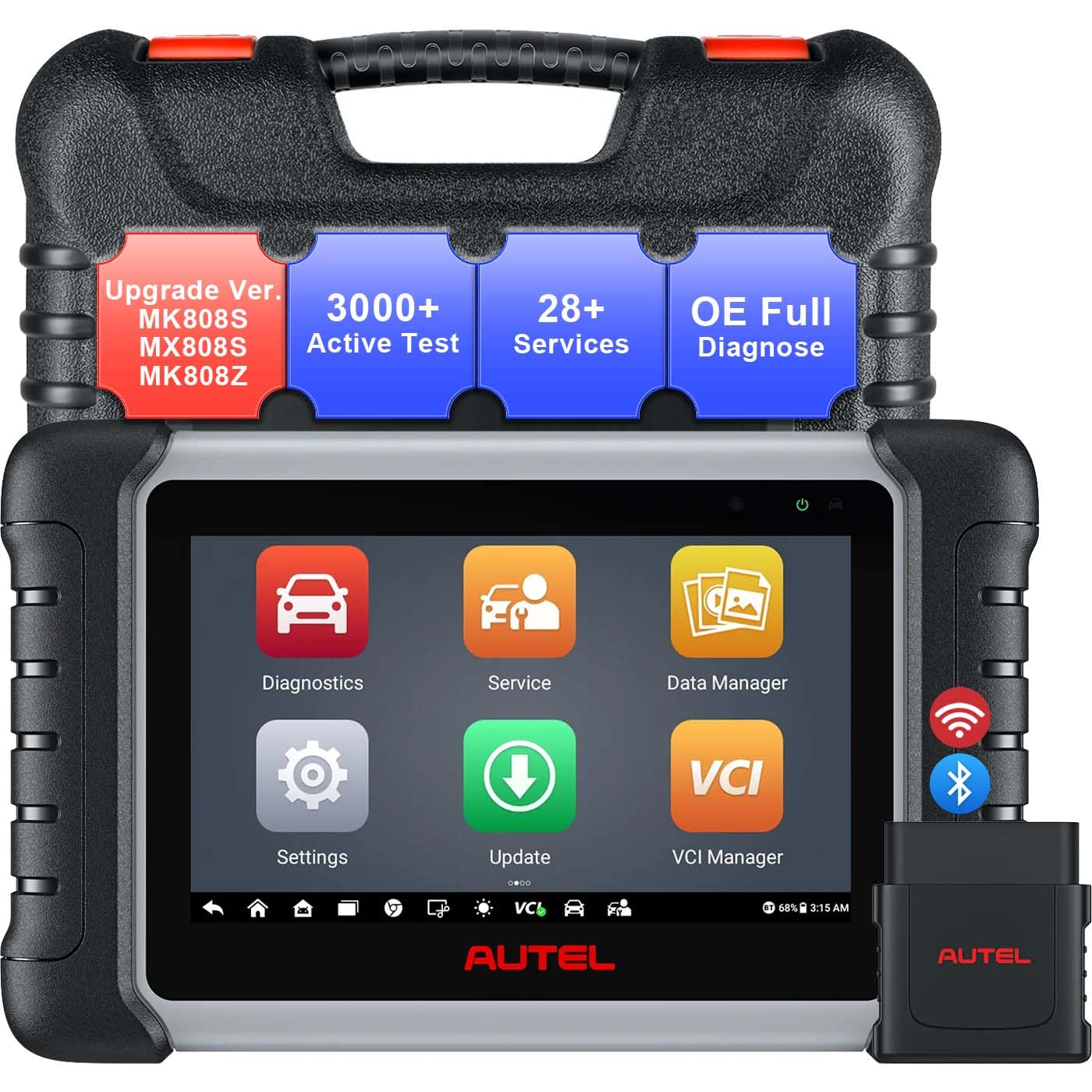
Figure 1: Autel MaxiCOM MK808Z-BT Diagnostic Scanner and VCI Mini.
Guía de configuración
1. Unpacking and Initial Power-On
- Carefully remove the MaxiCOM MK808Z-BT tablet and VCI Mini from the packaging.
- Ensure all components listed in the 'What's in the Box' section are present.
- Press and hold the Power button on the tablet to turn it on. The device will boot up to the Android 11 interface.
- Charge the device fully before first use using the provided power adapter.
2. Connecting the VCI Mini
The VCI (Vehicle Communication Interface) Mini connects wirelessly to the MK808Z-BT tablet via Bluetooth, allowing for remote diagnostics.
- Localiza o porto OBDII do vehículo, normalmente debaixo do taboleiro.
- Plug the VCI Mini securely into the vehicle's OBDII port. The VCI Mini's indicator light should illuminate.
- On the MK808Z-BT tablet, navigate to the 'VCI Manager' application.
- Select 'Bluetooth' as the connection method and pair with the VCI Mini. A stable connection will be indicated on the tablet screen.

Figure 2: The MaxiCOM MK808Z-BT tablet and VCI Mini for wireless diagnostics.
3. Software Updates and Wi-Fi Connection
To ensure optimal performance and access to the latest vehicle coverage and features, regularly update the software.
- Connect the MK808Z-BT tablet to a stable Wi-Fi network (2.4GHz or 5GHz) via the 'Settings' menu.
- Tap the 'Update' icon on the main screen.
- Download and install all available system and vehicle software updates.
4. FCA SGW Access Setup (for 2018+ vehicles)
For diagnostics and services on 2018 and newer FCA (Chrysler, Dodge, Jeep, Alfa Romeo, Fiat) vehicles, secure gateway (SGW) access is required.
- Visit the AutoAuth official websitio (www.autoauth.com).
- Register for an FCA account.
- Purchase AutoAuth access.
- Follow the on-screen prompts on your MK808Z-BT to link your scanner to your AutoAuth account and begin diagnostics.

Figure 3: Steps for setting up FCA AutoAuth SGW access.
Instrucións de funcionamento
1. All-System Diagnostics
The MK808Z-BT can access all available electronic control modules (ECUs) in a vehicle to read and clear diagnostic trouble codes (DTCs), view datos en directo e recuperar información da ECU.
- From the main menu, tap 'Diagnostics'.
- Select the vehicle make, model, and year. Use the AutoVIN feature (for 2006+ vehicles) for automatic vehicle identification.
- Choose 'Auto Scan' to perform a comprehensive scan of all systems or select specific modules for diagnosis.
- Review DTCs, view live data streams in text or graph format, and analyze system status.

Figure 4: The scanner's ability to access all vehicle systems for diagnostics.
2. Bidirectional Control (Active Tests)
Bidirectional control allows the scanner to send commands to vehicle actuators and receive feedback, enabling functional testing of components without manual controls. This helps in quickly identifying faulty components.
- Activate radiator fans.
- Modulate throttle.
- Operate windows and mirrors.
- Test fuel injectors.
- Control lights and wipers.
- Perform various other active tests on components like ABS pumps, solenoids, and relays.

Figure 5: Illustrates the bidirectional control functionality, sending commands to vehicle components.
3. Funcións de servizo
The MK808Z-BT provides access to over 28 common maintenance and service functions.
- Reinicio do aceite: Restablecer o sistema de vida útil do aceite despois dun cambio de aceite.
- EPB (freo de estacionamento electrónico): Deactivate and activate the brake control system for brake service.
- Purgamento do ABS: Realizar procedementos de purga do sistema ABS.
- Calibración do SAS (sensor de ángulo de dirección): Calibrar o sensor do ángulo de dirección.
- BMS (Sistema de xestión de batería): Rexistra novas substitucións de baterías.
- Codificación do inxector: Codifique os novos números de inxectores na ECU.
- TPMS (Sistema de monitorización da presión dos pneumáticos): Perform TPMS sensor relearn procedures.
- And many more, including Throttle Adaptation, Suspension Calibration, and Headlamp Axuste.

Figura 6: Examples of the 28+ service functions available on the scanner.
4. Expandable Tools Integration
The MK808Z-BT supports integration with additional Autel tools for enhanced diagnostic capabilities:
- BT506 Battery Test: Connect the BT506 (sold separately) to perform in-vehicle and out-of-vehicle battery, starter, and generator tests.
- MV108S Inspection Camera: Pair with the MV108S (sold separately) to inspect hard-to-reach areas of the vehicle with high-definition imaging.
Mantemento
1. Actualizacións de software
Regular software updates are crucial for maintaining optimal performance, expanding vehicle coverage, and accessing new features. Connect to Wi-Fi and check for updates frequently via the 'Update' application.
2. Limpeza do dispositivo
To clean the tablet's screen, use a soft, lint-free cloth. For the rugged rubberized housing, a damp cloth with mild soap can be used. Avoid harsh chemicals or abrasive materials that could damage the device.
3. Coidado da batería
The MK808Z-BT is equipped with a Lithium Ion battery. To prolong battery life:
- Evite descargar completamente a batería con frecuencia.
- Garda o dispositivo nun lugar fresco e seco cando non estea en uso.
- Cargue o dispositivo regularmente, mesmo se non o usa activamente, para manter a batería en bo estado.
Resolución de problemas
Problemas comúns e solucións
- O dispositivo non se acende: Ensure the battery is charged. Connect the power adapter and try again. If the issue persists, contact technical support.
- VCI Mini not connecting: Verify the VCI Mini is securely plugged into the vehicle's OBDII port and receiving power. Check Bluetooth settings on the tablet and ensure the VCI Mini is paired. Restart both the tablet and the VCI Mini.
- Sen comunicación co vehículo: Confirm the vehicle's ignition is on. Check the OBDII cable and VCI Mini connection. Ensure the correct vehicle make, model, and year are selected in the diagnostic software. Verify the vehicle's battery voltage é suficiente.
- Conxelación ou rendemento lento do software: Close unnecessary applications. Ensure the device has sufficient storage space. Perform a software update to the latest version. If issues continue, consider a factory reset (backup data first).
- FCA SGW access issues: Double-check your AutoAuth account registration and subscription status. Ensure your Autel scanner is correctly linked to your AutoAuth account.
For persistent issues or problems not covered here, please refer to the technical support section.
Especificacións
| Característica | Especificación |
|---|---|
| Sistema Operativo | Android 11.0 |
| Procesador | RK3566 (5X Faster) |
| Memoria | 4 GB de RAM + 64 GB de almacenamento |
| Mostrar | Pantalla táctil capacitiva LCD de 7 polgadas con resolución de 1024 x 600 |
| Conectividade | Wi-Fi (2.4 & 5 GHz), Bluetooth (VCI Mini) |
| Batería | Batería de iones de litio de 5000 mAh |
| Dimensións (L x W x H) | 6 cm de longo x 10 cm de ancho x 2 cm de alto |
| Peso do elemento | 5.33 libras |
| Protocolos admitidos | ISO9141-2, ISO14230-2, ISO15765, K/L-Line, Flashing Code, SAE-J1850 VPW, SAE-J1850 PWM, ISO11898 (Highspeed, Middlespeed, Lowspeed and Singlewire CAN, fault-tolerant CAN), SAE J2610, GM UART, UART Echo Byte Protocol, Honda Diag-H Protocol, MPV, GMLAN, Mini-Bus Protocol, TP2.0, TP1.6, etc. |

Figure 7: Key hardware specifications of the MK808Z-BT.
Garantía e Soporte
Información da garantía
The Autel MaxiCOM MK808Z-BT Diagnostic Scanner typically comes with a manufacturer's limited warranty covering defects in materials and workmanship. Please refer to the warranty card included with your product or visit the official Autel websitio web para coñecer os termos e condicións específicos, incluíndo a duración da garantía e os detalles da cobertura.
Soporte técnico
For technical assistance, product inquiries, or troubleshooting beyond the scope of this manual, please contact Autel customer support:
- Visita o sitio web oficial de Autel websitio (www.autel.com) for support resources, FAQs, and contact information.
- Look for the 'Support' or 'Contact Us' section on the website to find phone numbers, email addresses, or live chat options.
- When contacting support, have your product model (MK808Z-BT) and serial number ready for faster service.


