1. Instrucións de seguridade importantes
Please read all instructions carefully before using this appliance and retain them for future reference. Failure to follow these instructions may result in electric shock, fire, or serious personal injury.
- Asegúrese de que a fonte de alimentación voltage coincide coa etiqueta de clasificación do electrodoméstico.
- Non fagas funcionar o ventilador cun cable ou enchufe danados. Se o cable está danado, debe ser substituído polo fabricante, o seu axente de servizo ou persoas con cualificación similar para evitar un perigo.
- Desconecte sempre o ventilador da toma de corrente antes de limpalo, reparalo ou movelo.
- Non introduza os dedos nin ningún obxecto na grella do ventilador mentres estea en funcionamento.
- Keep the fan away from water or other liquids. Do not use it in wet or damp ambientes.
- Este aparello só é para uso interior. Non use ao aire libre.
- Do not place the fan near heat sources such as radiators, heat registers, stoves, or other appliances that produce heat.
- Vixiar aos nenos para asegurarse de que non xoguen co aparello.
- Do not use the fan in areas where gasoline, paint, or flammable liquids are stored.
2. Produto rematadoview
The Altus AL 40 TFB is a sleek and efficient tower air cooler designed for indoor use. It features a compact design, multiple speed settings, and easy-to-use push-button controls.
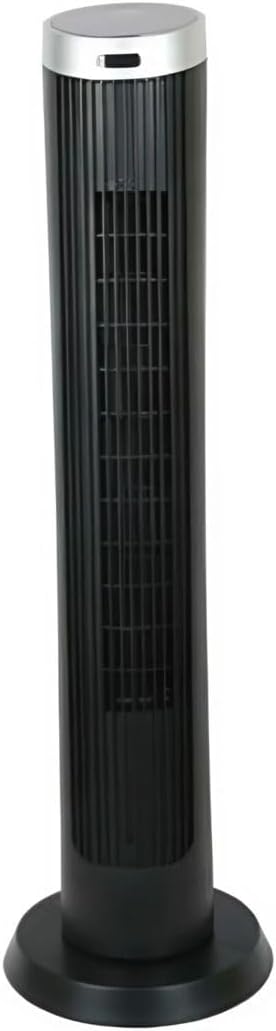
Figura 2.1: Fronte view of the Altus AL 40 TFB Tower Air Cooler. This image shows the tall, slender black body of the fan with its air outlet grille and a stable round base.
Compoñentes:
- Panel de control: Located on the top of the unit for easy access to all functions.
- Reixa de saída de aire: Vertical grille on the front for air dispersion.
- Base: Stable round base for secure placement.
- Cable de alimentación: Situado na parte traseira da unidade.

Figura 2.2: Detallado view of the control panel on top of the Altus AL 40 TFB Tower Air Cooler. The panel features a digital display showing '28' and several push buttons for various functions.
3. Configuración
Follow these steps to set up your Altus AL 40 TFB Tower Air Cooler:
- Desempaquetar: Carefully remove the fan from its packaging. Retain the packaging for future storage or transport.
- Montaxe da base (se é necesario): Some models may require minor base assembly. If your unit's base is detached, align the base sections and secure them according to the diagrams in the packaging. Ensure it is firmly attached.
- Colocación: Place the fan on a firm, level surface. Ensure there is adequate space around the fan for proper airflow, at least 30 cm (12 inches) from walls or furniture. This appliance is designed for indoor use only.
- Conexión de alimentación: Plug the power cord into a standard electrical outlet. Ensure the outlet meets the voltage requisitos especificados na etiqueta do produto.
4. Instrucións de funcionamento
Your Altus AL 40 TFB Tower Air Cooler is equipped with user-friendly push-button controls on the top panel.
Funcións do panel de control:
- Botón de encendido (⏻): Press once to turn the fan ON, press again to turn it OFF.
- Botón de velocidade (💨): Press repeatedly to cycle through the 3 available fan speeds: Low, Medium, and High. The current speed setting may be indicated on the digital display.
- Botón de modo (M): If available, press to select different operating modes (e.g., Normal, Natural, Sleep). Refer to the digital display for the active mode.
- Botón de oscilación (↔): Press to activate or deactivate the oscillation function, which allows the fan to rotate from side to side to distribute air over a wider area.
- Botón do temporizador (🕒): If available, press to set an automatic shut-off timer. Each press typically increases the timer duration by a set increment (e.g., 1 hour).
Funcionamento xeral:
- Enchufe o ventilador nunha toma de corrente adecuada.
- Preme o botón de encendido (⏻) to turn on the fan.
- Select your desired fan speed using the Speed Button (💨).
- Activate oscillation if desired by pressing the Oscillation Button (↔).
- To turn off the fan, press the Power Button (⏻) de novo.
5. Mantemento
Regular maintenance ensures optimal performance and extends the lifespan of your Altus AL 40 TFB Tower Air Cooler.
Limpeza:
- Desenchufe sempre o ventilador antes de limpar.
- Limpeza exterior: Limpe as superficies exteriores do ventilador cun pano suave eamp cloth. Do not use abrasive cleaners, waxes, or polishes as they may damage the finish.
- Air Inlet/Outlet Grilles: Use a vacuum cleaner with a brush attachment to gently remove dust and debris from the air inlet and outlet grilles. Do not attempt to disassemble the fan for cleaning.
- Asegúrate de que o ventilador estea completamente seco antes de volvelo conectar e poñelo en funcionamento.
Almacenamento:
When not in use for extended periods, store the fan in a cool, dry place. It is recommended to store it in its original packaging to protect it from dust and damage.
6 Solución de problemas
If you encounter any issues with your Altus AL 40 TFB Tower Air Cooler, please refer to the following common problems and solutions:
- O ventilador non se acende:
- Comprobe se o cable de alimentación está conectado correctamente a unha toma de corrente que funcione.
- Ensure the power button on the control panel has been pressed.
- Verify that the household circuit breaker or fuse has not tripped.
- Fluxo de aire débil:
- Check if the fan speed is set to a higher setting.
- Ensure the air inlet and outlet grilles are not blocked by dust or obstructions. Clean them if necessary.
- Ruído inusual:
- Asegúrate de colocar o ventilador sobre unha superficie estable e nivelada.
- Check for any foreign objects that might have fallen into the fan grilles.
- Se o ruído persiste, interrompa o uso e contacte co servizo de atención ao cliente.
If the problem cannot be resolved using the above steps, please contact Altus customer support.
7. Especificacións
Detailed technical specifications for the Altus AL 40 TFB Tower Air Cooler:
| Característica | Especificación |
|---|---|
| Marca | Altus |
| Nome do modelo | AL 40 TFB |
| Cor | Negro |
| Deseño de ventiladores eléctricos | Floor Fan (Tower Type) |
| Fonte de enerxía | Eléctrico con cable |
| Dimensións do produto (P x A x A) | 29P x 29L x 101A cm |
| Tipo de montaxe | Montaxe no piso |
| Tipo de acabado | Pintado |
| Uso interior/exterior | Interior |
| Método de control | Pulsador |
| Número de niveis de potencia | 3 |
| Sen fíos | Non |
8. Garantía e soporte
Altus provides comprehensive support for its products. For any assistance or warranty-related inquiries, please contact our customer service.

Figura 8.1: Altus customer service and warranty information. The image displays the Altus logo, a message about service availability, and a contact number for support.
Our services are always available for your Altus products. You can benefit from our door-to-door service by calling our support line for any assistance you may need.
Arçelik Service Warranty: For products under warranty, our home product pickup service is provided free of charge.
Customer Support Line: 0850 210 0 888
Please have your product model number (AL 40 TFB) and purchase details ready when contacting support.


