Introdución
Thank you for choosing the Bigben Karaoke Microphone. This all-in-one portable karaoke system combines a stereo microphone with a powerful 15W Bluetooth speaker and dynamic light effects, designed to enhance your singing and music listening experience. This manual provides essential information for safe and optimal use of your device.
Información de seguridade
- Le todas as instrucións antes de usar o dispositivo.
- Manteña o dispositivo lonxe da auga e da humidade.
- Non expoña a temperaturas extremas nin a luz solar directa.
- Non intente desmontar nin reparar o dispositivo vostede mesmo. Consulte persoal de servizo cualificado.
- Use só os accesorios de carga especificados.
- Manter fóra do alcance dos nenos.
Contido do paquete
Comprobe que todos os elementos estean presentes no paquete:
- Bigben Karaoke Microphone (Model PARTYBTMIC2WH)
- Cable de carga (USB)
- Manual de usuario (este documento)
- Front Glass (as an included component, likely pre-installed or a protective cover)

Imaxe 1: The Bigben Karaoke Microphone shown in its retail packaging. The packaging highlights features such as Bluetooth connectivity, 4 vocal effects, and wireless speaker functionality.
Produto rematadoview
The Bigben Karaoke Microphone features an integrated speaker and various controls for an interactive experience.
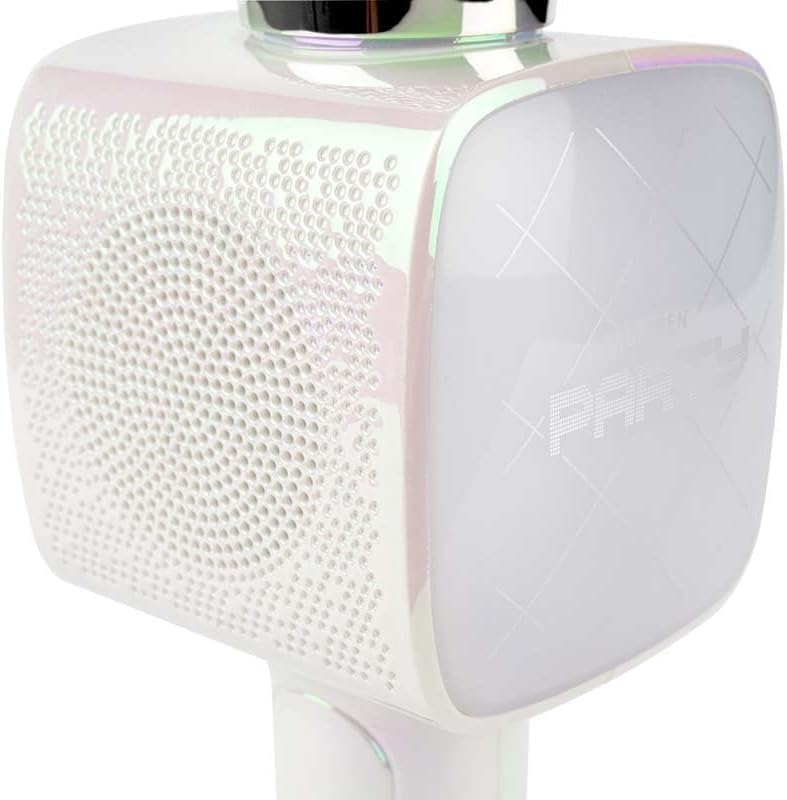
Imaxe 2: Un primeiro plano view of the Bigben Karaoke Microphone, focusing on the speaker grille and the light-up panel. The panel displays "PARTY" and shows dynamic light effects.
Características principais:
- Bluetooth 5.0: For stable wireless connection to your devices.
- Altavoz integrado: 15W output for clear and powerful sound.
- Efectos de luz: Dynamic lighting to enhance the karaoke experience.
- Efectos de son: 4 different vocal effects and an echo effect.
- Múltiples entradas: USB, Micro SD, and 3.5mm headphone jack.
Configuración
1. Carga do micrófono
- Connect the provided USB charging cable to the microphone's charging port.
- Conecta o outro extremo do cable USB a un adaptador de corrente USB compatible (non incluído) ou ao porto USB dun ordenador.
- A luz indicadora de carga acenderase. Unha vez cargada completamente, a luz pode cambiar de cor ou apagarse.
2. Acendido/apagado
- To power on, press and hold the Power button for a few seconds until the indicator light illuminates and you hear an audible prompt.
- Para apagar, manteña premido o botón de acendido/apagado de novo ata que o indicador luminoso se apague.
3. Emparellamento Bluetooth
- Ensure the microphone is powered on and in Bluetooth pairing mode (usually indicated by a flashing light).
- No teu teléfono intelixente, tableta ou outro dispositivo compatible con Bluetooth, vai á configuración de Bluetooth.
- Busca available devices and select "Bigben Karaoke Mic" (or similar name) from the list.
- Once paired, you will hear a confirmation sound, and the indicator light will stop flashing.
Instrucións de funcionamento
1. Tocar música
- Vía Bluetooth: After successful pairing, play music from your connected device. The sound will output through the microphone's speaker.
- Via USB/Micro SD: Insert a USB drive or Micro SD card (with music files) into the respective port. The microphone will automatically detect and play music.
- Via 3.5mm Audio Cable: Connect an external audio source using a 3.5mm audio cable (not included) to the headphone input.
2. Usando o micrófono
- Speak or sing directly into the microphone grille.
- Adjust the microphone volume using the dedicated controls on the device.
3. Efectos de son
- Efectos vocais: The microphone offers 4 different vocal effects. Press the "Effect" button (or similar labeled button) to cycle through these effects.
- Efecto de eco: Activate or adjust the echo effect using its dedicated control.
4. Efectos de luz
The microphone features dynamic light effects. These lights typically activate automatically when the device is on and can often be toggled or changed using a dedicated light button, if available.
Mantemento
- Limpeza: Wipe the microphone with a soft, dry cloth. Do not use abrasive cleaners or solvents.
- Almacenamento: Almacene o dispositivo nun lugar fresco e seco lonxe da luz solar directa cando non o use.
- Coidado da batería: For optimal battery life, charge the device regularly, even if not used frequently.
Resolución de problemas
| Problema | Causa posible | Solución |
|---|---|---|
| Sen poder | A batería está esgotada. | Charge the microphone fully. |
| Non hai son do altofalante | Volume is too low; device not connected; incorrect input mode. | Increase volume; ensure Bluetooth is paired or cable is connected; check USB/Micro SD insertion. |
| O micrófono non funciona | Microphone volume is too low; microphone function is off. | Increase microphone volume; ensure microphone is active. |
| Conexión Bluetooth inestable | Device is too far from the microphone; interference. | Move devices closer; avoid obstacles; disconnect and re-pair. |
Especificacións
| Característica | Detalle |
|---|---|
| Marca | Bigben |
| Número de modelo | PARTYBTMIC2WH |
| Conectividade | Bluetooth 5.0, USB, Micro SD, 3.5mm Headphone Jack |
| Saída do altofalante | 15 W |
| Efectos sonoros | 4 Vocal Effects, Echo Effect |
| Dimensións do produto (LxWxH) | 20 x 15 x 10 cm |
| Peso do elemento | 300 gramos |
| Cor | Branco |
| Número de canles | 2 |
| Pilas necesarias | Yes (type unknown, likely integrated rechargeable) |
Garantía e Soporte
For warranty information and customer support, please refer to the documentation provided with your purchase or visit the official Bigben websitio. Garda o comprobante de compra para reclamacións de garantía.
For technical assistance or further inquiries, please contact Bigben customer service through their official channels.


