1. Introdución
This manual provides comprehensive instructions for the setup, operation, and maintenance of your MUSETEX K2 ATX Mid Tower PC Case. The K2 case is designed for high-performance computing, featuring a 270-degree panoramic dual tempered glass design for an expansive view of internal components and efficient cooling.
It comes equipped with 7 pre-installed PWM ARGB fans, expandable up to 10, ensuring optimal thermal management for high-end hardware. The case supports various motherboard form factors and offers ample space for components and storage.
2. Configuración e instalación
2.1 Compatibilidade de compoñentes
- Soporte para placa base: ATX, Micro-ATX, and Mini-ITX.
- Lonxitude da GPU: Up to 415mm (16.34 inches).
- Altura do enfriador da CPU: Ata 166 mm.
- Soporte de radiador: Top mounting up to 360mm liquid radiator.
- Lonxitude da fonte de alimentación: Up to 156mm (6.14 inches).
2.2 Internal Layout and Dimensions
The K2 case features a well-organized internal structure to facilitate easy installation of components.

Figure 1: Internal component clearance and fan/radiator support.

Figure 2: Overall dimensions of the MUSETEX K2 PC case.
2.3 Ventilador e sistema de refrixeración
The case includes 7 pre-installed PWM ARGB fans. The system can be expanded to support up to 10 fans for enhanced cooling performance. The innovative air duct design, with side panel apertures and pre-installed side fans, ensures efficient heat dissipation.
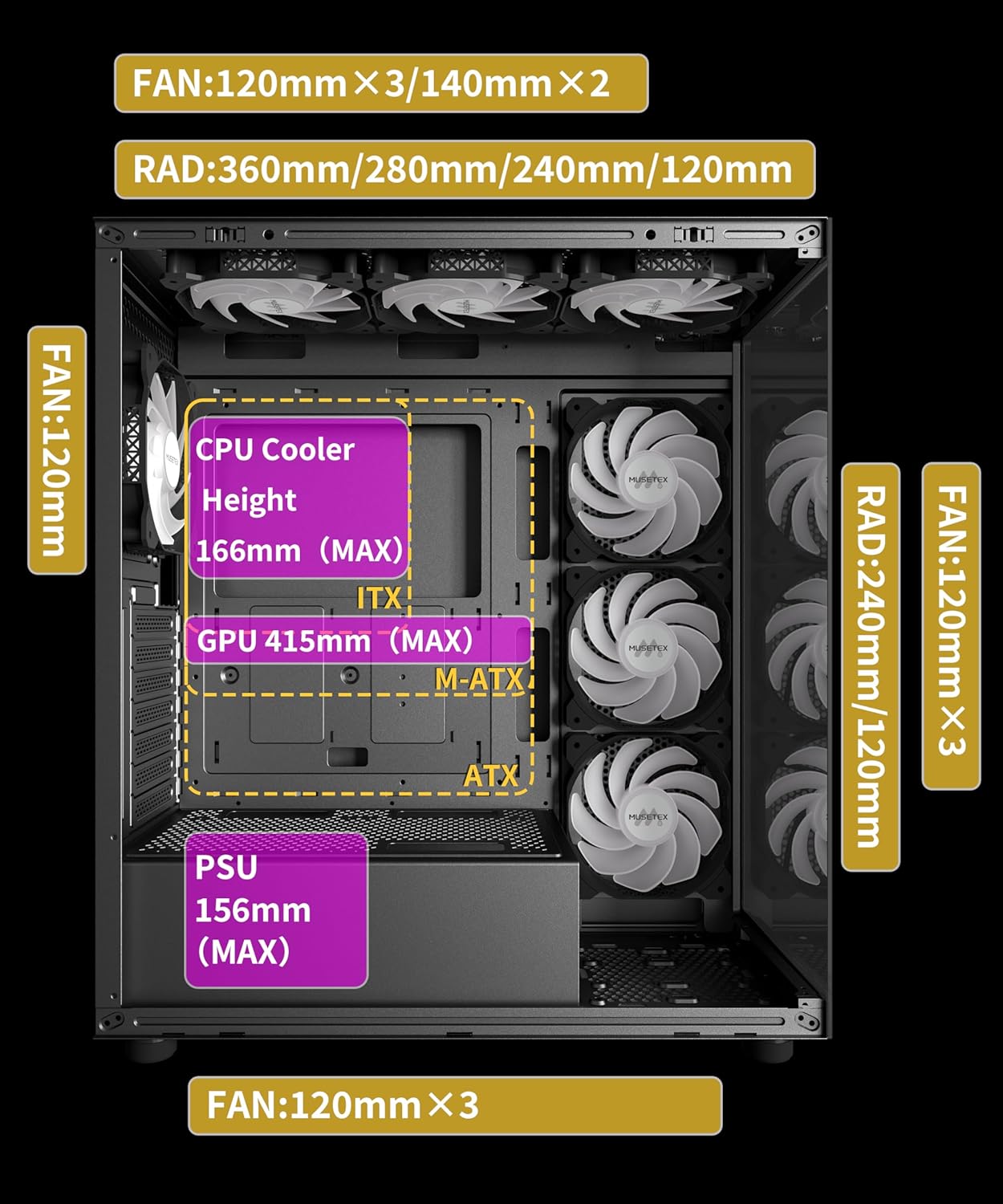
Figure 3: Airflow diagram within the MUSETEX K2 PC case.
2.4 Instalación do almacenamento
The K2 case provides flexible storage options:
- With E3 HDD Rack Installed: 3 x 2.5" drives and 2 x 3.5" drives.
- Without E3 HDD Rack Installed: 2 x 2.5" drives and 1 x 3.5" drive.
2.5 Panel frontal de E/S
The top I/O panel provides convenient access to essential ports:
- 1 x Type-C port
- 2 x portos USB 3.0
- Microphone & Audio jacks
- Botón de encendido
- Botón Reiniciar
Figure 4: Front I/O Panel connections.
2.6 Finalización da montaxeview
The MUSETEX K2 case features snap-on panels for quick and easy assembly and disassembly, simplifying the building process. Cable management is facilitated by pre-routed wiring and dedicated channels.
Video 1: This video demonstrates the installation process for various components within the MUSETEX K2 ATX PC Case, including motherboard, CPU cooler, radiator, fans, GPU, and storage drives, highlighting cable management and easy panel removal.
3. Instrucións de funcionamento
3.1 Control do ventilador ARGB
The pre-installed ARGB fans can be controlled via motherboard software. This allows for customization of lighting modes and adjustment of fan speeds to achieve desired aesthetic and cooling performance.
3.2 Xestión do fluxo de aire
The case is designed for optimal airflow, drawing cool air from multiple directions and exhausting warm air efficiently. Ensure no obstructions block the fan intakes or exhausts for best performance.
4. Mantemento
4.1 Limpeza do filtro de po
The MUSETEX K2 case includes magnetic dust filters at the top and a power supply dust filter at the bottom. Regularly clean these filters to prevent dust accumulation, which can impede airflow and component cooling. The magnetic filters are easily removable for cleaning.

Figure 5: Magnetic dust filter for easy maintenance.
4.2 Tempered Glass Cleaning
Clean the tempered glass panels with a soft, lint-free cloth and a mild glass cleaner or water. Avoid abrasive materials that could scratch the glass.
5 Solución de problemas
If you encounter any issues with your MUSETEX K2 PC case, please consider the following:
- Fans not spinning or lighting up: Verify all fan and ARGB connections to the motherboard or fan controller. Ensure power is supplied correctly.
- Compoñentes de sobrequecemento: Check for proper fan orientation and ensure dust filters are clean. Confirm adequate airflow within the case.
- Front I/O ports not functioning: Ensure all front panel connectors (USB, audio, power, reset) are correctly plugged into the motherboard headers.
Para problemas persistentes, consulte a sección de soporte para obter información de contacto.
6. Especificacións
| Característica | Detalle |
|---|---|
| Marca | MUSETEX |
| Nome do modelo | K2 (YK2 Series) |
| Tipo de caso | Torre media |
| Compatibilidade da placa base | ATX, Micro ATX, Mini ITX |
| Dimensións (LxWxH) | 16.73 x 8.35 x 18.5 polgadas |
| Peso do elemento | 15 libras |
| Cor | Negro |
| Material | Metal, plástico, vidro temperado |
| Número de portos USB 3.0 | 2 |
| Método de arrefriamento | Aire, Auga |
| Tipo de montaxe da fonte de alimentación | Montaxe inferior |
| Usos recomendados | Business, Gaming |
7. Garantía e soporte
MUSETEX is committed to providing high-quality products and excellent customer support. If you encounter any problems with your PC case, please do not hesitate to contact us.
You can reach our support team by navigating to the product page on Amazon and clicking on the "Sold by MUSETEX" link to find our contact information. We are dedicated to assisting you and ensuring your satisfaction.


