1. Introdución
This manual provides essential information for the proper use and maintenance of your XIAOMI Redmi 15 5G smartphone. Please read this guide thoroughly before operating your device to ensure optimal performance and longevity. The Redmi 15 5G is designed for reliable daily use, featuring a large display, powerful battery, and advanced camera system.
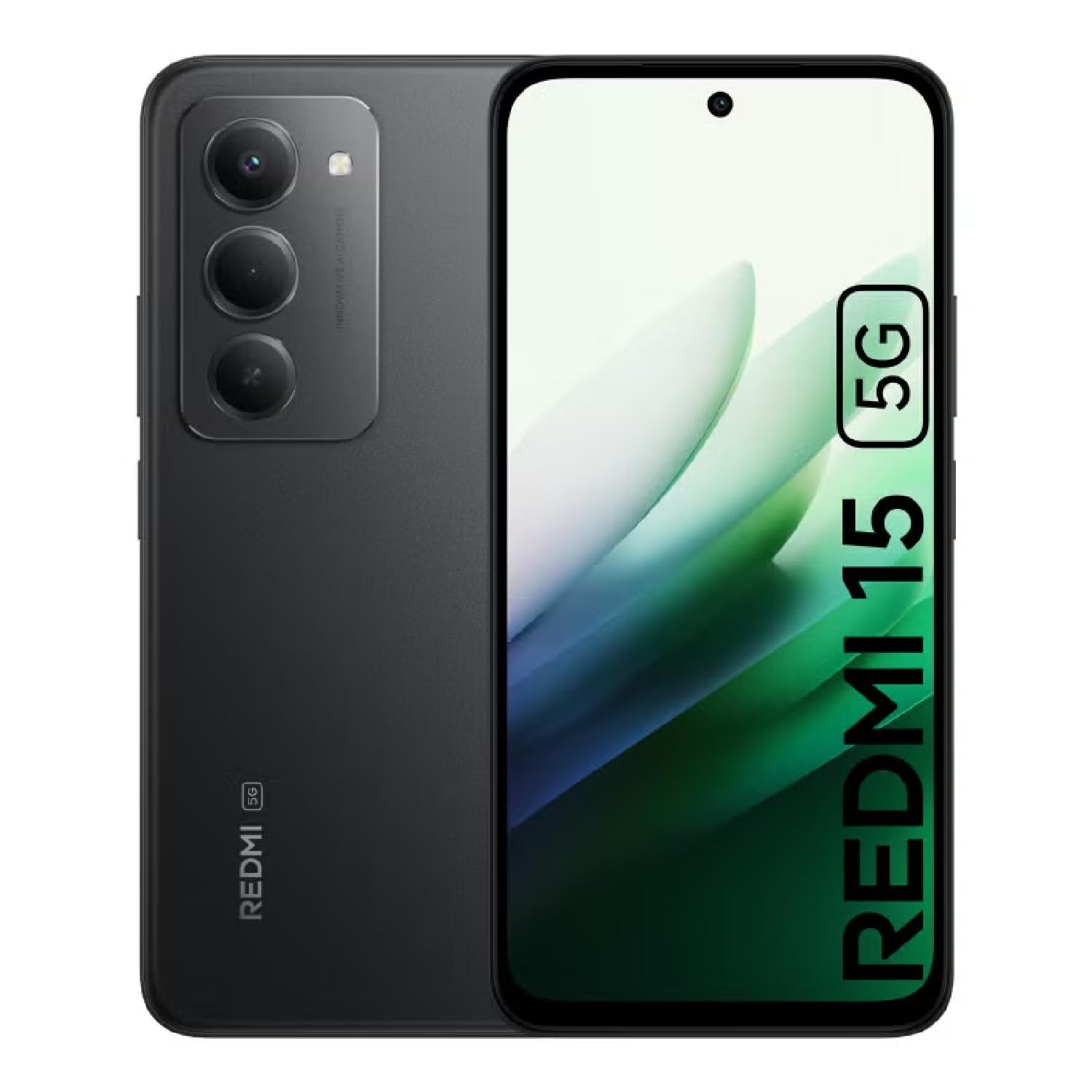
Image: The XIAOMI Redmi 15 5G smartphone, showcasing its design in multiple color options.
2. Que hai na caixa
- XIAOMI Redmi 15 5G Smartphone
- Cable USB
- Funda do teléfono
- SIM Ejector Tool (may be included with documentation)
- Guía de inicio rápido e información de garantía
3. Configuración
3.1. Instalación da tarxeta SIM e da tarxeta MicroSD
- Localiza a bandexa da tarxeta SIM no lateral do teu dispositivo.
- Insira a ferramenta de expulsión da tarxeta SIM no pequeno orificio que hai xunto á bandexa e prema suavemente ata que esta saia.
- Place your Nano-SIM card(s) and/or microSD card into the tray, ensuring they are correctly oriented. The Redmi 15 5G supports a hybrid SIM slot (SIM1 + SIM2 or SIM1 + microSD).
- Volva inserir a bandexa no teléfono con coidado.
3.2. Acendido inicial e configuración
- Press and hold the Power button until the XIAOMI logo appears.
- Sigue as instrucións na pantalla para seleccionar o teu idioma, rexión e conectarte a unha rede wifi.
- Sign in with your Google account or create a new one to access apps and services.
- Set up your preferred security methods, such as a PIN, pattern, password, fingerprint, or AI face unlock.
4. Instrucións de funcionamento
4.1. Características da pantalla
The Redmi 15 5G features an immersive 6.9-inch FHD+ DotDisplay with a resolution of 2340 × 1080 pixels (374 PPI). Enjoy smooth visuals with a refresh rate of up to 144Hz and a touch sampling rate of up to 288Hz. The display offers a typical brightness of 700 nits (850 nits HBM) and a contrast ratio of 1400:1. It includes an all-day eye-care display with DC dimming and TÜV Rheinland certifications for low blue light, circadian friendly, and flicker-free viewing. The Wet Touch Technology 2.0 ensures accurate touch response even with wet fingers.
4.2. Sistema de cámaras
Capture high-quality photos and videos with the 50MP AI dual camera system. The main camera features a 5P lens with an f/1.8 aperture. Video recording supports 1080p (1920x1080) HD at 30 fps and 720p (1280x720) HD at 30 fps. The 8MP front camera (f/2 aperture) is ideal for selfies and video calls, offering features like filmCamera, HDR mode, soft-light ring, portrait mode, and time-lapse. Front camera video recording also supports 1080p and 720p HD at 30 fps.

Imaxe: Detallada view of the Redmi 15 5G's rear camera system.
4.3. Rendemento e batería
Powered by the Snapdragon® 6s Gen 3 5G Mobile Platform, built on an efficient 6nm process, the device offers smooth and reliable performance. The octa-core CPU (Kryo, up to 2.3GHz) and Adreno GPU ensure efficient multitasking and gaming. The phone comes with 8GB of RAM, expandable up to 16GB with Memory extension (utilizing ROM storage). A massive 7000mAh (typical) battery provides extended usage, offering up to 24 hours of talk time.
4.4. Conectividade e seguridade
The Redmi 15 5G supports 5G connectivity (SA and NSA bands), 4G LTE, and 3G/2G networks. It includes NFC for contactless payments and data transfer, Wi-Fi for internet access, and comprehensive GPS support (GPS, Glonass, Galileo, Beidou). Security features include a side-mounted fingerprint sensor and AI face unlock for convenient and secure access.
5. Mantemento
- Limpeza: Usa un pano suave e sen fiapos para limpar a pantalla e a carcasa. Evita produtos químicos agresivos.
- Actualizacións de software: Comprobe e instale regularmente actualizacións do sistema para garantir un rendemento, unha seguridade e un acceso óptimos a novas funcións.
- Coidado da batería: Para prolongar a duración da batería, evite temperaturas extremas e non deixe que a batería se descargue completamente con frecuencia.
- Xestión de almacenamento: Limpar periodicamente o innecesario files and apps to maintain device speed and free up storage space.
6 Solución de problemas
- O dispositivo non se acende: Ensure the battery is charged. Connect the device to its charger and wait a few minutes before attempting to power it on again.
- Apps Freezing or Lagging: Close background applications. Clear app cache or data if the issue persists with a specific app. Restarting the device can also resolve temporary performance issues.
- Conectividade de rede deficiente: Check if your SIM card is properly inserted. Ensure mobile data is enabled and you are within network coverage. For Wi-Fi issues, restart your router and phone.
- Esgotando a batería rapidamente: Reduce screen brightness, disable unnecessary features like GPS or Bluetooth when not in use, and close power-intensive background apps.
- Fingerprint Sensor Not Working: Ensure your finger is clean and dry. Re-register your fingerprints if the issue persists.
7. Especificacións
| Característica | Especificación |
|---|---|
| Nome do modelo | 25057RN09E |
| Tamaño de visualización | 6.9 polgadas |
| Resolución | 2340 x 1080 |
| Taxa de actualización | 144 Hz |
| Procesador | Snapdragon 6s Gen 3 Mobile Platform (Octa-core, up to 2.3GHz) |
| RAM | 8 GB (expandable up to 16GB with Memory extension) |
| Capacidade de almacenamento | 256 GB (ampliable ata 2 TB con microSD) |
| Cámara principal | 50 MP AI Dual Camera |
| Cámara frontal | 8 MP |
| Capacidade da batería | 7000 mAh |
| Sistema Operativo | Xiaomi HyperOS baseado en Android 15 |
| Conectividade | 5G, Wi-Fi, NFC, GPS |
| Seguridade | Side Fingerprint Sensor, AI Face Unlock |
| Dimensións | 6.74 x 3.23 x 0.34 polgadas |
| Peso | 7.9 onzas (224 gramos) |
8. Garantía e soporte
For warranty information, please refer to the warranty card included in your product packaging or visit the official XIAOMI website. If you encounter any issues not covered in this manual, please contact XIAOMI customer support for assistance. Keep your proof of purchase for warranty claims.


