Introdución
This manual provides detailed instructions for the LIGE Smart Watch for Women, model FV12-D1-US. It covers setup, operation, maintenance, and troubleshooting to ensure optimal use of your device. This smartwatch features a 1.43-inch AMOLED HD display, Bluetooth calling capabilities, over 100 sports modes, comprehensive health monitoring, and IP68 water resistance.

Image: The LIGE Smart Watch FV12-D1-US displayed with both its metal mesh strap and silicone strap, showcasing its elegant design and customizable options.
O que hai na caixa
Upon opening your LIGE Smart Watch package, you should find the following items:
- LIGE Smart Watch (FV12-D1-US)
- Correa metálica
- Correa de silicona
- Strap accessories
- Cable de carga magnético
- Manual de instrucións de usuario

Image: A visual representation of the package contents, including the smartwatch, two different straps, a charging cable, and the instruction manual.
Guía de configuración
Follow these steps to set up your LIGE Smart Watch and connect it to your smartphone:
- Cargar o reloxo intelixente: Before first use, fully charge the smartwatch using the provided magnetic charging cable.
- Activa o Bluetooth: Asegúrate de que o Bluetooth estea activado no teu smartphone.
- Descarga a aplicación: Scan the QR code provided in the manual or on the watch screen, or search for the "FitCloudPro" app in your phone's app store (App Store for iOS, Google Play Store for Android). You can also visit http://fitcloud.hetangsmart.com/qrcode/_cn/ para o enlace de descarga.
- Instalar e abrir a aplicación: Install the "FitCloudPro" app and open it.
- Engadir dispositivo: In the app, navigate to the device section and select "Add Device" or similar. The app will search for available devices. Select "FV12" from the list.
- Confirmación de emparellamento: Aparecerá unha solicitude de emparellamento Bluetooth no teu teléfono. Confirma o emparellamento.
- Enable Call Function: On the watch, you may need to turn on the call function. In the app, ensure "Connected to Call audio" is enabled for full calling features.
- Configuración completa: Once connected, the watch will synchronize data with the app, and you can begin customizing settings and using its features.
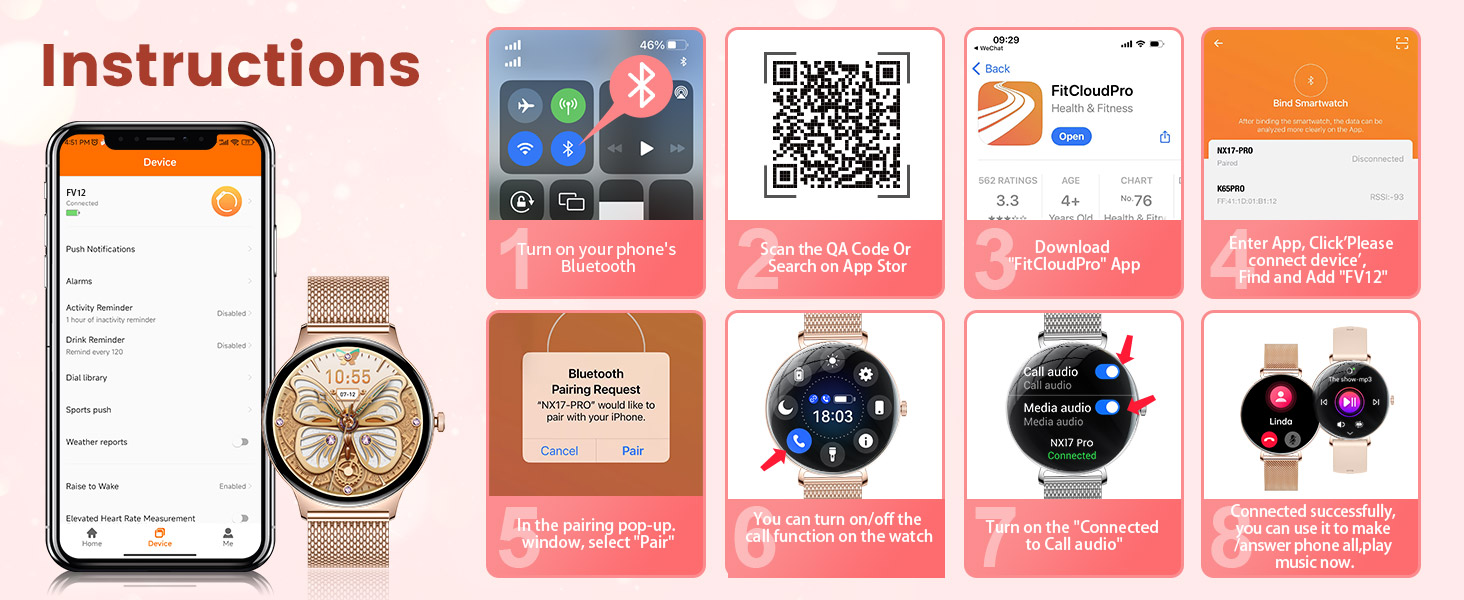
Image: A visual guide demonstrating the process of pairing the smartwatch with a smartphone, including app download, Bluetooth connection, and call function activation.
Instrucións de funcionamento
Navegación básica
- Pase o dedo cara arriba/abaixo: Acceder á configuración rápida ou ás notificacións.
- Pase o dedo cara á esquerda/dereita: Navega polos widgets e as funcións principais.
- Prema o botón lateral: Wake up the screen, return to the home screen, or access the app menu.
- Tap Screen: Selecciona elementos ou confirma accións.
Chamadas e notificacións por Bluetooth
Once connected via Bluetooth, your smartwatch can handle calls and display notifications.
- Responder/Facer chamadas: Use the watch to answer incoming calls or dial numbers directly from your wrist. Access your contact list or call records.
- Notificacións de mensaxes: Receive real-time alerts for texts, emails, and social media apps (e.g., WhatsApp, Facebook, Instagram, YouTube, Twitter, Snapchat, LinkedIn). Customize which app notifications you wish to receive through the FitCloudPro app.

Image: The smartwatch screen showing an incoming call and various social media app icons, illustrating its communication features.
Caras de reloxo personalizables
Personalize your watch by choosing from a variety of pre-installed watch faces or uploading your own photos through the FitCloudPro app. This allows you to match your watch's appearance to your style or mood.
Funcións intelixentes adicionais
- Control de música: Controla a reprodución de música no teu teléfono intelixente directamente desde o reloxo.
- Cámara remota: Use your watch as a remote shutter button for your phone's camera.
- Alarmas: Configura alarmas para espertarte ou lembrarte de tarefas importantes.
- Pronóstico do tempo: Recibe actualizacións meteorolóxicas en tempo real no teu pulso.
- Reminder Functions: Includes sedentary reminders and drink water reminders to promote healthy habits.
- Asistente de voz: Accede ao asistente de voz do teu teléfono directamente desde o reloxo.

Image: A collage of images demonstrating the smartwatch's diverse functionalities, including controlling music, setting alarms, checking weather, using a voice assistant, and receiving health reminders.
Vixilancia da Saúde
The LIGE Smart Watch provides comprehensive health monitoring features to help you track your well-being. Note: Data is for reference only and should not be used as professional diagnostic information.
- Monitorización da frecuencia cardíaca: Continuously records heart rate changes throughout the day.
- Monitorización de osíxeno no sangue (SpO2): Mide os niveis de osíxeno no sangue.
- Seguimento do sono: Analyzes sleep quality, including light and deep sleep stages, to help improve sleep habits.
- Monitorización do estrés: Helps you monitor stress levels and reminds you to relax when needed.
- Seguimento da saúde da muller: Supports tracking of menstrual cycles, predictions, gestation, and ovulation.

Image: The smartwatch interface showing real-time data for sleep duration, heart rate, blood oxygen saturation, and stress levels, alongside images of users engaged in related activities.

Image: A visual representation of the female cycle tracking feature on the smartwatch, showing period, prediction, and ovulation dates on a calendar interface.
Modos deportivos e seguimento da actividade
The LIGE Smart Watch offers over 100 sports modes to cater to various physical activities. It accurately records your workout data, helping you achieve your fitness goals.
- Máis de 100 modos deportivos: Includes activities like running, walking, cycling, swimming, yoga, rock climbing, and more.
- Datos da actividade: Tracks steps, distance, calories burned, and active time.
- Sincronización da aplicación: Sync data with the FitCloudPro app to review your progress and set new fitness plans.

Image: A user exercising with dumbbells, while the smartwatch screen shows activity metrics like duration, calories, and steps, highlighting the extensive sports mode functionality.
Duración da batería e carga
The smartwatch is equipped with a 260mAh battery, designed for extended use. A single charge can provide several days of operation, with an intelligent power management system optimizing energy consumption.
- Uso diario: Approximately 4-7 days.
- Tempo de espera: Ata 15 días.
- Cargando: Use the provided magnetic charging cable. Align the magnetic pins with the charging contacts on the back of the watch.

Image: The smartwatch being charged via its magnetic cable, with an infographic detailing its battery life for daily use and standby time.
Resistencia á auga (IP68)
The LIGE Smart Watch has an IP68 waterproof rating, making it suitable for various daily scenarios. This means it is resistant to dust and can withstand immersion in water up to 1.5 meters for 30 minutes.
- Adecuado para: Hand washing, rain, shallow swimming.
- Non apto para: Hot showers, saunas, diving, or high-pressure water activities. Avoid contact with hot water or steam.

Image: The smartwatch partially submerged in water, with water droplets on its surface, visually confirming its IP68 waterproof capability.
Mantemento
To ensure the longevity and optimal performance of your LIGE Smart Watch, follow these maintenance guidelines:
- Limpeza: Regularly wipe the watch screen and straps with a soft, dry cloth. If necessary, use a slightly damp cloth for the straps, then dry thoroughly.
- Evitar produtos químicos: Non empregues produtos químicos agresivos, disolventes de limpeza nin deterxentes fortes, xa que poden danar o acabado e os selos do reloxo.
- Cargando: Always use the original charging cable. Ensure the charging contacts are clean and dry before charging.
- Almacenamento: Garda o reloxo nun lugar fresco e seco cando non o uses. Evita temperaturas extremas.
- Exposición á auga: While IP68 rated, it is recommended to dry the watch thoroughly after exposure to water to prevent skin irritation or damage to internal components over time.
Resolución de problemas
If you encounter issues with your LIGE Smart Watch, refer to the following common solutions:
- O reloxo non se acende: Asegúrate de que o reloxo estea completamente cargado. Conéctao ao cargador durante polo menos 30 minutos.
- Cannot connect to phone/Bluetooth issues:
- Asegúrate de que o Bluetooth estea activado no teléfono e no reloxo.
- Asegúrate de que o reloxo estea dentro do alcance Bluetooth do teu teléfono.
- Reinicia tanto o teléfono como o reloxo.
- Forget the device in your phone's Bluetooth settings and re-pair through the FitCloudPro app.
- Ensure the FitCloudPro app has necessary permissions (location, Bluetooth, notifications).
- Non aparecen as notificacións:
- Check app notification settings in the FitCloudPro app.
- Ensure your phone's notification settings allow the FitCloudPro app to send notifications.
- Verifica que o reloxo estea conectado correctamente á aplicación.
- Datos sanitarios inexactos:
- Asegúrate de levar o reloxo ben axustado ao pulso, nin demasiado solto nin demasiado axustado.
- Limpa o sensor que está na parte traseira do reloxo.
- Remember that data is for reference and not medical diagnosis.
- A pantalla non responde: Try restarting the watch by pressing and holding the side button. If unresponsive, allow the battery to drain completely and then recharge.
Especificacións
| Característica | Especificación |
|---|---|
| Número de modelo | FV12-D1-US |
| Mostrar | 1.43 Inches AMOLED, 466 x 466 pixels |
| Espesor da caixa | 7.9 mm |
| Peso do elemento | 3.17 onzas |
| Capacidade da batería | 260 millónsamp Horas (polímero de litio) |
| Conectividade | Bluetooth |
| Sistema Operativo | AsteroidOS |
| Resistencia á auga | IP68 |
| Compatibilidade | Android 5.0+ and iOS 8.0+ (iOS 13+ for one-touch call function) |
| Características especiais | Fitness Tracker, Phone Call, Sleep Monitor, IP68 Waterproof, Calorie Tracker, Alarm Clock, Stopwatch, Timer, Pedometer, Camera Control, Music Playback/Control, Sedentary Reminder, Weather, Notifications, All-day activity tracker, Distance, Breathing Training, 100 Sports Modes, Voice Assistant |
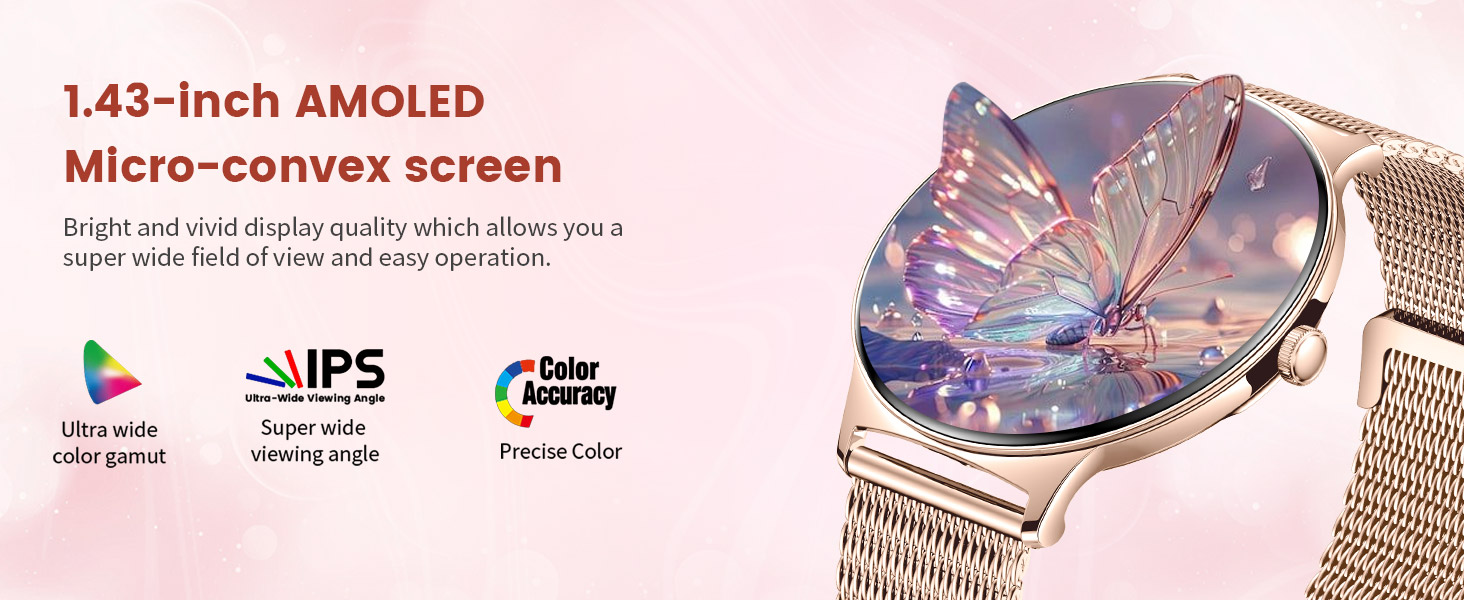
Imaxe: Primeiro plano view of the smartwatch's 1.43-inch AMOLED micro-convex screen, highlighting its vibrant colors, wide viewing angle, and precise color accuracy.
Garantía e Soporte
LIGE is committed to providing excellent customer service and product quality.
- Garantía: The LIGE Smart Watch comes with a 2-year guarantee.
- Servizo de devolucións: Enjoy a 6-month returns service.
- Atención ao cliente: 24-hour online service is available for any questions or issues you may have.
If you experience any damage issues, usage problems, are not 100% satisfied, or have concerns about quality assurance, please contact the LIGE Customer Service Team directly. They aim to provide a satisfactory reply within 24 hours.

Image: An infographic detailing LIGE's customer support offerings, including 24-hour online service, 6-month returns service, and a 2-year guarantee.


