1. Introdución
Thank you for choosing the DIERYA DK68-C 60% Gaming HE Keyboard. This compact, high-performance keyboard is designed for competitive gaming, featuring magnetic switches, rapid trigger functionality, adjustable actuation, and vibrant RGB backlighting. This manual provides essential information for setup, operation, maintenance, and troubleshooting to ensure optimal performance.

Image 1.1: The DIERYA DK68-C 60% Gaming HE Keyboard, showcasinpolo seu deseño compacto e a súa iluminación RGB.
2. Contido do paquete
Verifique que todos os elementos estean presentes no seu paquete:
- DIERYA DK68-C Keyboard x 1
- Cable trenzado USB-C x 1
- Extractor de teclas x 1
- Manual de usuario x 1
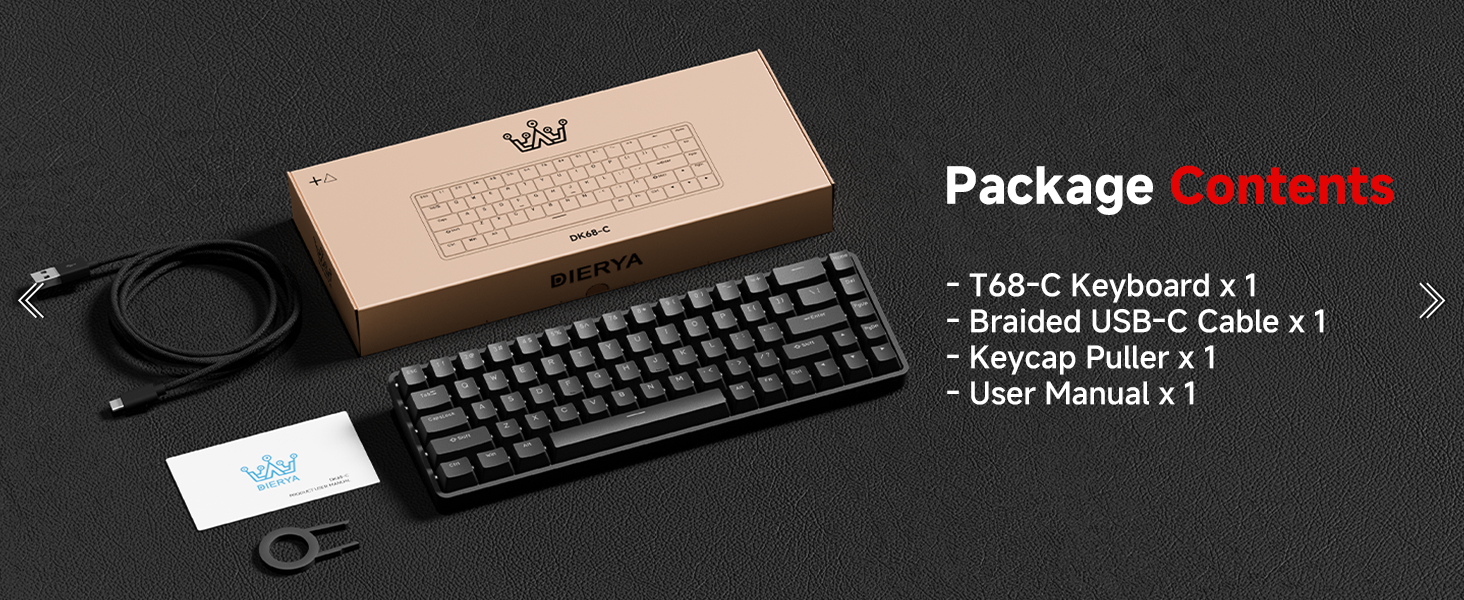
Image 2.1: Illustration of the DIERYA DK68-C keyboard and its included accessories: USB-C cable, keycap puller, and user manual.
3. Configuración
The DIERYA DK68-C keyboard is designed for plug-and-play functionality with Windows operating systems.
- Conecta o teclado: Insert the USB-C end of the provided braided cable into the port on the back of the keyboard.
- Conectar ao ordenador: Plug the USB-A end of the cable into an available USB port on your Windows PC.
- Instalación de controladores: The keyboard will be automatically recognized by your Windows system, and necessary drivers will install without user intervention.
- Proba inicial: Abre un editor de texto ou un navegador e proba a escritura para asegurarte de que todas as teclas funcionan correctamente.
Nota: This keyboard is optimized for Windows systems. While it may function with other operating systems, full feature compatibility is not guaranteed. Console compatibility depends on specific game support for keyboard input.
4. Instrucións de funcionamento
4.1 Características principais
- Magnetic Switches: Equipped with magnetic switches for adjustable actuation and rapid trigger response.
- Disparador rápido: Allows keys to register input and reset based on movement distance, enabling faster repeated presses.
- Actuación axustable: Customize the actuation point from 0.1mm to 4.0mm for each key, tailoring sensitivity to your preference.
- Taxa de sondaxe de 8000 Hz: Provides ultra-low latency (under 0.3ms) for highly responsive input during intense gaming.
- Retroiluminación RGB: Features 16.8 million color RGB lighting with various customizable effects.
- Disposición compacta de 68 teclas: A space-saving design that retains essential keys, including arrow keys, and provides additional functions via the Fn key.
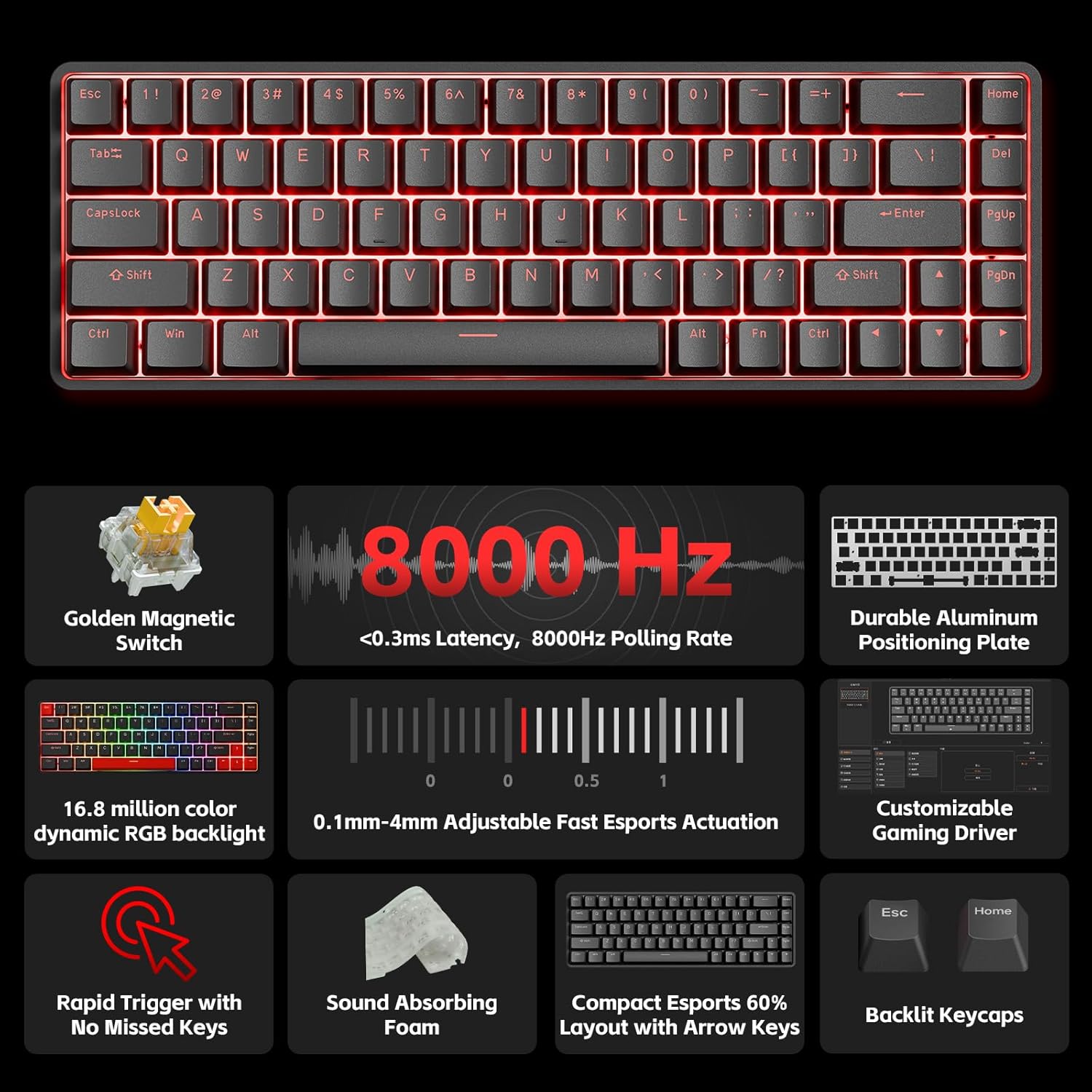
Imaxe 4.1: Unha sobreview of the DIERYA DK68-C's key features, including magnetic switches, 8000Hz polling rate, RGB backlight, and customizable driver.
4.2 Adjustable Actuation and Rapid Trigger
The magnetic switches allow for precise control over key sensitivity.
- Rango de actuación: The actuation point can be set between 0.1mm and 4.0mm. A lower value means a more sensitive key press.
- Disparador rápido: This feature dynamically adjusts the reset point of a key, allowing for quicker successive presses. For example, a key can reset as soon as it begins to move upwards, rather than requiring a full release.
These settings are typically configured using the dedicated software or web-based customization tool provided by DIERYA.

Image 4.2: Visual representation of the 0.1mm to 4.0mm adjustable actuation range for the magnetic switches.
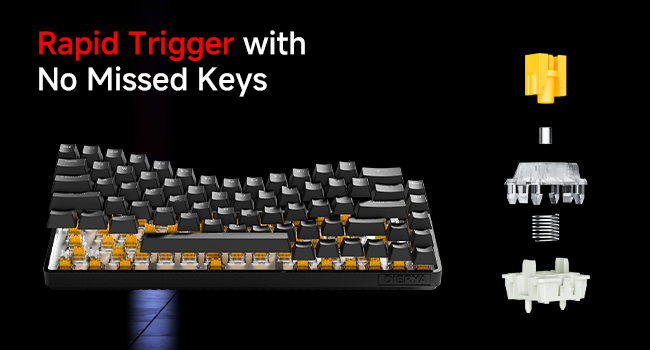
Image 4.3: Diagram illustrating the components of a magnetic switch and the concept of rapid trigger for precise input.
4.3 Retroiluminación RGB
The keyboard features dynamic RGB backlighting with 16.8 million colors. Lighting effects and colors can be customized through the web-based customization tool. This allows for personalized visual effects and macros without requiring software installation.
4.4 Function (Fn) Key Combinations
Due to its compact 68-key layout, some functions are accessed by holding the Fn key in combination with other keys. Refer to the keyboard's keycap legends or the web-based customization tool for specific combinations, which typically include:
- Controis multimedia: Play/Pause, Volume Up/Down, Mute.
- Teclas de función (F1-F12): Accessed via Fn + number row keys.
- Axustes de iluminación: Changing RGB modes, brightness, speed.
- Teclas de frecha: Dedicated arrow keys are present, but additional navigation functions might be available via Fn.
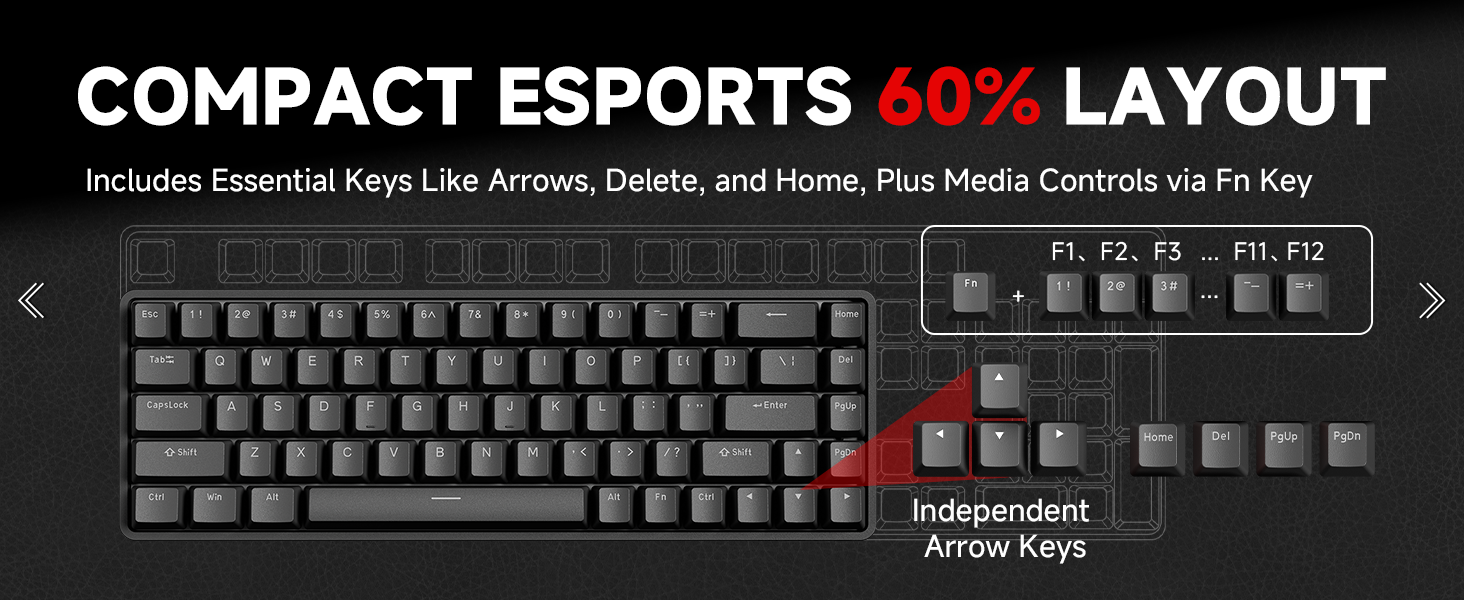
Image 4.4: Diagram illustrating the compact 60% layout and how F-keys and other functions are accessed using the Fn key.
4.5 Software de personalización
The DIERYA DK68-C supports a web-based customization tool for advanced settings. This tool allows you to:
- Adjust actuation points for individual keys.
- Configure Rapid Trigger settings.
- Remapear teclas e crear macros.
- Personalize RGB lighting effects and colors.
Access the official DIERYA website for the link to the customization tool.
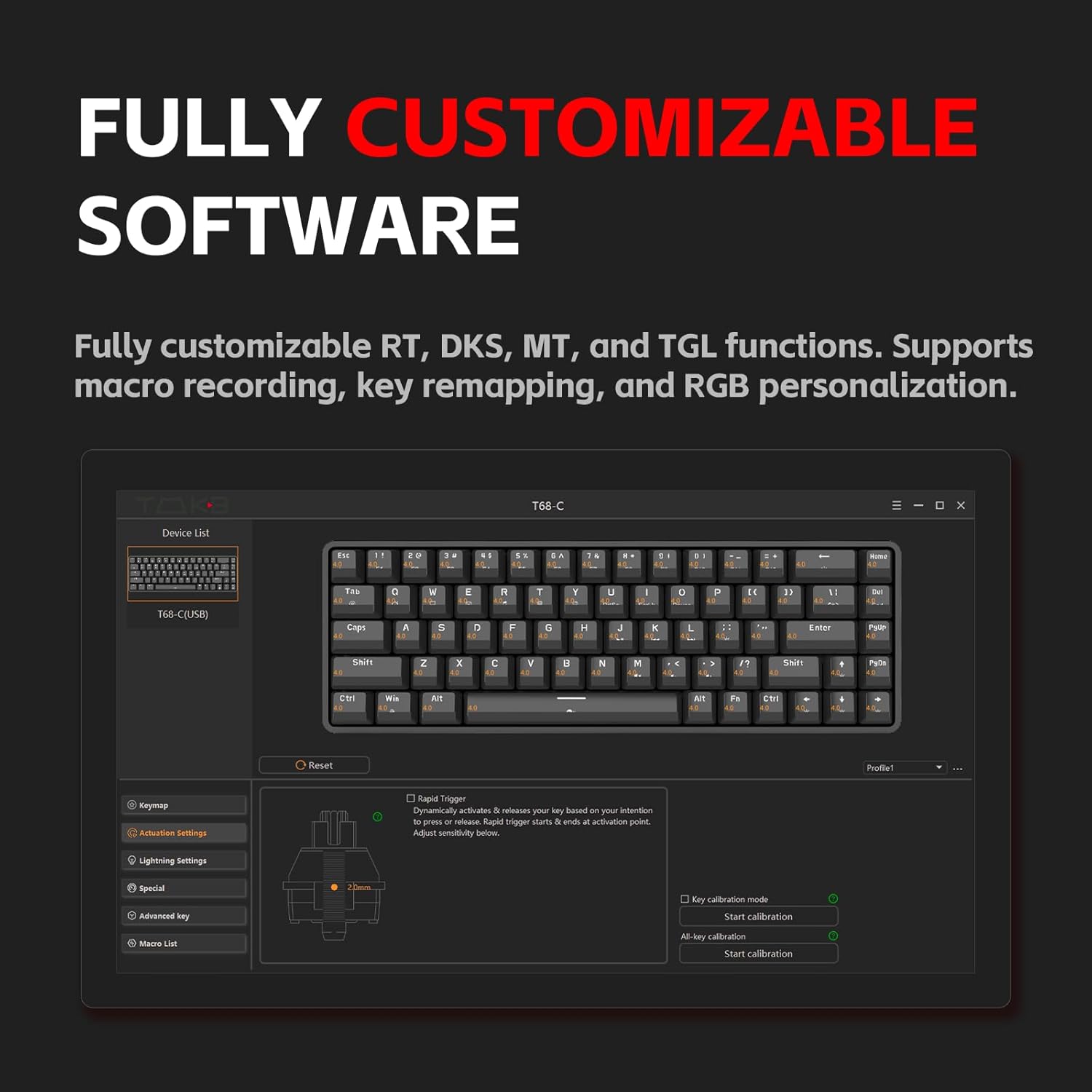
Image 4.5: Screenshot of the customization software interface, showing options for key remapping, lighting settings, and advanced key functions.
5. Mantemento
5.1 Limpeza do teclado
Unha limpeza regular axuda a manter o rendemento e a aparencia do teclado.
- Desconectar: Desconecte sempre o teclado do ordenador antes de limpalo.
- Eliminación de po: Usa aire comprimido para eliminar o po e os residuos que hai entre as tapas das teclas.
- Limpeza das tapas das teclas: Use the provided keycap puller to carefully remove keycaps. Clean them with a soft cloth lightly dampened with water or a mild cleaning solution. Ensure keycaps are completely dry before reattaching.
- Limpeza de superficies: Wipe the keyboard surface with a soft, lint-free cloth. Avoid harsh chemicals or abrasive materials.
5.2 Coidado do interruptor
The magnetic switches are designed for durability. Avoid spilling liquids on the keyboard, as this can damage the switches and internal components. If a switch feels inconsistent, ensure no debris is lodged within it.
6 Solución de problemas
If you encounter issues with your DIERYA DK68-C keyboard, refer to the following common solutions:
| Problema | Posible Solución |
|---|---|
| O teclado non responde |
|
| As chaves non se rexistran nin se escriben dúas veces |
|
| A iluminación RGB non funciona ou é incorrecta |
|
| As combinacións de teclas Fn non funcionan |
|
7. Especificacións
| Característica | Detalle |
|---|---|
| Modelo | DK68-C |
| Tipo de teclado | 60% Gaming HE Keyboard |
| Tipo de cambio | Interruptores magnéticos |
| Rango de actuación | 0.1 mm - 4.0 mm (axustable) |
| Taxa de votación | 8000 Hz |
| Latencia | <0.3 ms |
| Retroiluminación | RGB (16.8 millóns de cores) |
| Conectividade | USB-C con cable |
| Dispositivos compatibles | PC (Windows) |
| Dimensións | 12.99 x 5.28 x 1.97 polgadas |
| Peso do elemento | 1.59 libras |
8. Garantía e soporte
DIERYA products are manufactured to high-quality standards. This product is covered by a manufacturer's warranty against defects in materials and workmanship. The specific warranty period and terms may vary by region and retailer. Please retain your proof of purchase for warranty claims.
For technical support, warranty inquiries, or further assistance, please visit the official DIERYA websitio web ou póñase en contacto co seu departamento de atención ao cliente. A información de contacto adoita atoparse na embalaxe do produto ou na ficha oficial websitio.
Recursos en liña:
- Oficial DIERYA Websitio: Visit the DIERYA Store
- Web-based Customization Tool: Refer to the official websitio para acceder.


