1. Introdución
This manual provides essential instructions for the assembly, operation, and maintenance of your Arcade1Up Ms. Pac-Man Classic SE Arcade Machine. Please read this manual thoroughly before use to ensure proper function and safety.

Image 1: The Arcade1Up Ms. Pac-Man Classic SE Arcade Machine, featuring vibrant blue and pink artwork with Ms. Pac-Man characters.
2. Información de seguridade
Observe as seguintes precaucións de seguridade:
- Keep the arcade machine away from water or excessive moisture.
- Asegúrese de que o cable de alimentación non estea danado nin desgastado.
- Do not attempt to open or modify the machine. Refer all servicing to qualified personnel.
- Place the machine on a stable, level surface to prevent tipping.
- Supervisar os nenos durante o seu uso.
3. Contido do paquete
Your Arcade1Up Ms. Pac-Man Classic SE Arcade Machine package includes:
- Arcade Machine Cabinet
- Adaptador de alimentación
- Manual de instrucións (este documento)
Note: An optional riser may be sold separately.
4. Configuración
4.1 Asemblea
The Arcade1Up Ms. Pac-Man Classic SE Arcade Machine requires some assembly. Follow the detailed instructions provided in the separate assembly guide included with your product. Ensure all screws and fasteners are securely tightened before use.

Image 2: Dimensions of the Arcade1Up Ms. Pac-Man Classic SE Arcade Machine, showing its height of 45.4 inches without a riser and indicating an optional riser is sold separately.
4.2 Conexión de alimentación
- Locate the power input port on the back of the arcade machine.
- Connect the provided power adapter to the machine.
- Enchufe o adaptador de corrente a unha toma eléctrica estándar.
- Ensure the power switch (if present) is in the 'OFF' position before plugging in.
Vídeo 1: Un overview of the Arcade1Up Ms. Pac-Man Classic SE Arcade Machine, demonstrating its features and setup in a home environment. This video is provided by the seller.
5. Instrucións de funcionamento
5.1 Acendido/Apagado
Locate the power switch on the control panel. Flip the switch to 'ON' to power on the machine. Flip to 'OFF' to power off.
5.2 Selección de xogos
Upon powering on, you will see a game selection menu. Use the joystick to navigate through the available games. Press the 'Start Game' button to select and launch your desired game.
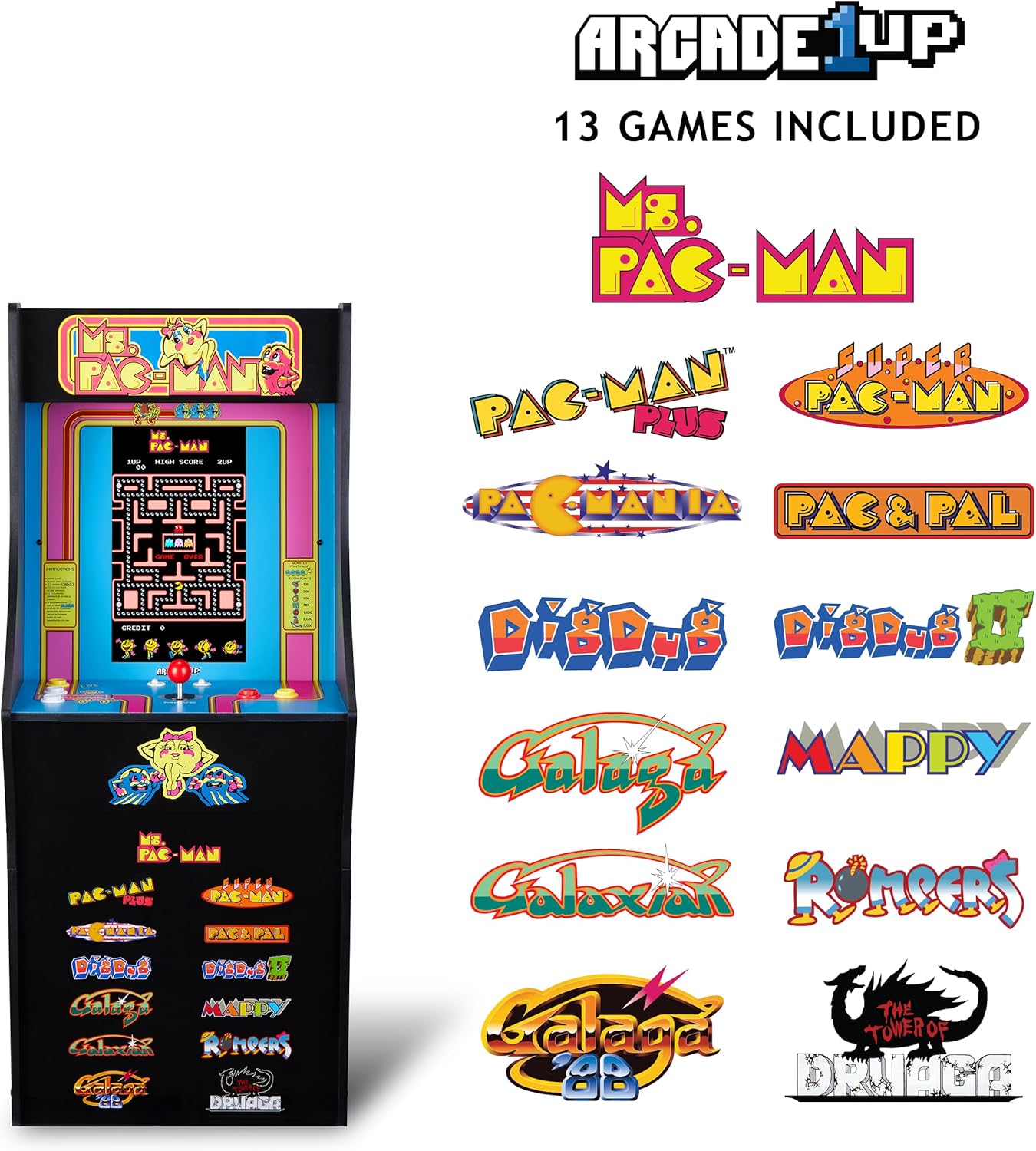
Image 3: The Arcade1Up Ms. Pac-Man Classic SE Arcade Machine displaying the list of 13 included games, such as Ms. Pac-Man, Dig Dug, and Galaga.
5.3 Controis
- Joysticks: Used for character movement in games.
- Start Game Button: Initiates a game or confirms selection.
- Botóns de acción: Used for specific in-game actions (e.g., firing, jumping).
- Control de volume: Adjust the game sound level using the dedicated volume buttons.
- To return to the game selection menu or save a high score, hold the 'Start Game' button for 5 seconds.
- To reset a game, hold the 'Start Game' button for 5 seconds.

Imaxe 4: Detallada view of the control panel, highlighting the joystick, start game button, and other action buttons for gameplay.
5.4 Included Games
Your Arcade1Up Ms. Pac-Man Classic SE Arcade Machine includes 13 classic games:
- Ms. PAC-MAN
- PAC-MAN PLUS
- SUPER PAC-MAN
- PAC & PAL
- PACMANIA
- DIG DUG
- DIG DUG 2
- GALAGA
- GALAXIAN
- GALAGA 88
- MAPPY
- ROMPERS
- THE TOWER OF DRUAGA
5.5 WiFi Leaderboards
Connect your arcade machine to WiFi to access online leaderboards and compete for high scores globally. Refer to the on-screen prompts for WiFi setup and leaderboard access.
Video 2: Gameplay footage of the Arcade1Up Ms. Pac-Man Classic SE Arcade Machine, showcasing the classic arcade experience and the online leaderboard feature. This video is provided by the seller.
6. Mantemento
- Limpeza: Use a soft, dry cloth to wipe down the cabinet and screen. Avoid abrasive cleaners or excessive moisture.
- Almacenamento: Garde a máquina nun lugar fresco e seco, lonxe da luz solar directa e de temperaturas extremas.
- Cable de alimentación: Inspeccione regularmente o cable de alimentación para detectar calquera signo de dano.
7 Solución de problemas
| Problema | Causa posible | Solución |
|---|---|---|
| A máquina non se acende. | Cable de alimentación non conectado; toma de corrente non funciona. | Asegúrate de que o cable de alimentación estea ben conectado. Proba a toma de corrente con outro dispositivo. |
| Sen son. | Volume turned down; speaker issue. | Check volume settings on the control panel. If problem persists, contact support. |
| O xogo conxélase ou falla. | Software glitch; temporary error. | Power off the machine, wait 10 seconds, then power back on. |
8. Especificacións
| Característica | Detalle |
|---|---|
| Número de modelo | MSP-A-405629 |
| Dimensións (H x W x D) | 45.4" x 17.35" x 45.4" (without riser) |
| Tamaño da pantalla | 15.6 Inches IPS Color Monitor |
| Número de xogos | 13 |
| Tipo de controlador | Joystick |
| Fonte de enerxía | Eléctrico con cable |
| Material | Plástico, acrilonitrilo butadieno estireno (ABS) |
| Peso do elemento | 47 libras |
| Idade recomendada polo fabricante | 10 anos en diante |
| Conectividade | WiFi Leaderboards |
9. Garantía e soporte
For warranty information, technical support, or service inquiries, please refer to the official Arcade1Up websitio web ou póñase en contacto co seu departamento de atención ao cliente. Garde o comprobante de compra para reclamacións de garantía.
Soporte en liña: www.arcade1up.com


