Introdución
Welcome to the user manual for your Logitech Alto Keys K98M Wireless Mechanical Keyboard. This guide provides comprehensive instructions for setup, operation, maintenance, and troubleshooting to ensure optimal performance and a satisfying typing experience. Please read this manual thoroughly before using your new keyboard.

Descrición da imaxe: The main product image of the Logitech Alto Keys K98M Wireless Mechanical Keyboard, presented in a graphite color, showcasing a súa disposición e deseño completos.
Características clave
- Immersive Typing with UniCushion: Experience a mechanical keyboard feel where the gasket mount absorbs vibrations for smoother keystrokes, delivering comfort and precision.
- Seamlessly Smooth Typing: Features hot-swappable Marble Switches with concave keys, offering stable and responsive typing for all-day comfort.
- Retroiluminación branca: Durable keycaps with white backlighting ensure functionality and style in any lighting condition.
- Customizable for Productivity: Program Action Keys via the Logi Options+ App to tailor the keyboard to your needs and boost productivity with one-click access to features.
- Functional and Stylish Design: Combines a transparent top case, 98-key layout, and vibrant colors for a practical, stylish, and satisfying tactile typing experience.
- Duración prolongada da batería: Enjoy up to 12 months of wireless use with Bluetooth Low Energy or Logi Bolt USB Receiver, with convenient USB-C recharging.
- Conectividade multidispositivo sen fisuras: Connects via Bluetooth and Logi Bolt, compatible with Windows, macOS, Chrome OS, Linux, and iOS for versatile use across devices.
Contido do paquete
Verifique que todos os elementos estean presentes na embalaxe do produto:

Descrición da imaxe: The image displays the typical contents found in the Logitech Alto Keys K98M package: the mechanical keyboard itself, a Logi Bolt USB receiver, and a USB-C charging cable.
- Logitech Alto Keys K98M Wireless Mechanical Keyboard
- Receptor USB Logi Bolt
- Cable de carga USB-C
Configuración e conectividade
Cargando o teclado
Before initial use, or when the battery indicator shows low power, connect the keyboard to a power source using the provided USB-C cable. The keyboard can be used normally while it is charging.

Descrición da imaxe: Un detallado view of the Logitech Alto Keys K98M keyboard, highlighting the USB-C charging port located on its side, indicating where to connect the charging cable.
Conectando mediante Bluetooth
- Asegúrate de que o teclado estea cargado adecuadamente.
- Acende o teclado usando o interruptor de acendido.
- Activate Bluetooth pairing mode on the keyboard. This is typically done by pressing and holding a dedicated Bluetooth pairing button or a function key combination (refer to your keyboard's specific layout for the Bluetooth icon).
- On your device (PC, Mac, Laptop, Tablet, Smartphone), navigate to the Bluetooth settings and select "Logitech Alto Keys K98M" from the list of available devices.
- Siga as indicacións en pantalla para completar o proceso de vinculación.
Connecting via Logi Bolt USB Receiver
- Insira o receptor USB Logi Bolt nun porto USB dispoñible do seu ordenador.
- Asegúrate de que o teclado estea acendido.
- The keyboard should automatically connect to the receiver. If the connection is not established, use the Logi Options+ software to manually pair the devices.
Software Installation (Logi Options+ App)
For full customization and to unlock all features of your keyboard, download and install the Logi Options+ App from the official Logitech websitio. Este software permíteche:
- Customize Action Keys for specific functions.
- Manage multi-device connections.
- Check battery status and receive notifications.

Descrición da imaxe: This image displays a complete desktop workstation featuring the Logitech Alto Keys K98M keyboard. The computer monitor shows the Logi Options+ application interface, demonstrating how users can customize the keyboard's functions and settings.
Operación do teclado
Experiencia de mecanografía
The Alto Keys K98M is engineered with UniCushion gasket mount technology, which effectively absorbs vibrations to provide a smoother, more acoustically pleasing, and tactile keystroke. The hot-swappable Marble Switches, combined with concave keycaps, ensure a stable and responsive typing experience suitable for extended use.

Descrición da imaxe: Un profesional secundariofile view of the Logitech Alto Keys K98M keyboard, clearly showing the UniCushion gasket design integrated into the keyboard's structure, which is responsible for vibration absorption.
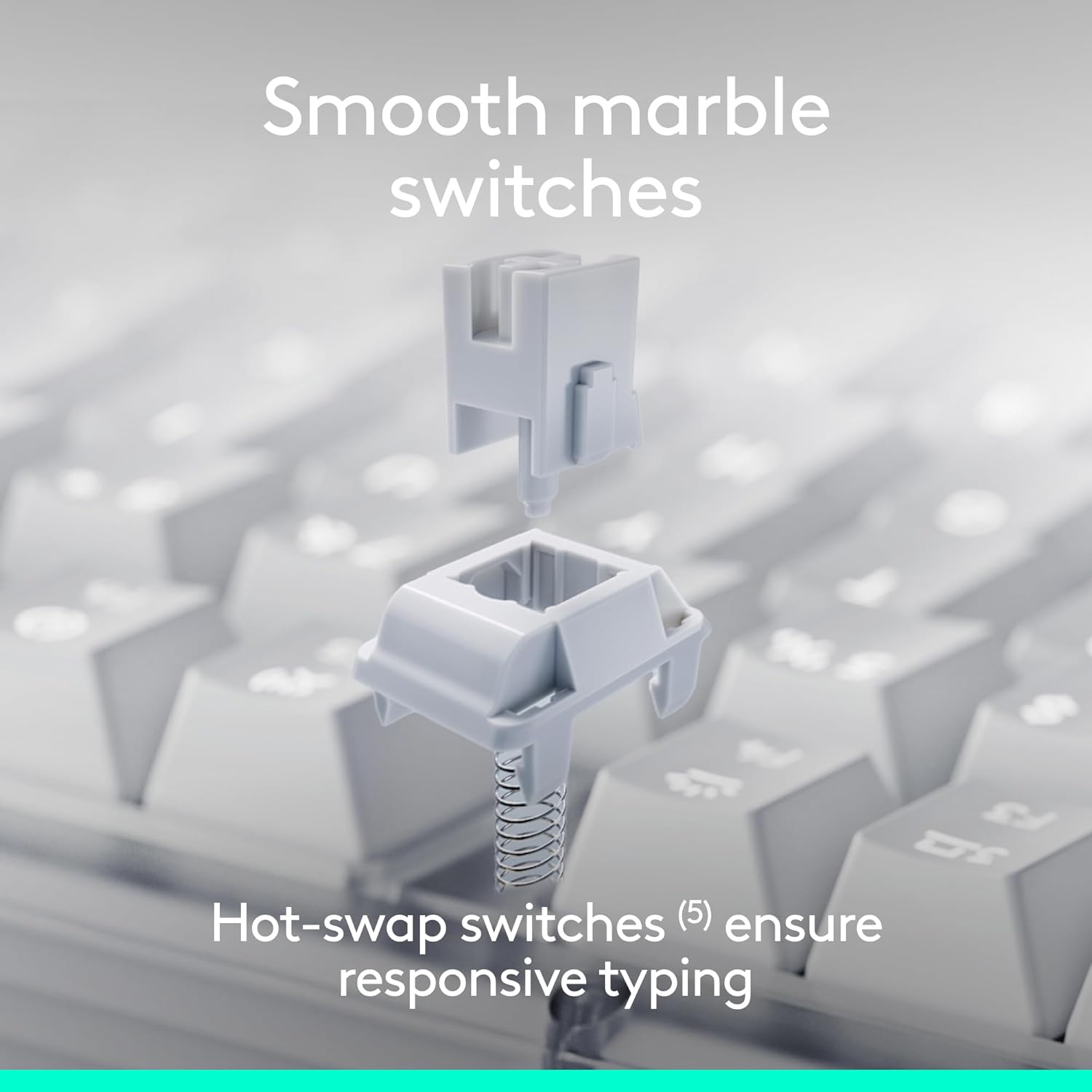
Descrición da imaxe: An exploded diagram illustrating the individual components of a hot-swappable Marble Switch, demonstrating its modular design for easy replacement or customization.
Control de retroiluminación
The keyboard features white backlighting to enhance visibility in various lighting conditions. Adjust the backlighting intensity using the dedicated function keys (typically F5 and F6, or similar keys marked with a sun icon). Pressing these keys will cycle through different brightness levels or turn the backlighting on/off.

Descrición da imaxe: A close-up photograph of the Logitech Alto Keys K98M keyboard in a low-light environment, showcasing the clear and bright white backlighting of the keys.
Customizing Action Keys
Leverage the Logi Options+ App to personalize the Action Keys (the function row keys) on your keyboard. You can assign specific tasks, launch applications, or create custom macros to streamline your workflow and boost productivity.
Conmutación multidispositivo
The Alto Keys K98M supports seamless switching between up to three connected devices. Use the Easy-Switch keys (usually F1, F2, F3, marked with device icons) to instantly switch between your paired computers, tablets, or smartphones.
Mantemento
Para garantir a lonxevidade e o rendemento óptimo do teclado, siga estas pautas de mantemento:
- Limpeza: Regularly clean the keycaps and the keyboard chassis with a soft, dry, lint-free cloth. For stubborn dirt, a slightly damp cloth with mild soap can be used, ensuring no moisture enters the keyboard.
- Evite produtos químicos agresivos: Do not use abrasive cleaners, solvents, or harsh chemicals, as these can damage the keyboard's finish and keycap legends.
- Coidado Ambiental: Keep the keyboard away from excessive moisture, direct sunlight, and extreme temperatures to prevent damage to internal components and battery degradation.
- Coidado das teclas e dos interruptores: If you are replacing hot-swappable switches, handle them gently to avoid bending pins. Ensure keycaps are re-seated firmly after cleaning or customization.
Resolución de problemas
If you encounter issues with your Logitech Alto Keys K98M keyboard, refer to the following common solutions:
O teclado non responde
- Comprobar a batería: Ensure the keyboard has sufficient battery charge. Connect it to a power source using the USB-C cable.
- Encendido: Verify that the keyboard's power switch is in the 'On' position.
- Restablecer a conexión:
- For Bluetooth: Go to your device's Bluetooth settings, forget the keyboard, and then re-pair it.
- For Logi Bolt: Ensure the USB receiver is securely plugged into a working USB port. Try a different USB port. If issues persist, use the Logi Options+ App to re-pair the keyboard with the receiver.
- Reiniciar dispositivos: Restart your computer or the device connected to the keyboard.
A retroiluminación non funciona ou é tenue
- Axustar o brillo: Use the dedicated backlighting function keys (e.g., F5/F6) to increase brightness.
- Nivel de batería: Low battery can cause backlighting to dim or turn off to conserve power. Charge the keyboard.
Claves específicas que non se rexistran
- Check Keycap Seating: Gently press down on the affected keycap to ensure it is fully seated on the switch.
- Limpeza de restos: Remove any debris or dust that may be lodged around or under the keycap.
- Switch Inspection (for hot-swappable): If comfortable, gently remove the keycap and then the switch. Inspect the switch pins for any bends or damage, and re-insert it carefully.
- Software/Firmware Update: Ensure your Logi Options+ App and keyboard firmware are up to date.
Especificacións
| Característica | Detalle |
|---|---|
| Marca | Logitech |
| Número de modelo | 920-013575 |
| Tecnoloxía de conectividade | Bluetooth, RF (Logi Bolt), USB |
| Tipo de teclado | Mecánica |
| Interruptores | Hot-swappable Marble Switches |
| Retroiluminación | Branco, cor única |
| Compatibilidade do sistema operativo | Chrome OS, Linux, Mac OS, Windows 10, iOS |
| Peso do elemento | 2.43 libras |
| Dimensións do produto | 15.79 x 5.79 x 1.56 polgadas |
| Fonte de enerxía | Alimentado por batería (recargable por USB-C) |
| Duración da batería | Up to 12 months (with Bluetooth Low Energy) |
Nota: As especificacións están suxeitas a cambios sen previo aviso.
Garantía e Soporte
For detailed warranty information, technical assistance, and access to additional resources for your Logitech Alto Keys K98M keyboard, please visit the official Logitech support websitio:
You can also find more product information and register your device at the Logitech Store on Amazon:
Produto oficial rematadoview
Descrición do vídeo: This official product video from Logitech provides an overview of the Alto Keys K98M Wireless Customizable Mechanical Keyboard, showcasing its design, key features, and the overall typing experience.


