1. Introdución
Thank you for choosing the CINMOORE Dummy Camera. This indoor security camera is designed to provide reliable surveillance and peace of mind for your home or office. Featuring advanced AI detection, two-way audio, and clear night vision, it offers comprehensive monitoring capabilities. This manual will guide you through the setup, operation, and maintenance of your device.

Imaxe: Fronte view of the CINMOORE Dummy Camera, a white, spherical camera with a dark lens and a blue indicator light, featuring the CINMOORE logo at its base.
2. Que está incluído
Comprobe o contido do paquete para asegurarse de que estean presentes todos os elementos:
- CINMOORE Security Camera × 1
- Mounting Bracket Base × 1
- Adaptador de alimentación × 1
- Data Cable × 1
- Screw Anchors × 1
- Manual do usuario × 1
3. Configuración
The CINMOORE Dummy Camera offers flexible installation options for various indoor environments.
3.1 Opcións de montaxe
The camera can be installed using the following methods:
- Montaxe no teito: Ideal for wide-angle coverage from above.
- Montaxe de mesa: Simple placement on any flat surface.
- Montaxe na parede: Secure installation on a vertical surface.
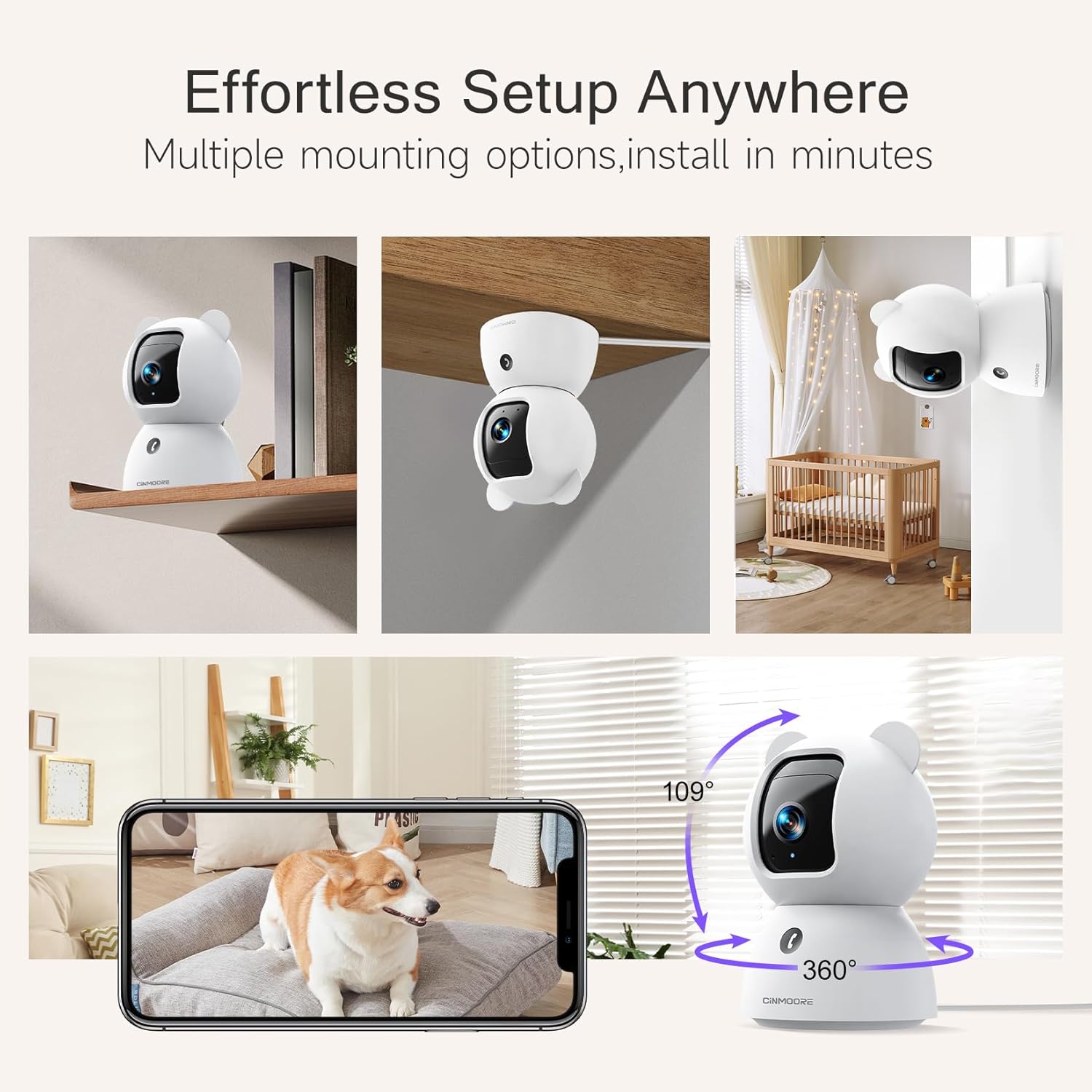
Image: A collage showing the CINMOORE Dummy Camera mounted in various positions: on a shelf, inverted on a ceiling, and on a wall, demonstrating its versatile installation options.
3.2 Pasos de configuración iniciais
- Encendido: Connect the camera to the power adapter using the provided data cable and plug it into a power outlet.
- Descarga a aplicación: Download the official CINMOORE app from your smartphone's app store (iOS/Android).
- Rexistro da conta: Abre a aplicación e rexistra unha nova conta ou inicia sesión se xa tes unha.
- Engadir dispositivo: Follow the in-app instructions to add your new camera. This typically involves scanning a QR code on the camera or connecting to its temporary Wi-Fi hotspot.
- Conexión Wi-Fi: Connect the camera to your home Wi-Fi network (2.4GHz recommended).
- Colocación: Position the camera in your desired location, ensuring it has a clear view da zona que desexa controlar.
4. Instrucións de funcionamento
4.1 Video Quality and Viewing
The camera captures video in 2.5K resolution, providing clear and detailed images. You can view the live feed and recorded footage through the CINMOORE app.

Image: A side-by-side comparison demonstrating the superior clarity of 2.5K resolution (left, showing a baby) versus 2K resolution (right, showing a puppy).
4.2 Pan & Tilt (PTZ) Functionality
The camera features PTZ (Pan, Tilt, Zoom) technology, allowing for 360-degree coverage. You can remotely control the camera's viewing angle through the app to monitor different areas of a room.

Image: The CINMOORE Dummy Camera surrounded by icons representing its features: Ultra HD 2.5K, Sound/Crying Alerts, Smart Night Vision, Encrypted Local Storage (up to 256GB), Secure Cloud Storage, Full Duplex Audio, Human/Pet Tracking, One-Touch Call, and Pan & Tilt, emphasizing its 360-degree protection.
4.3 Audio bidireccional
Utilize the full-duplex two-way audio feature to communicate with people or pets in the camera's vicinity. This allows for natural, real-time conversations.

Image: A scene depicting a person speaking through a smartphone to a dog via the CINMOORE Dummy Camera, illustrating the two-way audio feature with speech bubbles.
4.4 Visión nocturna
The camera is equipped with clear IR night vision, providing 2.5K clarity even in low-light or complete darkness, with a range of up to 33 feet.

Imaxe: Unha persoa viewing a black-and-white night vision feed from the CINMOORE Dummy Camera on their smartphone, showing a baby and a dog in a crib, demonstrating clear IR night vision in a dark room.
4.5 AI Alerts and Detection
The camera supports various AI-powered detection features without monthly fees, including:
- Detección de movemento: Alerts you to general movement.
- Detección de persoas: Specifically identifies human figures.
- Detección de mascotas: Recognizes pet activity.
- Detección de choros: Notifies you of baby crying sounds.

Image: Two children playing near the CINMOORE Dummy Camera, with icons below representing its AI detection capabilities: Person, Pet, Motion, and Crying, highlighting its no-monthly-fee AI alerts.
4.6 Opcións de almacenamento
The camera offers flexible and secure storage solutions:
- Almacenamento da tarxeta SD: Supports local storage via an SD card (not included), expandable up to 512GB. Ensure "SD Card Encryption" is enabled in the app for secure viewing.
- Almacenamento na nube: Offers AWS Cloud Storage with a 30-day free trial, providing bank-level encrypted storage for your recordings.

Image: A diagram showing the CINMOORE Dummy Camera with callouts for its storage features: SD card slot (expandable up to 512GB), Reset Button, and AWS Cloud Storage (30-day free trial), emphasizing encrypted and secure flexible storage.
5. Mantemento
To ensure optimal performance and longevity of your CINMOORE Dummy Camera, follow these maintenance guidelines:
- Limpeza: Limpe con coidado a lente e o corpo da cámara cun pano suave e seco. Evite o uso de produtos químicos agresivos ou materiais abrasivos.
- Colocación: Asegúrate de colocar a cámara nun lugar estable, lonxe da luz solar directa, de temperaturas extremas e de alta humidade.
- Actualizacións de firmware: Regularly check for and install firmware updates through the CINMOORE app to ensure your camera has the latest features and security enhancements.
- Fonte de alimentación: Empregue só o adaptador de corrente orixinal que se inclúe coa cámara.
6 Solución de problemas
If you encounter issues with your CINMOORE Dummy Camera, refer to the following common troubleshooting steps:
- Cámara sen conexión: Check your Wi-Fi connection and ensure the camera is within range of your router. Restart the camera by unplugging and re-plugging the power adapter.
- Baixa calidade do vídeo: Ensure the lens is clean and free from dust. Check your internet speed; a stable connection is crucial for high-resolution streaming.
- Sen audio: Verify that the microphone and speaker settings are enabled in the app. Ensure there are no obstructions blocking the microphone or speaker on the camera.
- Detection Not Working: Check the detection sensitivity settings in the app. Ensure the camera's view está despexado e non está obstruído.
- Non se pode conectar á aplicación: Ensure you have the latest version of the CINMOORE app. Try resetting the camera (using the reset button, if available) and re-adding it to the app.
For further assistance, please contact CINMOORE customer support.
7. Especificacións
| Nome do modelo | Cámara de seguridade interior |
| Número de modelo do artigo | CM-C2LU |
| Marca | CINMOORE |
| Tecnoloxía de conectividade | Con cable, Wi-Fi |
| Resolución de captura de vídeo | 2.5 mil |
| Uso interior/exterior | Interior |
| Características especiais | 2 Way Audio, Cry Detection, HD Resolution, PTZ Technology |
| Range de visión nocturna | 33 pés |
| Tipo de montaxe | Ceiling Mount / Tabletop Mount / Wall Mount |
| Material | Acrilonitrilo Butadieno Estireno (ABS) |
| Dimensións do artigo L x W x H | 7.6 x 7.6 x 11.4 centímetros |
| Peso do elemento | 340 g |
| Nivel de resistencia á auga | Impermeable |
| Usos recomendados | Baby Monitoring, Pet Monitoring, Indoor Home Security, Office Surveillance |
8. Garantía e soporte
Garantía: The CINMOORE Dummy Camera comes with a 1-year warranty from the date of purchase. Please retain your proof of purchase for warranty claims.
Soporte: For technical support, troubleshooting assistance, or warranty inquiries, please visit the official CINMOORE website or contact their customer service team. Refer to the product packaging or the CINMOORE app for specific contact details.


