1. Introdución
Grazas pola compraasing the MUSITREND T408 Record Player. This versatile audio system combines a 3-speed turntable with a CD player, cassette deck, AM/FM radio, USB/SD playback, and Bluetooth connectivity. Please read this manual thoroughly before operating the unit to ensure proper use and to maximize your listening experience. Keep this manual for future reference.
Precaucións de seguridade
- Non expoña a unidade á choiva nin á humidade.
- Non bloquee as aberturas de ventilación.
- Asegúrese de que a fonte de alimentación adecuada voltage como se indica na unidade.
- Evite colocar a unidade preto de fontes de calor ou baixo a luz solar directa.
- Use só accesorios/accesorios especificados polo fabricante.
- Desenchufe a unidade durante as tormentas eléctricas ou cando non se use durante longos períodos.
2. Contido do paquete
Verifique que todos os elementos que se indican a continuación estean incluídos no seu paquete:
- MUSITREND T408 Record Player Unit
- Control remoto
- Manual de instrucións
- 45 RPM Adapter (located on the turntable platter)
3. Produto rematadoview
The MUSITREND T408 is a comprehensive audio system designed for various media playback. It features a classic wooden finish with a silver-toned control panel.
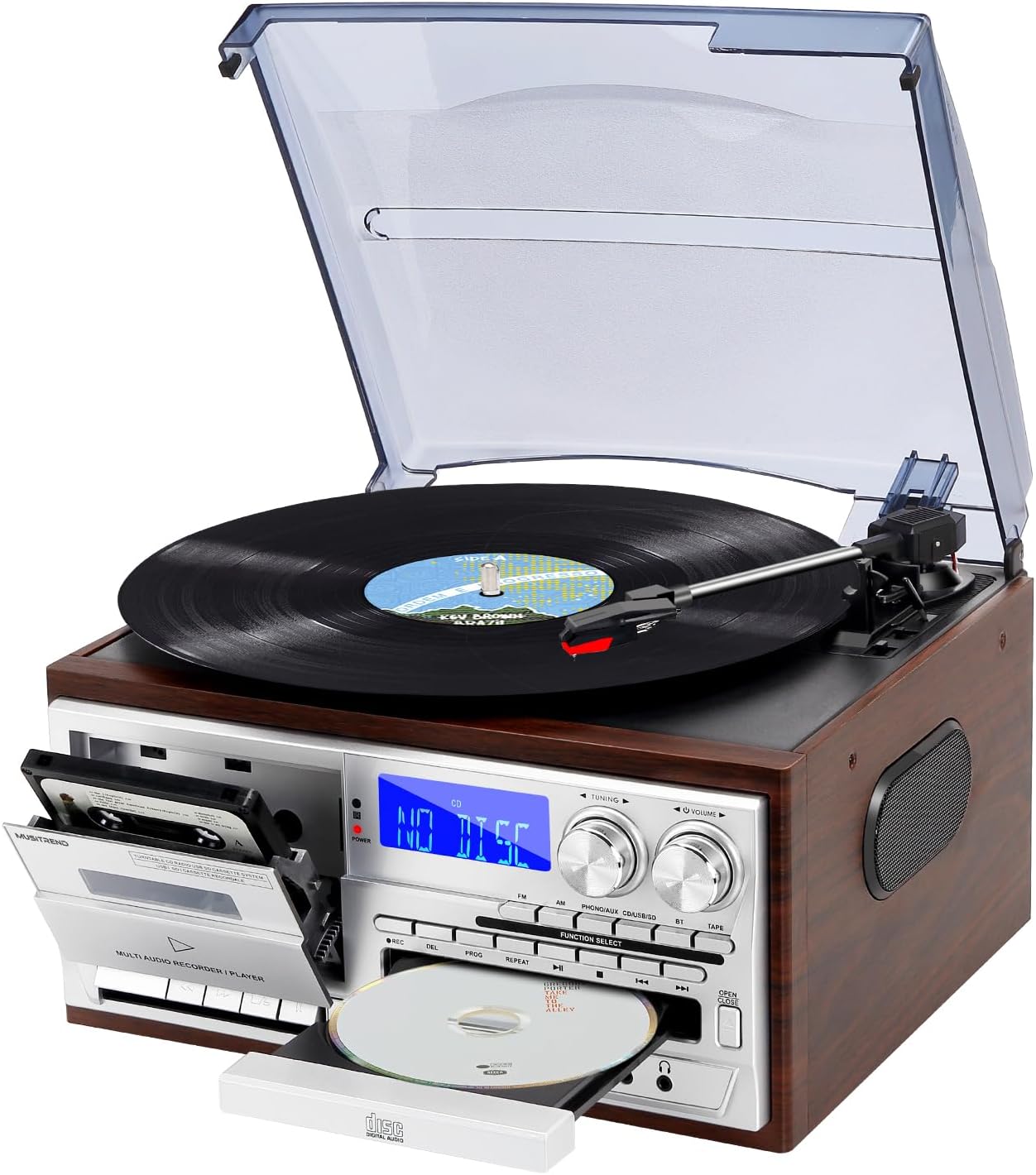
Figura 3.1: Fronte view of the MUSITREND T408 Record Player.
Compoñentes clave:
- Plato xiratorio: Located on top, with a clear dust cover. Supports 33, 45, and 78 RPM records.
- Casete: Front-loading slot on the left side of the control panel.
- Reproductor de CD: Front-loading tray below the main display.
- Panel de control: Features a digital display, tuning and volume knobs, function select buttons (FM, AM, PHONO/AUX/BT, CD, USB/SD, TAPE), and playback controls.
- Porto USB: Para a reprodución desde unha unidade flash USB.
- Ranura para tarxetas SD/MMC: For SD/MMC card playback.
- Conector AUX IN: Para conectar dispositivos de audio externos.
- Jack para auriculares: Para escoita privada.
- Altofalantes estéreo incorporados: Integrated into the unit for direct audio output.
- Saída de liña RCA: (Rear panel) For connecting to external amplevantadores ou altofalantes alimentados.
- Antena FM: (Rear panel) For improved radio reception.

Figura 3.2: Máisview of the MUSITREND T408's multiple functions.
4. Configuración
4.1 Colocación inicial
- Place the unit on a flat, stable surface away from direct sunlight, heat sources, and excessive dust or moisture.
- Asegúrese de que haxa unha ventilación axeitada arredor da unidade.
4.2 Conexión de alimentación
- Conecte o cable de alimentación de CA a unha toma de parede estándar.
- Press the Power button on the unit or remote control to turn it on.
4.3 Conexión da antena FM
- For optimal FM radio reception, extend the FM wire antenna located on the rear panel.
- Adjust its position for the best signal.
4.4 Conexión de altofalantes externos (opcional)
- To connect external powered speakers or an amplifier, use RCA cables (not included) to connect the RCA Line Out jacks (Red for Right, White for Left) on the rear of the unit to the corresponding input jacks on your external audio equipment.

Figure 4.1: RCA Line Out connection points on the rear panel.
5. Instrucións de funcionamento
5.1 Turntable (Vinyl Playback)
- Levante a tapa antipolvo.
- Place a vinyl record on the turntable platter. If playing a 45 RPM single, place the included 45 RPM adapter over the center spindle.
- Select the appropriate speed (33, 45, or 78 RPM) using the speed selector switch located on the turntable deck.
- Push the Function Select button until "PHONO/AUX/BT" is displayed, then press it again to select "PHONO".
- Solte o bloqueo do brazo de ton.
- Gently lift the tone arm using the cue lever and position it over the desired track of the record.
- Lower the cue lever to slowly drop the tone arm onto the record. Playback will begin.
- To stop playback, lift the tone arm using the cue lever and return it to the tone arm rest. Secure the tone arm lock.

Figure 5.1: Turntable features including speed selector and stylus.
5.2 Reproductor de CD
- Press the Function Select button until "CD" is displayed.
- Prema o botón OPEN/CLOSE para abrir a bandexa de CD.
- Coloque un CD coa etiqueta cara arriba na bandexa.
- Press the OPEN/CLOSE button again to close the tray. The unit will read the CD, and playback will start automatically.
- Use os botóns PLAY/PAUSE, STOP e SKIP (adiante/atrás) para controlar a reprodución.
5.3 Cassette Player
- Press the Function Select button until "TAPE" is displayed.
- Press the STOP/EJ button on the cassette deck to open the cassette door.
- Insert a cassette tape into the compartment with the open edge facing up.
- Pecha a porta do casete.
- Prema o botón REPRODUCIR para iniciar a reprodución.
- Use the REW (rewind), F.F (fast forward), STOP/EJ, and PAUSE buttons to control playback.

Figure 5.2: CD and Cassette playback functions.
Radio AM/FM 5.4
- Press the Function Select button until "FM" or "AM" is displayed.
- Rotate the TUNING knob to search for radio stations.
- Axuste o volume usando o botón VOLUME.
5.5 Emparejamento Bluetooth
- Press the Function Select button until "BT" is displayed. The unit will enter Bluetooth pairing mode, indicated by a flashing Bluetooth icon on the display.
- No teu dispositivo con Bluetooth (teléfono intelixente, tableta, etc.), activa Bluetooth e busca os dispositivos dispoñibles.
- Select "MUSITREND" from the list of devices.
- Once paired, the Bluetooth icon on the unit's display will stop flashing. You can now stream audio from your device to the record player.

Figure 5.3: Bluetooth streaming from a smartphone.
5.6 Reprodución USB/SD
- Insert a USB flash drive into the USB port or an SD/MMC card into the SD/MMC slot.
- Press the Function Select button until "USB/SD" is displayed. The unit will automatically detect and begin playing audio files dos soportes inseridos.
- Use os botóns PLAY/PAUSE, STOP e SKIP (adiante/atrás) para controlar a reprodución.
5.7 Recording to USB/SD
The unit supports recording audio from the turntable, CD player, or cassette deck directly to a USB flash drive or SD card.
- Insert a USB flash drive or SD card into its respective slot.
- Select the desired source (PHONO, CD, or TAPE) using the Function Select button.
- Begin playback of the source audio (e.g., start playing a record, CD, or cassette).
- Press the REC (Record) button on the unit. The recording indicator will light up, and the unit will begin recording the audio to the USB drive or SD card.
- Press the STOP button to end the recording.
5.8 Control remoto
The included remote control allows convenient operation of various functions from a distance. Ensure the remote has working batteries and is pointed towards the unit's front panel.
- Potencia: Acende / apaga a unidade.
- Silenciar: Silencia/activa o audio.
- Function Select Buttons: Directly select input sources (PHONO, CD, TAPE, FM, AM, BT, USB/SD).
- Controis de reprodución: Play, Pause, Stop, Skip/Search (forward/backward).
- Volume +/-: Axusta o volume principal.
- REC: Initiates recording to USB/SD.
6. Mantemento
6.1 Limpeza da unidade
- Limpe a unidade cun pano suave e seco. Non empregue produtos de limpeza abrasivos nin solventes.
- Manteña a tapa antipo pechada cando non se use o prato xiratorio para evitar a acumulación de po.
6.2 Coidado do punteiro
- The stylus (needle) is a delicate component. Handle it with care.
- Limpa o punteiro periodicamente cun cepillo suave, cepillando de atrás para adiante.
- Replace the stylus when you notice a degradation in sound quality or visible wear. Replacement styli are available from audio retailers.
6.3 Coidado de rexistros
- Keep records clean and free of dust. Use a record brush before each play.
- Garda os discos en vertical nas súas fundas para evitar que se deformen.
7 Solución de problemas
If you encounter issues with your MUSITREND T408, refer to the following common problems and solutions:
| Problema | Causa posible | Solución |
|---|---|---|
| Sen poder | Cable de alimentación non conectado correctamente. | Comprobe a conexión do cable de alimentación á unidade e á toma de corrente. |
| Non hai son dos altofalantes | Volume demasiado baixo; función incorrecta seleccionada; auriculares conectados. | Increase volume; select correct function; disconnect headphones. |
| Tocadiscos non xira | Power off; speed selector incorrect. | Ensure unit is on; check speed selector (33/45/78 RPM). |
| Non se reproduce o CD/casete | Media inserted incorrectly; dirty/damaged media. | Reinsert media correctly; clean or try a different CD/cassette. |
| Bluetooth non se conecta | Unit not in BT mode; device too far; device already connected to another unit. | Select BT mode; ensure device is within range; disconnect from other devices. |
| Mala recepción de radio | FM antenna not extended/positioned correctly. | Extend and adjust the FM wire antenna. |
8. Especificacións
| Característica | Detalle |
|---|---|
| Nome do modelo | T408 |
| Marca | MUSITREND |
| Dimensións do produto | 12.79 x 11.41 x 7.87 polgadas |
| Peso do elemento | 8.08 libras |
| Velocidades de tocadiscos | 33, 45, 78 RPM |
| Tipo de motor | Transmisión directa |
| Conectividade | Bluetooth, USB, SD/MMC, AUX In, RCA Line Out |
| Compoñentes incluídos | Control remoto |
| Fonte de enerxía | Eléctrico con cable |
9. Garantía e soporte
For warranty information, technical support, or service inquiries, please refer to the documentation provided with your purchase or contact MUSITREND customer service directly. Keep your proof of purchase for any warranty claims.
10. Vídeos de produtos
Watch these official videos for a visual guide to the MUSITREND T408 Record Player's features and operation.
MUSITREND 9 in 1 Vinyl Record Player Overview
Este vídeo ofrece unha visión xeralview of the MUSITREND 9-in-1 record player, demonstrating its various playback functions including vinyl, CD, cassette, and radio.
Musitrend Multimedia 9 in 1 Record Player Features
This video highlights the multimedia capabilities of the Musitrend 9-in-1 record player, showcasing its diverse input options and user interface.


