Introdución
Thank you for choosing the EUQQ YYK-Q10 AI Translator Earbuds. These earbuds are designed to provide seamless real-time language translation, high-quality audio, and effective noise cancellation, making them ideal for communication across language barriers, business meetings, and everyday use. This manual will guide you through the setup, operation, and maintenance of your new device to ensure optimal performance and user experience. Please read this manual thoroughly before using the product.
Contido do paquete
Comprobe se o paquete contén os seguintes elementos:
- EUQQ YYK-Q10 AI Translator Earbuds (L/R)
- Estuche de carga
- Cable de carga USB
- Varios tamaños de puntas para os oídos
- Manual de usuario
Se falta algún elemento ou está danado, póñase en contacto co servizo de atención ao cliente.
Produto rematadoview
The EUQQ YYK-Q10 features a compact design with intuitive controls and a smart charging case. Familiarize yourself with the components below.
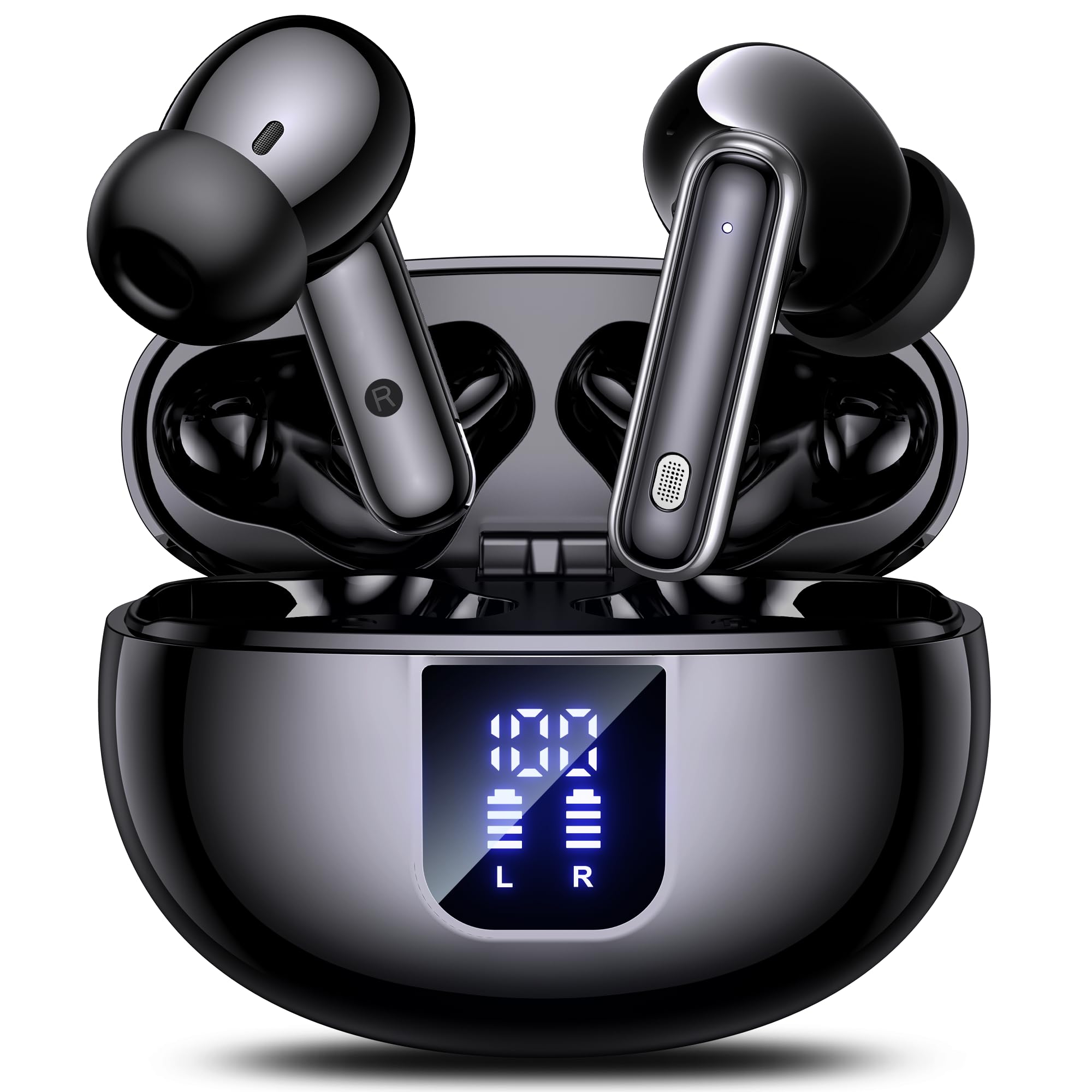
Image: The EUQQ YYK-Q10 AI Translator Earbuds are shown inside their open charging case. The case is black and features a digital display on the front, indicating battery levels for both the case and individual earbuds (L and R). The earbuds themselves are black with silver accents.
Compoñentes clave:
- Auriculares: Left (L) and Right (R) earbuds with touch control areas and microphones.
- Estuche de carga: Stores and charges the earbuds. Features a digital display for battery status.
- Porto de carga: USB-C port on the charging case for power input.
- Indicadores LED: On earbuds and case to show charging status and connection.
Configuración
1. Carga inicial
- Coloque os dous auriculares no estoxo de carga.
- Conecta o cable de carga USB ao porto de carga da carcasa e a unha fonte de alimentación.
- The digital display on the case will show the charging status. Ensure both earbuds and the case are fully charged before first use (approximately 1-2 hours).
2. Emparellamento Bluetooth
- Abre a caixa de carga. Os auriculares entrarán automaticamente no modo de emparellamento, o que se indicará mediante luces LED intermitentes.
- No teu smartphone ou dispositivo, activa o Bluetooth e busca os dispositivos dispoñibles.
- Select "EUQQ YYK-Q10" from the list of devices.
- Once connected, the earbud LEDs will stop flashing, and a voice prompt will confirm the connection.
3. Instalación da aplicación (para as funcións de tradución)
To utilize the real-time translation features, download the dedicated EUQQ translation app from your device's app store (iOS App Store or Google Play Store). Follow the in-app instructions to connect your earbuds and configure language settings.
Instrucións de funcionamento
Encendido/apagado
- Encendido: Abre a caixa de carga ou saca os auriculares da caixa. Acenderanse automaticamente.
- Apagado: Volve colocar os auriculares na caixa de carga e pecha a tapa. Apagaranse automaticamente.
Music Playback Controls (Touch Controls)
- Reproducir/Pausa: Toca un só auricular en calquera dos auriculares.
- Próxima pista: Toca dúas veces no auricular dereito.
- Pista anterior: Toca dúas veces no auricular esquerdo.
- Subir volume: Toca tres veces no auricular dereito.
- Baixar volume: Toque tres veces no auricular esquerdo.
Xestión de chamadas (controis táctiles)
- Responder/Finalizar chamada: Toca un só auricular en calquera dos auriculares.
- Rexeitar a chamada: Mantén premido calquera dos auriculares durante 2 segundos.
Translation Mode
Activate translation mode through the dedicated EUQQ app. The app will guide you through selecting source and target languages. Depending on the app's features, you may use different modes:
- Modo de conversa: Speak into your earbud's microphone, and the translation will be played through the other person's earbud or your phone's speaker.
- Interpreter Mode: One person wears an earbud, the other speaks into the phone.
- Touch-to-Speak Mode: Tap an earbud to speak, release to translate.
Refer to the EUQQ app's help section for detailed instructions on specific translation modes and features.
Cancelación de ruído
The earbuds feature dual-mic noise cancelling. This feature is typically active by default or can be toggled via the companion app. It helps reduce ambient noise during calls and translation sessions for clearer communication.
Mantemento
- Limpeza: Limpa regularmente os auriculares e a funda de carga cun pano suave, seco e sen pelusa. Non empregues produtos químicos agresivos nin materiais abrasivos.
- Consellos para oídos: Retire e limpe as almofadas dos oídos periodicamente con auga e xabón suave. Asegúrese de que estean completamente secas antes de volvelas colocar.
- Contactos de carga: Limpa con coidado os contactos de carga tanto dos auriculares como da funda cun hisopo de algodón seco para garantir unha carga correcta.
- Almacenamento: Cando non os uses, garda os auriculares no seu estoxo de carga para protexelos e mantelos cargados. Evita temperaturas e humidade extremas.
Resolución de problemas
| Problema | Solución |
|---|---|
| Os auriculares non se emparejan |
|
| Sen son nin baixo volume |
|
| Problemas de carga |
|
| A tradución non funciona |
|
Especificacións
| Característica | Detalle |
|---|---|
| Marca | EUQQ |
| Nome do modelo | YYK-Q10 |
| Tecnoloxía de conectividade | Sen fíos |
| Factor de forma dos auriculares | In-Ear |
| Cor | Negro |
| Compoñentes incluídos | Instruction Manual (and other standard accessories like earbuds, case, cable, ear tips) |
| Número de elementos | 1 (product unit) |
| Pilas necesarias | No (built-in rechargeable) |
| Número de modelo do fabricante | YYK-Q10 |
| Dimensións do paquete | 0.1 x 0.1 x 0.1 cm; 45.36 g |
| ASIN | B0FN3WC8LW |
Información da garantía
The EUQQ YYK-Q10 AI Translator Earbuds come with a standard manufacturer's warranty. For detailed information regarding warranty coverage, terms, and conditions, please refer to the warranty card included in your package or visit the official EUQQ websitio. Garde o comprobante de compra para reclamacións de garantía.
Atención ao cliente
If you encounter any issues or have questions regarding your EUQQ YYK-Q10 AI Translator Earbuds, please do not hesitate to contact our customer support team. You can find contact information on the official EUQQ website or through the support section of the EUQQ translation app.
Recursos en liña:
- Official EUQQ Websitio: Visit EUQQ Store on Amazon
- EUQQ Translation App (for in-app support)


