1. Introdución
This manual provides instructions for the safe and efficient operation of your vretti Bluetooth Thermal Label Printer, model B0FNW9FCS5. Please read this manual thoroughly before using the device and retain it for future reference.
2. Información de seguridade
- Ensure the printer is connected to a power source with the correct voltage.
- Non expoña a impresora á auga nin a humidade excesiva.
- Evite colocar a impresora baixo a luz solar directa ou preto de fontes de calor.
- Non intente desmontar nin reparar a impresora vostede mesmo. Póñase en contacto co persoal de servizo cualificado.
- Manter fóra do alcance dos nenos.
- Use only vretti approved accessories and power adapters.
3. Contido do paquete
Verifica que todos os elementos estean presentes no paquete:
- vretti Bluetooth Thermal Label Printer (Model B0FNW9FCS5)
- Adaptador de alimentación
- Cable USB
- Guía de inicio rápido
- Sample Labels (50 premium labels)
4. Configuración
4.1 Conexión física
- Connect the power adapter to the printer and then to a power outlet.
- Connect the USB cable from the printer to your computer (if using USB connection).
- Acende a impresora usando o interruptor de acendido.
4.2 Cargar etiquetas
The printer features an integrated paper bin designed for easy label loading.
- Abra a tapa superior da impresora.
- Place the roll of thermal labels into the integrated paper bin. Ensure the labels feed from the bottom of the roll and the printable side faces upwards.
- Adjust the guide rails to fit the width of your labels snugly, without creasing them. The printer supports label widths from 0.78 inches (19mm) to 4.6 inches (116mm).
- Feed the first label through the print mechanism until it is positioned correctly.
- Pecha a tapa superior.

Figura 4.2.1: Label loading into the integrated paper bin. The visualization window allows monitoring label supply. Adjustable guide rails ensure proper label alignment for various sizes like 2"x3", 3"x3", and 4"x6".
4.3 Instalación de controladores e software
The vretti printer offers dual connectivity options: USB and Bluetooth.

Figura 4.3.1: Connectivity Compatibility Guide. USB connection is compatible with MacOS, Windows, Linux, and Chrome OS. Bluetooth connection is compatible with iOS, Android, and Tablets. Bluetooth is not supported for MacOS, Windows, Linux, or Chrome OS.
4.3.1 USB Connection (Windows/Mac/Linux/ChromeOS)
For most operating systems, the printer is designed for "Plug & Play" functionality. Connect the USB cable, and your system should automatically detect and install the necessary drivers within approximately 60 seconds. If drivers do not install automatically, refer to the included Quick Start Guide or the manufacturer's website for manual driver installation instructions.
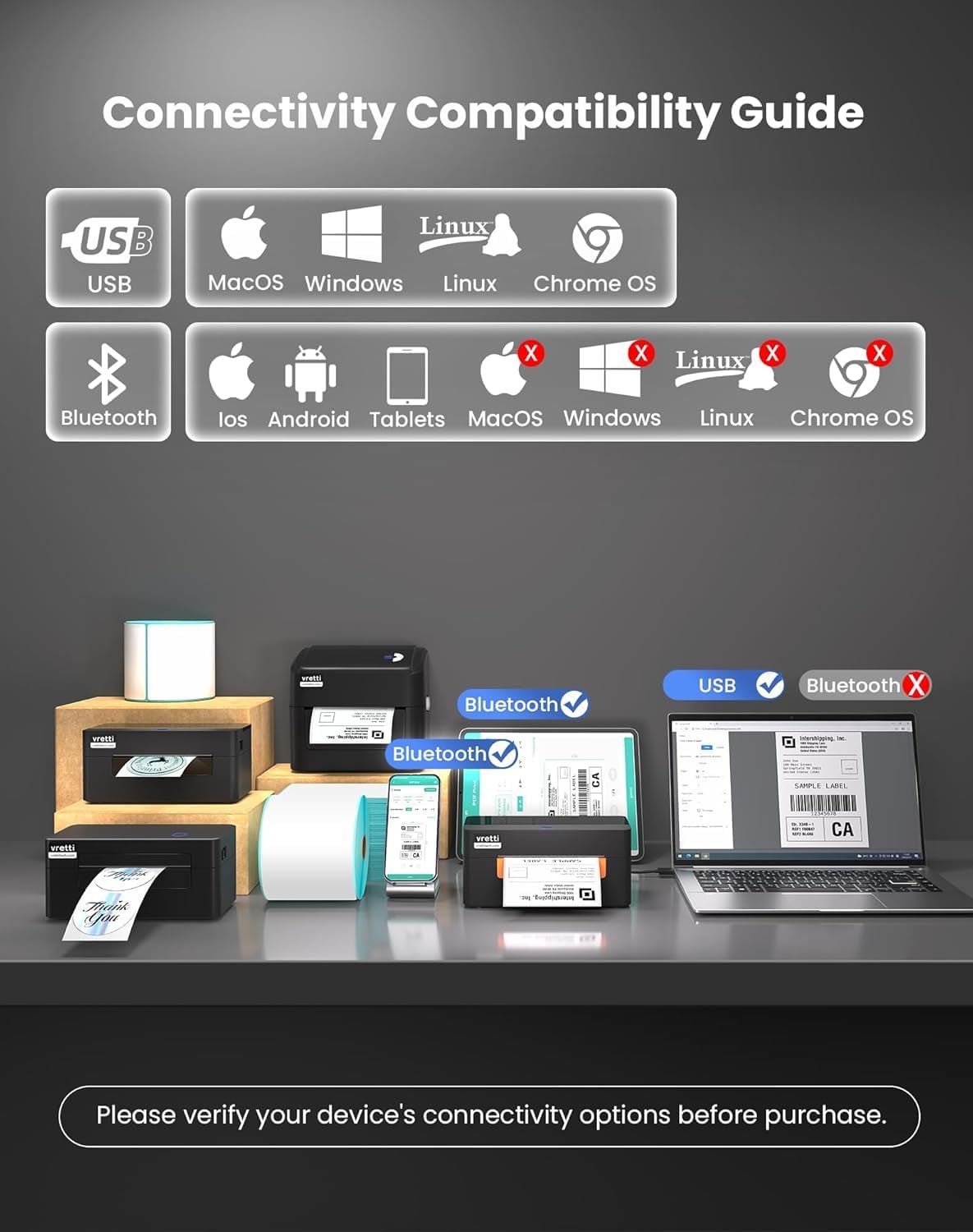
Figura 4.3.2: The vretti label printer is designed for quick deployment, allowing users to master its operation rapidly, often within 2 minutes for basic setup.
4.3.2 Bluetooth Connection (iOS/Android/Tablets)
- Asegúrate de que o Bluetooth estea activado no teu dispositivo móbil ou tableta.
- Turn on the vretti printer.
- On your device, search for available Bluetooth devices and select the vretti printer (e.g., "vretti Printer" or similar).
- Siga as indicacións en pantalla para completar o proceso de vinculación.
- Install the vretti printing application from your device's app store (e.g., Apple App Store, Google Play Store) to manage print jobs.
5. Instrucións de funcionamento
5.1 Impresión de etiquetas
The vretti thermal label printer uses direct thermal printing technology, eliminating the need for toner or ink. It is optimized for 4x6 inch shipping labels and barcodes.
- Ensure labels are properly loaded (refer to Section 4.2).
- Abra o documento ou a aplicación desde a que desexa imprimir.
- Seleccione "Imprimir" no menú da aplicación.
- Choose the vretti printer from the list of available printers.
- Adjust print settings as needed, such as label size (e.g., 4x6 inches) and orientation.
- Iniciar o traballo de impresión.

Figura 5.1.1: The printer delivers 203 dpi resolution, ensuring clear and scannable barcodes with a 99.99% recognition rate for labels such as DHL 4x6 shipping labels and QR codes.

Figura 5.1.2: The vretti printer offers a print speed of 152 mm/s, capable of producing 72 labels per minute. Its direct thermal technology eliminates ink/toner, leading to significant cost savings and a print head lifespan three times longer than standard printers.
6. Mantemento
6.1 Limpeza do cabezal de impresión
The printer features automatic cleaning functionality. However, if print quality degrades, manual cleaning may be necessary.
- Apague a impresora e desconéctea da fonte de alimentación.
- Abre a tapa superior.
- Gently wipe the print head with a lint-free cloth lightly dampcon alcohol isopropílico.
- Deixe que o cabezal de impresión seque completamente antes de pechar a tapa e acender a impresora.
6.2 Limpeza xeral
Limpe o exterior da impresora cun pano suave e seco. Non empregue produtos de limpeza abrasivos nin disolventes.
7 Solución de problemas
| Problema | Causa posible | Solución |
|---|---|---|
| A impresora non se acende | No power, faulty power adapter | Comprobe as conexións de alimentación, probe cunha toma de corrente diferente. |
| Mala calidade de impresión | Dirty print head, incorrect label type, low-quality labels | Clean the print head (Section 6.1). Ensure you are using thermal labels. Try new labels. |
| As etiquetas non se alimentan correctamente | Labels improperly loaded, guide rails not adjusted | Reload labels, adjust guide rails (Section 4.2). |
| Non se pode conectar a través de Bluetooth | Bluetooth not enabled, incorrect pairing, device incompatibility | Ensure Bluetooth is on. Re-pair the device. Confirm your device is compatible (iOS/Android/Tablets only). |
| Impresora non recoñecida polo ordenador (USB) | Driver issue, faulty USB cable, incorrect port | Try a different USB port or cable. Reinstall drivers if necessary. |
8. Especificacións
| Característica | Detalle |
|---|---|
| Marca | vretti |
| Número de modelo | B0FNW9FCS5 |
| Tecnoloxía de impresión | Térmica directa |
| Resolución de impresión | 203 ppp |
| Velocidade de impresión | Up to 152 mm/s (72 labels/min) |
| Ancho da etiqueta | 0.78" - 4.6" (19 mm - 116 mm) |
| Conectividade | USB (Windows/Mac/Linux/ChromeOS), Bluetooth 5.0 (iOS/Android/Tablets) |
| Capacidade máxima de follas | 500 labels (integrated bin) |
| Dimensións (L x W x H) | 29.5 x 20.5 x 18.8 cm (aprox.) |
| Fonte de enerxía | Adaptador de enerxía externo |
9. Garantía e soporte
vretti products are manufactured to high-quality standards. For warranty information and technical support, please refer to the warranty card included with your product or visit the official vretti website. Please have your model number (B0FNW9FCS5) and purchase date available when contacting support.


