Introdución
This manual provides detailed instructions for the installation, operation, and maintenance of your CAMECHO [2025] Motorcycle Dashcam. This device features a 6.86-inch HD touchscreen, dual front and rear cameras, wireless CarPlay and Android Auto, dual Bluetooth, and IP68 waterproofing, designed for a safe and connected riding experience.

Image: The CAMECHO Motorcycle Dashcam main unit, showcasincoa súa pantalla de 6.86 polgadas.
Contido do paquete
Verifique que todos os elementos que se indican a continuación estean incluídos no seu paquete:
- 6.86-inch Player (Main Unit)
- Monte Universal
- Manual de usuario
- Cable de alimentación
- Accessories (mounting hardware)
- 2 x Cameras (Front and Rear)

Image: A visual representation of all components included in the product package, such as the main unit, cameras, cables, and mounting accessories.
Especificacións
| Marca | CAMECHO |
| Nome do modelo | CMAECHO [2025] |
| Mostrar | 6.86-inch HD Touchscreen (1280*480) |
| Resolución de vídeo | 1080 p |
| Conectividade | Wireless CarPlay, Wireless Android Auto, Dual Bluetooth, Wi-Fi |
| Clasificación impermeable | IP68 |
| Temperatura de funcionamento | -4 °F a 149 °F (-20 °C a 65 °C) |
| Vehículos compatibles | All 12V Motorcycle Models |
| Soporte de almacenamento | TF Card up to 128GB (not included) |
| Campo de View | 135 Degrees (each camera) |
| Dimensións | 214mm x 82mm x 67mm (Main Unit) |
| Peso | 600 gramos |
Configuración e instalación
Follow these steps to properly install your dashcam system on your motorcycle.
- Fixar o soporte: Secure the universal mount to your motorcycle's handlebar using a Phillips screwdriver.
- Adjust the Connecting Rod: Clamp the connecting rod to the mount. The mount is 360° adjustable for optimal positioning.
- Insert and Adjust Device: Insert the main dashcam unit into the mount. Adjust its position as desired and tighten the adjustment ring to secure it.
- Cableado: Connect the power cable. The red wire connects to the motorcycle battery positive terminal, and the black wire connects to the motorcycle battery negative terminal (ground wire). Ensure all connections are secure.
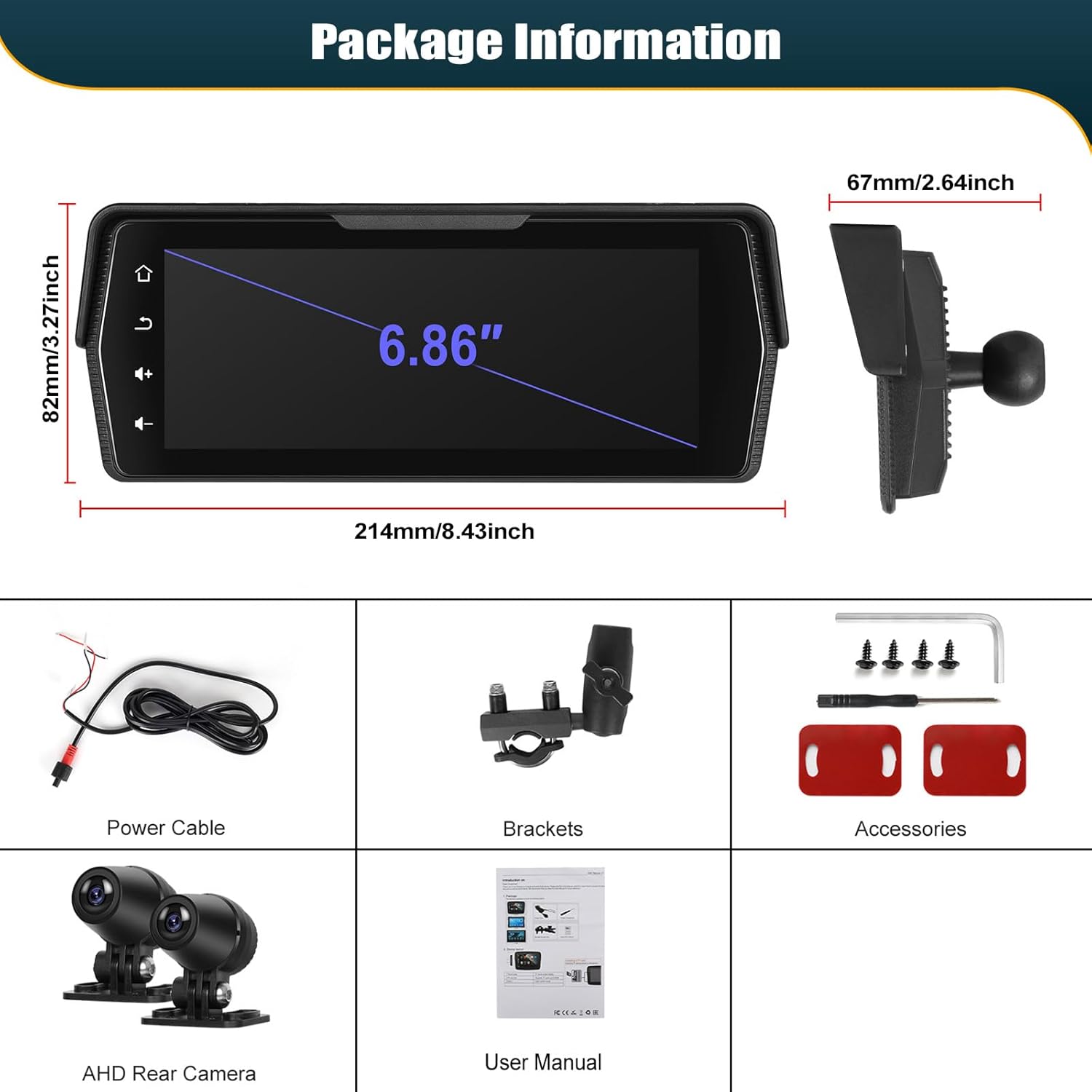
Image: Step-by-step visual guide for mounting the dashcam unit and connecting the power wires to the motorcycle battery.
Instalación de cámara
Install the front and rear cameras in positions that provide a clear, unobstructed view of the road. Ensure they are securely mounted and their cables are routed safely, away from moving parts or heat sources.

Image: Diagram showing the optimal placement of front and rear cameras on a motorcycle for a comprehensive viewángulo de ing.
Instrucións de funcionamento
Acendido e configuración inicial
Once installed and wired, the device will power on with your motorcycle's ignition. Follow the on-screen prompts for initial language selection and time settings.
CarPlay sen fíos e Android Auto
This device supports wireless CarPlay and Android Auto. To connect:
- Activa o Bluetooth e a wifi no teu smartphone.
- On the dashcam, navigate to the CarPlay or Android Auto icon and select it.
- Busca the dashcam's Bluetooth name on your phone and pair.
- Once paired via Bluetooth, the device will automatically establish a Wi-Fi connection for CarPlay/Android Auto functionality.
This allows you to use navigation, make calls, listen to music, and send messages directly from the dashcam screen, supporting Siri and Google Voice Assistant for hands-free operation.

Image: The dashcam display showing the user interface for Wireless CarPlay and Android Auto, with various app icons.
Conexión Bluetooth dual
The dual Bluetooth feature allows you to connect your smartphone to the dashcam for CarPlay/Android Auto, and simultaneously connect a Bluetooth helmet or external speaker for audio output.
- Connect your phone to the dashcam via Bluetooth for CarPlay/Android Auto as described above.
- Access the Bluetooth settings on the dashcam.
- Busca and pair your Bluetooth helmet or speaker.
This enables music playback and call audio directly through your helmet or speaker.

Image: Illustration of the dual Bluetooth functionality, connecting the dashcam to both a smartphone and a Bluetooth-enabled helmet.
Función de gravación de vídeo
The dashcam continuously records footage from both front and rear cameras. Ensure a TF card (up to 128GB, not included) is inserted for recording. The device supports loop recording, overwriting the oldest files cando a tarxeta está chea.
- Cambio Views: On the screen, you can switch between front view, traseira view, or a split-screen display.
- Reprodución: Access recorded videos directly on the device via the playback function.
- Emergency Lock: In case of a sudden impact, the current recording will be automatically locked to prevent overwriting. You can also manually lock recordings.
- Visión nocturna: The rear camera features night vision capabilities for clear recording in low-light conditions.

Image: The dashcam screen displaying the video recorder interface, showing live views from both front and rear cameras and control options.
Mantemento
Waterproof and Durability
The CAMECHO dashcam is designed with an IP68 waterproof rating, making it resistant to dust, shock, and water immersion. It is built to withstand various weather conditions, including rain, snow, and dusty environments.

Image: Visual representation of the dashcam's durability, showing its resistance to water, dust, and extreme temperatures.

Image: The dashcam mounted on a motorcycle, illustrating its compatibility with all 12V models and resilience in rainy, snowy, and sandy conditions.
Limpeza
To clean the screen and camera lenses, use a soft, lint-free cloth. For stubborn dirt, dampen the cloth slightly with water or a mild screen cleaner. Avoid abrasive materials or harsh chemicals.
Actualizacións de firmware
Periodically check the official CAMECHO website for any available firmware updates to ensure optimal performance and access to new features. Follow the instructions provided with the update files con coidado.
Resolución de problemas
| Problema | Causa posible | Solución |
|---|---|---|
| O dispositivo non se acende. | Incorrect power connection, low motorcycle battery. | Check power cable connections (red to positive, black to negative). Ensure motorcycle battery has sufficient charge. |
| CarPlay/Android Auto non se conecta sen fíos. | Bluetooth/Wi-Fi off on phone, incorrect pairing. | Ensure phone's Bluetooth and Wi-Fi are enabled. Re-pair the phone via Bluetooth on the dashcam. Ensure no other devices are interfering. |
| No video recording. | No TF card, TF card full, TF card error. | Insert a compatible TF card (up to 128GB). Format the TF card in the device settings. Replace the TF card if it's faulty. |
| Poca calidade de vídeo. | Dirty camera lens, low light, camera not focused. | Clean camera lenses. Ensure cameras are securely mounted and facing correctly. Adjust display settings if needed. |
| A pantalla táctil non responde. | Fallo temporal de software, temperatura extrema. | Restart the device. Allow the device to return to normal operating temperature. If persistent, perform a touch calibration in settings. |
Vídeos oficiais de produtos
Watch these official videos for further guidance on product features and usage.
Vídeo: Unha análise exhaustivaview or demonstration of the CAMECHO Motorcycle Dashcam's features and functionality.
Video: Detailed guide on the installation process or specific feature setup for the dashcam.
Video: Demonstration of the dashcam's wireless connectivity features, such as CarPlay or Android Auto.
Información da garantía
CAMECHO products are covered by a standard manufacturer's warranty against defects in materials and workmanship. Please refer to the warranty card included in your package or visit the official CAMECHO websitio web para coñecer os termos e condicións específicos, incluíndo a duración da garantía e os procedementos de reclamación.
Conserve o comprobante de compra para reclamacións de garantía.
Atención ao cliente
For technical assistance, troubleshooting, or any questions regarding your CAMECHO Motorcycle Dashcam, please contact our customer support team.
- Correo electrónico: bs_support21@126.com
- Recursos en liña: Visit the official CAMECHO websitio web con preguntas frecuentes, manuais actualizados e descargas de software.

Image: A customer support representative ready to assist with product inquiries.