1. Introdución
Grazas pola compraasing the Monster S350 Bluetooth Speaker. This portable wireless speaker features a touch screen, Bluetooth 6.0 connectivity, and support for TF cards, offering a versatile audio experience. This manual provides detailed instructions for setup, operation, maintenance, and troubleshooting to ensure optimal performance and longevity of your device.
2. Información de seguridade
- Non expoñas o altofalante a temperaturas extremas, luz solar directa ou humidade elevada.
- Evite deixar caer ou someter o altofalante a fortes impactos.
- Manteña o altofalante lonxe da auga e doutros líquidos.
- Non intente desmontar, reparar nin modificar o altofalante vostede mesmo. Póñase en contacto co persoal de servizo cualificado se é necesario.
- Emprega só o cable de carga incluído ou un equivalente certificado.
- Desfágase das baterías segundo a normativa local. Non as incinere.
3. Contido do paquete
Comprobe se o paquete contén os seguintes elementos:
- Altofalante Bluetooth Monster S350
- Cable de carga USB
- Manual de usuario
4. Produto rematadoview
Familiarize yourself with the components of your Monster S350 speaker.

Figura 4.1: Fronte view of the Monster S350 Bluetooth Speaker, showcasing its retro design and touch screen.

Figura 4.2: Close-up of the speaker's top controls, illustrating the long press function for power and swipe gestures for volume adjustment.
Controis e portos:
- Botón de potencia/volume: Long press to turn on/off. Swipe up to increase volume, swipe down to decrease volume.
- Pantalla táctil: For navigation, settings, and displaying information.
- Ranura para tarxetas TF: Insira unha tarxeta TF (microSD) para reproducir música localmente.
- Porto de carga USB-C: Para cargar o altofalante.
5. Configuración
5.1 Carga do altofalante
- Conecta o cable de carga USB ao porto USB-C do altofalante.
- Conecta o outro extremo do cable a un adaptador de corrente USB (non incluído) ou ao porto USB dun ordenador.
- O indicador de carga na pantalla mostrará o estado da carga. Unha carga completa adoita tardar aproximadamente de 2 a 3 horas.
5.2 Acendido/Apagado
- Para acender: Long press the Power/Volume knob until the screen lights up.
- Para apagar: Long press the Power/Volume knob until the screen turns off.
5.3 Emparejamento Bluetooth
Pair your Monster S350 with a Bluetooth-enabled device.
- Ensure the speaker is powered on and within range of your Bluetooth device (e.g., smartphone, tablet).
- No teu dispositivo Bluetooth, activa o Bluetooth e busca os dispositivos dispoñibles.
- Select "Monster S350" from the list of found devices.
- Unha vez emparellado, o altofalante indicará unha conexión correcta e poderás comezar a reproducir audio.

Figura 5.1: The speaker displaying its Bluetooth connection status alongside a smartphone's Bluetooth settings.
Reprodución de tarxetas TF 5.4
Play music directly from a TF (microSD) card.
- Asegúrate de que o altofalante estea apagado.
- Insert a TF card (up to 32GB, formatted to FAT32) into the TF card slot until it clicks into place.
- Power on the speaker. The speaker will automatically detect the TF card and switch to local music playback mode, or you can select it from the touch screen menu.

Figura 5.2: Demonstrating the insertion of a TF card into the speaker's dedicated slot for local music playback.
6. Instrucións de funcionamento
6.1 Reprodución de audio básica
- Reproducir/Pausa: Tap the play/pause icon on the touch screen.
- Próxima pista: Swipe right on the touch screen or tap the next track icon.
- Pista anterior: Swipe left on the touch screen or tap the previous track icon.
- Control de volume: Swipe up on the Power/Volume knob to increase volume, swipe down to decrease volume. Alternatively, adjust volume via the connected Bluetooth device.
6.2 Usando a pantalla táctil
The full-color touchscreen display allows for intuitive navigation and access to various features.
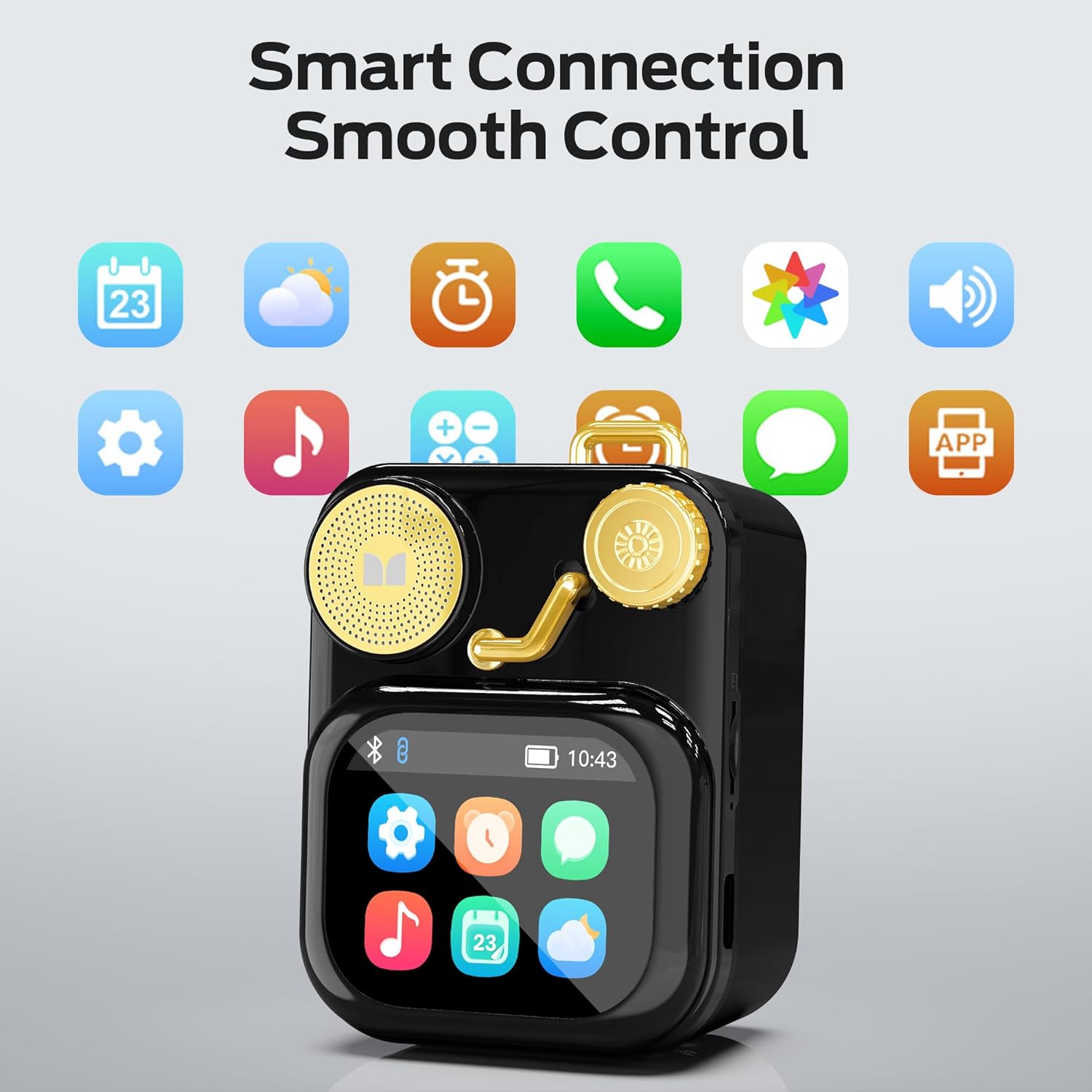
Figura 6.1: The speaker's touch screen displaying various application icons for smart features.
- Navegación: Swipe left/right or up/down to browse through menus and options.
- Selección: Toca unha icona ou unha opción para seleccionala.
- Configuración: Access system settings, Bluetooth options, display preferences, and more through the settings icon.
6.3 Funcións intelixentes
When connected to a compatible smartphone via Bluetooth and the companion app (if available), the speaker can display various smart features:

Figura 6.2: Examples of smart features displayed on the speaker's screen, including notifications, weather, lyrics, and Bluetooth call information.
- Mobile Notifications: Receive alerts for messages and other app notifications.
- Información da canción: Display song titles and artist information during playback.
- Alarmas: Set and manage alarms directly from the speaker.
- Actualizacións do tempo: View información meteorolóxica en tempo real.
- Ruído branco: Access soothing white noise sounds for relaxation.
7. Mantemento
7.1 Limpeza
- Wipe the speaker's surface with a soft, dry, lint-free cloth.
- Non empregues produtos de limpeza abrasivos, alcol nin disolventes químicos, xa que poden danar o acabado.
- Manteña os portos libres de po e residuos.
7.2 Almacenamento
- Garde o altofalante nun lugar fresco e seco, lonxe da luz solar directa e de temperaturas extremas.
- If storing for an extended period, charge the battery to approximately 50% every three months to preserve battery life.
8 Solución de problemas
If you encounter issues with your Monster S350 speaker, refer to the following solutions:
| Problema | Causa posible | Solución |
|---|---|---|
| O altofalante non se acende. | A batería está esgotada. | Cargue o altofalante mediante o cable USB proporcionado. |
| Non hai son do altofalante. | Volume is too low or muted. Device not paired. | Increase speaker volume. Ensure Bluetooth device is paired and playing audio. |
| Non se pode emparellalo por Bluetooth. | Speaker is not in pairing mode. Device is out of range. Interference. | Ensure speaker is on and Bluetooth is enabled. Move devices closer. Turn off other Bluetooth devices. |
| Non se reproduce música na tarxeta TF. | Card not inserted correctly. Unsupported file format. Corrupted card. | Volva inserir a tarxeta TF. Asegúrese de que a música estea ben. files are in a supported format (e.g., MP3). Try a different TF card. |
| As funcións intelixentes non funcionan. | Not connected to companion app. App issues. | Ensure the speaker is connected to the companion app on your smartphone. Check app permissions and updates. |
9. Especificacións
Technical details of the Monster S350 Bluetooth Speaker:
- Nome do modelo: S350
- Marca: Monstro
- Material: Metal
- Cor: Negro
- Dimensións do produto: 12.5D x 10.5W x 5.4H Centimetres (approx. 4.9 x 4.1 x 2.1 inches)
- Peso do artigo: 160 gramos (aprox. 0.35 libras)
- Tecnoloxía de conectividade: Bluetooth 6.0
- Potencia de saída máxima do altofalante: 10 vatios
- Modo de saída de audio: Estéreo
- Tipo de montaxe: Mesa
- Batería: 1 batería de iones de litio (incluída)
- Compatibilidade con tarxetas TF: Yes (up to 32GB, FAT32 format recommended)

Figura 9.1: Diagram illustrating the internal woofer for deep bass and tweeter for crisp highs, contributing to the speaker's audio quality.
10. Garantía e soporte
For warranty information or technical support, please refer to the documentation included with your purchase or contact Monster customer service. Keep your proof of purchase for warranty claims.
Contacto de Atención ao Cliente: Please visit the official Monster website or refer to your product packaging for the most current support contact information.


