1. Introdución
This manual provides detailed instructions for the setup, operation, maintenance, and troubleshooting of your Lenovo ThinkVision T24-40 23.8-inch Monitor. Please read this manual thoroughly before using your monitor to ensure proper functionality and to prevent damage.
Características principais:
- 23.8" viewable screen size for enhanced clarity.
- WLED backlight technology for uniform illumination.
- 4 ms response time for smooth transitions.
- Designed to meet Eye Comfort standards with a 5-Star Eye Comfort Rating.
- 16:9 widescreen aspect ratio.
- 250 Nit brightness levels for clear visuals.
- Anti-glare matte screen finish.
- 1920 x 1080 maximum resolution.
2. Que hai na caixa
Comprobe que todos os elementos estean presentes na embalaxe:
- ThinkVision T24-40 Widescreen LED Monitor
- Cable DP
- Cable USB-A a USB-B
3. Configuración
3.1. Montaxe do monitor
Para montar o soporte do monitor:
- Retire con coidado os compoñentes do monitor e do soporte da embalaxe.
- Attach the stand neck to the back of the monitor. Align the tabs and push firmly until it clicks into place. Secure it with the captive thumb screw.
- Attach the base to the stand neck. Align the base with the bottom of the neck and secure it with the captive thumb screw.
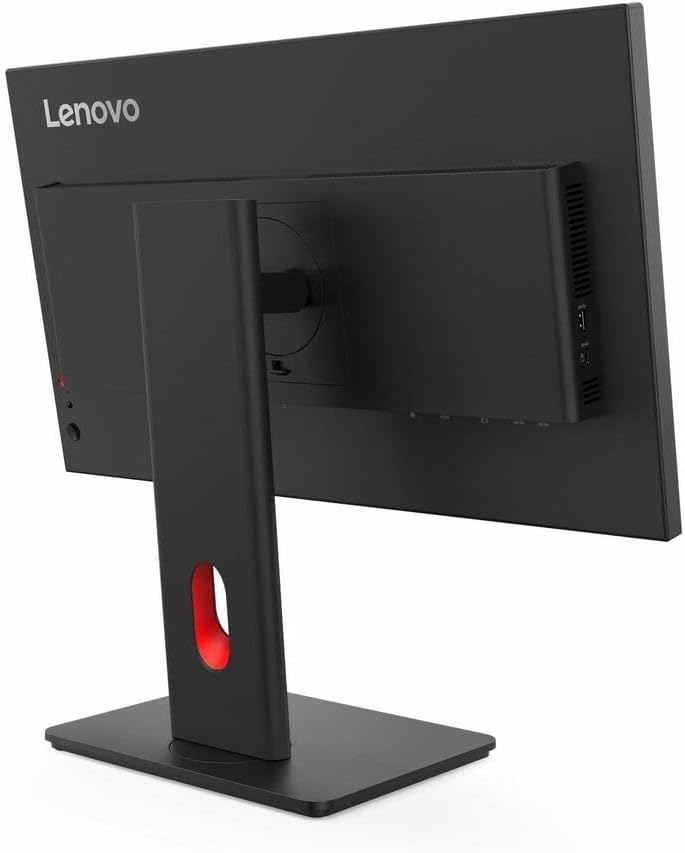
Figura 1: Traseira view of the monitor with the stand attachment area.

Figura 2: Lateral view illustrating the monitor with its stand assembled.
3.2. Conectando o monitor
Connect the monitor to your computer using the provided cables:
- Conexión de alimentación: Connect the power cable to the monitor's power input port and then to a power outlet.
- Conexión de vídeo: Connect the DisplayPort (DP) cable from your computer's DP output to the monitor's DP input. Alternatively, use an HDMI cable if your computer supports it.
- Conexión USB: Connect the USB-A to USB-B cable from your computer to the monitor to enable the monitor's USB hub functionality.

Figura 3: Traseira view of the monitor showing various input ports and connected cables.
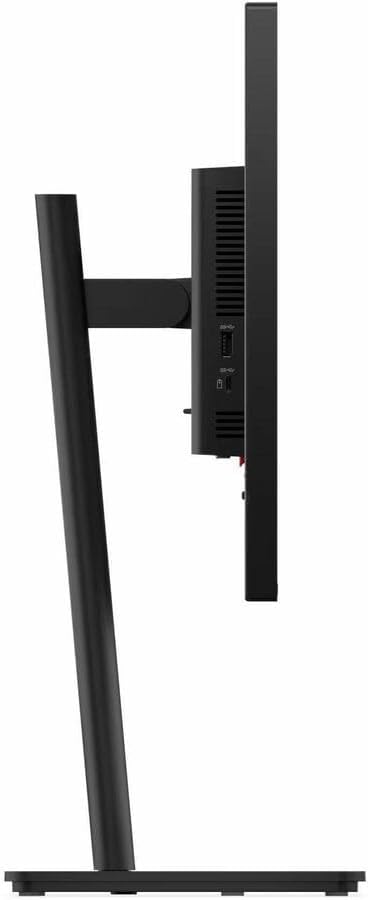
Figure 4: Close-up of the monitor's side ports, including HDMI and VGA.
4. Instrucións de funcionamento
4.1. Acendido/apagado
Prema o botón de acendido/apagado situado no marco inferior dereito do monitor para acender ou apagar o monitor. A luz indicadora de acendido/apagado acenderase cando o monitor estea acendido.
4.2. Controis da visualización en pantalla (OSD)
The monitor features several buttons on the bottom bezel to access and navigate the On-Screen Display (OSD) menu. These controls allow you to adjust various display settings.

Figure 5: Control buttons located on the lower right side of the monitor bezel.
4.3. Axustar a configuración da pantalla
Use the OSD buttons to navigate through the menu options. Common adjustments include:
- Brillo/Contraste: Adjust the overall luminance and contrast levels of the display.
- Fonte de entrada: Select between available input sources (e.g., HDMI, DisplayPort, VGA).
- Configuración de cor: Customize color temperature, gamma, and other color-related parameters.
- Modo de visualización: Choose from preset display modes optimized for different content types (e.g., Standard, Movie, Game).
4.4. Axustes físicos
O soporte do monitor permite axustes ergonómicos:
- Axuste de altura: Empurre ou tire suavemente do monitor cara arriba ou cara abaixo para acadar o obxectivo desexado viewing altura.
- Axuste de inclinación: Inclina a pantalla cara adiante ou cara atrás para optimizar o teu viewángulo de ing.
- Axuste de xiro: Xire o monitor á esquerda ou á dereita sobre a súa base.
5. Mantemento
To ensure the longevity and optimal performance of your ThinkVision T24-40 monitor, follow these maintenance guidelines:
- Limpeza da pantalla: Use un pano suave e sen pelusa dampened with water or a non-ammonia, non-alcohol-based screen cleaner. Do not spray liquid directly onto the screen.
- Limpeza do Casing: Use un pano suave e seco para limpar o monitor casing. Evitar produtos de limpeza abrasivos.
- Ventilación: Asegúrate de que as aberturas de ventilación do monitor non estean bloqueadas para evitar o sobrequecemento.
- Almacenamento: When not in use for extended periods, store the monitor in a cool, dry place, ideally in its original packaging.
6 Solución de problemas
Se tes problemas co monitor, consulta os seguintes problemas e solucións comúns:
| Problema | Posible Solución |
|---|---|
| Non hai imaxe na pantalla | Ensure power cable is securely connected. Verify video cable is connected to both monitor and computer. Select correct input source via OSD. |
| Image is dim or too bright | Adjust brightness and contrast settings using the OSD menu. |
| As cores aparecen incorrectas | Adjust color settings in the OSD menu. Ensure graphics drivers are up to date. |
| Parpadea o monitor | Check video cable connections. Ensure refresh rate is set correctly in your computer's display settings. |
| Sen son | If using monitor speakers, ensure volume is not muted and is turned up. Check audio output settings on your computer. |
7. Especificacións
| Característica | Detalle |
|---|---|
| Tamaño da pantalla de pé | 23.8 polgadas |
| Resolución de pantalla | 1920x1080 |
| Resolución máxima de pantalla | 1920 x 1080 píxeles |
| Marca | Lenovo |
| Serie | ThinkVision |
| Número de modelo do artigo | T24-40 |
| Peso do elemento | 6.61 libras |
| Dimensións do produto | 1.8 x 21.3 x 12.4 polgadas |
| Cor | Eclipse Black, Black |
| Relación de aspecto | 16:9 |
| Descrición da superficie da pantalla | Mate |
8. Garantía e soporte
For warranty information, technical support, or to download the latest drivers and user manuals, please visit the official Lenovo support websitio. Conserve o recibo de compra para reclamacións de garantía.
Soporte Lenovo Websitio: pcsupport.lenovo.com


