1. Introdución
The Radtel RT-6D PRO DMR Radio is a dual-band two-way communication device designed for both amateur radio enthusiasts and professional users. It supports DMR Tier 1 and Tier 2 digital operations, as well as traditional analog communication, across VHF (144-148MHz) and UHF (420-450MHz) frequency ranges. This manual provides essential information for the proper setup, operation, and maintenance of your RT-6D PRO radio.
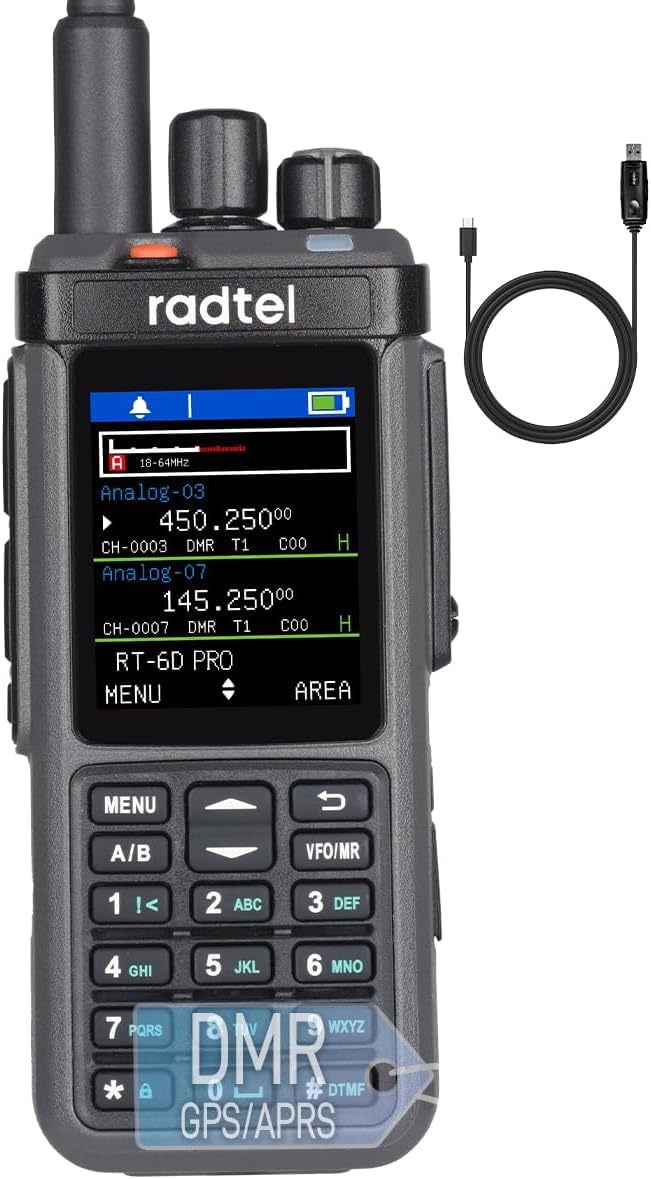
Figure 1: Radtel RT-6D PRO DMR Radio
2. Contido do paquete
Verifica que todos os elementos estean presentes no teu paquete:
- 1x RT-6D PRO Main unit
- 1 batería de ións de litio de 2400 mAh
- 1x Antena de dobre banda
- 1x clip de cinto
- 1x Charging base
- 1x Type-C Power cable
- 1x Manual de usuario en inglés
3. Produto rematadoview
3.1 Compoñentes de radio

Figure 2: Radtel RT-6D PRO Labeled Components
Familiarize yourself with the main parts of your radio:
- Antena: Para transmitir e recibir sinais.
- Botón de canle: Úsase para seleccionar canles.
- Botón de volume/acendido/apagado: Controla a acendida e o volume do son.
- Luz indicadora: Mostra o estado da radio (por exemplo, transmitindo, recibindo, cargando).
- PTT1 / PTT2: Push-to-Talk buttons for initiating transmissions.
- Side-key: Programmable function button.
- Teclado: For manual frequency input, menu navigation, and DTMF tones.
- Relator: Saídas de audio recibidas.
- Conector para auriculares: Para conectar accesorios de audio externos.
- Type-C Charging/Programming Port: For battery charging and connecting to a computer for programming.
3.2 Características principais
- GPS and APRS Functionality: Integrated GPS for location services and APRS for position reporting.
- Promiscuous Mode: Automatically scans and monitors digital channels for active talk groups and color codes.
- Porto USB tipo C: Conveniently handles both charging and programming.
- Gran capacidade de datos: Stores 2,000 contacts, manages 90 Talk Group lists (up to 128 groups each), and accesses a global database of 500,000 contacts with CSV import capability.
- Channel and Zone Capacity: Supports 256 zones and 1024 channels.
- Cifrado: Operates with AES-256 encryption protocols.
- One-Touch Frequency Scanner: Simplifies signal identification.
- Alertas meteorolóxicas da NOAA: Provides live weather feeds.

Figure 3: Radtel RT-6D PRO Feature Icons
4. Configuración inicial
4.1 Instalación e carga da batería
- Aliñe a batería de ións de litio de 2400 mAh co compartimento da batería na parte traseira da radio.
- Deslice a batería no seu lugar ata que faga clic de forma segura.
- To charge, connect the Type-C power cable to the radio's Type-C port and a compatible power source (e.g., wall adapter, car charger, power bank, or computer USB port). The indicator light will show charging status.
4.2 Conexión da antena
- Screw the dual-band antenna clockwise onto the antenna connector at the top of the radio until it is finger-tight. Do not overtighten.
4.3 Basic Power On/Off
- To power on, rotate the Volume/ON/OFF button clockwise until you hear a click and the display illuminates.
- To power off, rotate the Volume/ON/OFF button counter-clockwise until you hear a click and the display turns off.
5. Funcionamento básico
5.1 Selección de canles
Rotate the Channel Knob at the top of the radio to cycle through available channels. The selected channel will be displayed on the screen.
5.2 Axuste do volume
After powering on, rotate the Volume/ON/OFF button to increase or decrease the audio output level.
5.3 Transmisión e recepción
- To transmit, press and hold one of the PTT (Push-to-Talk) buttons (PTT1 or PTT2) on the side of the radio. Speak clearly into the microphone.
- Solte o botón PTT para deter a transmisión e volver ao modo de recepción.
- When receiving a signal, the indicator light will illuminate, and audio will be heard through the speaker or connected earphone.
5.4 Contact Management
The RT-6D PRO supports extensive contact management features:
- Contactos locais: Store up to 2,000 individual contacts.
- Talk Group Lists: Manage up to 90 Talk Group lists, each supporting up to 128 groups.
- Global Database: Access a built-in global database of 500,000 contacts.
- Import Functionality: Import custom contact lists via CSV files for streamlined call management.

Figure 4: Contact Management Interface
5.5 GPS and APRS Functions
The integrated GPS module allows the radio to determine its location. This data can be used for APRS (Automatic Packet Reporting System) to transmit your position to other APRS-enabled devices or networks.
5.6 Alertas meteorolóxicas da NOAA
The radio can receive NOAA weather alerts, providing timely information on severe weather conditions in your area.
6. Funcións avanzadas
6.1 DMR Tier 1 & Tier 2 Operation
The RT-6D PRO supports both DMR Tier 1 (unlicensed, direct mode) and Tier 2 (licensed, repeater mode) digital communication, offering enhanced audio quality and spectral efficiency compared to analog modes.

Figure 5: 1024 Channel Capacity and Call Types
6.2 Promiscuous Mode
This mode allows the radio to automatically scan and monitor all digital channels, identifying active talk groups and color codes without prior programming, facilitating seamless communication in dynamic environments.
6.3 Encryption Protocols (AES-256)
For secure communications, the RT-6D PRO supports AES-256 encryption, ensuring privacy and preventing unauthorized interception of your transmissions.
6.4 Programming via Type-C Port
The radio can be programmed using Customer Programming Software (CPS) via the Type-C USB port. This allows for customization of channels, contacts, talk groups, and other advanced settings. Refer to the specific CPS software manual for detailed programming instructions.

Figure 6: 10W High Power Transmission
7. Información de seguridade
Please read and adhere to the following safety guidelines to ensure safe operation and prevent damage to your radio:
- Entorno operativo: Operate the radio in environments with temperatures between 0-40°C and below 2000m altitude. Operating outside these conditions may damage the radio.
- Valores SAR: The radio has been tested for Head SAR (25mm from device) and Body SAR (0mm from device, with headset and belt clip). Specific Absorption Rate (SAR) values are: Face up (25mm): 0.277W/Kg; Back (0mm): 4.061W/Kg; Hand (0mm): 4.270W/Kg.
- Seguridade da batería: Risco de explosión se a batería é substituída por unha de tipo incorrecto. Elimina as pilas usadas segundo a normativa local.
- Avisos xerais: Be cautious of electric shock, flammable materials, and ionizing radiation.
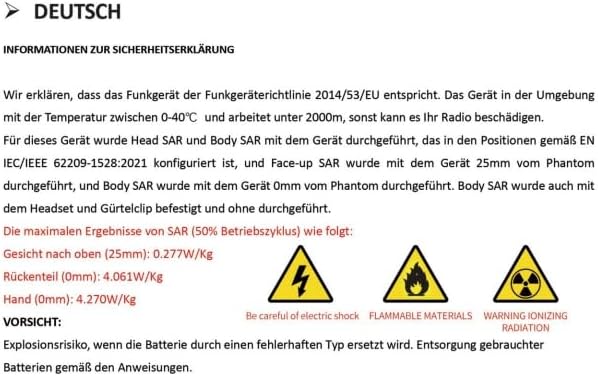
Figure 7: Safety Declaration (German original, summarized above)
8. Mantemento e coidados
Proper care will extend the life of your Radtel RT-6D PRO radio:
- Limpeza: Use un suave, damp pano para limpar o exterior da radio. Non empregue produtos químicos agresivos nin disolventes.
- Resistencia á auga: Esta radio é Non resistente á auga. Avoid exposure to water, rain, or high humidity.
- Coidado da batería: Store the battery in a cool, dry place when not in use. Avoid overcharging or fully discharging the battery frequently.
- Almacenamento: When storing for extended periods, remove the battery and store the radio in a dry, dust-free environment.
9 Solución de problemas
9.1 Problemas comúns e solucións
| Problema | Causa posible | Solución |
|---|---|---|
| A radio non se acende | Batería baixa ou esgotada; batería instalada incorrectamente. | Charge the battery fully. Ensure the battery is correctly installed. |
| Poor signal reports or audio quality | Loose antenna connection; incorrect microphone gain setting; wrong frequency/channel. | Ensure antenna is securely attached. Adjust microphone gain via CPS if available. Verify correct frequency and channel settings. |
| Difficulty programming via Type-C port | Incorrect CPS version; driver issues; antivirus interference; faulty cable. | Download the latest CPS from the official Radtel website. Install necessary drivers. Temporarily disable antivirus software during installation/programming. Try a different Type-C cable. |
| Incorrect time display or GPS issues | Firmware bug; poor GPS signal reception; incorrect UTC offset setting. | Check for firmware updates. Ensure the radio has a clear view of the sky for GPS signal acquisition. Verify UTC offset settings in the radio menu or CPS. |
| Radio stops receiving intermittently | Software/firmware issue; channel interference. | Restart the radio. Try switching to a different channel and then back. Check for firmware updates from Radtel. |
10. Especificacións
| Característica | Especificación |
|---|---|
| Número de modelo | RT-6D PRO |
| Peso do elemento | 1.45 libras |
| Dimensións do produto | 1.5 x 2.36 x 9.84 inches (radio body: 1.57"D x 2.36"W x 10.23"H) |
| Tipo de batería | 1x 9V Li-ion battery (included) |
| Número de canles | 1024 |
| Rango de frecuencias | 144-148Mhz / 420-450Mhz |
| Rango de conversación máximo | 6 Quilómetro |
| Voltage | 7.4 voltios |
| Nivel de resistencia á auga | Non resistente á auga |
| Características especiais | GPS/APRS, Type C Charging, Digital/Analog, 500K Global Contacts |

Figure 8: Radtel RT-6D PRO Dimensions
11. Garantía e soporte
11.1 Información da garantía
The Radtel RT-6D PRO radio comes with a 1 ano de garantíaConserva o comprobante de compra para reclamacións de garantía.
11.2 Atención ao cliente
For technical assistance, troubleshooting beyond this manual, or warranty inquiries, please contact Radtel customer support through their official website or the retailer where the product was purchased. Ensure you have your model number and purchase details ready when contacting support.