1. Introdución
This manual provides detailed instructions for the proper use and maintenance of your LIGE Smart Watch FV6-B2. Please read this manual thoroughly before using the device to ensure optimal performance and longevity.
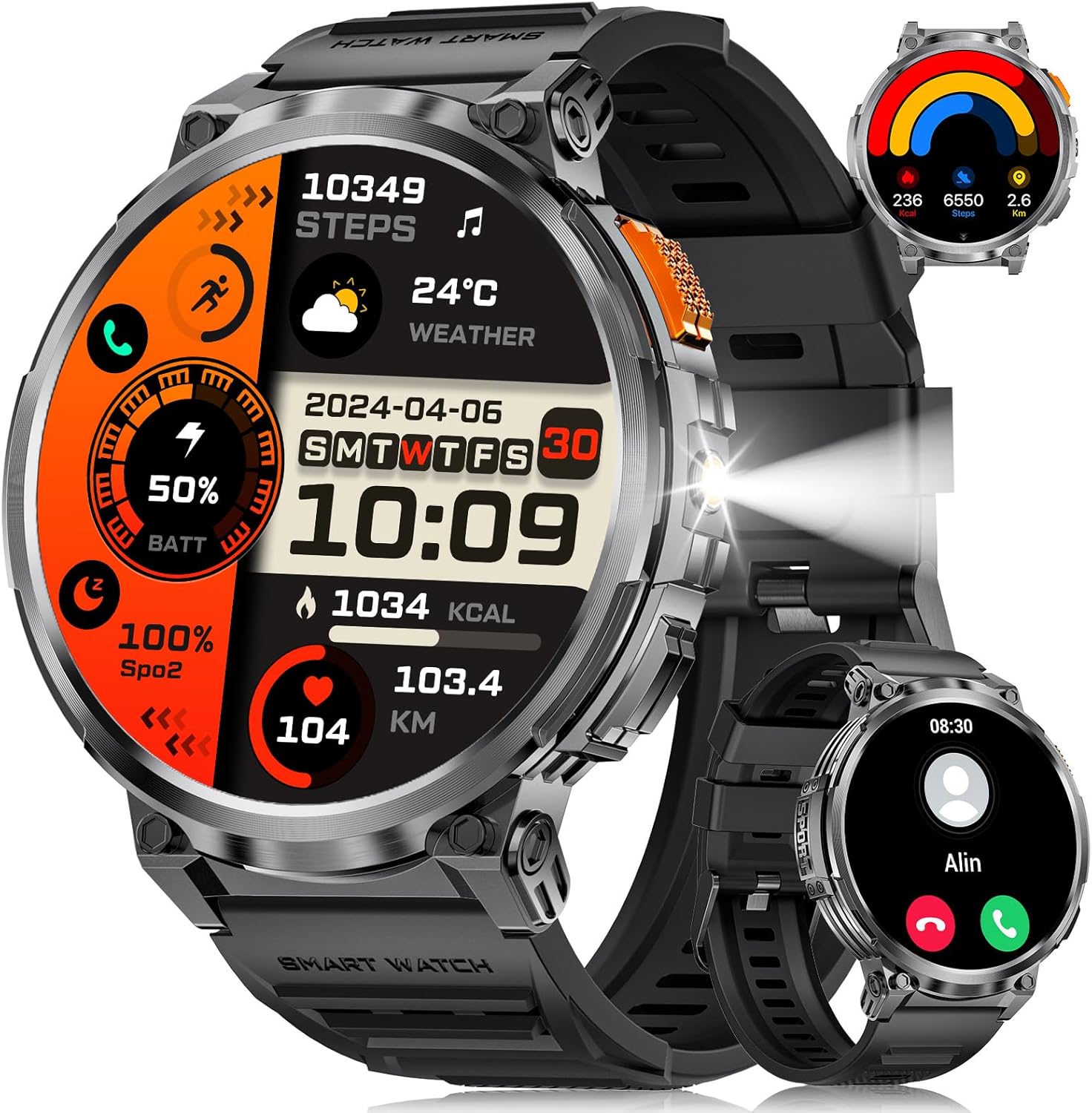
Imaxe 1.1: LIGE Smart Watch FV6-B2 displaying various health and activity metrics.
2. Contido do paquete
Verifica que todos os elementos estean presentes no paquete:
- 1 x LIGE Smart Watch FV6-B2
- 1 x Watch Strap (pre-installed or separate)
- 1 x cable de carga
- Accessories and Extension Tools (for strap adjustment, if applicable)
- 1 x Manual de usuario (este documento)
3. Guía de configuración
3.1 Carga inicial
Before first use, fully charge your smartwatch. Connect the provided charging cable to the watch and a compatible USB power source. A full charge typically takes approximately 2.5 hours. The watch features a 730mAh battery, providing extended usage time.

Imaxe 3.1: Smartwatch connected to its charging cable, highlighting the 730mAh battery.
3.2 Instalación e emparellamento da aplicación
To unlock the full functionality of your LIGE Smart Watch FV6-B2, download and install the companion application on your smartphone. The watch is compatible with Android 4.4 and iOS 8.0 or above. Refer to the quick start guide or packaging for the specific app name and QR code.
- Scan the QR code provided in the watch packaging or search for the app in your smartphone's app store.
- Instala a aplicación no teu teléfono intelixente.
- Abre a aplicación e sigue as instrucións en pantalla para crear unha conta ou iniciar sesión.
- Activa o Bluetooth no teu smartphone.
- Within the app, search for your LIGE Smart Watch FV6-B2 and initiate the pairing process.
- Confirma a solicitude de emparellamento tanto no teu teléfono intelixente como no reloxo intelixente.
For visual guidance, a connection video may be available. Check the product page or manufacturer's websitio para máis información.
4. Instrucións de funcionamento
4.1 Navegando pola interface
The LIGE Smart Watch FV6-B2 features a 1.85-inch HD display with a 360x360 resolution and a highly responsive touch interface. Navigate through menus and functions with simple swipes and taps.
- Pase o dedo cara arriba/abaixo: Scroll through notifications or menu options.
- Pase o dedo cara á esquerda/dereita: Access quick widgets or different watch faces.
- Toca: Selecciona un elemento ou abre unha aplicación.
- Botón lateral: Typically used to return to the home screen, power on/off, or access the app list.

Imaxe 4.1: Detallado view of the 1.85-inch HD display.
4.2 Chamadas e notificacións por Bluetooth
Once paired with your smartphone, the watch supports Bluetooth calling and displays notifications.
- Facer/Responder chamadas: Use the built-in microphone and speaker to handle calls directly from your wrist. Access the dial keypad or call records on the watch.
- Notificacións de mensaxes: Receive alerts for incoming messages from various applications (e.g., SMS, social media).

Imaxe 4.2: Bluetooth calling and notification features on the smartwatch.
4.3 Vixilancia da saúde
The watch utilizes advanced biosensor technology for continuous health tracking.
- Monitorización da frecuencia cardíaca: Mide a túa frecuencia cardíaca ao longo do día.
- Monitorización da presión arterial: Ofrece lecturas de presión arterial.
- Monitorización do sono: Tracks your sleep patterns, including deep and light sleep stages. View detailed sleep reports in the companion app.

Imaxe 4.3: Sleep monitoring interface on the smartwatch.
4.4 Modos deportivos e seguimento da actividade
The watch supports over 120 sports modes to track your physical activities.
- Modos integrados: Access over 20 pre-installed exercise modes.
- Modos personalizados: Add over 100 additional sports modes via the app (e.g., running, badminton, baseball).
- Tracking Metrics: Records training history, speed, rhythm, heart rate, and steps to help plan and improve exercise efficiency.

Imaxe 4.4: Acabadoview of multiple sports tracking modes.
4.5 Funcións adicionais
The LIGE Smart Watch FV6-B2 includes several utility features:
- Previsión do tempo
- Asistente de voz
- Reloxo despertador
- Cronómetro
- Podómetro
- Music Control Playback
- Control de fotos
- Recordatorio de auga potable
- Multi-language Switching
- Women's Health Tracking
- Axuste de brillo
- Modo Non molestar
- Establece un contrasinal
- Raise Hand to Turn On Screen
- Built-in Flashlight (range up to 20m)

Imaxe 4.5: Multifunctional interface showing various features.
Over 200 watch desktop faces can be downloaded and switched. You can also customize the watch face with your favorite pictures.
5. Mantemento
5.1 Resistencia á auga
The LIGE Smart Watch FV6-B2 has an IP68 waterproof rating. This means it is protected against dust ingress and can withstand immersion in water up to 1.5 meters for up to 30 minutes. It is suitable for use in rainy conditions, during sweating, or while showering. However, it is not recommended for diving or high-pressure water activities.

Imaxe 5.1: Smartwatch demonstrating its IP68 waterproof capability.
5.2 Limpeza e coidado
- Limpa regularmente o reloxo e a correa cun pano suave eamp pano.
- Evita o uso de produtos químicos agresivos, produtos de limpeza abrasivos ou solventes, xa que poden danar o acabado e os selos do reloxo.
- Asegúrate de que os contactos de carga estean limpos e secos antes de cargalos para evitar a corrosión.
- Garda o reloxo nun lugar fresco e seco cando non o uses.
6 Solución de problemas
6.1 Watch Will Not Turn On
- Cargue o reloxo mediante o cable proporcionado durante polo menos 10 minutos.
- If it still does not turn on, press and hold the side button for 10 seconds to force a restart.
- If the issue persists, charge the watch fully for 2.5 hours.
- If the watch still does not power on after these steps, contact customer support.
6.2 Watch Stopped Working Suddenly
- Restart the watch by pressing and holding the side button for 10 seconds.
- Asegúrate de que o reloxo estea suficientemente cargado.
- If the problem continues, consider resetting the watch via the settings menu: Settings > System > Reset. Note that a reset will erase all data on the watch.
- Se o problema persiste, póñase en contacto co servizo de atención ao cliente.
6.3 Problemas de conectividade (Bluetooth)
- Ensure Bluetooth is enabled on both your smartphone and the smartwatch.
- Make sure the watch is within the Bluetooth range of your smartphone (typically 10 meters or 33 feet).
- Reinicia tanto o teu teléfono intelixente como o reloxo intelixente.
- Unpair and re-pair the watch through the companion app.
- Check if the companion app is running in the background and has necessary permissions.
7. Especificacións
| Característica | Detalle |
|---|---|
| Número de modelo | FV6-B2 |
| Tamaño de visualización | 1.85 polgadas |
| Resolución de visualización | 360 x 360 píxeles |
| Capacidade da batería | 730 mAh (polímero de litio) |
| Tempo de carga | Aprox. 2.5 horas |
| Uso típico Duración da batería | 15+ días |
| Duración da batería en modo de espera | 50+ días |
| Clasificación de resistencia á auga | IP68 |
| Conectividade | Bluetooth |
| OS compatible | Android 4.4 e superior, iOS 8.0 e superior |
| Sistema Operativo | AsteroidOS |
| Capacidade de almacenamento da memoria | 128 MB |
| Peso do elemento | 8.8 onzas |
| Dimensións do paquete | 8.07 x 3.78 x 0.87 polgadas |
8. Garantía e soporte
8.1 Información da garantía
Specific warranty details are not provided in the available product information. Please refer to the warranty card included in your product packaging or contact the manufacturer directly for comprehensive warranty terms and conditions.
8.2 Atención ao cliente
Should you encounter any issues or have questions regarding your LIGE Smart Watch FV6-B2, please contact our customer support team. We aim to respond to all inquiries within 24 hours.
For support, please visit the official LIGE websitio web ou consulte a información de contacto que se inclúe na embalaxe do produto.
9. Vídeos oficiais de produtos
No official product videos from the seller were found in the provided data for this model. Please check the product's online listing or the manufacturer's websitio para calquera recurso de vídeo dispoñible.


