Introdución
This manual provides essential information for setting up and operating your DOOGEE Fire 5 Ultra Rugged Phone. Please read it carefully to ensure proper use and to maximize the device's capabilities. The DOOGEE Fire 5 Ultra is designed for durability and performance in challenging environments, featuring robust construction, a large battery, and advanced functionalities.
Contido do paquete
Verifica que todos os elementos estean presentes no paquete:
- DOOGEE Fire 5 Ultra Cellphone
- Cable USB
- Cargador
- Película protectora (preaplicada)
- Manual de usuario
- Tarxeta de garantía
- Card Slot Opener

Image: Contents of the DOOGEE Fire 5 Ultra box, including the phone, charger, USB cable, protective film, user manual, warranty card, and card slot opener.
Video: An unboxing video of the DOOGEE Fire 5 Ultra, showcasing the phone and its accessories as they are removed from the packaging.
Funcións principaisview
Explore the main features and design aspects of the DOOGEE Fire 5 Ultra.
Video: A 3D animated overview of the DOOGEE Fire 5 Ultra, highlighting its rugged design, dual camping lights, and camera system.
Guía de configuración
1. Instalación da tarxeta SIM e da tarxeta de almacenamento
The DOOGEE Fire 5 Ultra supports dual Nano SIM cards and a TF card for expandable storage up to 2TB. Use the provided card slot opener to access the SIM/TF card tray.
- Localiza a bandexa da tarxeta SIM no lateral do teléfono.
- Insira o abridor da ranura para tarxetas no pequeno orificio que hai xunto á bandexa e prema suavemente ata que a bandexa saia expulsada.
- Coloque a(s) tarxeta(s) Nano SIM e/ou tarxeta TF nas ranuras designadas da bandexa. Asegúrese de que a orientación sexa correcta como se indica na bandexa.
- Volva inserir a bandexa con coidado no teléfono ata que encaixe no seu lugar.
2. Carga inicial
Before first use, fully charge your device. The phone comes with a 13000mAh battery and supports 18W fast charging.
- Conecta o cable USB ao adaptador do cargador.
- Conecta o adaptador do cargador a unha toma de corrente.
- Connect the USB-C end of the cable to the charging port on your phone.
- Deixa que o teléfono se cargue ata que o indicador da batería mostre o 100 %.
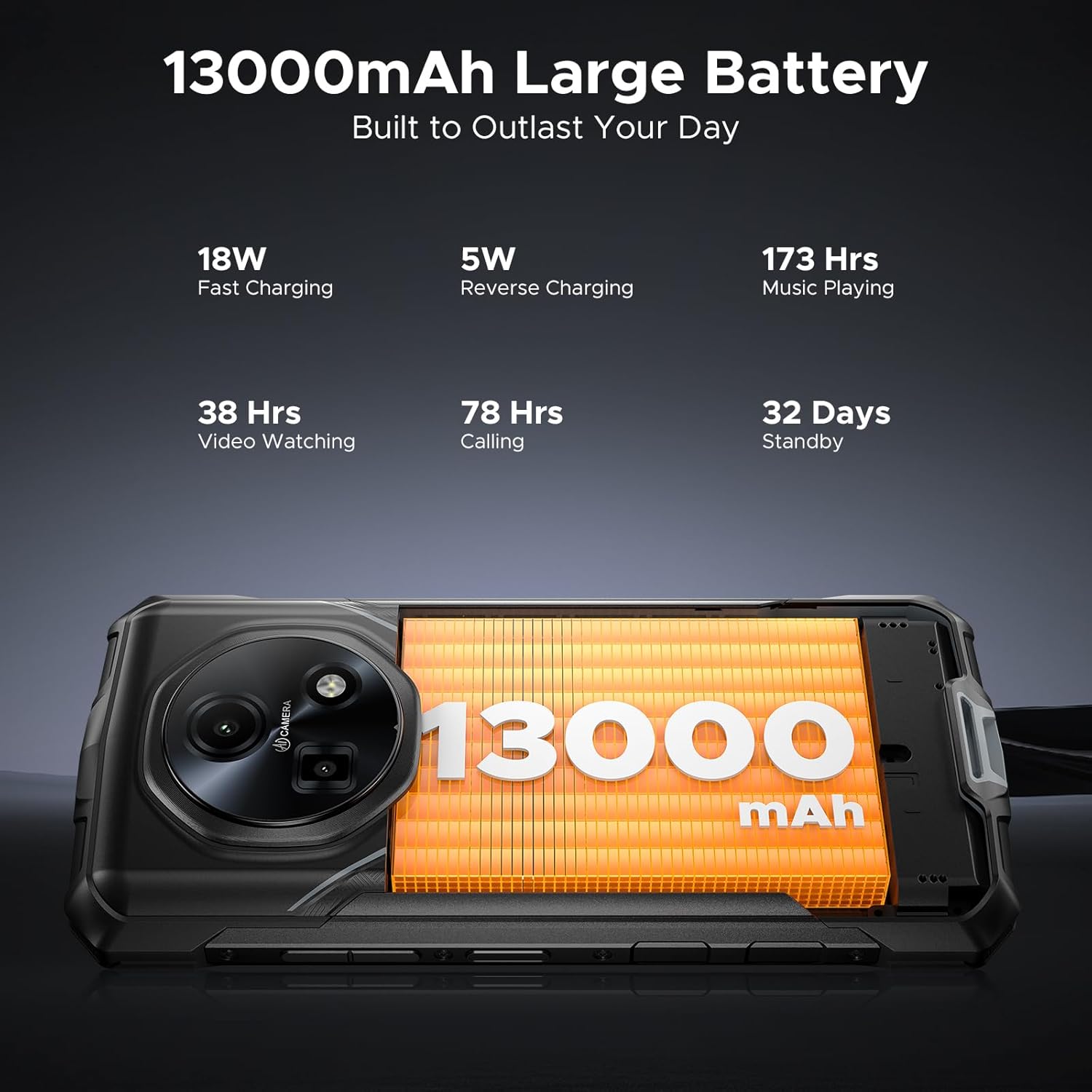
Image: Close-up of the DOOGEE Fire 5 Ultra's charging port with a USB-C cable connected.
Operando o seu dispositivo
Power On/Off and Screen Lock
- Para acender o dispositivo, manteña premido o botón de acendido/apagado ata que apareza o logotipo de DOOGEE.
- Para apagar, manteña premido o botón de acendido e, a seguir, seleccione "Apagar" entre as opcións.
- To lock the screen, briefly press the Power button. To unlock, press the Power button and swipe up, or use fingerprint/face unlock.
Dobre Camping Lights
The DOOGEE Fire 5 Ultra features dual camping lights on the back, providing illumination for various situations. These lights offer three modes: illumination, strobe, and SOS.
- Activación: Access the quick settings panel or a dedicated app to control the campluces ing.
- Modos: Switch between steady illumination, strobe (flashing), and SOS (Morse code for distress).
- Brightness & Timer: Adjust the brightness level and set a timer for automatic shut-off through the phone's settings or the dedicated app.

Image: The back of the DOOGEE Fire 5 Ultra showing the dual camping lights illuminated.
Video: A demonstration of the DOOGEE Fire 5 Ultra's powerful dual camping lights, showcasing their brightness and different modes.
Funcións da cámara
The phone is equipped with a 48MP AI main camera and an 8MP front camera. The camera app offers various modes for photography and video recording.
- Cámara principal: Supports AI shooting, night mode, panorama, and 2K video recording.
- Cámara frontal: Features beauty mode for enhanced selfies and supports face unlock.
- Acceso: Abre a aplicación Cámara desde a pantalla de inicio ou a pantalla de bloqueo.

Image: Close-up of the DOOGEE Fire 5 Ultra's rear camera module.
Visualización e navegación
The 6.6-inch HD IPS display features a 90Hz refresh rate for smooth visuals.
- Navegación: Use standard Android gestures or on-screen navigation buttons.
- Modo escuro: Enable Dark Mode in display settings for comfortable viewcon pouca luz.
Video: A demonstration of the DOOGEE Fire 5 Ultra's 6.6-inch HD+ IPS display with a 90Hz refresh rate, showing smooth visuals.
Características de seguridade
- Side Fingerprint ID: Register your fingerprints in the Security settings for quick and secure unlocking. The sensor is located on the side of the device.
- Face ID: Configura o recoñecemento facial para un desbloqueo cómodo.
Connectivity and Other Functions
- 4G LTE: Ensures stable cellular connectivity.
- NFC: For contactless payments and quick data transfer. Activate in Settings > Connected devices > NFC.
- OTG: On-The-Go functionality allows connecting USB devices like flash drives or external keyboards.
- Radio FM: Escoita emisoras de radio FM (pode requirir auriculares como antena).
Durabilidade e protección
The DOOGEE Fire 5 Ultra is built to withstand harsh conditions, certified with industry-leading durability standards.
- IP68/IP69K Rating: This certification indicates the device is highly resistant to dust and water. It can withstand immersion in 1.5 meters of water for up to 30 minutes and is protected against high-pressure, high-temperature water jets.
- MIL-STD-810H Compliance: Tested against military standards for durability, the phone is resistant to drops, shocks, vibrations, and extreme temperatures, making it suitable for industrial job sites and outdoor adventures.

Image: The DOOGEE Fire 5 Ultra shown in various rugged scenarios, including being dropped, submerged in water, and covered in mud, illustrating its IP68/IP69K and MIL-STD-810H ratings.
Rendemento e almacenamento
- Procesador: Powered by the MediaTek Helio G81 octa-core processor, providing smooth performance for daily tasks and light gaming.
- Sistema operativo: Runs on Android 15, offering the latest features and security updates.
- IA de Xemelgos: Integrated Gemini AI optimizes performance and power efficiency based on usage patterns.
- RAM: Features 32GB RAM (8GB physical + 24GB extended virtual RAM) for efficient multitasking.
- Almacenamento interno: Comes with 256GB of internal storage.
- Almacenamento ampliable: Supports storage expansion up to 2TB via a TF (microSD) card (sold separately).

Image: Visual representation of the MediaTek Helio G81 Octa-Core chipset and the 32GB RAM + 256GB ROM configuration.
Video: An animation highlighting the MediaTek Helio G81 Octa-Core processor and its role in the DOOGEE Fire 5 Ultra's performance.
Xestión da batería
The DOOGEE Fire 5 Ultra is equipped with a large 13000mAh battery, designed for extended use.
- Capacidade: 13000mAh for prolonged operation, ideal for outdoor activities or remote work.
- Carga rápida: Supports 18W fast charging to reduce recharge times.
- Carga inversa OTG: The phone can act as a power bank to charge other small devices (e.g., headphones, flashlights) using an OTG cable (not included).
Image: The DOOGEE Fire 5 Ultra displaying its 13000mAh battery capacity and charging status.
Video: A visual representation of the DOOGEE Fire 5 Ultra's 13000mAh large battery and its fast charging capabilities.
Especificacións técnicas
| Característica | Especificación |
|---|---|
| Nome do modelo | Fire5 Ultra |
| Marca | DOOGEE |
| Sistema Operativo | Android 15 |
| Modelo CPU | MediaTek Helio G81 de oito núcleos |
| RAM | 32 GB (8 GB físico + 24 GB virtual) |
| Capacidade de almacenamento da memoria | 256 GB (ampliable ata 2 TB mediante tarxeta TF) |
| Tamaño da pantalla | 6.6 Inches HD+ IPS Display |
| Resolución | 2560 x 1440 |
| Taxa de actualización | 90 Hz |
| Cámara principal | Cámara principal con IA de 48 MP |
| Cámara frontal | Cámara frontal de 8 MP |
| Capacidade da batería | 13000 millónsamp Horario |
| Cargando | Carga rápida de 18 W, carga inversa OTG |
| Características especiais | Dual SIM, Octa Core Processor, Water Resistant (IP68/IP69K), MIL-STD-810H, Dual Camping Lights (1200LM), NFC, GPS, Side Fingerprint ID, Face ID, FM Radio |
| Dimensións do produto | 6.95 x 3.25 x 0.74 polgadas |
| Peso do elemento | 13.9 onzas |
Resolución de problemas
If you encounter issues with your DOOGEE Fire 5 Ultra, refer to the following common solutions:
- O dispositivo non se acende: Asegúrate de que a batería estea cargada. Conecta o cargador e agarda uns minutos antes de tentar acender de novo.
- A pantalla non responde: Try restarting the device by holding the Power button for approximately 10-15 seconds until it reboots.
- Problemas de conectividade de rede: Check if your SIM card is properly inserted. Verify that mobile data is enabled in settings. If issues persist, contact your network provider.
- As aplicacións fallan ou conxélanse: Clear the cache of the problematic app in Settings > Apps. If the issue continues, try reinstalling the app.
- Rendemento lento: Close unnecessary background applications. Clear cached data regularly. Consider performing a factory reset if performance significantly degrades (back up your data first).
- Problemas de carga: Ensure the USB cable and charger are securely connected and undamaged. Try a different power outlet or charger if available.
Garantía e Soporte
Your DOOGEE Fire 5 Ultra comes with a manufacturer's warranty. Please refer to the included warranty card for specific terms and conditions.
- Período de garantía: Typically includes a 1-year warranty service from the manufacturer.
- Política de devolución: Products purchased may be eligible for return within 30 days of receipt, subject to the retailer's return policy.
- Atención ao cliente: For technical assistance or warranty claims, please contact DOOGEE customer support. Refer to the contact information provided on the warranty card or the official DOOGEE websitio.

Image: DOOGEE's service commitment, including 1-year warranty and customer service details.


