1. Introdución
This manual provides essential information for the safe and efficient use of your Fossibot F107 Pro 5G Rugged Smartphone. Please read it thoroughly before operating your device.
O que hai na caixa
- Fossibot F107 Pro 5G Smartphone
- Cable USB Tipo-C
- Adaptador de alimentación (66 W)
- Ferramenta de expulsión de SIM
- Manual de usuario
- Tarxeta de garantía
2. Características do produto
The Fossibot F107 Pro is engineered for durability and high performance, offering a range of advanced features:
- Massive 28000mAh Battery with 66W Fast Charge: Experience extended usage with a large battery and rapid charging capabilities. The OTG function allows charging of other devices.
- Sistema de cámara avanzado: Features a 200MP AI main camera for detailed photos, a 2MP Night Vision Camera for clear low-light imaging, and a 50MP front camera for high-quality selfies. Supports 4K video recording and various modes including underwater, HDR, and 360° panorama.
- Robust Performance and Storage: Equipped with 12GB RAM (expandable up to 18GB virtual RAM for a total of 30GB) and 512GB internal storage, utilizing DDR5 technology for faster performance and lower power consumption.
- Immersive 6.95" FHD+ Display: A 2.4K display with 2400x1080 resolution and a 120Hz Smart Dynamic Refresh Rate provides smooth visuals and responsive interaction.
- 5G Network Connectivity: Supports 5G networks (T-Mobile compatible; Verizon and AT&T are not supported). Please verify local frequency band compatibility before purchase.
- Deseño robusto: Built to MIL-STD-810H standards, with IP68 and IP69K ratings for water, dust, and drop resistance.
- Lanterna integrada: A powerful flashlight with a 50-meter beam distance for outdoor activities and emergencies.
- Seguridade e comodidade: Includes NFC for contactless payments, Face ID, and Fingerprint unlock for secure and quick access.

Imaxe: Máis deview of Fossibot F107 Pro's main features, highlighting its large battery, memory, camera, and rugged certifications.
3. Disposición do dispositivo
Familiarize yourself with the physical components of your Fossibot F107 Pro.

Imaxe: Fronte e parte traseira view of the Fossibot F107 Pro, showcasinpolo seu deseño robusto e o seu módulo de cámara.

Imaxe: Side profile of the Fossibot F107 Pro, indicating the location of the power button, volume rocker, and SIM/TF card slot.
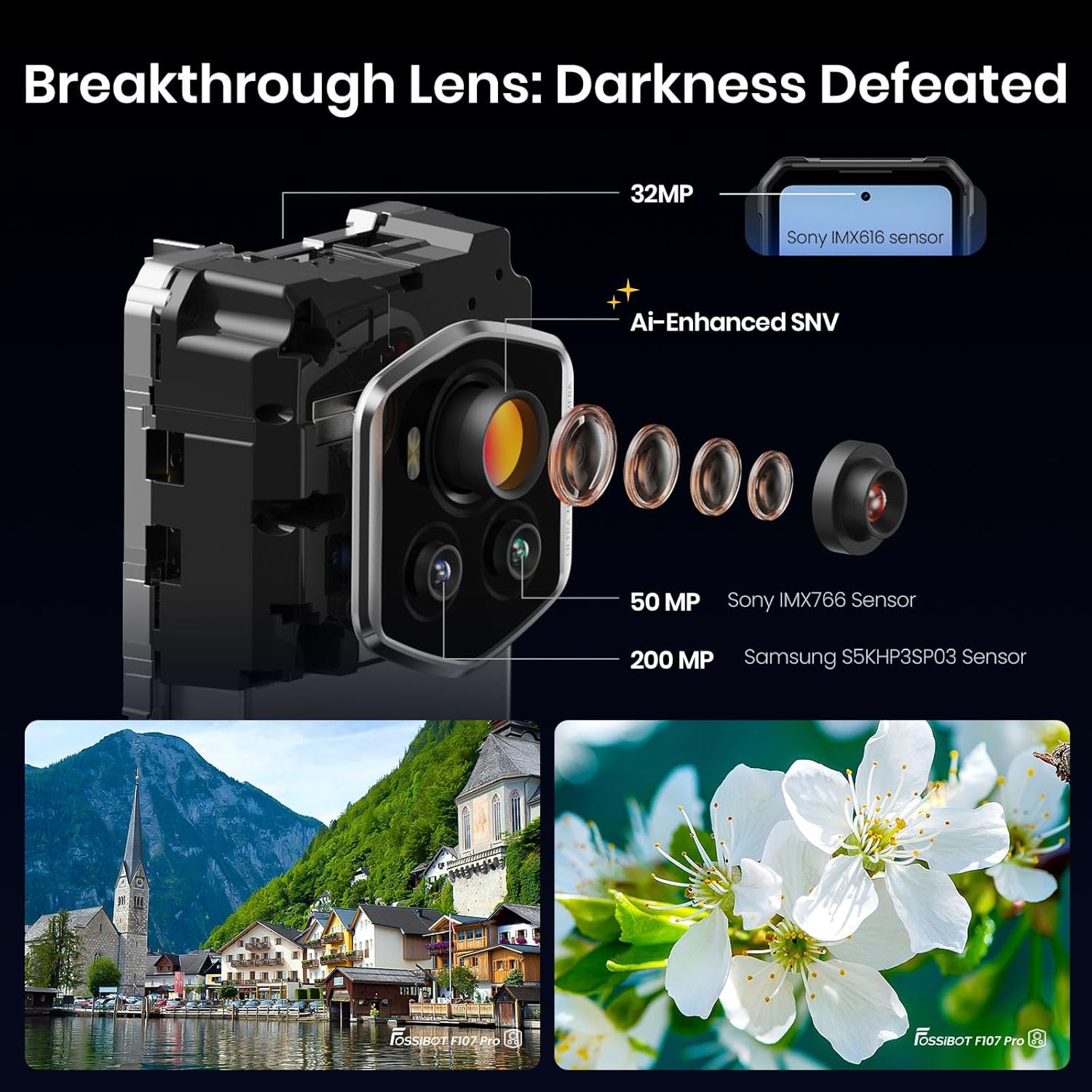
Imaxe: Detallada view of the Fossibot F107 Pro's multi-lens camera system, including the 200MP main sensor and night vision lens.
4. Configuración
4.1 Instalación da tarxeta SIM e da tarxeta TF
- Localiza a bandexa da tarxeta SIM/TF no lateral do dispositivo.
- Insira a ferramenta de expulsión da tarxeta SIM no pequeno orificio que hai xunto á bandexa e empurre suavemente ata que esta saia.
- Place your Nano-SIM card(s) and/or TF card (microSD) into the designated slots on the tray. Ensure the gold contacts face downwards.
- Volva inserir a bandexa con coidado no teléfono ata que encaixe no seu lugar.
4.2 Carga inicial
Before first use, fully charge your device. Use the provided 66W power adapter and USB Type-C cable for optimal charging speed.
- Conecta o cable USB tipo C ao porto de carga situado na parte inferior do teléfono.
- Conecte o outro extremo do cable ao adaptador de alimentación.
- Enchufe o adaptador de alimentación a unha toma de corrente.
- O indicador de carga aparecerá na pantalla.
4.3 Acendido/Apagado
- Para acender: Press and hold the Power button (located on the side) until the Fossibot logo appears.
- Para apagar: Mantén premido o botón de acendido e, a seguir, selecciona "Apagar" entre as opcións que aparecen na pantalla.
- Para reiniciar: Press and hold the Power button, then select "Restart" from the options on the screen.
4.4 Configuración inicial
Upon first power-on, follow the on-screen prompts to configure your device, including language, Wi-Fi connection, Google account, and security settings.
5. Instrucións de funcionamento
5.1 Navegación básica (Android 15)
Your Fossibot F107 Pro runs on Android 15. Navigate using gestures or the traditional three-button navigation bar (configurable in Settings).
- Pantalla de inicio: Swipe left/right to access app pages.
- Caixón de aplicacións: Pasa o dedo cara arriba desde a parte inferior da pantalla ata view todas as aplicacións instaladas.
- Notificacións e configuración rápida: Desliza o dedo cara abaixo desde a parte superior da pantalla para acceder ás notificacións e aos axustes rápidos.
5.2 Uso da cámara
The Fossibot F107 Pro features a versatile camera system.
- Abre a aplicación Cámara.
- Select your desired mode (Photo, Video, Night Vision, Portrait, etc.).
- Toca o botón do obturador para capturar unha foto ou iniciar/deter a gravación de vídeo.

Imaxe: Explosión view of the camera module, showing the 200MP Samsung S5KHP3SP03 sensor, 50MP Sony IMX766 sensor, and 32MP Sony IMX616 sensor.

Image: Demonstrates the difference between Starlight Night Vision (full-color) and traditional Infrared Night Vision (black and white).
5.3 Funcionamento da lanterna
The powerful integrated flashlight can be accessed via Quick Settings or a dedicated button (if configured).

Image: The Fossibot F107 Pro's flashlight illuminating a path, highlighting its 50-meter beam distance.
5.4 Funcionalidade OTG
The On-The-Go (OTG) feature allows your phone to act as a power bank to charge other devices or connect USB accessories.
- Connect an OTG adapter (not included) to your phone's USB-C port.
- Connect the device you wish to charge or the USB accessory to the OTG adapter.
- Ensure OTG is enabled in your phone's settings if it doesn't activate automatically.
5.5 Security Features (Face ID, Fingerprint)
Set up Face ID or Fingerprint unlock for convenient and secure access to your device.
- Ir a Configuración > Seguridade e privacidade > Desbloqueo do dispositivo.
- Follow the on-screen instructions to register your face or fingerprint.
5.6 Configuración da pantalla
Customize your display experience, including the 120Hz refresh rate.

Image: Visual representation of the Fossibot F107 Pro's display specifications, including resolution, refresh rate, and brightness.
6. Mantemento
To ensure the longevity and optimal performance of your Fossibot F107 Pro, follow these maintenance guidelines:
- Resistencia á auga e ao po: The device is IP68/IP69K rated. Ensure all port covers are securely closed before exposing the phone to water or dust. Do not intentionally submerge the phone in corrosive liquids or extreme temperatures.
- Limpeza: Use un suave, damp pano para limpar a superficie do teléfono. Evita produtos químicos agresivos ou materiais abrasivos.
- Coidado da batería: Avoid extreme temperatures. Do not fully discharge the battery regularly. Use the original charger for optimal battery health.
- Protección de pantalla: While the screen is durable, consider using a screen protector for added scratch resistance.
- Temperatura: Operate the device within recommended temperature ranges (typically 0°C to 35°C).
7 Solución de problemas
If you encounter issues with your Fossibot F107 Pro, refer to the following common solutions:
7.1 Phone Not Powering On
- Ensure the battery is charged. Connect the phone to the charger for at least 30 minutes.
- Mantén premido o botón de acendido/apagado durante 10-15 segundos para forzar un reinicio.
7.2 Problemas de carga
- Verify that the charging cable and adapter are securely connected and undamaged.
- Tenta usar un cargador e un cable compatibles diferentes.
- Clean the charging port gently with a dry, soft brush to remove any debris.
7.3 Problemas de conectividade de rede
- Comprobe se a súa tarxeta SIM está inserida correctamente.
- Ensure mobile data is enabled in Settings.
- Reinicie o teléfono.
- Verify that your carrier (T-Mobile) has coverage in your area. Remember, Verizon and AT&T are not supported.
7.4 Camera Not Working
- Restart the Camera app or the phone.
- Check app permissions for the Camera app in Settings.
- Ensure there are no physical obstructions on the camera lenses.
7.5 Rendemento lento
- Pecha as aplicacións en segundo plano innecesarias.
- Borrar os datos da caché das aplicacións que se usan con frecuencia.
- Asegúrate de que haxa espazo de almacenamento suficiente dispoñible.
- Considera un restablecemento de fábrica como último recurso (primeiro fai unha copia de seguridade dos teus datos).
8. Especificacións
| Característica | Especificación |
|---|---|
| Marca | FOSSIBOT |
| Nome do modelo | fossibot f107 pro |
| Sistema Operativo | Android 15 |
| Tamaño da pantalla | 6.95 polgadas |
| Resolución | 2400 x 1080 |
| Taxa de actualización | 120 Hz |
| Tamaño da memoria RAM instalada | 12 GB (expandable to 30GB virtual RAM) |
| Capacidade de almacenamento da memoria | 512 GB |
| Capacidade da batería | 28000 millónsamp Horario |
| Tecnoloxías de Conectividade | 5G, NFC, OTG, GPS |
| Soporte de operadores inalámbricos | T-Mobile (Verizon and AT&T not supported) |
| Robusteza | MIL-STD-810H, IP68, IP69K |
| Peso do elemento | 3.04 libras |
| Dimensións do paquete | 9.25 x 8.19 x 2.4 polgadas |
| Data de primeira dispoñibilidade | 17 de setembro de 2025 |
9. Garantía e soporte
Your Fossibot F107 Pro comes with a standard manufacturer's warranty. For detailed warranty information, please refer to the warranty card included in your product packaging or visit the official FOSSIBOT websitio.
For technical support, troubleshooting assistance, or service inquiries, please contact FOSSIBOT customer support through their official channels. Keep your purchase receipt and product serial number handy when contacting support.
10. Vídeo do produtoview
Vídeo: Un overview of the Fossibot F107 Pro, showcasing its features, ruggedness, and battery life in various usage scenarios.