1. Introdución
This user manual provides comprehensive instructions for the installation, operation, and maintenance of your NIVIAN NVS-MINICURTAIN-WR-KIT WiFi Roller Shutter Controller. This device is designed to integrate motorized blinds and awnings into your smart home system, offering control via the Tuya Smart app, an included RF remote, and voice assistants like Amazon Alexa and Google Assistant. Please read this manual thoroughly before use to ensure proper functionality and safety.
2. Información de seguridade
- Instalación eléctrica: Installation should only be performed by a qualified electrician or a person with sufficient knowledge of electrical systems. Ensure the main power supply is disconnected before installation.
- Voltage Compatibilidade: Verifique que a fonte de alimentación voltage matches the device's specifications (100-240V AC, 50/60Hz).
- Protección contra sobrecarga: Do not exceed the maximum current rating of 3A. The device includes overvoltage protección.
- Seguridade dos materiais: The device is constructed with flame-retardant materials for enhanced safety.
- Ambiente: Non expoñas o dispositivo a humidade, temperaturas extremas ou ambientes corrosivos.
- Nenos e animais: Keep the device and its components out of reach of children and pets.
3. Contido do paquete
O paquete debe conter os seguintes elementos:
- NIVIAN NVS-MINICURTAIN-WR-KIT WiFi Roller Shutter Controller
- Control remoto RF
- Manual de usuario (este documento)
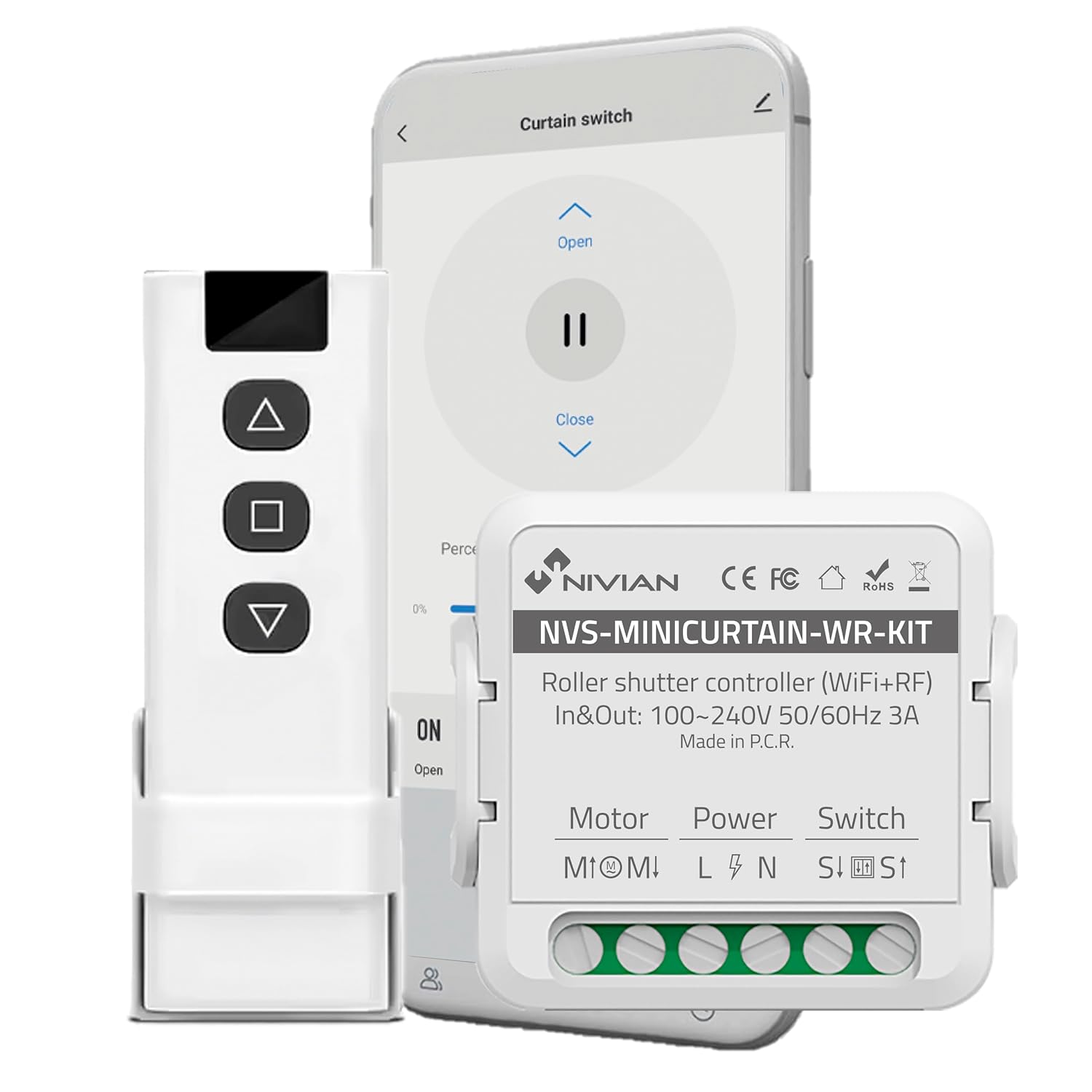
Image 3.1: Contents of the NIVIAN NVS-MINICURTAIN-WR-KIT package, showing the smart controller, RF remote, and a smartphone interface.
4. Produto rematadoview
The NIVIAN NVS-MINICURTAIN-WR-KIT is a compact smart switch designed to control motorized roller shutters and awnings. It integrates WiFi connectivity for app control and RF for the included remote. Key features include:
- Conectividade WiFi: Control via Tuya Smart app from anywhere.
- Control remoto RF: Convenient local control with the included RF remote.
- Control de voz: Compatible con Amazon Alexa e Google Assistant.
- Programación e temporizadores: Automate opening and closing times.
- Escenarios intelixentes: Create custom automation rules based on conditions.
- Monitorización enerxética: Track power consumption of connected motors.
- Deseño compacto: Easily integrates behind existing wall switches.

Imaxe 4.1: Acabadoview of the controller's features and compatibility.
5. Configuración e instalación
5.1 Diagrama de cableado
Before proceeding with installation, ensure the main power supply to the circuit is turned OFF at the breaker. This device is designed to be installed behind an existing manual wall switch for motorized blinds/awnings. The controller has terminals for Motor (M1, M2), Power (L, N), and Switch (S1, S2).

Imaxe 5.1: Ex.ample of the controller installed with an existing wall switch.
- Desconectar a enerxía: Turn off the main power supply to the circuit at your home's electrical panel.
- Cableado de acceso: Remove the existing wall switch plate and switch to access the wiring.
- Conectar os cables do motor: Connect the motor's UP and DOWN wires to the M1 and M2 terminals on the controller.
- Conectar os cables de alimentación: Connect the Live (L) and Neutral (N) wires from your power supply to the L and N terminals on the controller.
- Connect Switch Wires: Connect the wires from your existing manual wall switch to the S1 and S2 terminals on the controller.
- Dispositivo seguro: Carefully place the controller inside the wall box, ensuring no wires are pinched. Reinstall the wall switch and plate.
- Restaurar enerxía: Volva a conectar a fonte de alimentación principal.
5.2 App Pairing (Tuya Smart)
- Descarga a aplicación: Download the "Tuya Smart" or "Smart Life" app from your smartphone's app store (iOS/Android).
- Rexistrarse/Iniciar sesión: Abre a aplicación e rexistra unha nova conta ou inicia sesión se xa tes unha.
- Entrar no modo de emparellamento: Power on the controller. The indicator light on the controller should blink rapidly (usually 2 times per second) to indicate it's in pairing mode. If not, press and hold the reset button (or the manual switch for 5-10 seconds) until it blinks rapidly.
- Engadir dispositivo: In the Tuya Smart app, tap the "+" icon in the top right corner to add a device. Select "Curtain Switch" or "Curtain Module" from the device list.
- Conectar a WiFi: Follow the on-screen instructions to connect the device to your 2.4GHz WiFi network. Enter your WiFi password.
- Finalización: Once connected, the device will appear in your app. You can rename it for easier identification.
5.3 RF Remote Pairing
The included RF remote control is pre-paired with the controller. If you need to re-pair or pair additional RF remotes:
- Entrar no modo de emparellamento: Briefly press the pairing button on the controller (or press the manual switch 4 times quickly). The indicator light will blink slowly.
- Prema o botón do mando a distancia: Within 5 seconds, press any button on the RF remote you wish to pair.
- Confirmación: The controller's indicator light will stop blinking, confirming successful pairing.
6. Instrucións de funcionamento
The NIVIAN controller offers multiple ways to operate your motorized blinds or awnings:

Image 6.1: Multiple control modes for the roller shutter controller.
6.1 Control da aplicación intelixente Tuya
- Open the Tuya Smart app and select your roller shutter device.
- You will see options to "Open," "Close," or "Pause" the blinds.
- Un por centotage slider allows you to set the opening/closing position precisely.

Image 6.2: Controlling roller shutters via the Tuya Smart app.
Control remoto 6.2 RF
- Use the "Up" button to open the blinds.
- Use the "Down" button to close the blinds.
- Use the "Stop/Pause" button to halt the blinds at any desired position.
6.3 Control por voz (Alexa/Asistente de Google)
To enable voice control, link your Tuya Smart account to Amazon Alexa or Google Assistant through their respective apps. Once linked, you can use commands such as:
- "Alexa, open [Device Name] blinds."
- "Hey Google, close [Device Name] blinds."
- "Alexa, set [Device Name] blinds to 50%."
6.4 Manual Wall Switch Control
The existing manual wall switch connected to the controller will continue to function normally, allowing for traditional physical control of your blinds.
7. Funcións intelixentes e automatización
7.1 Programación e temporizadores
Within the Tuya Smart app, you can set schedules for your blinds to open or close at specific times on chosen days. This is ideal for daily routines or simulating presence when away.
7.2 Smart Scenarios
Create custom automation rules (scenarios) in the Tuya Smart app. These can be triggered by various conditions:
- Weather Changes: Automatically close blinds if the weather forecast predicts strong sun or rain.
- Location Changes: Open blinds when you arrive home.
- Hora do día: Adjust blinds based on sunrise/sunset.
- Estado do dispositivo: Integrate with other smart devices (e.g., close blinds when a smart light turns on).

Image 7.1: Creating smart home automation scenarios.

Image 7.2: Simulating presence by raising and lowering blinds remotely.
7.3 Monitorización de enerxía
The controller provides energy consumption reports and graphs within the Tuya Smart app, allowing you to monitor and manage the power usage of your connected motors.
8. Mantemento
- Limpeza: Usa un pano seco e suave para limpar o dispositivo. Non empregues produtos químicos agresivos nin produtos de limpeza abrasivos.
- Actualizacións de firmware: Periodically check the Tuya Smart app for available firmware updates to ensure optimal performance and security.
- Battery Replacement (RF Remote): If the RF remote's range or responsiveness decreases, replace its battery (type usually CR2032, check remote for specifics).
9 Solución de problemas
| Problema | Causa posible | Solución |
|---|---|---|
| Device not pairing with app. | Incorrect WiFi password, 5GHz WiFi network, device not in pairing mode. | Ensure correct 2.4GHz WiFi password. Confirm device indicator is blinking rapidly. Reset device and try pairing again. |
| Blinds not responding to app/remote. | No power to controller, incorrect wiring, RF remote battery low, WiFi disconnected. | Check power supply. Verify wiring connections. Replace RF remote battery. Check WiFi connection in app. |
| Blinds move in the wrong direction. | Motor wires (M1/M2) are reversed. | Disconnect power and swap the M1 and M2 motor wires. |
| O control por voz non funciona. | Tuya account not linked to Alexa/Google, incorrect device name, internet connectivity issues. | Ensure Tuya account is linked. Use the exact device name. Check internet connection. |
10. Especificacións
| Número de modelo | NVS-MINICURTAIN-WR-KIT |
| Entrada/Saída Voltage | 100-240 V CA, 50/60 Hz |
| Corrente nominal | 3A |
| Conectividade sen fíos | WiFi 2.4GHz, RF |
| Modo de funcionamento | ON-OFF-ON |
| Tipo de contacto | Normalmente aberto |
| Tipo de conector | Enchufar |
| Tipo de cambio | Pulsador |
| Tipo de terminal | Parafuso |
| Material | Acrilonitrilo Butadieno Estireno (ABS) |
| Dimensións (L x W x H) | 40 x 40 x 20 mm |
| Peso | 70 g |
| Orixe | China |
11. Garantía e soporte
NIVIAN products are designed for reliability and performance. For warranty information, technical support, or to access additional resources, please visit the official NIVIAN websitio ou póñase en contacto co servizo de atención ao cliente.
For tutorials and tips, visit NIVIAN on Instagcarneiro or YouTube.


