1. Introdución
This manual provides essential instructions for the safe and effective use of your DNT Optics TNC335R ThermNight Thermal & Night Vision Multispectral Scope, bundled with the QDM150 Quick Detach Mount. The TNC335R is an advanced optical device designed for enhanced observation capabilities in various lighting conditions, offering both thermal and night vision functionalities. Please read this manual thoroughly before operating the device.
2. Información de seguridade
- Seguridade ocular: Never look directly at the sun or other intense light sources through the scope, as this can cause permanent eye damage.
- Seguridade da batería: Use only recommended battery types. Do not mix old and new batteries, or different types of batteries. Dispose of batteries according to local regulations.
- Montaxe: Ensure the scope is securely mounted to your firearm using the QDM150 mount. Improper mounting can lead to injury or damage to the device.
- Condicións ambientais: Avoid exposing the device to extreme temperatures, direct impact, or corrosive substances.
- Mantemento: Do not attempt to disassemble or modify the scope. Refer all servicing to authorized DNT Optics personnel.
3. Contido do paquete
Verifica que todos os elementos estean presentes no teu paquete:
- DNT Optics TNC335R ThermNight Multispectral Scope
- QDM150 Quick Detach Mount
- Tapas de lentes
- Batería recargable
- Cable de carga USB
- Pano de limpeza de lentes
- Manual de usuario (este documento)
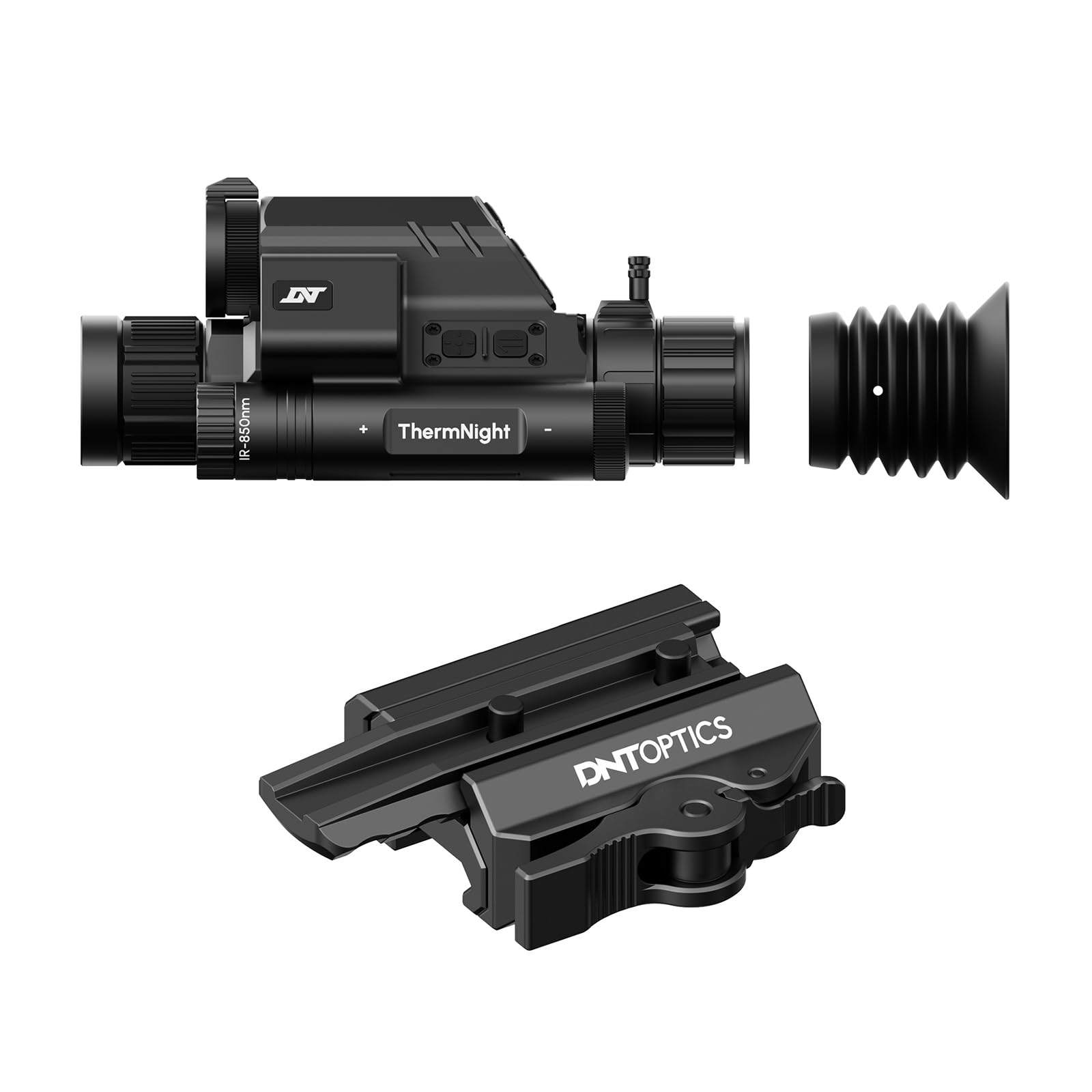
Image 1: DNT Optics TNC335R ThermNight Multispectral Scope with QDM150 mount. This image displays the main scope unit alongside its quick-detach mounting system, providing a visual reference for the product.
4. Configuración
4.1 Instalación da batería
- Locate the battery compartment on the scope.
- Desenrosque a tapa da batería.
- Insert the rechargeable battery, ensuring correct polarity (+/-).
- Securely replace the battery cap.
- Charge the battery fully before first use using the provided USB cable.
4.2 Mounting the QDM150
- Attach the QDM150 mount to the scope according to the mount's specific instructions, ensuring it is firmly secured.
- Position the scope with the QDM150 mount onto your rifle's Picatinny rail.
- Engage the quick-detach levers to lock the mount onto the rail. Verify that the scope is stable and does not wobble.
4.3 Initial Power-On and Zeroing
- Manteña premido o botón de acendido ata que a pantalla se ilumine.
- Perform initial zeroing of the scope according to standard rifle scope zeroing procedures. Refer to the detailed zeroing guide available on the DNT Optics websitio para obter instrucións completas.
5. En funcionamento
5.1 Encendido/apagado
- Encendido: Manteña premido o botón de acendido durante aproximadamente 3 segundos.
- Apagado: Press and hold the power button for approximately 5 seconds until the display shuts down.
5.2 Selección de modo
The TNC335R offers multiple observation modes:
- Modo térmico: Detects heat signatures. Ideal for low-light or obscured conditions.
- Modo de visión nocturna: Amplifies ambient light for clear viewing in near-darkness.
- Modo día: Standard optical viewing for daylight conditions.
Press the 'Mode' button to cycle through the available observation modes.
5.3 Reticle Adjustment
Use the directional buttons or rotary dial (depending on model variant) to adjust the reticle's position for precise aiming. Refer to the on-screen menu for specific reticle options and adjustments.
5.4 Brillo e contraste
Navigate to the 'Display Settings' in the main menu to adjust screen brightness and image contrast for optimal viewndo en diferentes entornos.
5.5 Zoom dixital
Press the 'Zoom' button to cycle through available digital magnification levels. Note that higher digital zoom levels may reduce image clarity.
6. Mantemento
6.1 Limpeza
- Lentes: Usa o pano de limpeza de lentes incluído ou un pano suave e sen fiapos deseñado especificamente para óptica. Limpe con coidado as superficies das lentes. Para a sucidade persistente, usa unha pequena cantidade de líquido de limpeza de lentes.
- Corpo: Wipe the scope's body with a soft, damp pano. Evite produtos de limpeza abrasivos ou solventes.
6.2 Coidado coa batería
- Recarga a batería regularmente, mesmo se non a usas con frecuencia, para manter a súa vida útil.
- Store the device with a partially charged battery if storing for extended periods.
6.3 Almacenamento
Store the scope in a cool, dry place, away from direct sunlight and extreme temperatures. Use the lens caps to protect the optical surfaces.
7 Solución de problemas
| Problema | Causa posible | Solución |
|---|---|---|
| O dispositivo non se acende. | Low or depleted battery; incorrectly installed battery. | Charge the battery; ensure battery is installed with correct polarity. |
| A imaxe está borrosa ou pouco clara. | Lens caps still on; dirty lenses; focus adjustment needed. | Remove lens caps; clean lenses; adjust the focus ring. |
| Os botóns non responden. | Device frozen; low battery. | Perform a soft reset (refer to DNT Optics website for specific instructions); charge battery. |
| QDM150 mount feels loose. | Levers not fully engaged; mounting screws loose. | Ensure quick-detach levers are fully locked; tighten any accessible mounting screws. |
8. Especificacións
- Marca: DNT Optics
- Nome do modelo: TNC335R
- Peso do artigo: 29.8 onzas
- Material: Aluminio
- Dispositivos compatibles: Rifle, escopeta
- Visión nocturna: Si
- Reticle Type: Cruz
- Tipo de rosca: 1/2"-28
- Cor: Negro
9. Garantía e soporte
DNT Optics products are covered by a limited warranty. For detailed warranty information, product registration, and technical support, please visit the official DNT Optics websitio web ou póñase en contacto co seu departamento de atención ao cliente. Garde o recibo da compra como proba de compra para reclamacións de garantía.
Oficial Websitio: DNT Optics Store on Amazon


