1. Produto rematadoview
The OnePlus 15 is an advanced Android smartphone designed for high performance and extended usage. It features a powerful Snapdragon 8 Elite Gen 5 processor, a large 7,300mAh battery, and a vibrant 6.78-inch 165 Hz AMOLED display. The device is equipped with a triple 50 MP camera system for detailed photography and offers robust durability with IP66/IP68/IP69 and IP19K ratings for dust and water resistance.
Características principais:
- Massive 7,300 mAh Battery: Provides extended power for all-day use and beyond.
- Tri-Chip System: Integrates the Snapdragon 8 Elite Gen 5, a dedicated Wi-Fi chip, and a CPU scheduler for optimized performance, connectivity, and efficiency.
- Triple 50 MP Camera System: Captures high-quality images with wide, ultra-wide, and telephoto capabilities.
- Deseño duradeiro: Built to resist dust and water, with IP66/IP68/IP69 and IP19K ratings for enhanced protection.
- 6.78-inch 165 Hz AMOLED Display: Delivers vivid colors, smooth motion, and exceptional clarity.
2. Que hai na caixa
Verifica que todos os elementos estean presentes na embalaxe do teu produto:
- OnePlus 15 Smartphone x1
- Cargador x1
- Cable de datos USB x1
- SIM Ejector Tool x1
- Guía rápida x1
- Safety Guide x1

Image: Contents of the OnePlus 15 retail box, showing the smartphone, charger, USB data cable, SIM ejector tool, quick guide, and safety guide.
3. Configuración
3.1 Instalación da tarxeta SIM
- Locate the SIM card tray on the side of your OnePlus 15.
- Insert the provided SIM ejector tool into the small hole on the SIM tray. Press firmly until the tray pops out.
- Place your Nano-SIM card(s) into the tray with the gold contacts facing down. Ensure they are correctly oriented according to the tray's outline.
- Carefully push the SIM tray back into the phone until it is flush with the device.
3.2 Acendido e configuración iniciais
- Press and hold the Power button (located on the right side of the device) until the OnePlus logo appears.
- Segue as instrucións na pantalla para seleccionar o idioma, conectarte a unha rede wifi e configurar a túa conta de Google.
- You may be prompted to transfer data from an old device. Follow the instructions or skip this step to set up as a new device.
- Configure security settings such as fingerprint unlock, face unlock, or a PIN/pattern.

Imaxe: Fronte view of the OnePlus 15 smartphone, showcasina súa pantalla e a cámara frontal.
4. Funcionamento do teu dispositivo
4.1 Pantalla e navegación
The OnePlus 15 features a 6.78-inch 165 Hz AMOLED display. Navigate the interface using touch gestures:
- Toca: Selecciona un elemento ou activa unha función.
- Pasar o dedo: Desprazarse por pantallas ou listas.
- Beliscar: Achegar ou afastar imaxes e web páxinas.
- Prensa longa: Acceder a menús contextuais ou mover iconas.
4.2 Botóns e portos
Familiarize yourself with the physical controls and connections:
- Botón de encendido: Located on the right side. Press to wake/sleep the screen, long press to power off or restart.
- Botóns de volume: Located on the left side. Adjust media volume, ringtone volume, and alarm volume.
- Porto USB tipo C: Located at the bottom. Used for charging, data transfer, and connecting Type-C headphones.
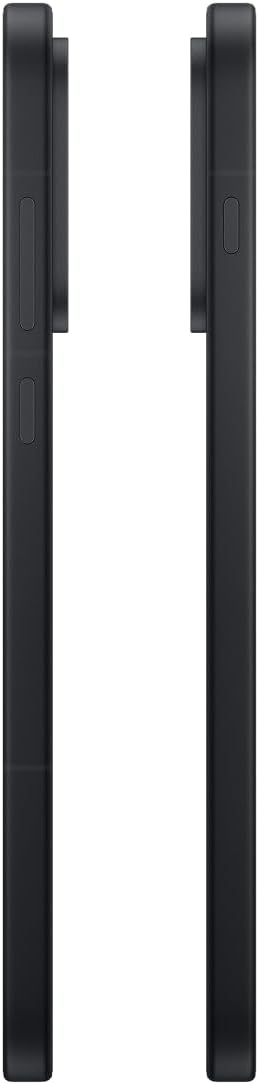
Imaxe: Lateral view of the OnePlus 15, showing the placement of the power and volume buttons.
4.3 Uso da cámara
The OnePlus 15 features a versatile triple 50 MP camera system. To open the camera app, tap the camera icon on your home screen or lock screen.
- Cambiar modos: Swipe left or right on the screen to switch between Photo, Video, Portrait, and other modes.
- Zoom: Pinch in or out on the viewfinder, or tap the zoom icons (e.g., 0.6x, 1x, 2x) to adjust magnification.
- Captura: Toca o botón do obturador para sacar unha foto ou iniciar/deter a gravación de vídeo.
- Configuración: Access camera settings for features like flash, timer, aspect ratio, and more.

Imaxe: Costas view of the OnePlus 15, highlighting the triple 50 MP camera system.
4.4 Xestión da batería
Your OnePlus 15 is equipped with a 7,300 mAh battery. To optimize battery life:
- Axusta o brillo da pantalla e define un tempo de espera máis curto.
- Desactiva o Wi-Fi, o Bluetooth e o GPS cando non estean en uso.
- Close background apps that are consuming power.
- Utilize Battery Saver mode when your battery is low.
- Use the provided charger and USB cable for optimal fast charging.
5. Mantemento
5.1 Limpeza do dispositivo
To clean your OnePlus 15:
- Usa un pano suave e sen fiapos para limpar a pantalla e o panel traseiro.
- Para manchas difíciles, lixeiramente dampLimpar o pano con auga ou cun limpador de pantallas.
- Evite o uso de produtos químicos agresivos, materiais abrasivos ou aire comprimido.
5.2 Actualizacións de software
As actualizacións de software regulares ofrecen novas funcións, melloras de seguridade e corrección de erros. Para comprobar se hai actualizacións:
- Ir a Configuración > Sobre o dispositivo > OxygenOS version.
- Toca Comproba se hai actualizacións.
- If an update is available, follow the on-screen instructions to download and install it. Ensure your device has sufficient battery and is connected to Wi-Fi before updating.
6 Solución de problemas
If you encounter issues with your OnePlus 15, try the following common troubleshooting steps:
- O dispositivo non responde: Mantén premido o botón de acendido/apagado durante uns 10 segundos para forzar un reinicio.
- Aplicacións que fallan: Clear the cache and data for the problematic app in Configuración > Aplicacións > [Nome da aplicación] > Almacenamento e caché.
- A batería esgotando rapidamente: Review uso da batería en Configuración > Batería to identify power-hungry apps. Adjust settings as described in Section 4.4.
- Problemas de conectividade de rede: Toggle Airplane Mode on and off, restart your device, or reset network settings in Configuración > Configuración do sistema > Copia de seguranza e restablecemento > Restablecer o teléfono > Restablece Wi-Fi, móbil e Bluetooth.
- Screen protector installation: For assistance with screen protector installation, refer to the following video guide:
Video: Installation guide for a screen protector on the OnePlus 15 5G. This video demonstrates the steps to correctly apply a screen protector to your device.
7. Especificacións
| Nome do modelo | OnePlus 15 |
| Número de modelo do artigo | CPH2749 |
| Dimensións do produto | 6.36 x 3.02 x 0.33 polgadas |
| Peso do elemento | 1.29 libras |
| Sistema Operativo | Android 16 |
| Modelo CPU | Snapdragon 8 Elite Gen 5 |
| Velocidade da CPU | 4.61 GHz |
| Tamaño da memoria RAM instalada | 12 GB |
| Capacidade de almacenamento da memoria | 256 GB |
| Tamaño da pantalla | 6.78 polgadas |
| Resolución | 2772*1272 |
| Taxa de actualización | 165 Hz |
| Capacidade da batería | 7300 millónsamp Horario |
| Tempo de conversación telefónica | 68.7 horas |
| Tecnoloxías de Conectividade | Bluetooth, Infrared, NFC, USB, Wi-Fi |
| Características especiais | Dual SIM, Wireless Charging |
| Fabricante | OnePlus |
8. Información importante de seguridade
Please read all safety information before using your device to ensure safe and proper use. Improper use may cause damage to the device or personal injury.
- Non expoñas o dispositivo a temperaturas extremas nin á luz solar directa durante períodos prolongados.
- Use only approved chargers, batteries, and accessories.
- Evite deixar caer o dispositivo nin someterlo a impactos fortes.
- Keep the device away from water and liquids, despite its water resistance ratings, to prevent potential damage.
- Non intente desmontar nin modificar o dispositivo.
9. Garantía e soporte
Your OnePlus 15 is covered by a manufacturer's warranty. For detailed warranty information, technical support, or service inquiries, please visit the official OnePlus websitio ou póñase en contacto co servizo de atención ao cliente.
Podes atopar asistencia adicional e información sobre o produto en OnePlus Store.


