1. Introdución
Thank you for choosing the Grundig 50 GKU 700 50-inch 4K Ultra HD Smart Google TV. This manual provides essential information for the safe and efficient use of your new television. Please read these instructions thoroughly before operating the device and retain them for future reference.
2. Información importante de seguridade
Para reducir o risco de descarga eléctrica, incendio ou lesións, siga sempre estas precaucións de seguridade básicas:
- Fonte de enerxía: Conecte o televisor só a unha toma de corrente alterna do volume especificadotage.
- Ventilación: Asegúrese de que haxa unha ventilación axeitada. Non bloquee as aberturas de ventilación.
- Auga e humidade: Non expoñas o televisor á choiva nin á humidade. Non coloques obxectos cheos de líquidos, como vasos, enriba do televisor.
- Limpeza: Desconecte o televisor da toma de corrente antes de limpalo. Use un pano suave e seco. Non empregue produtos de limpeza líquidos nin produtos de limpeza en aerosol.
- Colocación: Coloque o televisor sobre unha superficie estable e nivelada. Evite colocalo baixo a luz solar directa ou preto de fontes de calor.
- Servizo: Non intente atender este produto vostede mesmo. Remita todo o servizo a persoal de servizo cualificado.
- Cable de alimentación: Protexa o cable de alimentación para evitar que se pise ou se pinche, especialmente nos enchufes, tomas de corrente e no punto de saída do aparello.
3. Contido do paquete
Comprobe que todos os artigos estean presentes no seu paquete:
- Grundig 50 GKU 700 50-inch 4K Ultra HD Smart Google TV
- Control remoto
- Cable de alimentación
- Soporte para TV (2 pezas)
- Tornillos para soporte de TV
- Manual de usuario (este documento)
- Guía de inicio rápido

Imaxe 1: Fronte view of the Grundig 50 GKU 700 TV with its stand. The screen displays a scenic landscape with mountains and a lake. The TV features a slim bezel and the Grundig logo at the bottom center.
4. Configuración
4.1 Fixación do soporte para TV
- Coloque con coidado a pantalla do televisor sobre unha superficie suave e plana (por exemplo, unha manta ou escuma) para evitar danala.
- Identify the left and right stand pieces.
- Aliñe cada peza do soporte coas ranuras correspondentes na parte inferior do televisor.
- Fixe os soportes cos parafusos proporcionados. Asegúrese de que estean ben axustados.
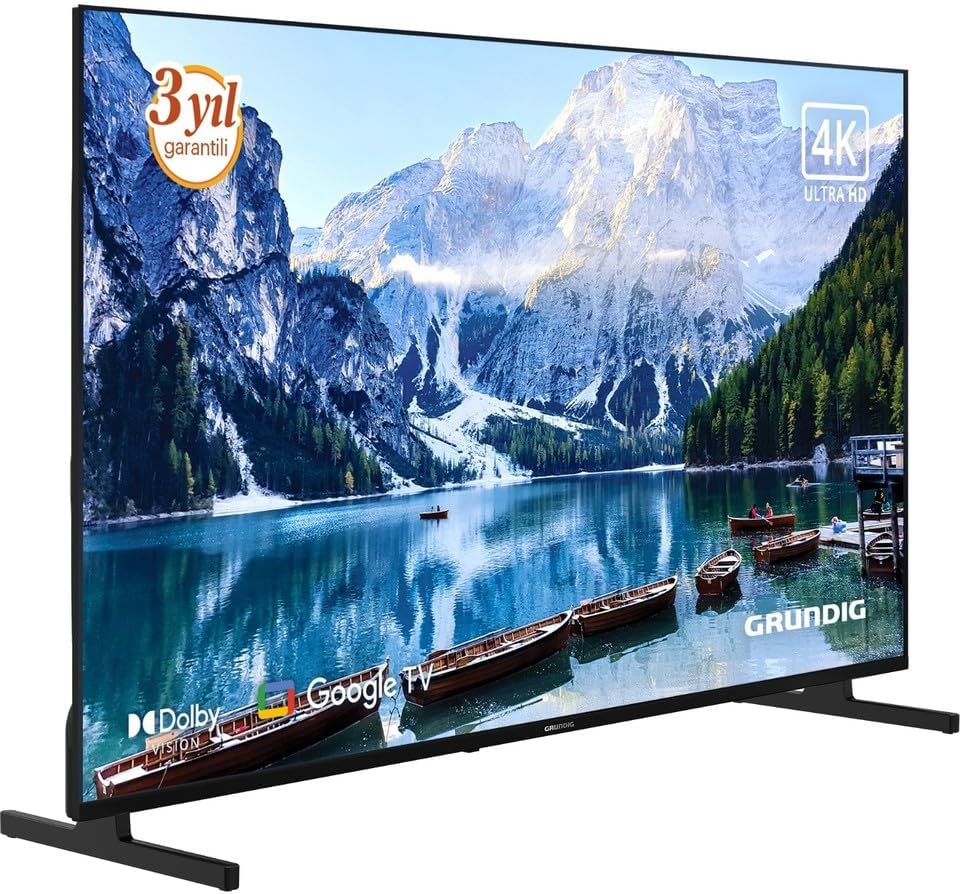
Imaxe 2: Fronte angulada view of the Grundig 50 GKU 700 TV, showcasing its slim design and the attached stand. The screen displays a vibrant image, highlighting the 4K Ultra HD capability.
4.2 Conexión de enerxía
- Localiza o porto de entrada de alimentación na parte traseira do televisor.
- Connect the power cable securely to the TV.
- Conecta o outro extremo do cable de alimentación a unha toma de corrente.

Imaxe 3: Primeiro plano view of the power input port located on the back of the Grundig TV, labeled "AC IN". A caution label regarding electric shock is visible nearby.
4.3 Conexión de dispositivos externos
Your Grundig TV offers various connection options:
- HDMI: For connecting Blu-ray players, game consoles, set-top boxes, etc. (HDMI 1, HDMI 2, HDMI 3 ports available).
- USB: Para conectar dispositivos de almacenamento USB para reproducir contido multimedia files. (USB 1, USB 2 ports available).
- Satellite/Antenna: For connecting a satellite dish or terrestrial antenna.
- Ethernet (LAN): Para unha conexión a internet por cable.

Imaxe 4: Detallado view of the connectivity panel on the back of the Grundig TV, showing multiple ports including USB, HDMI (HDMI 1/ARC, HDMI 2, HDMI 3), satellite/antenna input, and an Ethernet (LAN) port.

Imaxe 5: Full rear view of the Grundig 50 GKU 700 TV, showing the overall design of the back panel and the central area where the power and input ports are located.
4.4 Asistente de configuración inicial
After connecting power and turning on the TV for the first time, a setup wizard will guide you through:
- Selección de idioma.
- Conexión de rede (Wi-Fi ou Ethernet).
- Google account sign-in (for Google TV features).
- Channel scanning (for satellite or terrestrial broadcasts).
5. Funcionamento da súa TV
5.1 Control remotoview
The remote control allows you to access all functions of your TV. Insert two AAA batteries (not included) into the remote control, ensuring correct polarity.

Imaxe 6: Fronte view of the Grundig TV remote control. Key buttons include Power, Google Assistant (microphone), Settings, Input, Navigation Pad with OK button, Volume, Channel, Home, Mute, Netflix, YouTube, Prime Video, and Apps buttons, along with numeric keys.

Imaxe 7: En ángulo view of the Grundig TV remote control, showing its ergonomic design and the layout of its buttons.
- Botón de encendido: Acende ou apaga o televisor.
- Botón do Asistente de Google: Activates voice control for searching content or controlling the TV.
- Navigation Pad (Up/Down/Left/Right) and OK: Para a navegación e selección de menús.
- Volume (+/-): Axusta o nivel de volume.
- Canle (Arriba/Abaixo): Cambia as canles de televisión.
- Botón de inicio: Volve á pantalla de inicio de Google TV.
- Botón de entrada: Selects input sources (HDMI, USB, Satellite, etc.).
- Netflix, YouTube, Prime Video, Apps Buttons: Direct access to streaming services and the app menu.
5.2 Interface de Google TV
Your TV runs on Google TV, providing a personalized experience with content recommendations, access to a vast library of apps from the Google Play Store, and integrated Google Assistant functionality.
- Pantalla de inicio: Displays recommended content, installed apps, and quick access to settings.
- Aplicacións: Download and manage your favorite streaming services and applications.
- Control de voz: Use the Google Assistant button on your remote to search for movies, check the weather, or control smart home devices.
6. Mantemento
6.1 Limpeza do televisor
- Desconecte sempre o televisor antes de limpalo.
- Usa un pano suave, seco e sen fiapos para limpar a pantalla e a carcasa.
- Para marcas difíciles na pantalla, lixeiramenteampen the cloth with water or a specialized screen cleaner (ensure it's safe for LED screens) and wipe gently. Do not spray liquid directly onto the screen.
- Evite o uso de limpadores abrasivos, ceras ou disolventes.
6.2 Actualizacións de software
Your TV may receive software updates periodically to improve performance and add new features. Ensure your TV is connected to the internet to receive these updates. You can usually check for updates in the TV's settings menu under "System" or "About".
7 Solución de problemas
Se tes problemas co teu televisor, consulta os seguintes problemas e solucións comúns:
7.1 Sen enerxía
- Check if the power cable is securely plugged into both the TV and the wall outlet.
- Verifica que a toma de corrente funciona conectando outro dispositivo.
- Prema o botón de acendido/apagado do mando a distancia ou do propio televisor.
7.2 Sen imaxe, pero hai son
- Ensure the correct input source is selected (e.g., HDMI 1, Satellite).
- Check the connections of external devices.
- Tenta reiniciar o televisor e calquera dispositivo conectado.
7.3 Sen son, pero hai imaxe
- Comprobe o nivel de volume e asegúrese de que o televisor non estea silenciado.
- If using external audio devices (soundbar, receiver), ensure they are properly connected and powered on.
- Comprobe a configuración de son no menú da televisión.
7.4 O control remoto non funciona
- Substitúe as pilas por outras novas, garantindo a polaridade correcta.
- Asegúrate de que non haxa obstrucións entre o mando a distancia e o sensor de infravermellos do televisor.
- If it's a Bluetooth remote, try re-pairing it with the TV (refer to TV settings for pairing instructions).
7.5 Problemas de conexión de rede
- For Wi-Fi, ensure the router is on and within range. Try restarting the router.
- For wired connection, ensure the Ethernet cable is securely connected to both the TV and the router.
- Check network settings in the TV menu.
8. Especificacións
| Característica | Especificación |
|---|---|
| Marca | Grundig |
| Nome do modelo | GE5T00 |
| Ano modelo | 2025 |
| Tamaño da pantalla | 50 polgadas |
| Tecnoloxía de visualización | LCD LED |
| Resolución | 4K (3840 x 2160 píxeles) |
| Relación de aspecto | 16:9 |
| Taxa de actualización | 60 Hz |
| Sistema Operativo | Google TV |
| Tecnoloxía de conectividade | USB, HDMI, Ethernet, Satellite/Antenna |
| Compoñentes incluídos | Cable de alimentación |
| Dimensións do produto | 190.5 x 5.08 x 480.06 cm |
| Peso do produto | 500 gramos |
| ASIN | B0FSG93693 |
9. Garantía e soporte
Your Grundig 50 GKU 700 TV comes with a manufacturer's warranty. Please refer to the warranty card included in your package for specific terms and conditions. For technical support, service inquiries, or to register your product, please visit the official Grundig website or contact their customer service department. Contact information can typically be found on the Grundig websitio web ou na documentación que se inclúe co televisor.
Soporte en liña: www.grundig.com


