1. Introdución
The Nitecore TUP2 is a compact and powerful rechargeable keychain flashlight designed for everyday carry. It features a maximum output of 1200 lumens, multiple color temperature options (warm, neutral, cool white), an OLED real-time display, and USB-C fast charging. This manual provides detailed instructions for the proper use, maintenance, and care of your TUP2 flashlight.
2. Contido do paquete
- Nitecore TUP2 Flashlight
- Cable de carga USB-C
- Clave de peche
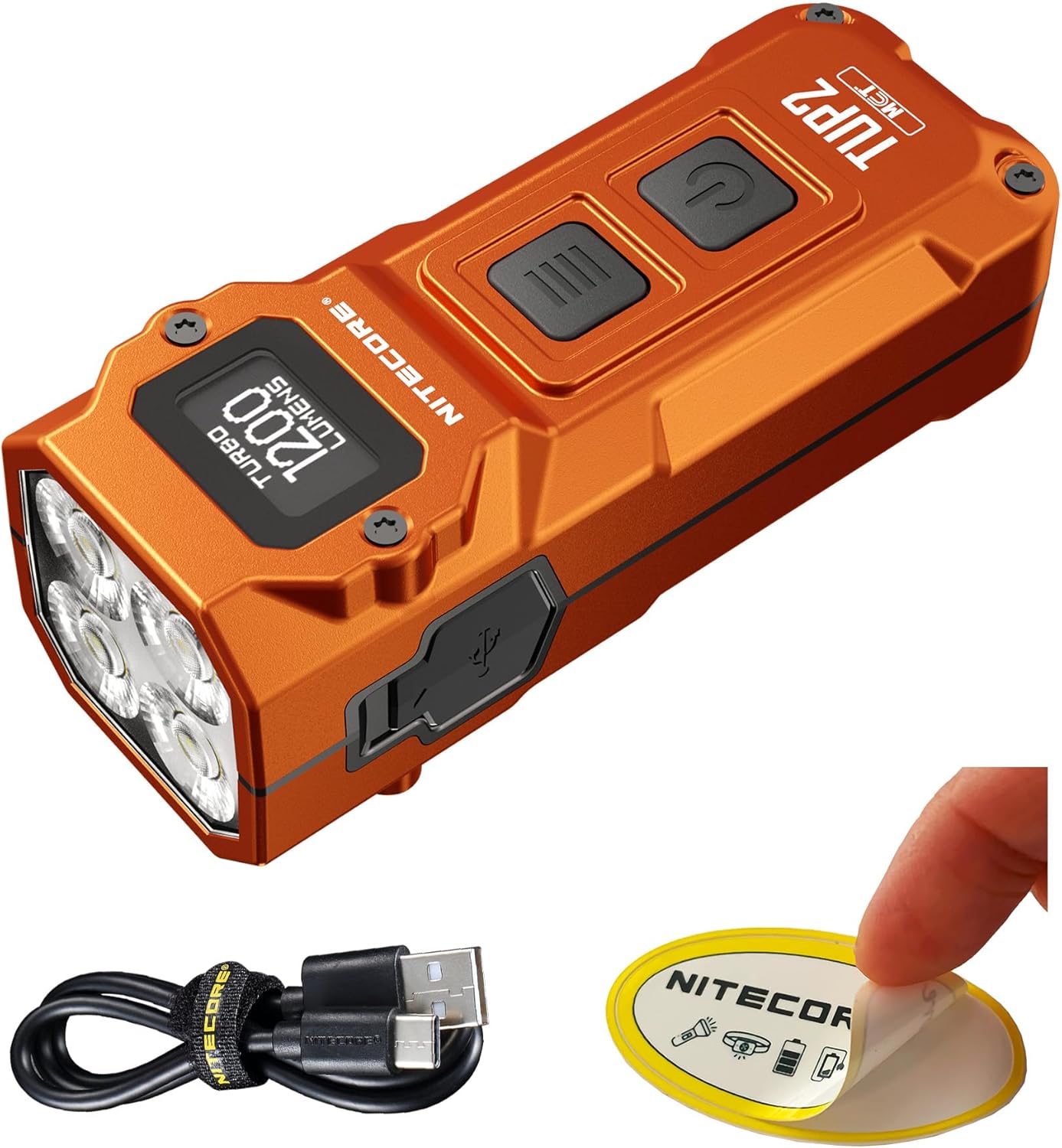
Image: The Nitecore TUP2 flashlight, along with its included USB-C charging cable and a Nitecore sticker.
3. Características clave
- Powerful 1200 Lumens Output: Delivers an ultra-bright beam reaching up to 136 yards.
- Multi-Color Temperature LEDs: Easily switch between warm (3000K), neutral white (4500K), and cool white (6500K) lighting.
- OLED Display & Smart Interface: Real-time screen shows brightness, color temperature, remaining runtime, and battery status.
- USB-C Fast Charging: Built-in rechargeable battery charges fully in under 1.5 hours.
- Compact & Durable Design: Measures only 2.76" and weighs 2.05 oz; IP54 water-resistant and impact-resistant up to 2 meters.

Image: The Nitecore TUP2, emphasizing its Multiple Color Temperatures (MCT) and 1200 lumen output.

Image: A visual representation of the TUP2's four LEDs, capable of producing three distinct color temperatures: 3000K Warm Light, 4500K Neutral White, and 6500K Cool White.

Image: The OLED display of the Nitecore TUP2, illustrating its ability to show real-time information such as current color temperature, unlock prompts, battery level, current brightness level, remaining runtime, and lockout mode status.
4. Instrucións de funcionamento
4.1 Encendido/apagado
- Para activar: Short press the Power Button (
 ).
). - Para desactivar: Short press the Power Button () while the light is on.
4.2 niveis de brillo
When the light is on, short press the Mode Button ( ) to cycle through brightness levels: ULTRALOW - LOW - MID - HIGH.
4.3 Direct Access Modes
- ULTRABAIXO: When the light is off, long press the Power Button () to directly access ULTRALOW mode.
- TURBO: When the light is on, long press the Mode Button () to directly access TURBO mode.
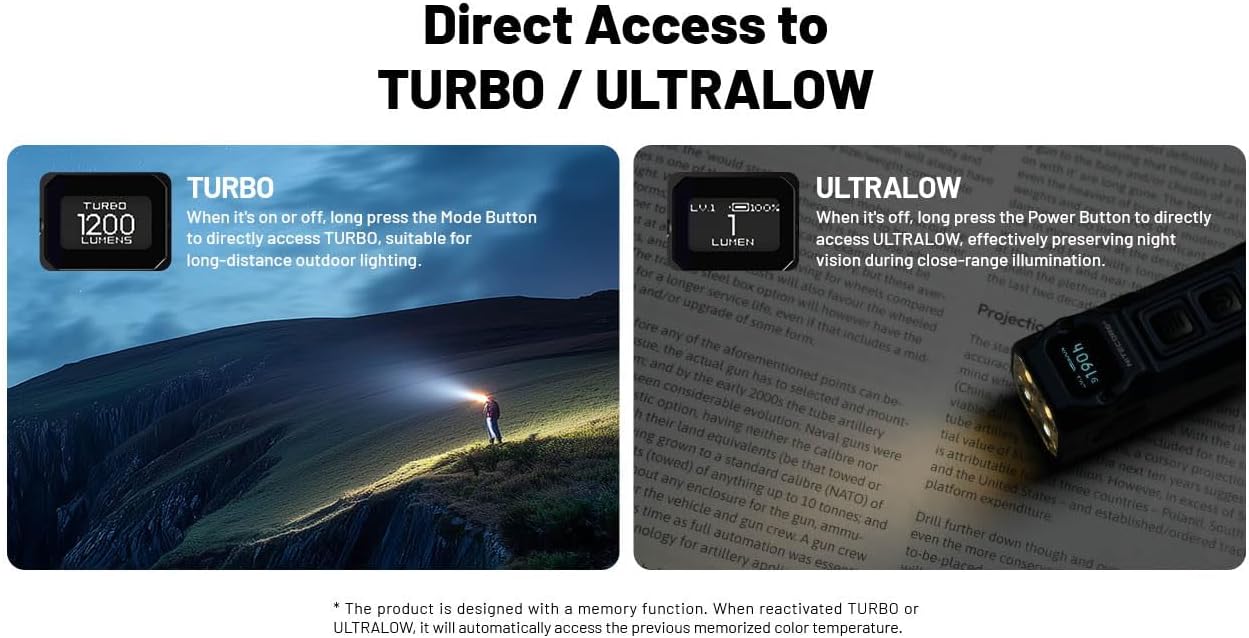
Image: The Nitecore TUP2 demonstrating direct access to its TURBO mode (1200 lumens) for long-distance lighting and ULTRALOW mode (1 lumen) for close-range illumination.
4.4 Color Temperature Switching
When the light is on, press and hold both the Mode Button () and Power Button () simultaneously to cycle through the three color temperatures: Warm (3000K), Neutral White (4500K), and Cool White (6500K).
4.5 Modos de bloqueo
The TUP2 features two lockout modes to prevent accidental activation.
- Modo de semibloqueo: When the light is off, press and hold the Power Button () until "SEMI LOCK" appears on the OLED display. In this mode, only direct access to TURBO is available.
- Modo de bloqueo total: When the light is off, press and hold both the Mode Button () and Power Button () simultaneously until "FULL LOCK" appears on the OLED display. All buttons are locked.
- Para desbloquear: In either lockout mode, press and hold both the Mode Button () and Power Button () simultaneously until the display shows the current battery level.

Image: The Nitecore TUP2's dual-button interface, detailing the Mode and Power buttons, and explaining the Semi Lockout and Full Lockout modes for secure carrying or storage.
4.6 Vídeos oficiais de produtos
Vídeo: Unha reestruturación detalladaview of the Nitecore TUP2, showcasing its features, operation, and performance. This video is provided by Lumen Tactical, a seller of the product.
5. Cargando
The Nitecore TUP2 features a built-in rechargeable battery with USB-C fast charging capability.
- Porto de carga: The USB-C charging port is located on the side of the flashlight, protected by a rubber cover.
- Proceso de carga: Connect the provided USB-C cable to the flashlight and a power source. The OLED display will show the charging status and battery level.
- Tempo de carga: Unha carga completa leva aproximadamente 1.5 horas.
- Indicador de carga: The OLED display provides real-time battery status during charging.

Image: The Nitecore TUP2 being charged via its USB-C port, with an emphasis on the protective cover for water, dust, and impact resistance.
6. Especificacións
The following table outlines the technical data for the Nitecore TUP2 flashlight, measured according to ANSI/PLATO FL 1-2019 standards using a built-in 1,300mAh Li-ion battery in a 26°C (79°F) ambient environment.
| Estándar FL1 | TURBO | ALTO | MID | BAIXO | ULTRABAIXO |
|---|---|---|---|---|---|
| Brillo | 1200 lúmenes | 300 lúmenes | 80 lúmenes | 15 lúmenes | 1 lúmenes |
| Tempo de execución | - | 2h | 7h 15min | 30 h | 190 h |
| Distancia do feixe | 125 m | 64 m | 33 m | 15 m | 4m |
| Pico de intensidade do feixe | 3,900 cd | 1,049 cd | 274 cd | 56 cd | 5 cd |
| Resistencia ao impacto | 2m | ||||
| Resistencia á auga | IP54 | ||||
Note: The stated data is measured using the built-in Li-ion battery (1,300mAh) in accordance with international flashlight testing standards. Data may vary in real-world use due to different environmental conditions.

Image: A table displaying the technical specifications of the Nitecore TUP2, including lumen output, runtime, beam distance, and impact resistance across different lighting modes (Turbo, High, Mid, Low, Ultralow).
6.1 Especificacións adicionais
- Material: Aluminio
- Tipo de fonte de luz: LED
- Fonte de enerxía: Alimentado por batería (1 batería de iones de litio incluída)
- Dimensións do produto: 1.06" D x 1.18" W x 2.76" H
- Peso do artigo: 2.08 onzas
Video: A demonstration of the Nitecore TUP2's brightness and beam throw in various outdoor settings, showcasing its performance across different light levels and color temperatures. This video is provided by Gear Review Depot, a public reviewer.
7. Mantemento
To ensure the longevity and optimal performance of your Nitecore TUP2 flashlight, follow these maintenance guidelines:
- Limpeza: Wipe the flashlight body with a clean, soft cloth. Avoid using harsh chemicals or abrasive materials.
- Porto de carga: Keep the USB-C charging port clean and free of debris. Ensure the rubber cover is properly sealed when not charging to maintain water resistance.
- Almacenamento: Store the flashlight in a cool, dry place away from direct sunlight and extreme temperatures. Recharge the battery periodically if not used for extended periods to prevent deep discharge.
8 Solución de problemas
If you encounter any issues with your Nitecore TUP2, please refer to the following common troubleshooting steps:
- A lanterna non se acende: Check if the flashlight is in lockout mode. Refer to section 4.5 for unlocking instructions. Ensure the battery is charged.
- Non cargando: Verify that the USB-C cable is securely connected to both the flashlight and the power source. Try a different USB-C cable or power adapter.
- Reduced Light Output: This may indicate a low battery. Recharge the flashlight. If the issue persists after a full charge, contact customer support.
- A pantalla OLED non funciona: Ensure the flashlight is charged. If the display remains unresponsive, contact customer support.
9. Garantía e soporte
The Nitecore TUP2 comes with a Limited Warranty. For specific warranty terms and conditions, please refer to the warranty card included in your package.
For further assistance, technical support, or to explore other Nitecore products, please visit the official Nitecore store:


