1. Introdución
Welcome to the user manual for your new Fire-Boltt Clickk Smartwatch. This device is designed to enhance your daily life with its advanced features, including a vibrant AMOLED display, integrated front camera, Nano SIM support for standalone communication, and comprehensive health and fitness tracking capabilities. This manual provides essential information for setting up, operating, and maintaining your smartwatch.
2. Contido do paquete
Verifique que todos os elementos estean presentes no seu paquete:
- Fire-Boltt Clickk Smartwatch
- Cable de carga
- Manual de usuario (este documento)
3. Guía de configuración
3.1. Carga do reloxo intelixente
Before initial use, fully charge your Fire-Boltt Clickk Smartwatch.
- Conecta o cable de carga fornecido ao porto de carga da parte traseira do reloxo intelixente.
- Conecte o outro extremo do cable de carga a a Adaptador de alimentación USB 5V 1A (not included). Using adapters with higher voltage ou amperage may damage the device.
- The smartwatch display will indicate charging status. A full charge typically takes approximately 2.5 hours.
Note: The smartwatch has a 1000 mAh battery. Ensure proper charging practices to maintain battery health.
3.2. Nano SIM Card Installation
The Fire-Boltt Clickk Smartwatch supports a Nano SIM card for standalone calling and network connectivity.
- Locate the SIM card tray on the side of the smartwatch.
- Carefully insert the Nano SIM card into the tray, ensuring the correct orientation as indicated on the tray.
- Empurre con coidado a bandexa de volta no reloxo intelixente ata que encaixe no seu lugar.
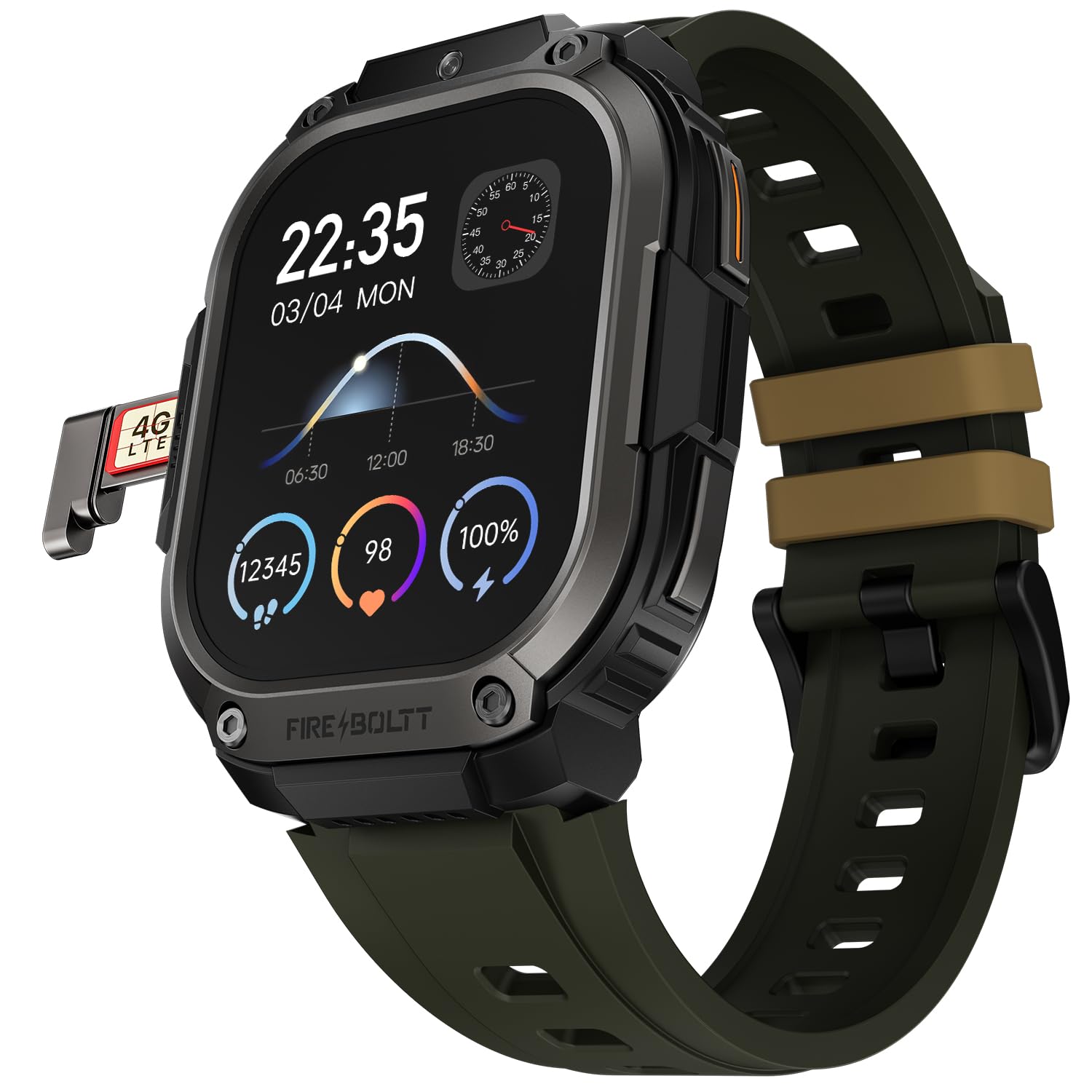
Imaxe 1: The Fire-Boltt Clickk Smartwatch displaying its 54.1mm AMOLED screen and the Nano SIM card tray partially ejected on the left side, showing a "4G LTE" SIM card. The watch face shows time (22:35), date (03/04 MON), and various health metrics like steps, heart rate, and battery percentage.
3.3. Acendido/apagado
- Para acender: Press and hold the power button (usually on the side) until the Fire-Boltt logo appears.
- Para apagar: Mantén premido o botón de acendido e logo selecciona "Apagar" na pantalla ou navega ata o menú de configuración e escolle "Apagar".
3.4. App Pairing (Bluetooth Connection)
To unlock the full potential of your smartwatch, pair it with the official Fire-Boltt application on your smartphone.
- Download the official Fire-Boltt app from your smartphone's app store (Google Play Store for Android, Apple App Store for iOS).
- Asegúrate de que o Bluetooth estea activado no teu teléfono intelixente e no reloxo intelixente.
- Open the Fire-Boltt app, create an account or log in, and follow the on-screen instructions to add your device.
- Select "Fire-Boltt Clickk" from the list of available devices in the app and confirm the pairing request on both your phone and smartwatch.
4. Funcionamento do reloxo intelixente
4.1. Navegación básica
- Pantalla táctil: Swipe left, right, up, or down to navigate through menus and widgets on the 2.12-inch AMOLED display. Tap to select items.
- Botóns laterais: Use the physical buttons on the side for quick access to functions like power on/off, back, or app shortcuts.
4.2. Realización e recepción de chamadas
- Chamadas Bluetooth: When paired with your smartphone, you can make and receive calls directly from your smartwatch using Bluetooth.
- Standalone Calling: With a Nano SIM card installed, the smartwatch can function as a standalone phone, allowing you to make and receive calls independently.
4.3. Using the Front Camera
The Fire-Boltt Clickk features a built-in 2 MP front camera.
- Accede á aplicación da cámara desde o menú principal.
- Use the camera for taking selfies or participating in video calls directly from your wrist.
4.4. Seguimento da saúde e da condición física
Your smartwatch is equipped with advanced sensors for comprehensive health monitoring.
- Monitorización da frecuencia cardíaca: Fai un seguimento continuo da túa frecuencia cardíaca ao longo do día.
- SpO₂ Tracking: Monitorea os teus niveis de osíxeno no sangue.
- HRV: Heart Rate Variability tracking.
- Seguimento da actividade: Utilizes a 3-axis acceleration sensor to track steps, distance, and calories burned.
- Modos deportivos: Select from multiple sports modes to accurately track various physical activities.
Todos os datos de saúde poden ser viewed on the smartwatch and synchronized with the Fire-Boltt app for detailed analysis.
4.5. Notificacións e funcións intelixentes
- Receive real-time notifications for calls, SMS, emails, and social media apps like WhatsApp directly on your wrist.
- The smartwatch supports Wi-Fi (802.11n) and built-in GPS for enhanced connectivity and location tracking.
5. Mantemento
5.1. Limpeza do reloxo intelixente
Para manter o teu reloxo intelixente en condicións óptimas:
- Limpe a pantalla e o corpo cun pano suave e sen fiapos.
- Evite o uso de produtos químicos agresivos ou materiais abrasivos.
- Asegúrate de que os contactos de carga estean limpos e secos antes de cargar.
5.2. Resistencia á auga
Information regarding specific water resistance ratings (e.g., IP67, 5ATM) is not provided. To prevent damage, avoid submerging the smartwatch in water or exposing it to high-pressure water jets.
6 Solución de problemas
6.1. Problemas comúns e solucións
- O reloxo intelixente non se acende: Ensure the device is fully charged using a 5V 1A adapter.
- A batería esgótase rapidamente:
- Reduce o brillo da pantalla.
- Limitar o uso da aplicación en segundo plano.
- Disable unnecessary features like Wi-Fi or GPS when not in use.
- Ensure you are using the correct 5V 1A charger.
- Non se pode emparellar co teléfono intelixente:
- Asegúrate de que o Bluetooth estea activado nos dous dispositivos.
- Restart both the smartwatch and smartphone.
- Make sure the Fire-Boltt app is updated to the latest version.
- Baixa calidade das chamadas: Ensure good network signal if using a SIM card. If using Bluetooth calling, ensure your phone has good signal and is within range.
Para obter máis axuda, consulte a sección de soporte ou póñase en contacto co servizo de atención ao cliente.
7. Especificacións
| Característica | Detalle |
|---|---|
| Marca | Fire-Boltt |
| Número de modelo | 221BSWAAY#3 |
| Tamaño de visualización | 54.1 mm (2.12 polgadas) |
| Tipo de visualización | AMOLED |
| Resolución | 410 x 502 píxeles |
| Cámara frontal | 2 MP |
| Soporte SIM | Nano SIM |
| Capacidade da batería | 1000 mAh (ión de litio) |
| Conectividade | Bluetooth, Wi-Fi (802.11n), GPS (Built-in) |
| Seguimento da saúde | Heart Rate, SpO₂, HRV, 3-axis acceleration sensor |
| Dispositivos compatibles | Teléfono intelixente |
| Peso do elemento | 46 g |
| Hardware de montaxe | Cable de carga |
8. Garantía e soporte
Your Fire-Boltt Clickk Smartwatch comes with a Garantía do fabricante de 1 anos desde a data de compra. Esta garantía cobre defectos de fabricación. Conserve o comprobante de compra para reclamacións de garantía.
For technical support, warranty claims, or further inquiries, please visit the official Fire-Boltt websitio web ou póñase en contacto co seu servizo de atención ao cliente. Pode atopar máis información no Tenda Fire-Boltt en Amazon.


